A practical, vendor-neutral guide for CIOs, IT directors, and digital workplace leaders evaluating SharePoint consulting partners in Australia — including a comparison...
TL;DR An intranet is a secure, private digital workspace where employees find company information, documents, news, people, and business processes in one place. Modern intranets are cloud based, mobile accessible, and integrated with Microsoft 365 and Microsoft Teams, with AI layered on top for search and summarization. SharePoint is the most widely deployed platform for building them, particularly for organizations already licensed for Microsoft 365. The three things that decide whether an intranet succeeds are content ownership, information architecture, and adoption planning. None of them are technology decisions.
Most employees do not struggle because they lack information. They struggle because there is too much of it, spread across too many places.
A typical knowledge worker moves between email, chat, shared drives, a CRM, an HR system, and half a dozen other applications before lunch. Every one of those tools was bought to make work easier. Together, they create a different problem: nobody can find anything.
An intranet solves that problem by giving employees one secure, centralized digital workplace where they can access company information, collaborate with colleagues, find documents, complete business processes, and stay informed.
Modern intranets have moved well past the static internal websites of the 2000s. Today’s platforms integrate directly with Microsoft 365, Microsoft Teams, and line of business applications to deliver personalized employee experiences. A growing number now layer in AI capabilities such as intelligent search, automated content recommendations, and conversational assistants that answer questions in plain language.
Whether you run a 50 person business trying to fix internal communication or a global enterprise building a connected digital workplace, the intranet is the foundation layer for collaboration, knowledge sharing, employee engagement, and productivity.
This guide covers what an intranet is, how it works, its benefits, its modern features, the different types available, real-world examples, implementation costs, and how platforms like SharePoint help organizations build intranets that scale.
An intranet is a private, secure network built exclusively for an organization’s employees.
It centralizes communication, documents, knowledge, business applications, and collaboration in one place.
Modern intranets are cloud based, mobile friendly, and integrated with platforms like Microsoft 365 and Microsoft Teams.
Organizations use them to improve employee engagement, knowledge sharing, productivity, and internal communication.
AI powered intranets add intelligent search, personalized content, automated workflows, and natural language assistance.
SharePoint is the most widely deployed platform for building secure, scalable enterprise intranets, particularly for organizations already licensed for Microsoft 365.
The three biggest reasons intranet projects fail are weak governance, poor information architecture, and no adoption plan. None of them are technology problems.
🎯 Key Takeaway : An intranet is not a website. It is the operating layer of your digital workplace. Organizations that treat it as an IT deliverable tend to get a document dump. Organizations that treat it as an employee experience product tend to get adoption.
Not sure whether your current setup is an intranet or just a file server with a homepage? Book a free 30 minute digital workplace assessment with a Beyond Intranet consultant. We will map where your content lives today and what it would take to consolidate it.
⚡ Quick Answer An intranet is a secure, private digital workspace that allows employees within an organization to communicate, collaborate, access information, share documents, and complete work through one centralized platform. Unlike the public internet, it is accessible only to authorized users inside the organization.
That is the short answer. The longer answer is that the word has quietly changed meaning over the past decade, and the gap between what people expect an intranet to be and what a modern one actually does is now very wide.
Think of it as your organization’s digital headquarters. It is where employees find company announcements, HR policies, project documents, department resources, and the tools they use to get work done. It connects people, information, and business processes in one place.
Instead of asking four different people where to find the expense policy, tracking down the right project folder over chat, and emailing HR about how to book leave, you sign in to one platform. Everything is there: the policy, the folder, the leave form, the org chart, the news.
That is what an intranet does. It brings employees, information, tools, and processes into a single organized workspace.
For a lot of organizations, the intranet has become the first thing employees open in the morning and the page their browser is set to. That position, the default homepage of working life, is what makes it strategically valuable.
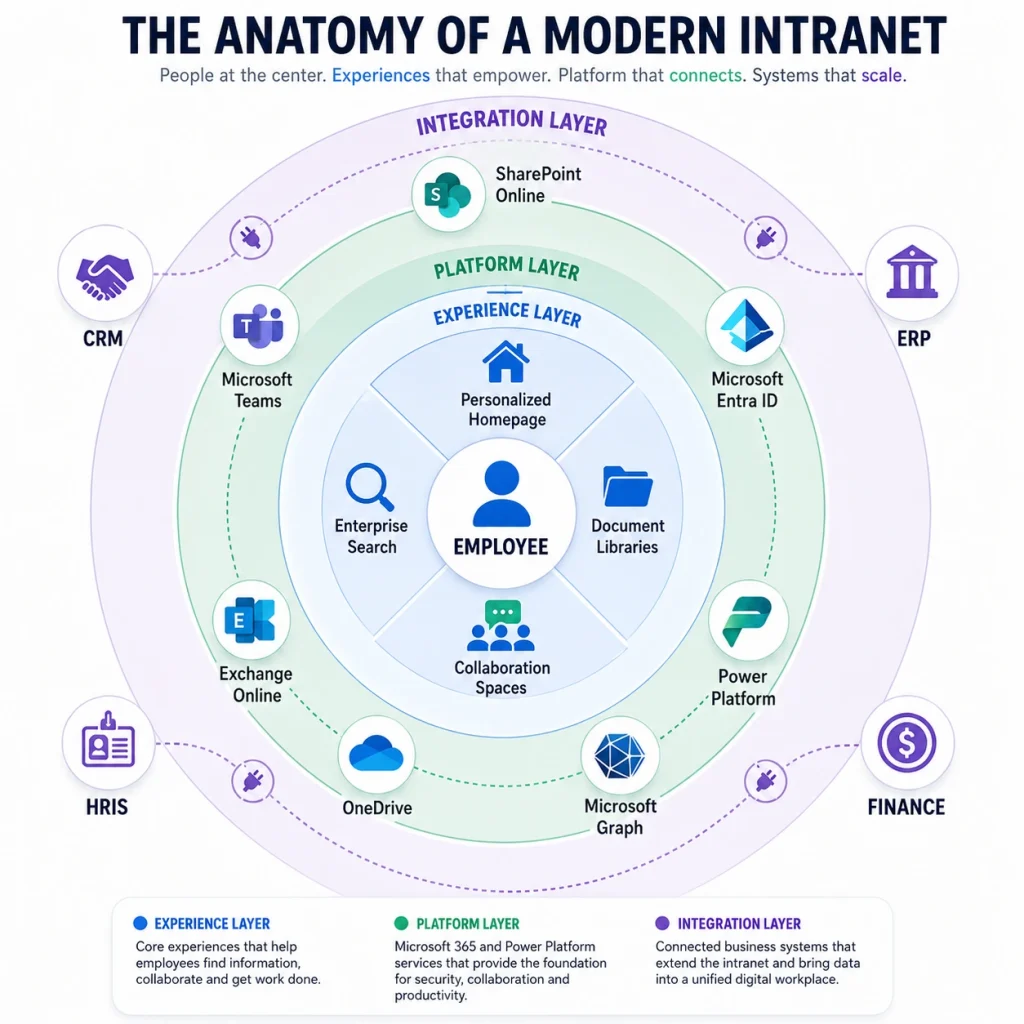
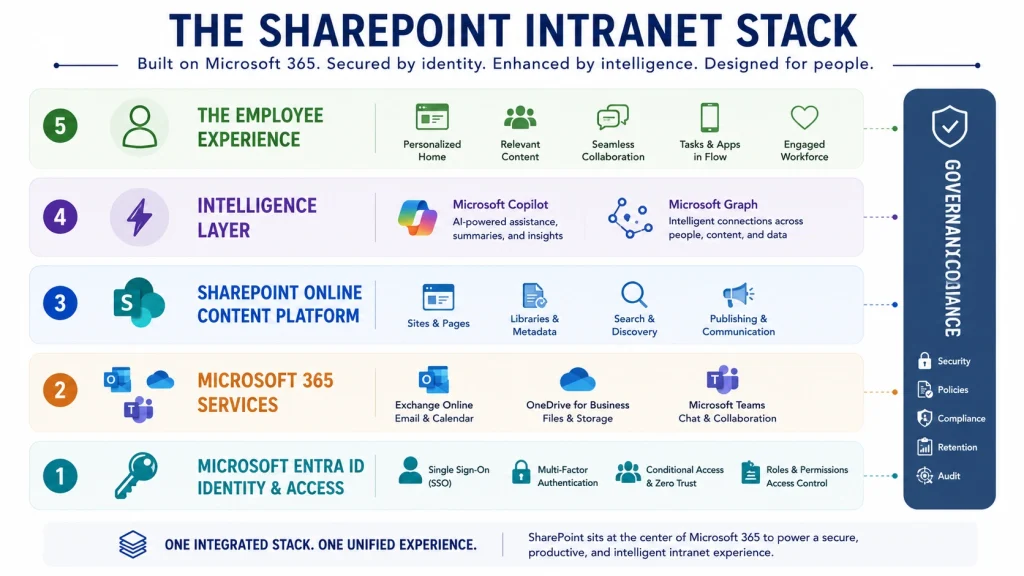
Technically, an intranet is a private network that uses standard internet technologies (web browsers, cloud services, authentication systems, and enterprise applications) to provide controlled access to organizational resources.
Modern intranets typically integrate with:
Technology
Role in the Intranet
Microsoft 365
Provides the underlying productivity and content services
Adds workflow automation and low code applications
Microsoft Graph
Supplies the signals that drive personalization and search relevance
Enterprise Search
Indexes people, files, and content across the tenant
Business applications
Connects CRM, ERP, and HR systems into the employee experience
These integrations are the difference between an intranet employees visit and an intranet employees work inside. Microsoft documents this architecture in its intelligent intranet overview on Microsoft Learn.
⚡ Quick Answer : The purpose of an intranet is to give employees one trusted destination for everything they need to do their job. Instead of information living across email, shared drives, chat, and separate business systems, the intranet centralizes access and reduces the effort required to find anything.
In practice, a modern intranet helps organizations:
Communicate company news and announcements so they are seen rather than buried
Store and organize documents securely with version control
Enable collaboration across departments and locations
Provide fast access to business applications
Capture and share organizational knowledge
Automate routine processes such as approvals and requests
Improve employee engagement and reinforce workplace culture
Support remote and hybrid work with consistent access from any device
The measurable outcome is time. Every minute an employee does not spend hunting for a document is a minute available for the work you hired them to do.
📊 Industry Statistic McKinsey Global Institute research found that the average interaction worker spends close to 20 percent of the working week looking for internal information or tracking down colleagues who can help with a task. A further 28 percent goes on managing email. Source: The social economy, McKinsey Global Institute. The widely quoted “1.8 hours per day” figure is a derivation of this same research.
💡 Expert Insight In our experience running SharePoint intranet projects, the fastest way to test whether an organization needs an intranet is to ask three employees in different departments to find the current travel expense policy. If they each go to a different place, or if any of them asks a colleague instead of searching, the information architecture is the problem, not the tooling.
Want to know how much time your team loses to search? Our consultants run a structured content discovery workshop that maps where your documents actually live and how long employees take to find them. Book a Complimentary Intranet Consultation
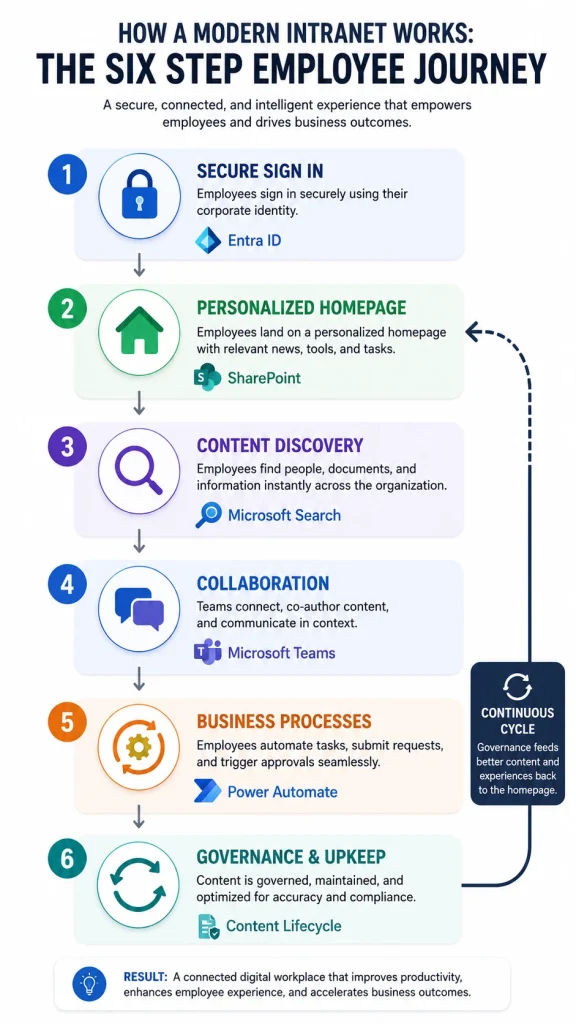
⚡ Quick Answer An intranet works by connecting employees, content, and business applications through a secure platform that only authorized users can reach. When an employee signs in with their organizational credentials, the platform uses their identity, role, department, and location to decide what content they see.
The mechanism that makes this feel useful rather than generic is personalization. Two employees signing in to the same intranet at the same moment should not see the same homepage.
For example:
An HR professional sees recruitment updates, policy changes, and onboarding resources.
A sales representative sees CRM dashboards, current pricing documents, and sales collateral.
An IT administrator sees system alerts, open service requests, and technical documentation.
A regional plant manager sees safety notices and shift updates for their site only.
This is not cosmetic. Personalization is what stops the intranet from becoming another place employees have to filter.
Secure sign in. Employees authenticate with corporate credentials, usually through single sign on backed by Microsoft Entra ID, often with multi factor authentication and conditional access policies applied.
Personalized homepage. The platform renders news, announcements, quick links, and recommended resources based on the signed in user’s profile.
Content discovery. Employees use enterprise search or structured navigation to locate documents, policies, forms, or knowledge articles.
Collaboration. Teams work on projects, co-author files, and manage tasks inside integrated workspaces connected to Microsoft Teams.
Business processes. Employees submit leave requests, expense claims, and approvals through automated workflows rather than email chains.
Governance and upkeep. Content owners publish, review, and retire content on a defined schedule so the platform stays accurate.
Step six is the one organizations skip, and it is the reason most intranets decay within eighteen months.
⚠ Common Mistake Treating launch as the finish line. The technical build is usually 30 percent of the effort. The other 70 percent is content migration, ownership assignment, review cycles, and adoption. Budget for it or plan to rebuild in two years.
Defines ownership, permissions, lifecycle, and standards
Content sprawl, broken permissions, and eventual abandonment
✔ Best Practice Do not build all nine components at launch. Ship the homepage, search, document libraries, and directory first. Those four cover the majority of daily use. Add automation and deeper integrations once you have real usage data showing which processes actually need it.
Planning an intranet build and unsure what to ship first? Our team runs phased SharePoint intranet rollouts that get employees using the platform in weeks, not quarters. Explore Our Modern Intranet
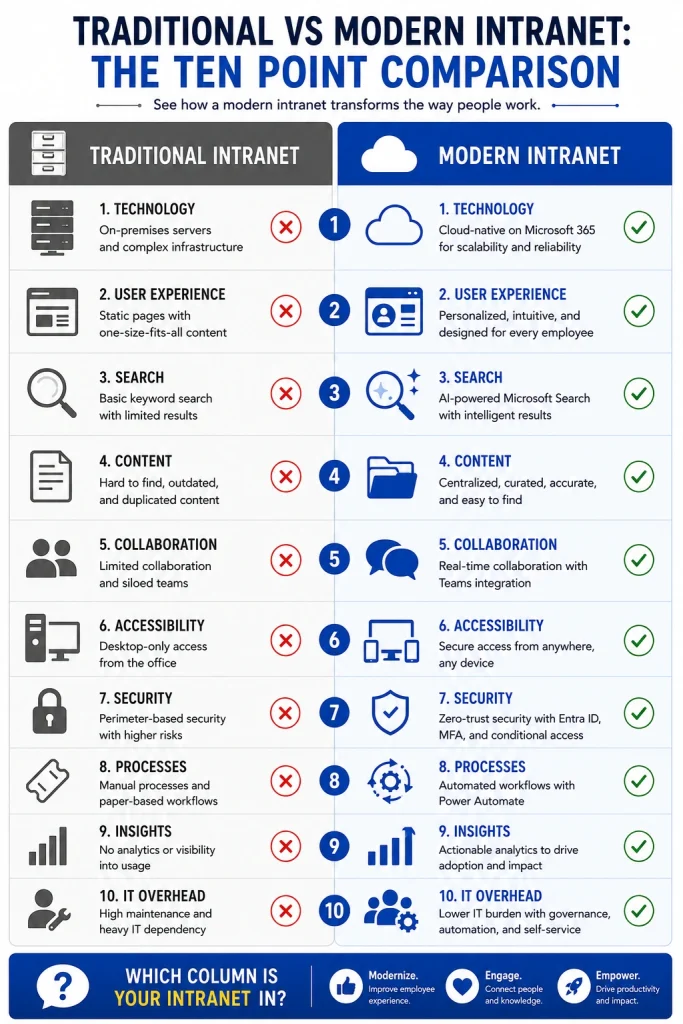
⚡ Quick Answer Traditional intranets were internal websites for publishing documents and announcements. Modern intranets are intelligent digital workplaces that connect people, knowledge, and business applications while personalizing the experience for each employee. The shift is from a place you read to a place you work.
The distinction matters commercially. Many organizations believe they already have an intranet, so they discount the category. What they usually have is a 2011 era publishing site that nobody has updated since the last rebrand.
Dimension
Traditional Intranet
Modern Intranet
Primary function
Publish and store
Connect, personalize, and automate
Content model
Static pages, manual updates
Dynamic, targeted by audience and role
Search
Basic keyword matching on titles
Semantic and AI assisted search across content, people, and chat
Access
Desktop, on the corporate network
Any device, any location, secured by conditional access
Collaboration
Limited or absent
Native, through Microsoft Teams and connected workspaces
Automation
None
Approvals, onboarding, and requests handled by Power Automate
Personalization
Same homepage for everyone
Role, department, region, and language aware
Intelligence
None
Content recommendations, summaries, and conversational assistants
Maintenance
IT ticket driven
Distributed content ownership with governance
Success measure
Pages published
Adoption, search success rate, and task completion
A modern intranet can recommend relevant content based on an employee’s role, surface frequently used resources automatically, integrate with Microsoft Teams and Microsoft 365, automate routine workflows through low code tools, and deliver AI assisted content discovery.
The practical result is that the intranet stops being a destination employees are told to visit and becomes infrastructure they use without thinking about it.
💡 Expert Insight The single clearest signal of a traditional intranet is the homepage. If it shows the same content to the CEO and to a warehouse supervisor, it is a publishing site. Personalization is not an advanced feature to add later; it is the dividing line between the two categories.
📖 Success Story A US based manufacturer replaced a legacy internal site with a modern SharePoint intranet to improve collaboration across production and office teams. Read the full modern intranet case study.
If your current platform sits closer to the left hand column of the infographics, the practical question is whether to modernize in place or rebuild. That decision usually turns on how much of the existing content is still accurate, which is covered in our guide on migrating an existing SharePoint intranet.
Still running a legacy internal site? We assess existing intranets and produce a modernization roadmap covering content, architecture, and governance. Schedule an Intranet Assessment
⚡ Quick Answer Organizations need an intranet because work is now distributed across dozens of tools and locations, and without a central layer, information fragments faster than teams can organize it. An intranet restores a single trusted source for documents, communication, and processes.
The way people work changed permanently over the last decade. Employees are no longer tied to one office, teams span time zones, and most organizations run twenty or more business applications.
That flexibility came with a cost. Information scattered across email, shared drives, chat threads, and business systems. Employees lost the ability to answer basic questions without asking a colleague, which converts every small query into two people’s time instead of one.
A modern intranet addresses this by giving employees one place to find trusted information, collaborate securely, and complete everyday tasks.
📊 Industry Statistic In Microsoft’s 2023 Work Trend Index, which surveyed 31,000 workers across 31 markets, 62 percent of respondents said they struggle with too much time spent searching for information during their workday, and 68 percent said they do not have enough uninterrupted focus time. Source: Microsoft Work Trend Index.
💡 Expert Insight When building a business case, avoid abstract productivity claims. Pick one process, measure it, and price it. Vendor onboarding is a good candidate because most organizations can count how many vendors they onboarded last year and roughly how long each took. Our vendor onboarding case study shows how a construction company restructured that specific process in SharePoint.
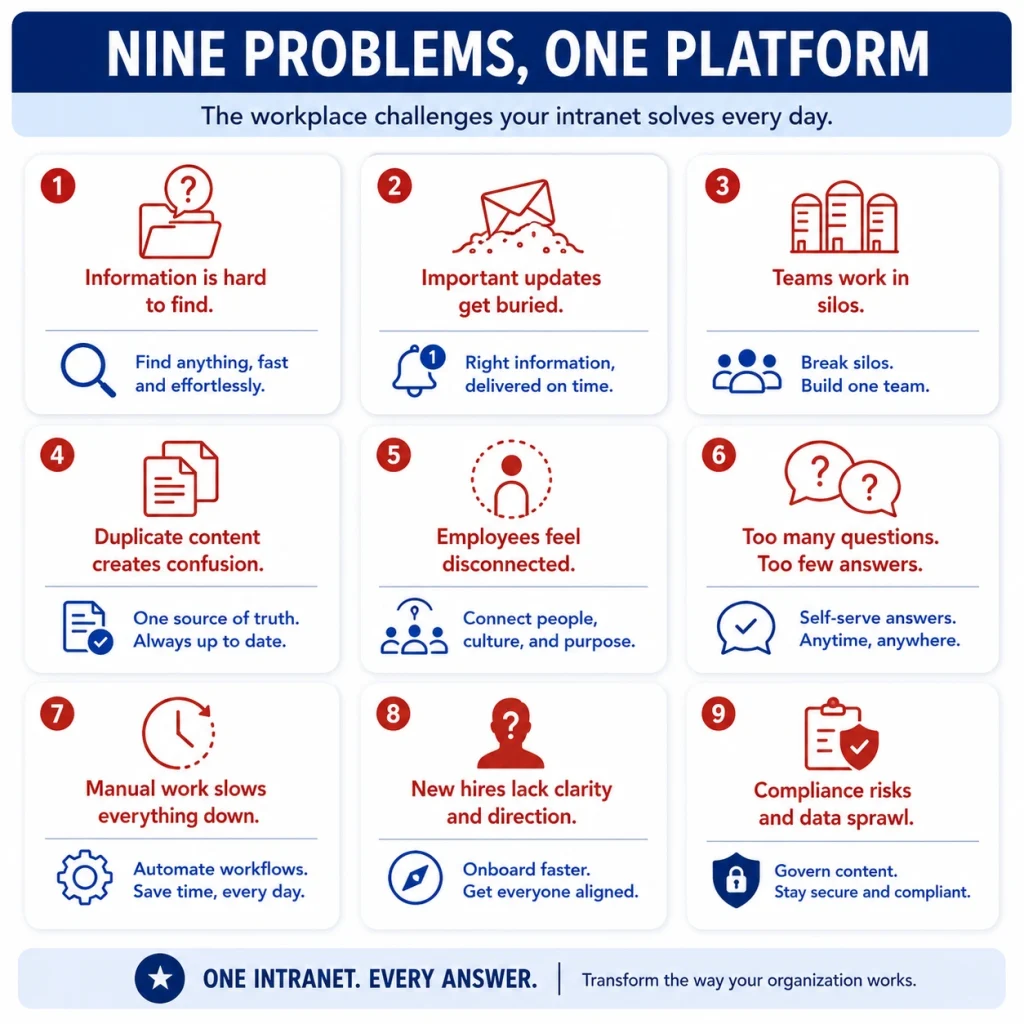
Most organizations do not go looking for an intranet. They go looking for a fix to a specific, recurring irritation. These are the ones that come up most often in discovery conversations.
Business Challenge
How a Modern Intranet Helps
Enabling Capability
Employees cannot find documents
Centralized libraries with metadata and intelligent search
⚠ Common Mistake Buying an intranet to solve a communication problem that is actually a content ownership problem. If nobody is accountable for keeping the travel policy current, moving it to a new platform will not make it current. Assign owners before you assign budget.
The Cost of Not Having One
The absence of an intranet is rarely visible on a budget line, which is why it persists. The costs show up elsewhere:
Onboarding drag. New hires take longer to reach productivity because institutional knowledge is undocumented.
Knowledge loss on exit. When experienced employees leave, what they knew leaves with them.
Duplicated work. Teams rebuild documents that already exist somewhere they could not find.
Compliance exposure. Sensitive files sit in personal drives and unmanaged shares with no retention policy.
Communication failure. Critical announcements reach some employees and not others, usually the frontline ones.
Building an internal business case for an intranet? We help teams quantify the current cost of fragmented information and model the return on a consolidated digital workplace. Book a Consultation
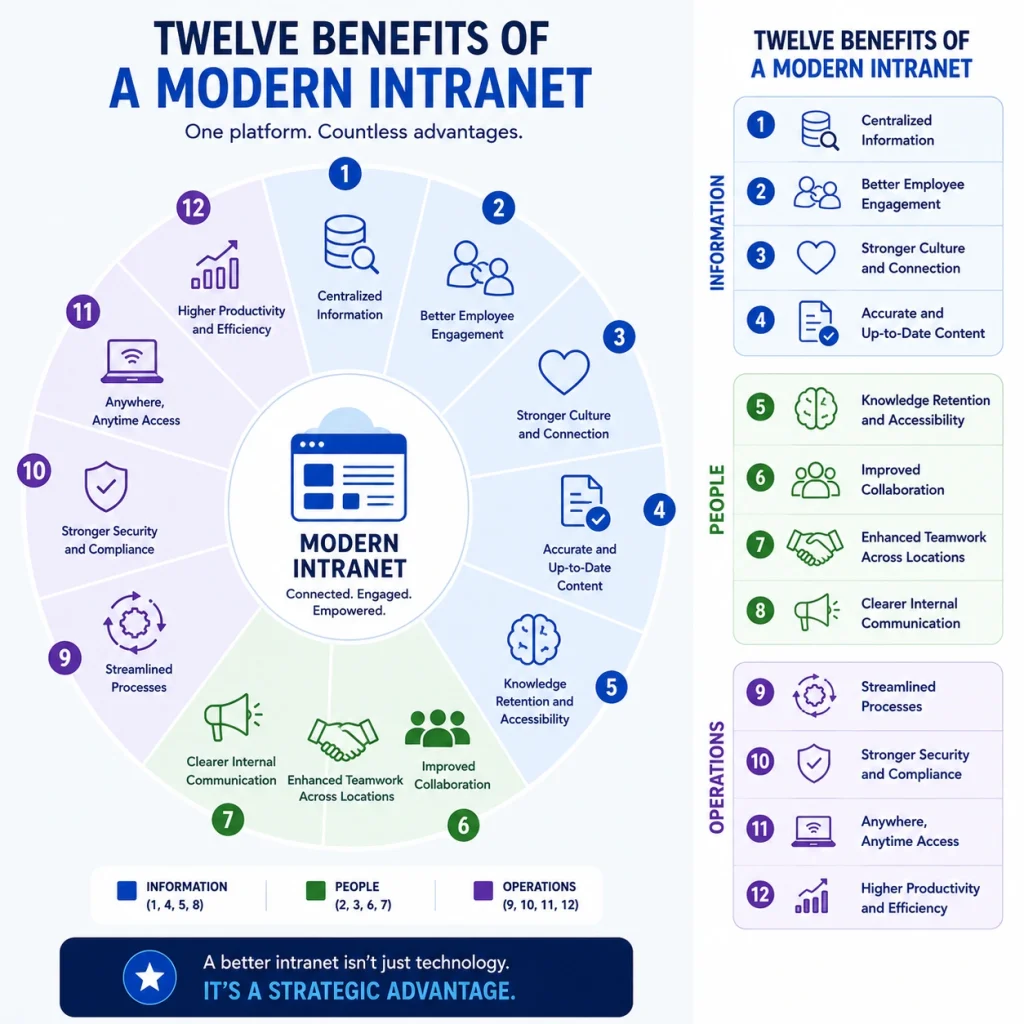
⚡ Quick Answer A well designed intranet reduces the time employees spend looking for information, centralizes internal communication, improves document control, automates routine processes, and gives distributed teams a shared workspace. The measurable outcomes are faster onboarding, higher engagement, and lower operational friction.
Here is the complete picture at a glance, followed by a closer look at the five benefits that most often justify the investment.
#
Benefit
What It Delivers
Where It Shows Up
1
Centralized information hub
A single source of truth for policies, procedures, and templates
Fewer “where is the…” messages
2
Better internal communication
Dedicated space for announcements, leadership updates, and recognition
Higher message reach than email
3
Improved collaboration
Team workspaces, shared libraries, and co-authoring
Cross department project delivery
4
Faster document management
Version control, permissions, and instant search
Reduced duplicate and outdated files
5
Stronger knowledge management
Institutional knowledge captured in a reusable form
Shorter ramp time, less knowledge loss
6
Increased employee engagement
Recognition, communities, polls, and social features
Improved culture in hybrid teams
7
Better onboarding
Welcome portals, learning paths, and org charts
New hires productive sooner
8
Improved productivity
Intelligent search, quick links, recent content
Less time searching, more time working
9
Workflow automation
Approvals, requests, and reviews routed automatically
Fewer bottlenecks and errors
10
Enterprise grade security
Role based permissions, MFA, conditional access, DLP
Controlled access to sensitive content
11
Hybrid and remote work support
Consistent secure access from any device or location
Frontline and field parity
12
Scalability
Multi department, multi region, multilingual structure
The most immediate benefit is that there is finally one place where the current version of something lives.
Instead of searching multiple systems, employees access company policies, standard operating procedures, HR documents, training materials, project documentation, templates, and forms from one library structure. Version history means the current file is unambiguous, which matters enormously in regulated industries.
This reduces confusion, cuts duplicate content, and removes the most common cause of internal errors: someone working from a document that was superseded four months ago.
Document management is the single most common reason organizations start an intranet project.
A properly configured SharePoint document management environment lets employees store files securely, control versions, apply granular permissions, search across libraries instantly, co-author in real time, track changes, and route approvals.
The compliance benefit is often underestimated. When auditors ask who approved a document and when, a managed library answers in seconds. A shared drive cannot answer at all.
📖 Success Story A financial services organization consolidated fragmented document processes into a custom SharePoint solution. See the document management case study. For a knowledge management angle, our healthcare knowledge management case study covers a similar consolidation in a clinical setting.
Every organization holds valuable institutional knowledge. Without a structured system, most of it sits in email threads, personal folders, and individual memory.
An intranet turns that knowledge into a searchable, reusable asset by centralizing best practices, standard operating procedures, technical documentation, training materials, FAQs, and wikis.
The return is clearest at two moments: when someone joins, and when someone leaves.
Modern intranets do considerably more than display information. Using Power Automate and Power Apps, organizations automate leave requests, expense approvals, purchase requisitions, IT service requests, employee onboarding, document approvals, and compliance reviews.
Automation reduces manual effort and errors, but the underrated benefit is visibility. When a request is stuck, everyone can see where and with whom.
📖 Success Story A legal team streamlined contract approvals using Power Automate and SharePoint Online. Read the contract approval workflow case study.
Unlike a public website, an intranet is built with enterprise security assumptions from the start. Organizations can implement role based permissions, multi factor authentication, conditional access policies, version history, audit trails, retention and compliance policies, and data loss prevention rules.
The point is not that these controls exist. It is that they apply consistently, which is impossible to achieve across a dozen disconnected tools and personal drives.
✔ Best Practice Configure permissions using Microsoft Entra ID security groups rather than assigning access to individuals. Individual permissions feel faster on day one and become unmanageable by month six. Every permissions cleanup project we have run started with the same root cause.
🎯 Key Takeaway The benefits compound. Search improves because documents are managed. Documents are managed because governance exists. Governance holds because ownership was assigned. Skip the foundation and the visible benefits do not arrive.
Want document management that stands up to an audit? Beyond Intranet designs SharePoint document environments with permissions, retention, and approval workflows configured from the start. Explore SharePoint Services
⚡ Quick Answer The core features of a modern intranet are a personalized homepage, news and announcements, document management, enterprise search, an employee directory, a knowledge base, workflow automation, mobile access, Microsoft Teams and Microsoft 365 integration, AI powered search, and usage analytics.
Not every intranet includes all of them, and not every organization needs all of them on day one. Use this table as an evaluation checklist when comparing platforms or scoping a build.
Feature
What It Does
Business Value
Priority
Personalized homepage
Displays role specific news, announcements, and links
Improves relevance and drives repeat visits
Essential
News and announcements
Centralized corporate communications with audience targeting
Ensures messages reach the right people
Essential
Document management
Secure storage with version control and metadata
Reduces duplication, improves compliance
Essential
Enterprise search
Locates people, documents, and content across the tenant
Saves time and increases productivity
Essential
Employee directory
Searchable organizational contacts, skills, and reporting lines
Speeds up cross team collaboration
Essential
Knowledge base
Central repository for guides and documentation
Preserves institutional knowledge
High
Workflow automation
Automates approvals and routine business processes
⚠ Common Mistake Skipping analytics. Organizations launch, then have no way to answer whether anyone is using the platform, which content is dead, or what employees search for and fail to find. Search queries that return no results are the single most useful dataset an intranet produces, and most organizations never look at them.
✔ Best Practice Review failed search terms monthly for the first six months after launch. Each one tells you either that content is missing or that it exists under a name nobody uses. Both are fixable in an afternoon, and both directly affect whether employees come back.
For a deeper comparison of platforms that offer these features, see our breakdown of the best intranet platforms and our Valo intranet alternatives guide for organizations evaluating a replacement.
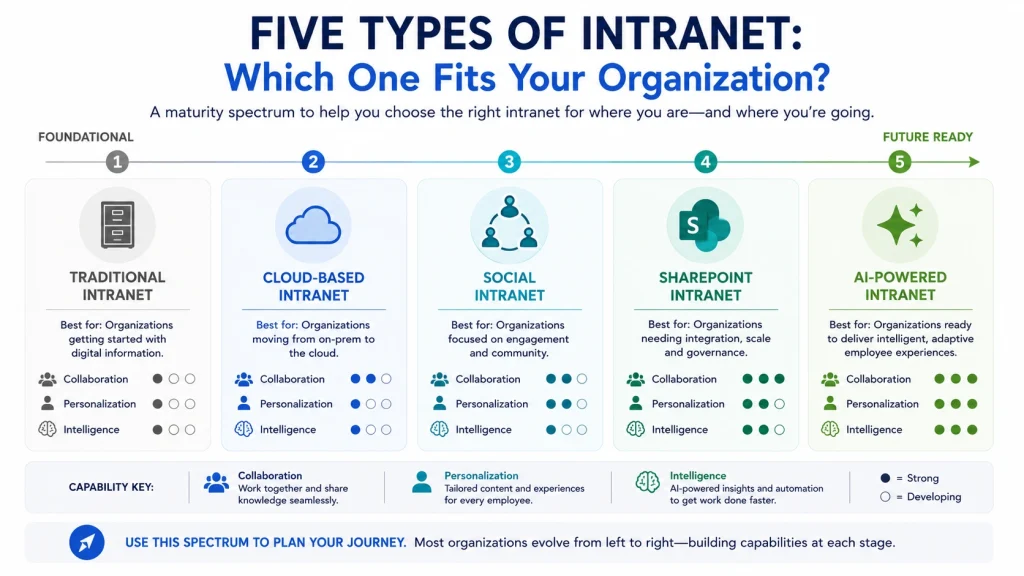
⚡ Quick Answer The main types of intranets are traditional intranets, cloud based intranets, social intranets, SharePoint intranets, and AI powered intranets. The right choice depends on organization size, collaboration requirements, security obligations, and how much of the Microsoft ecosystem is already in place.
These categories overlap in practice. A SharePoint intranet is also cloud based, and a well built one includes social and AI capabilities. Treat them as characteristics to combine rather than mutually exclusive products.
Traditional intranets were built to publish internal information and store company documents. Employees could reach policies, forms, announcements, and departmental resources, but collaboration was limited or absent.
Best suited for: small organizations, businesses with basic communication needs, and companies that primarily need a centralized document repository.
Advantages: straightforward to implement, centralized information, basic document management, one place for internal communication.
Limitations: limited collaboration, dated user experience, difficult to maintain, minimal personalization, no AI capability.
Cloud intranets are hosted online so employees can securely reach company resources from any location with an internet connection. With hybrid work now standard, cloud has become the default choice for organizations that want flexibility, scalability, and lower infrastructure overhead.
Advantages: remote accessibility, automatic platform updates, high scalability, reduced IT maintenance burden, enterprise grade security inherited from the cloud provider.
Organizations moving from on premises environments should review our comparison of SharePoint on premise vs online before committing to an approach.
A social intranet prioritizes engagement and collaboration by borrowing patterns from consumer social platforms.
Employees share updates, join discussions, recognize colleagues, participate in communities, and work across departments more openly.
Typical features include discussion forums, employee recognition, social feeds, communities of practice, team workspaces, and polls and surveys.
Organizations focused on workplace culture usually pair social capabilities with Microsoft Teams and Microsoft Viva Engage rather than running a separate social platform.
SharePoint is the most widely deployed enterprise intranet platform, and for organizations already paying for Microsoft 365, it is usually the most economically sensible one.
Modern SharePoint goes well beyond document management. It lets organizations build fully branded, customized intranets that integrate with Microsoft 365, Microsoft Teams, Power Platform, and line of business applications.
Why organizations choose SharePoint:
Native Microsoft 365 integration with no additional licensing for core capability
Enterprise grade security inherited from the Microsoft cloud
Flexible site architecture using hub, communication, and team sites
Organizations planning a long term digital workplace strategy tend to choose SharePoint because it scales from small business to global enterprise without replacing the Microsoft ecosystem they already run.
📖 Success Story An American electronics manufacturer deployed a fully developed SharePoint intranet to simplify business processes and improve internal communication, covering company news, hiring workflows, and project management in one environment. Read the QSC SharePoint intranet case study.
The current generation of intranets is shaped by artificial intelligence. Rather than only storing information, these platforms actively help employees find knowledge, automate routine tasks, and make faster decisions.
Modern AI capabilities include:
Natural language search that understands intent rather than matching keywords
AI generated summaries of long documents and threads
Personalized content recommendations
Intelligent document discovery based on work context
Automated content tagging and metadata suggestion
Conversational assistants for policy and process questions
Workflow recommendations based on usage patterns
⚠ Common Mistake Deploying AI on top of an ungoverned content estate. AI search does not fix bad content, it surfaces it faster and with more confidence. If three conflicting versions of the expense policy exist, an AI assistant will confidently cite one of them. Content cleanup is a prerequisite, not a follow up phase.
Evaluating whether SharePoint is the right platform for your intranet? We run platform selection workshops that compare SharePoint against your alternatives using your actual requirements, licensing position, and internal capability. Book a Platform Assessment
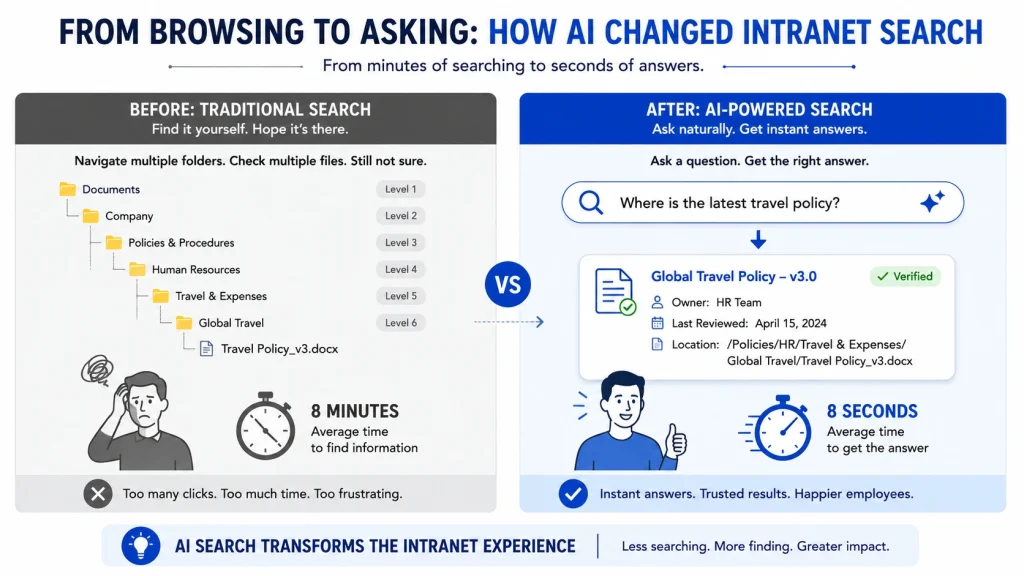
⚡ Quick Answer AI changes the intranet from something employees navigate into something they ask. Instead of remembering where a document lives, employees describe what they need in plain language and the platform interprets intent, applies existing permissions, and returns an answer with sources.
The practical shift is from browsing to asking.
Instead of clicking through folder structures or trying to recall a file name, employees ask questions like:
“Where is the latest HR policy?”
“Show me the marketing presentation from last quarter.”
“Who manages vendor contracts?”
“Find onboarding documents for new employees.”
“Summarize the changes in the updated travel policy.”
The intranet interprets the intent and surfaces the relevant content. That reduces the number of times employees interrupt a colleague to ask something the organization has already documented.
💡 Expert Insight The most valuable AI use case in most intranets is not the one vendors demonstrate. Demos focus on drafting and summarization. In deployment, the capability employees use daily is finding the current version of something and confirming it is current. Optimize for that first.
Answers in natural language with a citation to the source document
Policies stored in SharePoint with correct permissions
Document summarization
Condenses long documents and reports
Documents in managed libraries, not personal drives
Meeting recaps
Generates notes and action items from Teams meetings
Transcription enabled and retention policy defined
Expert finding
Identifies colleagues with relevant experience
Complete employee profiles and skills metadata
Draft generation
Produces first drafts of internal communications
Templates and tone guidance available
Project context
Surfaces related documents, emails, and conversations
Content organized by project, not by person
Notice that every row has a prerequisite. That is the honest version of the Copilot conversation, and it is why Copilot readiness assessments exist.
For organizations wanting to build custom conversational experiences rather than use Copilot as delivered, Copilot Studio allows purpose built agents grounded in specific content sets.
📖 Success Story A global enterprise integrated Microsoft Copilot Studio with SharePoint to streamline how employees interact with internal content. Read the Copilot Studio integration case study.
📊 Industry Statistic Microsoft’s 2023 Work Trend Index found that the average employee spends 57 percent of their time in Microsoft 365 communicating, in meetings, email, and chat, and 43 percent creating, in documents, spreadsheets, and presentations. Source: Microsoft Work Trend Index.
⚠ Common Mistake Rolling out Copilot licences before auditing permissions. Over permissive sharing that went unnoticed for years becomes immediately visible when an AI assistant can search across everything a user technically has access to. Run a permissions review first. Every organization we have worked with found something they did not expect.
If you are planning an AI layer on your intranet, work through this sequence:
Audit permissions. Identify over shared sites, broken inheritance, and orphaned access.
Clean up duplicate content. Decide which version of each critical document is authoritative and archive the rest.
Assign content owners. Every important document needs a named person accountable for its accuracy.
Apply metadata. Consistent tagging is what lets AI distinguish a current policy from a superseded one.
Define retention. Set rules for what gets archived and when.
Then deploy. AI applied to a governed content estate performs dramatically better than the same AI applied to a messy one.
Thinking about Copilot for your intranet? Our AI readiness assessment reviews permissions, content quality, and metadata so your Copilot rollout produces accurate answers rather than confident wrong ones. Schedule an AI Readiness Assessment
⚡ Quick Answer SharePoint is a leading intranet platform because it combines document management, collaboration, enterprise security, workflow automation, and AI capability inside a Microsoft 365 subscription most organizations already hold. The result is enterprise grade intranet capability without a second platform licence, a second identity system, or a second vendor relationship.
Choosing an intranet platform involves more than publishing company news. The platform has to support collaboration, governance, security, automation, and growth over a five to ten year horizon.
Employees always work from the current version while administrators retain full version history, granular permissions, and retention control. This is the capability SharePoint has been refining for two decades, and it remains the strongest reason organizations choose it.
Organizations get role based permissions, multi factor authentication, conditional access, compliance and retention policies, data loss prevention, audit logging, and information governance. These are inherited from the Microsoft 365 tenant rather than configured separately for the intranet.
Using the Power Platform, organizations automate employee onboarding, leave requests, purchase approvals, document approvals, expense claims, and IT support requests. For higher volume or legacy system scenarios, robotic process automation extends the same approach to systems without modern APIs.
Every organization operates differently, and SharePoint accommodates that without a rebuild. Organizations customize department sites, employee portals, knowledge hubs, HR portals, project workspaces, and learning centers. For organizations with formal training requirements, SharePoint can also host a learning management system.
Branding is often underestimated. A SharePoint intranet that carries your visual identity gets noticeably better adoption than one running default themes, which is why SharePoint branding and intranet design are treated as distinct workstreams rather than cosmetic afterthoughts.
💡 Expert Insight The strongest argument for SharePoint is rarely a feature comparison. It is licensing and identity. If an organization already runs Microsoft 365, choosing a third party intranet means a second licence, a second identity integration, a second security review, and a second vendor relationship, in exchange for capability SharePoint can usually deliver with design work. That calculation changes only when the organization has requirements SharePoint genuinely cannot meet.
✔ Best Practice Budget for design and information architecture, not just development. The most common reason a SharePoint intranet underperforms against a purpose built product is that the organization funded the build and not the experience. Plan for a discovery and IA phase before anything is configured.
Ready to build on SharePoint? Beyond Intranet has delivered SharePoint intranets for manufacturing, healthcare, financial services, nonprofit, and retail organizations across the US, Australia, and Europe. Explore SharePoint Intranet Development
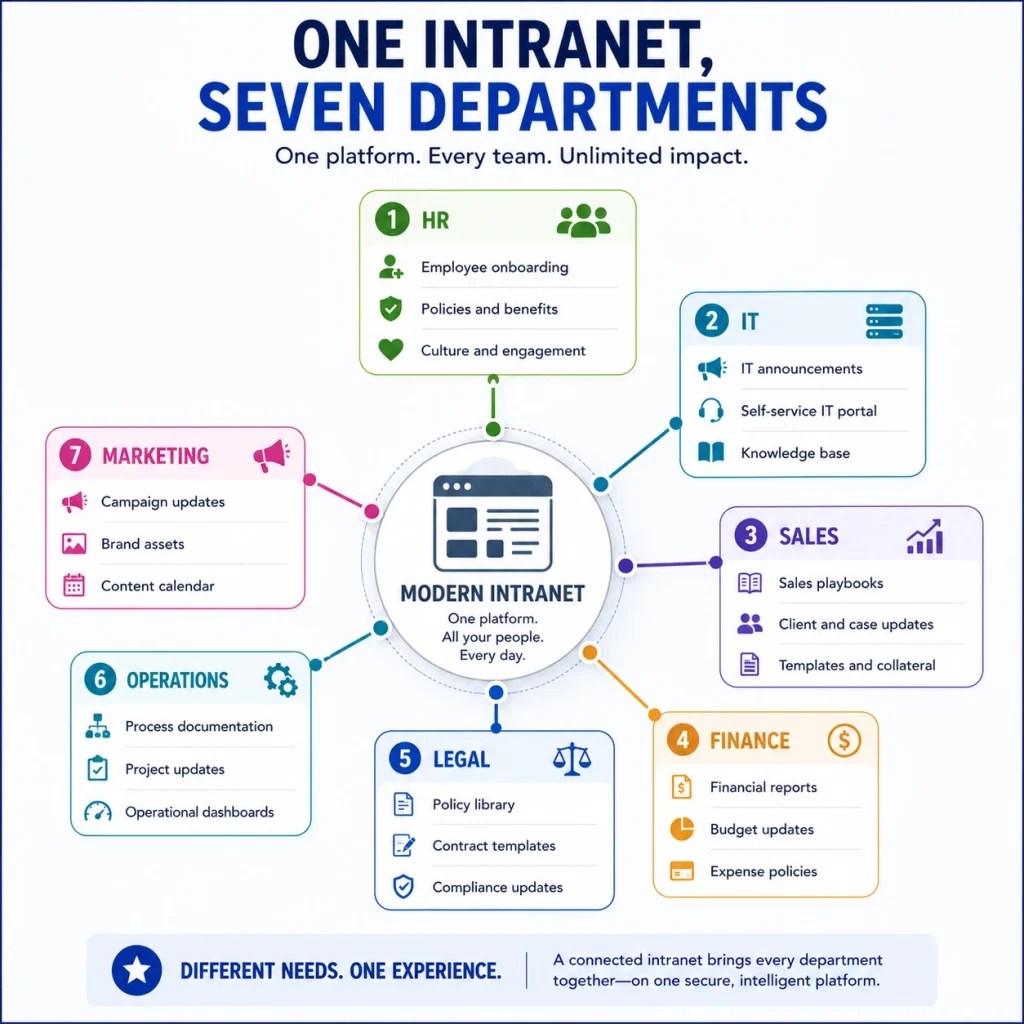
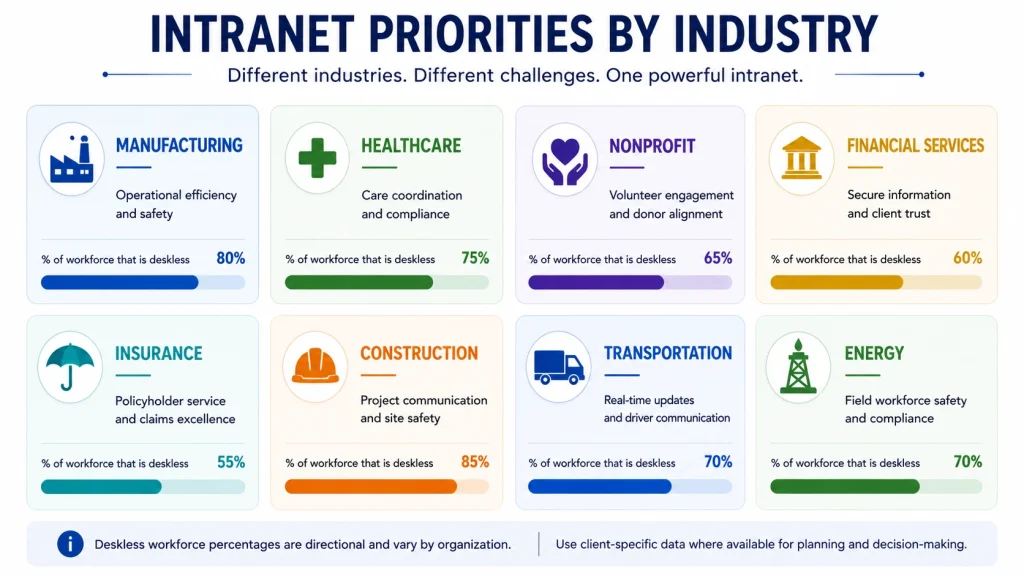
⚡ Quick Answer Intranets are used differently by every department and industry. HR teams use them for policies and onboarding, IT for knowledge articles and service requests, sales for playbooks and collateral, manufacturing for SOPs and shift communication, and healthcare for clinical protocols and compliance documentation.
The value of an intranet becomes concrete when you look at what specific teams actually do with it.
Manufacturing organizations use intranets to standardize procedures across sites, distribute safety documentation, maintain quality control records, and handle shift communication where a large part of the workforce has no desk. See the QSC manufacturing case study and the tool inspection Power Apps case study.
Healthcare providers rely on intranets for clinical protocols, staff communication, compliance documentation, department collaboration, and mandatory training records. Our healthcare intranet work covers this pattern, and the hospital charge capture case study shows a process specific application.
Construction, real estate, transportation, and energy organizations share a common characteristic: a workforce that is mostly not at a desk. Mobile access is not a nice to have in these sectors, it is the entire point. See our sector pages for construction, real estate, transportation and logistics, and oil and gas.
💡 Expert Insight Frontline heavy organizations need a different design approach entirely. Desk based employees will tolerate three clicks to reach a form. A technician on a plant floor with gloves on will not. For these environments, design the mobile experience first and let the desktop version inherit from it, rather than the reverse.
📖 Success Story An Australian not for profit improved document search and collaboration through a modern SharePoint intranet. Read the document search case study.
For visual references of how these environments look in practice, see our gallery of SharePoint intranet examples and our collection of intranet examples. Want to see what an intranet looks like in your industry? Browse Beyond Intranet case studies across manufacturing, healthcare, nonprofit, financial services, insurance, and retail. View Customer Success Stories
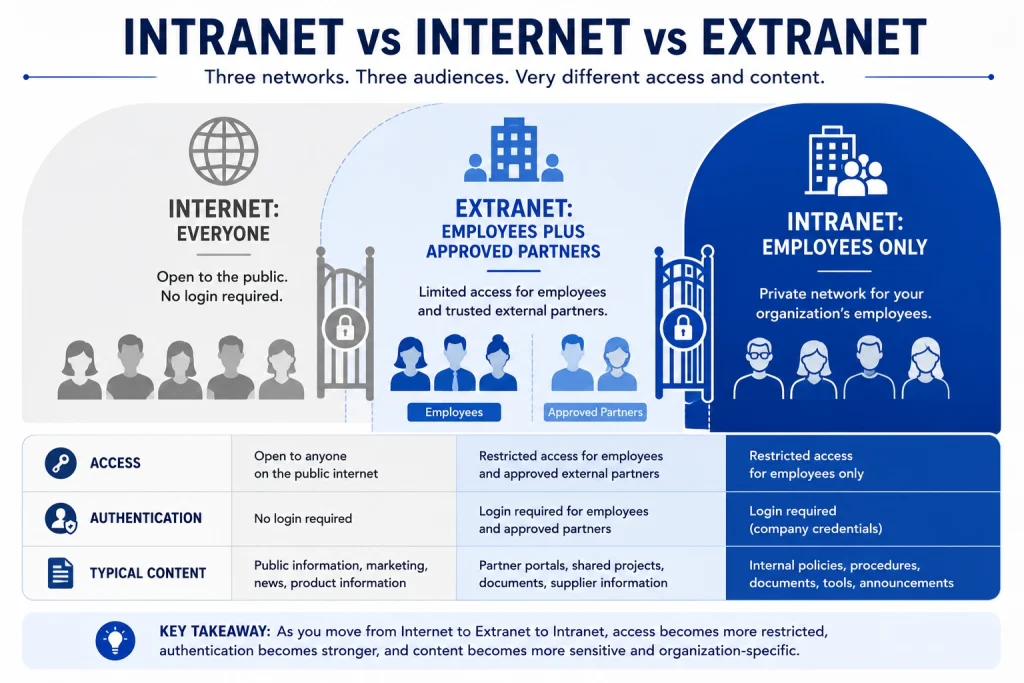
⚡ Quick Answer An intranet is private and restricted to employees. The internet is public and open to everyone. An extranet sits between them, giving controlled access to specific external parties such as vendors, clients, or contractors. The difference comes down to who is allowed in and what authentication is required.
Although the three terms sound similar, they solve different problems, and organizations typically run all three at once.
Attribute
Intranet
Internet
Extranet
Access
Employees only
Public
Employees plus approved external partners
Purpose
Internal communication and collaboration
Public information sharing and marketing
Secure collaboration with vendors, customers, or partners
Security model
Private and permission based
Publicly accessible
Controlled external access with scoped permissions
Users
Employees and contractors
Anyone
Employees, suppliers, clients, contractors
Typical content
Policies, documents, announcements, knowledge base
Websites, blogs, product pages, online services
Project documents, contracts, shared workspaces
Authentication
Required
Usually not required
Required, often with guest identity governance
Governed by
Internal IT and compliance
Marketing and web teams
Both, plus contractual obligations
Example
Company employee portal
Corporate website
Vendor or client portal
Quick Summary
The internet connects everyone.
An intranet connects employees.
An extranet connects employees with specific external stakeholders.
Most organizations use all three together. A company might publish marketing content on its public website, run an intranet for employee collaboration, and provide an extranet where clients access project updates and deliverables.
✔ Best Practice If you are extending your intranet to external parties, use Microsoft Entra ID B2B guest access rather than creating shared accounts or a separate portal. Guest access keeps external identities governed, auditable, and revocable, which shared credentials never are.
This overview covers the essential distinctions. For a deeper treatment of security models, ownership, accessibility, and business use cases, read our complete guides on intranet vs internet and intranet vs extranet.
Need to share content securely with clients or vendors? We design extranet and guest access architectures on SharePoint and Microsoft Entra ID with governance built in from the start. Book a Consultation
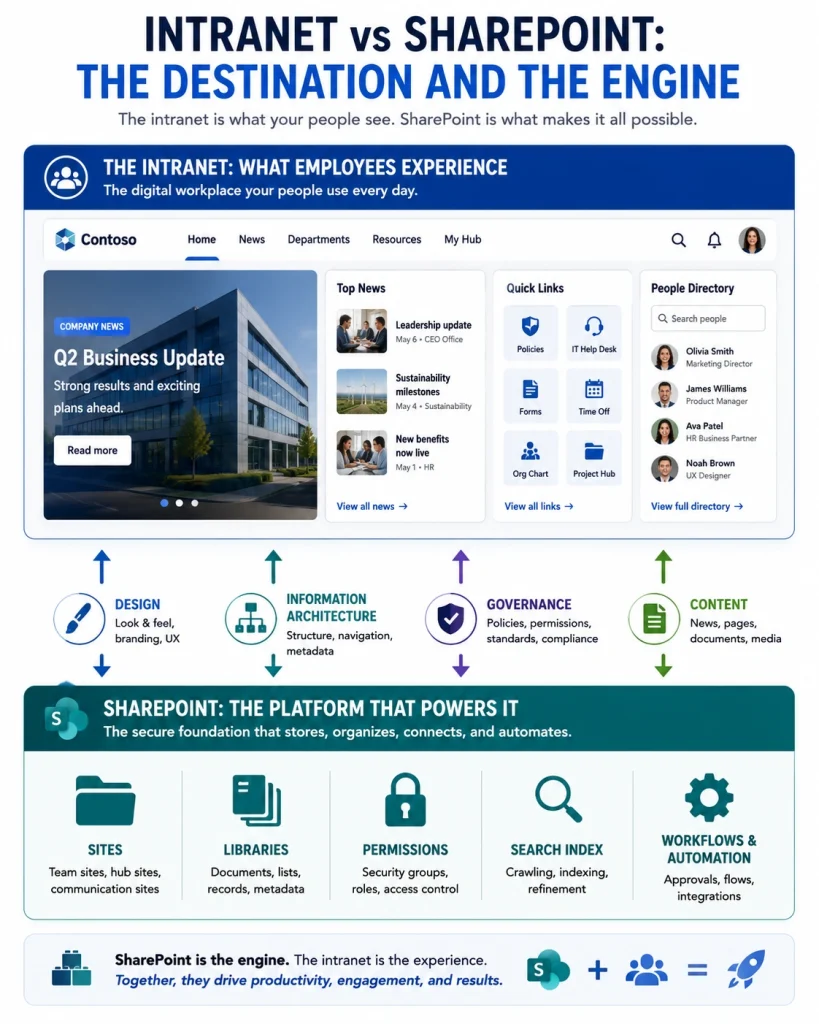
⚡ Quick Answer No, they are not the same thing. An intranet is the digital workplace itself, the destination employees use every day. SharePoint is one of several platforms used to build and run that destination. Every SharePoint intranet is an intranet, but not every intranet runs on SharePoint.
This is one of the most common points of confusion in evaluation conversations, and it matters because it changes how you scope a project.
The clearest way to think about it:
The intranet is the destination.
SharePoint is the technology that powers it.
An analogy that works in stakeholder meetings: an intranet is to SharePoint what a website is to WordPress. The platform provides the capability. What employees experience depends entirely on what you build with it.
That distinction explains why two organizations with identical SharePoint licences can have wildly different intranets. One invested in information architecture, design, governance, and adoption. The other turned the feature on.
Modern SharePoint intranets extend well past document management by integrating with Microsoft Teams, Power Platform, Microsoft Viva, and Microsoft Copilot to create a connected employee experience.
⚠ Common Mistake Treating “we have SharePoint” as equivalent to “we have an intranet”. Having the platform available in your tenant is the starting point of the project, not the completion of it. This assumption is behind a large share of the abandoned intranets we are asked to assess.
🎯 Key Takeaway Buy the platform for capability and licensing fit. Invest in design, architecture, and governance for adoption. Organizations that only do the first get a technically functional intranet nobody uses.
You already have SharePoint. Now make it an intranet employees use. Our team turns existing SharePoint tenants into designed, governed intranets with information architecture built around how your people actually work. Explore SharePoint Consulting
⚡ Quick Answer Successful intranets are designed around employee tasks rather than organizational structure, launch with a defined content ownership model, prioritize search quality, automate high volume processes, work properly on mobile, plan governance before launch, and are measured continuously afterwards against a baseline set before go live.
Organizations that achieve high adoption focus on experience rather than feature count.
Start by understanding what employees are actually trying to do:
What information do they search for most often?
Which processes consume the most time?
Which tools do they open every day?
What questions does HR or IT answer repeatedly?
Answer those four questions before designing anything. The last one is particularly useful because repeated questions are a direct map of your content gaps. Nielsen Norman Group’s intranet usability research is a good external reference for how award winning intranets approach this.
Publish on a rhythm rather than in bursts: company news, policy updates, training material, leadership messages, and employee recognition. Fresh content is what makes the intranet worth revisiting.
Set a review cadence per content type. Policies annually, procedures semi annually, and news continuously.
Employees expect internal search to behave like web search. That expectation is not going to reverse, so meeting it is the only option.
Improve search through consistent metadata, a maintained taxonomy, curated results for high frequency queries, and monitoring of failed searches. SharePoint Syntex and AI assisted tagging can reduce the manual effort of metadata application considerably.
Use workflow automation for leave requests, purchase approvals, document reviews, employee onboarding, and IT requests.
Pick processes by volume and pain, not by ease of automation. Automating a rare process is a demo. Automating the approval every employee touches monthly is a result.
If a meaningful share of your workforce is deskless, the mobile experience is the primary experience. Test on an actual phone, in the actual working environment, with the actual network conditions your employees have.
Decide who can create sites, who owns which content, how permissions are structured, and what happens to content nobody has touched in two years. These decisions are quick to make before launch and expensive to retrofit.
✔ Best Practice Set a baseline before launch, not after. Time how long it currently takes an employee to find three specific documents and complete one common request. Repeat the same test 90 days post launch. That single comparison is worth more to a steering committee than any usage dashboard.
🎯 Key Takeaway The organizations with the best intranets are rarely the ones with the biggest budgets. They are the ones that decided who owns content before they decided what the homepage looks like..
⚡ Quick Answer Building an intranet takes five phases: discovery and requirements, information architecture and design, build and configuration, content migration and governance setup, and launch with adoption support. A focused first release typically takes 8 to 16 weeks depending on scope and content volume.
The sequence matters more than the timeline. Phases three and four are the ones organizations try to run in parallel, and it is usually where projects lose control. Microsoft’s guidance on planning an intelligent intranet covers the platform side of the same sequence.
Interview stakeholders across departments, not just IT and internal communications. Audit existing content and be ruthless about what does not move. Assess the technical environment, current licensing, and identity configuration.
The content audit is the phase most often shortened, and shortening it is what causes the migration overrun in phase four.
Run card sorting sessions with actual employees to determine how content should be organized. Define the site structure, hub relationships, navigation model, and metadata schema. Design the homepage and key page templates for both desktop and mobile.
Provision sites, configure page templates and web parts, apply branding, tune search, and build the first set of automated workflows. Keep the initial workflow scope small. Two or three high volume processes is the right number for a first release.
Migrate the content that survived the audit. Assign named owners to every content area. Configure the permission model using security groups. Set retention and review policies. This is also where you decide who can create new sites and under what conditions.
Announce the launch properly. Run role specific training. Establish a champion in each department. Collect feedback and act on some of it visibly, because the first visible response to employee feedback determines whether you get any more.
💡 Expert Insight Resist the pressure to launch with complete content. A smaller intranet that is entirely accurate builds more trust than a comprehensive one that is 70 percent current. You can add sections. You cannot easily rebuild credibility with employees who found something wrong in week one.
✔ Best Practice Run a pilot with one or two departments before organization wide launch. Choose a department with a cooperative leader and a real pain point rather than the largest one. The pilot gives you a working example to show everyone else, which is worth more than any internal communications campaign.
📖 Success Story A nonprofit organization improved its volunteer onboarding experience with a personalized SharePoint solution, a good example of a focused first release that solved one specific process well. Read the volunteer onboarding case study.
For organizations replacing an existing platform, SharePoint migration planning should run alongside phase one rather than after it. If you are moving from an older SharePoint version, our classic to modern SharePoint guide covers the specific considerations.
⚡ Quick Answer The most common intranet implementation challenges are low employee adoption, outdated content, poor information architecture, weak governance, limited integration with existing tools, and no measurement after launch. None of these are technology failures. All of them are planning and ownership failures, which means all of them are preventable.
Launching is the easy part. Most organizations that are disappointed by their intranet were not let down by the platform.
The most frequent reason intranets fail is that people do not use them.
This usually traces back to a small number of causes: the interface is hard to navigate, content goes stale, employees were never told what the platform is for, or the experience is identical for everyone regardless of role.
What to do instead: launch with a communication plan, run role specific training, and keep promoting new content and capabilities for at least six months after go live. Identify champions in each department who can answer questions locally.
An intranet loses credibility fast when employees find a policy dated three years ago. Once trust is gone, employees revert to asking colleagues, and usage never recovers.
What to do instead: assign a named owner to every content area, set review cycles with automated reminders, and apply an archival policy. Content with no owner should not be published.
Without a clear structure, employees cannot find what exists. This is the most expensive problem to fix retroactively because it means re-tagging and reorganizing content that is already in use.
A well designed intranet organizes content through department and topic sites, consistent metadata and taxonomy, clear navigation, hub site relationships, and enterprise search tuned to the organization’s vocabulary.
💡 Expert Insight Information architecture should be built from how employees search, not from your org chart. Organizations naturally structure the intranet the way the company is structured, which makes sense to leadership and nobody else. An employee looking for the parental leave policy is not thinking about which department owns it. Card sorting with real employees before the build is the cheapest insurance available on an intranet project. Nielsen Norman Group’s intranet information architecture research documents navigation structures from 77 real intranets and is worth reviewing before you design yours.
Without governance, organizations end up with duplicate content, inconsistent branding, broken permissions, compliance exposure, and uncontrolled site sprawl.
Governance should define content ownership, approval processes, permission models, site creation rules, lifecycle and retention, and compliance requirements. See our SharePoint governance framework for a working model, and Microsoft’s intranet governance planning guidance for the platform level decisions.
Employees should not have to leave the intranet to do their work. When the intranet is a separate destination from the tools people actually use, it becomes a place they visit occasionally rather than work within.
A successful intranet connects to Microsoft Teams, Outlook, OneDrive, Power Automate, HR systems, CRM platforms, and any line of business application employees touch daily. SharePoint integration services address this directly.
Organizations frequently launch without deciding what success looks like, which makes it impossible to justify further investment or diagnose problems.
What to do instead: define baseline metrics before launch. Adoption rate, search success rate, task completion time for two or three key processes, and content freshness are enough to start.
⚠ Common Mistake Migrating everything. Organizations move their entire legacy file share into the new intranet because deciding what to keep feels harder than moving it all. It is not. It just moves the decision to every employee who searches, forever. Audit and archive before migration, not after.
Inherited an intranet nobody uses? We run intranet health assessments covering adoption, content quality, architecture, and governance, and deliver a prioritized remediation plan. Schedule an Assessment
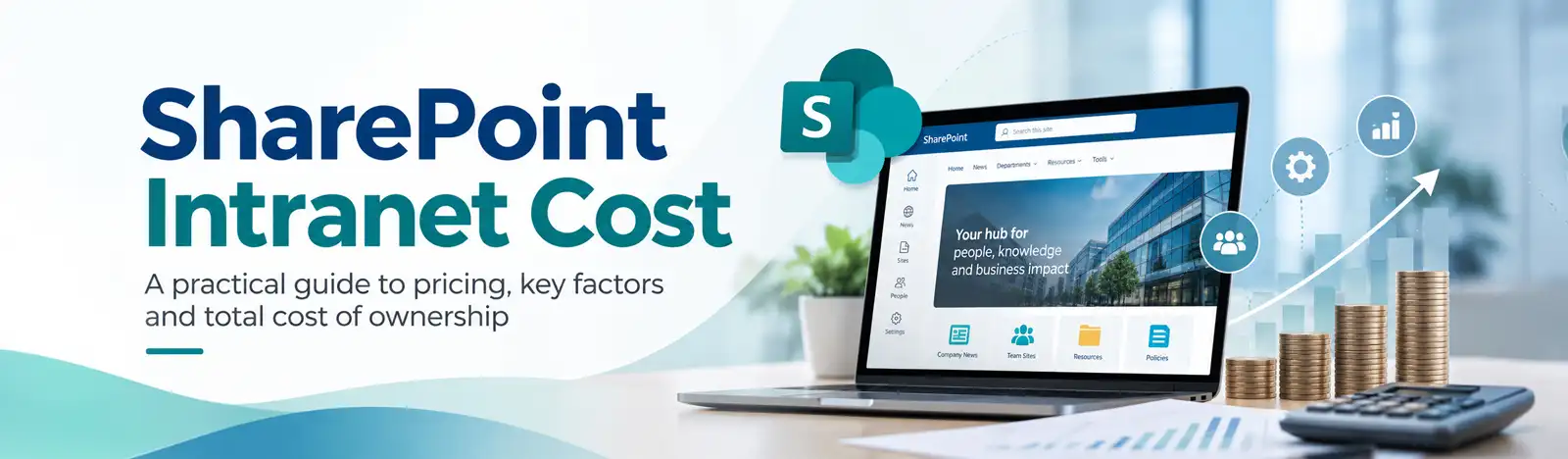
⚡ Quick Answer Intranet cost depends on four variables: platform licensing, implementation effort, content migration volume, and ongoing support. Organizations already licensed for Microsoft 365 generally have no additional platform cost for a SharePoint intranet, which shifts the entire budget to design, build, and adoption.
That last point is the one that changes the conversation. The question is rarely “how much does an intranet cost”. It is “what does it cost beyond what we already pay Microsoft”.
Using out of the box web parts rather than custom development
A phased release rather than a single large launch
Nonprofit licensing, which materially changes the calculation for eligible organizations. See Microsoft for nonprofits.
💡 Expert Insight The most reliable cost estimate comes from content volume, not employee count. A 200 person organization with 15 years of unmanaged file shares is a bigger project than a 2,000 person organization that already runs disciplined document management. When requesting quotes, provide your content inventory. Suppliers who quote without asking for it are guessing.
⚠ Common Mistake Budgeting for build and not for the first year of operation. Content management, governance administration, and adoption support are ongoing costs. Organizations that fund only the build tend to see the intranet degrade within twelve to eighteen months, then pay again for a remediation project.
✔ Best Practice Scope a paid discovery phase separately from the build. It costs a fraction of the project, produces a defensible estimate, and protects you from committing a full budget against unknown content volume.
An intranet is a secure private network that lets employees communicate, collaborate, access documents, and complete business processes within an organization. It is accessible only to authorized users and functions as the central digital workplace.
The main purpose of an intranet is to centralize communication, knowledge, documents, business applications, and collaboration in one secure place, so employees spend less time searching and more time working.
The internet is publicly accessible to anyone. An intranet is private and restricted to authorized employees within a single organization, and requires authentication.
Yes. Microsoft SharePoint is one of the most widely used platforms for building modern intranet portals, document hubs, and employee collaboration sites.
Common intranet features include company news, employee directories, document sharing, collaboration spaces, internal portals, and workflow automation.
An intranet serves employees only. An extranet extends controlled access to specific external parties such as customers, suppliers, or contractors, usually through governed guest identities.
The main types are traditional, cloud based, social, SharePoint, and AI powered intranets. In practice these overlap, and most modern deployments combine cloud, social, and AI characteristics on a SharePoint foundation.
No. Teams excels at real time collaboration and conversation. An intranet is the organization’s structured hub for communication, knowledge, and resources. Most organizations run both and integrate them.
A properly configured intranet uses role based permissions, multi factor authentication, conditional access, encryption, data loss prevention, audit logging, and retention policies. Security depends on configuration and governance, not on the platform alone.
Cost depends on licensing, implementation effort, content migration volume, and ongoing support. Organizations already using Microsoft 365 typically face no additional platform licence for SharePoint, which moves the budget to design, build, and adoption.
A focused first release usually takes 8 to 16 weeks across discovery, architecture, build, content migration, and launch. Content volume and integration complexity are the two variables that move the timeline most.
A modern intranet is a cloud based, personalized, mobile accessible digital workplace that integrates with productivity tools and adds automation and AI capability, as opposed to a static internal publishing site.
Healthcare, manufacturing, construction, financial services, insurance, education, nonprofit, government, transportation, energy, and professional services all use intranets, though their priorities differ considerably.
Small businesses benefit most from the document management and knowledge sharing elements. If a small business already holds Microsoft 365 licences, a lightweight SharePoint intranet is usually achievable without additional platform cost.
Low adoption, outdated content, poor information architecture, weak governance, and limited integration. These are planning and ownership problems rather than technology problems.
Intranet governance defines who owns content, who approves it, how permissions are structured, who can create sites, how long content is retained, and when it is reviewed or archived.
Yes, but only if it is designed mobile first. Frontline access requires simple navigation, minimal clicks, offline tolerance where possible, and content written for quick consumption on a phone.
An AI powered intranet uses artificial intelligence for natural language search, document summarization, content recommendations, automated tagging, and conversational assistance. Its accuracy depends entirely on content quality and permission hygiene.
Yes. Microsoft Copilot uses Microsoft Graph to reason over organizational content while respecting existing permissions. Effective results require a governed content estate with accurate permissions and consistent metadata.
Still have questions? Talk to a Beyond Intranet consultant. No sales script, just an honest assessment of whether an intranet solves the problem you actually have. Book a Consultation
An intranet has moved a long way from the internal website it used to be. Today it is the layer that connects employees, information, and business processes securely enough to satisfy compliance and simply enough that people actually use it.
Whether the goal is better internal communication, controlled document management, support for hybrid and frontline work, or higher employee engagement, a well designed intranet delivers value that compounds over time.
Organizations already running Microsoft 365 can go further with a SharePoint based intranet that brings collaboration, automation, enterprise search, and AI powered experiences into one platform without a second licence or a second identity system.
One thing is worth repeating because it is the difference between the intranets that succeed and the ones that quietly die: the platform is not the project. The organizations that get value from their intranet are the ones that decided who owns content, how it stays current, and what problem the platform is solving, before anyone configured a site.
If you are planning to build, modernize, or rescue a digital workplace, the decisions you make in discovery will matter more than the ones you make in development.
Work With Beyond Intranet
Beyond Intranet designs and delivers SharePoint intranet solutions for organizations across manufacturing, healthcare, financial services, insurance, nonprofit, and retail sectors in the US, Australia, and Europe. Our work covers discovery and information architecture, design and branding, development, migration, governance, Copilot readiness, and ongoing managed support.
🎯 Key Takeaway Start with the problem, not the platform. Identify the one process or information gap costing your organization the most, solve that properly, and let the intranet grow from a success rather than a mandate.
Bhupendra is a Digital Transformation Expert and Microsoft 365 Consultant who helps organizations modernize the way they work using the Microsoft 365 suite of services. As a Microsoft Certified Teams Administrator Associate, with credentials in Microsoft 365 Fundamentals and the Microsoft Service Adoption Specialist assessment, he combines technical expertise with adoption strategies to drive meaningful business change.