A practical, vendor-neutral guide for CIOs, IT directors, and digital workplace leaders evaluating SharePoint consulting partners in Australia — including a comparison...
TL;DR: What is SharePoint? Microsoft SharePoint is a secure, web-based platform in Microsoft 365 that helps organizations store, manage, share, and collaborate on documents and information through intranet sites, team workspaces, and automated business workflows.
SharePoint at a Glance
Before exploring SharePoint in detail, here’s a quick overview of what the platform offers and why it’s widely used by organizations worldwide. Whether you’re evaluating SharePoint for document management, collaboration, or building a modern intranet, this summary highlights its core capabilities.
Quick Insight: SharePoint is more than a document management system. It serves as the foundation for modern digital workplaces by connecting people, content, and business processes through Microsoft 365.
Why SharePoint Matters Today
Would your organization save time and money if every document, idea, and project update was always accessible—securely, from anywhere?
That’s exactly what SharePoint enables. Microsoft SharePoint is trusted by enterprises worldwide and is widely adopted across Fortune 500 organizations.
When people ask “What is SharePoint?” they are usually looking for a solution to:
Lost or duplicated files
Slow collaboration across departments
Compliance and document control challenges
Disconnected tools and information silos
SharePoint brings content, communication, and business processes together in one connected digital workplace.
Planning to deploy SharePoint? Our SharePoint Implementation Services help organizations design, configure, and launch a secure Microsoft 365 workplace.
What is Microsoft SharePoint?
Microsoft SharePoint is a browser-based collaboration and content management platform designed to help organizations:
Securely store documents
Share knowledge across teams
Build intranet portals
Automate workflows
Integrate with Microsoft 365 tools like Teams, OneDrive, Outlook, and Power Platform
In simple terms, SharePoint is the foundation many businesses use to manage information and collaboration at scale.
What is SharePoint Used For?
SharePoint is used across industries for four major business purposes:
1. Document Management and Secure File Sharing
SharePoint provides centralized document libraries where teams can:
Store and organize files with metadata
Track version history and approvals
Control access with permissions
Search content quickly across the organization
Many companies use SharePoint to replace traditional file servers with a more secure, cloud-based system making it a powerful SharePoint document management system.
2. Team Collaboration and Project Workspaces
SharePoint enables real-time collaboration through Team Sites where employees can:
Co-author documents simultaneously
Share calendars and tasks
Manage project deliverables n- Connect conversations from Microsoft Teams directly to shared files
SharePoint is the content backbone behind Teams collaboration.
3. Intranet Portals and Internal Communication
Organizations use SharePoint Communication Sites to build modern intranets, including:
Company news and announcements
HR policies and employee resources
Knowledge bases and training hubs
Department portals and navigation
This makes SharePoint a powerful tool for improving internal communication and employee experience.
4. Workflow Automation and Business Integration
SharePoint works deeply with Microsoft Power Platform, allowing businesses to:
Automate approvals and document routing
Build custom business apps using Power Apps
Integrate SharePoint with ERP and CRM systems (SAP, Salesforce, Dynamics)
This transforms SharePoint from a document tool into a workflow engine.
SharePoint was first introduced in 2001 as a Microsoft web-based platform for content storage and collaboration.
Over time, it evolved through multiple versions:
SharePoint 2003
SharePoint 2007
SharePoint 2010
SharePoint 2013
SharePoint 2016 / 2019
Today, most organizations use SharePoint Online, the cloud version included with Microsoft 365.
Understanding the SharePoint Architecture
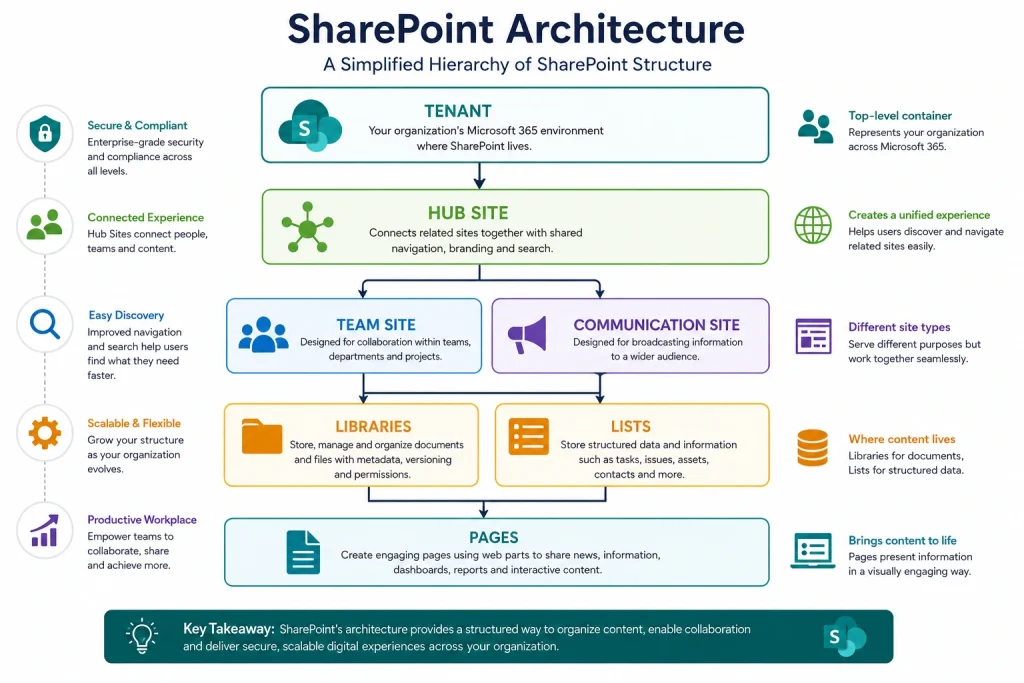
Understanding SharePoint’s architecture makes it easier to plan an intranet, organize content, and scale your digital workplace. Rather than storing information in a single location, SharePoint organizes content through a structured hierarchy that improves navigation, governance, and collaboration.
The architecture typically includes:
Microsoft 365 Tenant
The top-level environment where your organization’s SharePoint Online services are hosted.
Hub Sites
Hub Sites connect related SharePoint sites using consistent navigation, branding, and search, creating a unified digital workplace experience.
Team Sites
Designed for collaboration between project teams and departments, Team Sites provide document libraries, lists, calendars, and Microsoft Teams integration.
Communication Sites
Communication Sites are designed for broadcasting information such as company news, announcements, leadership messages, and policies to a wider audience.
Document Libraries
Document libraries provide centralized storage for files while supporting version history, metadata, permissions, co-authoring, and approval workflows.
Lists
SharePoint Lists organize structured business information such as projects, assets, issues, employee records, or inventories.
Pages and Web Parts
Pages allow organizations to create engaging employee experiences using reusable web parts such as news, events, documents, videos, Power BI dashboards, and quick links.
SharePoint Online vs SharePoint Server (On-Premises)
Businesses can choose between different deployment options:
Version
Best For
SharePoint Online
Cloud-first organizations wanting automatic updates and lower infrastructure management
SharePoint Server (On-Prem)
Organizations needing full local control due to strict regulatory or legacy requirements
Hybrid SharePoint
Enterprises balancing cloud collaboration with on-prem data residency needs
Modern SharePoint vs Classic SharePoint
Microsoft introduced Modern SharePoint in 2017 to improve usability and scalability.
Key differences include:
Modern sites use a flat architecture instead of subsites
Better mobile experience
Faster page building with modern web parts
Improved navigation and governance
Most intranet and collaboration projects are built on Modern SharePoint and often benefit from expert SharePoint consulting services.
Types of SharePoint Sites (And When to Use Them)
Team Sites
Team Sites are built for collaboration within departments or project teams.
Examples:
Product launch planning site
HR onboarding workspace
Regional sales enablement hub
Team Sites connect with Microsoft Teams, Planner, and Group calendars.
Communication Sites
Communication Sites are designed for broadcasting information across the organization.
Examples:
Company intranet homepage
IT support portal
Employee training resource center
Channel Sites (Teams Connected)
When private or shared channels are created in Microsoft Teams, SharePoint automatically provisions channel-specific sites for document storage with unique permissions.
Core Features That Define SharePoint
SharePoint is built on several foundational capabilities:
Sites and pages
Document libraries
Lists and structured data
Metadata and search
Permissions and governance controls
Workflow automation via Power Automate
Integration with Microsoft 365 ecosystem
How SharePoint Fits into the Microsoft 365 Ecosystem
One of SharePoint’s greatest strengths is its seamless integration with Microsoft 365. Instead of operating as a standalone platform, SharePoint works alongside Microsoft’s productivity applications to create a connected digital workplace where employees can collaborate, automate processes, and securely manage information.
Microsoft Product
How It Works with SharePoint
Microsoft Teams
Access SharePoint files, pages, and document libraries directly within Teams.
OneDrive
Synchronize and securely store personal work files connected to SharePoint.
Microsoft Viva
Deliver personalized employee experiences and organizational knowledge.
Power Apps
Build custom business applications using SharePoint Lists and Libraries as data sources.
Power Automate
Automate approvals, notifications, document reviews, and business processes.
Power BI
Visualize SharePoint data using interactive dashboards and reports.
Microsoft Copilot
Search organizational knowledge, summarize documents, and generate content using AI.
Microsoft Entra ID
Manage user identities, permissions, and secure access across Microsoft 365.
Organizations already using Microsoft 365 often choose SharePoint because these native integrations improve productivity, reduce context switching, and simplify information management.
SharePoint vs OneDrive vs Teams (Quick Comparison)
Many organizations ask how SharePoint compares to other Microsoft tools:
Tool
Primary Purpose
OneDrive
Personal file storage for individual users
SharePoint
Team and organization-wide content management and collaboration
Microsoft Teams
Chat, meetings, and collaboration interface (SharePoint stores the files behind Teams)
Organizations often compare SharePoint with other collaboration and document management platforms before making an investment. While every platform has its strengths, SharePoint stands out for its enterprise-grade content management, Microsoft 365 integration, and extensive customization capabilities.
Personal productivity and lightweight collaboration
Confluence
Team documentation and knowledge bases
Businesses already using Microsoft 365 generally benefit most from SharePoint because it integrates seamlessly with Teams, Outlook, OneDrive, Power Platform, and Microsoft Copilot.
Who Uses SharePoint?
SharePoint is widely used by:
IT teams managing governance and compliance
HR departments building employee portals
Operations teams automating workflows
Project teams collaborating across locations
Enterprises centralizing knowledge and documents
SharePoint Use Cases Across Departments
SharePoint supports a wide range of business functions beyond document storage. Organizations use it to improve collaboration, centralize information, and automate processes across departments.
Department
Common SharePoint Use Case
Human Resources
Employee onboarding, HR policies, training portals
Information Technology
Knowledge base, IT helpdesk documentation, asset management
Standard operating procedures, quality documentation
Legal
Contract management, compliance documentation
Regardless of department, SharePoint helps employees find information faster, collaborate more effectively, and streamline day-to-day business operations.
Best Practices for SharePoint Success
To maximize SharePoint value, organizations should:
Is SharePoint the Right Solution for Your Organization?
Choosing the right collaboration platform depends on your business goals, technology ecosystem, and long-term digital workplace strategy. SharePoint is particularly well suited for organizations looking to centralize information, improve collaboration, and leverage their Microsoft 365 investment.
Business Requirement
Is SharePoint a Good Fit?
Document Management
✓ Excellent
Company Intranet
✓ Excellent
Microsoft 365 Integration
✓ Excellent
Workflow Automation
✓ Excellent
Knowledge Management
✓ Excellent
Employee Collaboration
✓ Excellent
AI-Powered Productivity
✓ Microsoft Copilot Integration
Enterprise Search
✓ Advanced Search & Metadata
Google Workspace-First Organizations
May require additional evaluation
If your organization relies on Microsoft 365, SharePoint provides a scalable and secure foundation for building a connected digital workplace. Its integration with Microsoft Teams, Power Platform, Microsoft Viva, and Microsoft Copilot makes it one of the most comprehensive collaboration platforms available for modern businesses.
Best Practices for a Successful SharePoint Implementation
A successful SharePoint deployment requires more than selecting the right technology. Organizations should establish governance policies, organize information architecture, train employees, and define ownership for content management. Regular content reviews, permission audits, and user feedback help keep the platform relevant and encourage long-term adoption.
To maximize the value of SharePoint:
Plan your information architecture before implementation.
Use metadata to improve search and content organization.
Define governance policies for permissions and content ownership.
Integrate SharePoint with Microsoft Teams and Power Platform.
Train employees to encourage adoption and collaboration.
Review content regularly to remove outdated information.
Leverage Microsoft Copilot to enhance knowledge discovery and productivity
SharePoint is Microsoft's collaboration and content management platform that helps organizations securely store documents, build intranet portals, automate workflows, and improve team collaboration. As part of Microsoft 365, SharePoint integrates with Microsoft Teams, OneDrive, Power Platform, Microsoft Viva, and Microsoft Copilot to create a connected digital workplace.
SharePoint is used for document management, team collaboration, intranet development, knowledge management, workflow automation, enterprise search, and secure content sharing. Organizations also use SharePoint to build employee portals, automate business processes, and improve collaboration across Microsoft 365.
Yes. SharePoint Online is included with most Microsoft 365 business and enterprise plans. It integrates seamlessly with Microsoft Teams, Outlook, OneDrive, Microsoft Viva, Power Platform, and Microsoft Copilot, allowing organizations to manage content and collaborate within a unified Microsoft ecosystem.
SharePoint helps organizations improve collaboration, centralize document management, automate business processes, strengthen security, simplify knowledge sharing, and build engaging intranet portals. Its integration with Microsoft 365 also enhances employee productivity and supports hybrid work environments.
SharePoint Online is the cloud version of SharePoint included in Microsoft 365, offering automatic updates and reduced infrastructure management. Unlike SharePoint Server, SharePoint Online doesn't require organizations to manage infrastructure or install updates manually.
Yes. SharePoint provides enterprise-grade security through encryption, role-based permissions, multi-factor authentication, audit logs, version control, data loss prevention, and Microsoft 365 compliance features. Organizations can securely manage sensitive business information while meeting regulatory and governance requirements.
SharePoint Online is Microsoft's cloud-based version of SharePoint that receives automatic updates and integrates with Microsoft 365 services. SharePoint Server is deployed on-premises, giving organizations greater control over infrastructure but requiring manual maintenance, updates, and server management.
OneDrive is designed for personal file storage and individual productivity, while SharePoint is built for team collaboration, document management, intranet development, and organization-wide content sharing. Many organizations use both together as part of Microsoft 365.
Yes. Every Team in Microsoft Teams stores its files in SharePoint, making SharePoint the document backbone of Teams. Every Team in Microsoft Teams automatically creates a SharePoint site to store documents.
Yes. SharePoint is one of the most widely used platforms for building modern intranets. Organizations use SharePoint to create employee portals, publish company news, manage documents, share knowledge, and improve internal communication through a centralized digital workplace.
Yes. SharePoint integrates with Microsoft Power Automate to automate approvals, document reviews, notifications, onboarding processes, leave requests, and other business workflows. Organizations can also use Power Apps to build custom applications that work with SharePoint data.
Microsoft Copilot uses content stored in SharePoint to help employees find information, summarize documents, answer questions, generate content, and improve knowledge discovery. Well-organized SharePoint sites enable Copilot to deliver more accurate and relevant AI-powered responses across Microsoft 365.
Conclusion: Why SharePoint Remains Essential
Microsoft SharePoint is more than a document storage system.
It is a collaboration platform, a SharePoint intranet foundation, a workflow automation engine, and a secure content hub powering modern digital workplaces.
If your organization wants to unlock SharePoint’s full potential—through intranet design, migration, governance, or integration—working with experienced SharePoint consulting experts can accelerate success.
Need help planning or optimizing SharePoint for your business? Explore our SharePoint services to build a secure, scalable digital workplace.
About Author
Bhupendra Singh
Bhupendra is a Digital Transformation Expert and Microsoft 365 Consultant who helps organizations modernize the way they work using the Microsoft 365 suite of services. As a Microsoft Certified Teams Administrator Associate, with credentials in Microsoft 365 Fundamentals and the Microsoft Service Adoption Specialist assessment, he combines technical expertise with adoption strategies to drive meaningful business change.