A practical, vendor-neutral guide for CIOs, IT directors, and digital workplace leaders evaluating SharePoint consulting partners in Australia — including a comparison...
Ask an HR manager when they last printed a new-hire packet. The answer increasingly involves a specific reason. Usually one form the team never converted.
A decade ago, new hires spent their first ninety minutes at a desk with a folder of forms, and nobody thought twice about it. Then companies started hiring across state lines. You cannot hand a clipboard to someone four states away, so HR teams improvised. What they improvised during the remote years is now what candidates expect everywhere.
Key takeaways
Paperless onboarding replaces printed new-hire forms and manual filing with digital forms and centralized storage. Your team captures the data more accurately and moves through the process faster. Auditors get better documentation, and new hires form a better impression during their first week. When you evaluate software, insist on checklists with automated reminders behind them. Your new hires need a portal they can use before day one, and the documents they submit need secure storage. And the switch itself runs as a six-step sequence. Most of it happens before you sign with a vendor.
What is paperless onboarding?
What is paperless onboarding?
Paperless onboarding means your new hires complete their paperwork digitally instead of on printed forms. They fill everything in online and submit it electronically. A central system holds the result behind access controls, and the physical packet disappears along with the filing cabinet.
Every legal requirement that applied to the printed version applies to the digital one. Teams expecting the switch to simplify compliance are usually surprised.
A paperless process still handles the I-9, the W-4, direct deposit details and policy acknowledgments. Those requirements are set by regulation, not by format, and a digital process that handles them carelessly is worse than a paper one that handles them properly. Going paperless improves how well you execute against those requirements, and it leaves the requirements themselves exactly where they were.
Worth distinguishing the genuine version from the common halfway state. Plenty of organizations describe themselves as paperless while emailing a PDF that the new hire prints and signs, then scans and returns. That is paper with extra steps, and it carries the same transcription risk while adding a scanner to the process.
This sits inside the broader shift toward paperless HR software, where employee records and documents move off paper together, along with the workflows around them. This piece stays with the onboarding slice of it.
Why paperless onboarding is the future of employee onboarding
Four pressures explain why this happened, and each exposes a limitation paper always had but organizations could work around.
Hiring is no longer geographically contained
Remote and hybrid hiring made physical paperwork a scheduling problem. A form that must be signed in person means either a courier, a delayed start, or a first day spent on administration that could have finished the week before.
An organization hiring across three states hits a wall with any process assuming everyone eventually walks into the same building. Once geography stops guaranteeing that, the printed packet loses its one real advantage. Proximity to the person who had to sign it.
Every handwritten form gets retyped into at least one system, and often three. Each retyping is an opportunity for a transposed digit in a bank account or a misspelled legal name. Those errors then surface at the worst possible moment. A payroll run, or halfway through a compliance audit.
The error is rarely dramatic, though a transposed routing number takes minutes to create and weeks to unwind once payroll has run against it.
Documentation expectations have hardened
Producing a signed acknowledgment from four years ago is straightforward when documents are indexed and searchable. It is an afternoon in a storage room when they are not, and the request usually arrives with a deadline attached.
Storage economics shifted as well. Physical records occupy space that carries rent, and few finance teams itemize a storage room.
Candidates read the first week as a signal
New hires form durable impressions fast. A first morning spent on forms says something about how the organization runs, and it competes directly with the effort that went into recruiting them. The wider case for getting this period right sits in a structured onboarding process if you want the full treatment.
Benefits of a paperless onboarding system
Five benefits, and the fifth one is the reason the other four became urgent.
Accuracy and compliance
Data entered once, by the person who owns it, removes the transcription layer entirely. Required fields can be enforced so a form arrives complete. Version control keeps every submission against the same current document. The audit trail then accumulates as a byproduct of the process itself. It already exists on the day an auditor asks for it.
Version control is the quiet part. A printed packet has as many versions as there are desks holding an old batch. The wrong one circulates until a manager spots an expired policy reference.
Time and cost savings
Printing, postage, physical storage and the hours spent chasing signatures all disappear. The larger saving is HR turnaround time. A packet arriving complete needs review rather than reconstruction.
Turnaround compounds across a hiring cycle. One packet reviewed instead of reconstructed saves roughly an hour, and forty hires a year returns a working week.
Employee experience
New hires complete paperwork before their start date. Day one can then be about the role and the people. That single change shapes what a new hire remembers about their first week more than most deliberate welcome gestures do.
The manager gains as well. A new hire productive from the first morning changes what week one can realistically hold.
Security and recordkeeping
Lock the room and you have exhausted what a filing cabinet can do about access. With role-based permissions you can give a manager the start date while the payroll administrator sees the banking details, and neither one sees the other.
People ask this directly, so here is the direct answer. Yes, paperless onboarding is generally more secure than paper, as long as your platform enforces role-based permissions and encrypts what it stores. An auditor can trace who opened which document and when. Nobody can do that with a cabinet, and GDPR-aligned handling gives you a defensible retention position on top.
Remote and hybrid readiness
None of the steps depend on anybody being in a building. That makes paperless onboarding easier for distributed teams than the in-person alternative, and it removes the awkward middle case where half the process works remotely and half does not.
What should I look for in paperless onboarding software?
Seven capabilities carry most of the decision. Insist on onboarding checklists with task assignment and automated reminders behind them. Your new hires need a portal they can use before day one, and role-based access should govern what they submit. Ask to see reporting that surfaces a stalled onboarding, and confirm that identity integration creates accounts before IT has to raise a ticket.
Capability
Why it matters
The demo question
Checklists and task assignment
Tasks reach the right person without anybody routing them
Assign one task across three departments
Automated reminders
Removes the chasing that consumes most of HR’s onboarding time
Show me the reminder schedule
Self-service new-hire portal
Paperwork completes before day one, not during it
Log in as a candidate, not an admin
Centralized document storage
One place, with retention rules attached from the start
Where does a completed document land?
Role-based access controls
A manager and a payroll administrator need different things
Hide a document from most of the company
Reporting and dashboards
Shows which onboardings stalled and at which step
Show me an incomplete onboarding
Identity integration
Accounts created automatically instead of by ticket
What triggers the account creation?
Table 1. Seven checks. The right-hand column is what separates a demo from a claim.
Electronic signature deserves a note of its own. It appears on most paperless onboarding feature lists and it genuinely earns its place there, though coverage across the category varies more widely than buyers tend to assume. Ask about it explicitly during the evaluation. It is the capability buyers most often take for granted.
See these features in action before you build your own evaluation checklist.
Fifteen minutes, running on real onboarding content, not a prepared slide.
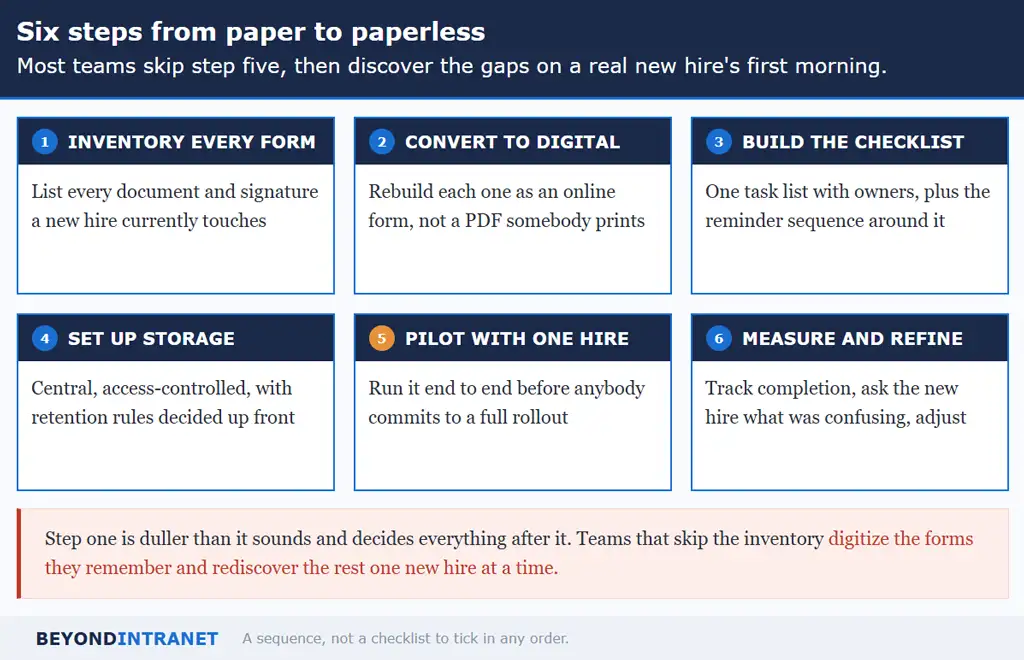
The process runs to six steps. Start by inventorying every form and signature a new hire currently touches, then convert those into online forms. Build one task checklist with a reminder sequence around it, and set up centralized storage with access controls. Pilot the whole thing with a single new hire before measuring completion and refining what you find.
A sequence, not a checklist to tick in any order.
Step 1. Inventory every form and signature
List every document a new hire currently touches. Include the ones only one person remembers. The department-specific acknowledgment usually surfaces late, along with the equipment receipt and whatever form covers parking. This step is duller than it sounds and decides everything after it. Teams that skip the inventory digitize whatever they remember, then rediscover the rest one new hire at a time.
Ask each department instead of working from the HR file alone. The forms HR knows about are the ones HR issues, and the gaps tend to be local additions never routed centrally.
Step 2. Convert them to digital forms
Rebuild each one as an online form. Upload a PDF that the new hire prints and you have defeated the purpose. Fill in a proper online form and the data flows onward into payroll on its own. Scan a PDF and an administrator still has to read it and type it out again.
Mobile matters more than teams expect. Plenty of new hires complete pre-start paperwork on a phone.
Step 3. Build the checklist and reminder sequence
Define one task list covering everything from offer acceptance through the first week, with a named owner per task. Then build the communication around it. Reminders should be automated, not manual, and the sequence itself borrows directly from welcome email templates if you want a starting point.
Owners matter more than tasks here. A checklist naming what must happen without naming who does it goes unexecuted.
Step 4. Set up centralized storage
Decide where completed documents live and who can see them before anything goes live. Retention rules belong in this step too. Employment records carry obligations that outlast the employment itself, and that decision is far harder to make retrospectively.
Step 5. Pilot with one new hire
Run the whole thing end to end on a single person before you commit to a full rollout. Most teams skip this step, and it is where you find the gaps cheaply. A form that renders badly on a phone. A reminder that fires on a Saturday. A task still assigned to a colleague who left.
Run the pilot with a new hire joining a role you fill regularly. A senior one-off tests only the exceptions.
Step 6. Measure and refine
Track completion rates and note where the process stalls. Then ask the new hire what confused them. They are the only person who went through it without knowing how it was meant to work. Revisit the checklist whenever your forms or policies change.
Best practices for a smooth rollout
The technology is the straightforward half. Adoption is where rollouts stall, usually for reasons that trace back to people.
Four habits separate a rollout that sticks from one that quietly reverts.
Tell managers before the first hire runs through it. They are who a confused new joiner asks.
Keep it simple for the new hire. Every additional field is a place somebody abandons the form partway through, and a half-complete submission costs more to chase than a shorter form would have cost in lost detail.
Let the system do the chasing. Automated reminders remove the most tedious part of HR’s onboarding week, and they do it without the awkwardness of a person following up for the third time.
Involve managers and teammates in the digital welcome. A paperless process removes administrative friction, which is a real gain and an entirely different thing from making somebody feel welcome. That second job still needs colleagues who reach out. There is more on that in improve the new-hire experience.
Revisit the checklist on a schedule. Your forms will change and so will your policies, and a checklist accurate at launch drifts within a year. Pair it with your onboarding checklist and review both at the same time.
One boundary is worth stating plainly. Beyond Intranet’s onboarding software covers checklists with automated reminders behind them. There is a Candidate Portal, centralized storage, and Azure Active Directory integration that creates accounts. Reporting and a template hub round it out. Signature capability sits outside that list, and knowing it before an evaluation saves time.
Yes, and it usually works better than the alternative. None of the steps depend on anybody being in an office, so a distributed hire completes the same process as an in-person one. The in-person paper handoff is the version that breaks under distance.
The forms and their deadlines are unchanged by the medium. Electronic completion and storage are permitted under federal guidance, subject to specific requirements around retention and physical document examination for the I-9. Confirm the current rules with your compliance advisor before switching.
The software configuration is usually days. The inventory and form conversion take longer, because they depend on tracking down every document currently in use. Most teams reach a working pilot within a few weeks and refine from there.
A small number of documents may need wet signatures or physical retention depending on your jurisdiction and industry. Identify those during the inventory step so they become a short, deliberate exception list instead of a reason to keep the whole process on paper.
Leave them where they are unless there is a reason to convert. Retroactive digitization is a separate project with its own cost, and going paperless from a given date forward delivers most of the benefit without it.
Where to start
Count the forms in your current new-hire packet and include the department-specific ones. That number is the scope of your conversion and it is usually higher than expected.
Pick the single form that causes the most follow-up today and convert that one first. One working digital form is more persuasive internally than a plan covering all of them.
Schedule the pilot before choosing software. Knowing you will run it end to end on a real person changes which questions you ask in a demo.
Time to retire the filing cabinet
Going paperless has stopped being a differentiator and become the baseline. Candidates expect it, distributed hiring requires it, and the compliance case for indexed digital records is now stronger than the case for a locked room. What remains is the practical work. Inventory the forms and convert them properly. Pilot before rolling out, and let the system handle the chasing.
Ready to retire the filing cabinet?
Talk to our team about moving your onboarding paperwork online, inside the Microsoft 365 environment you already run.