Beyond Intrante - SharePoint Services

The Subscription Management Software Built Inside Microsoft 365

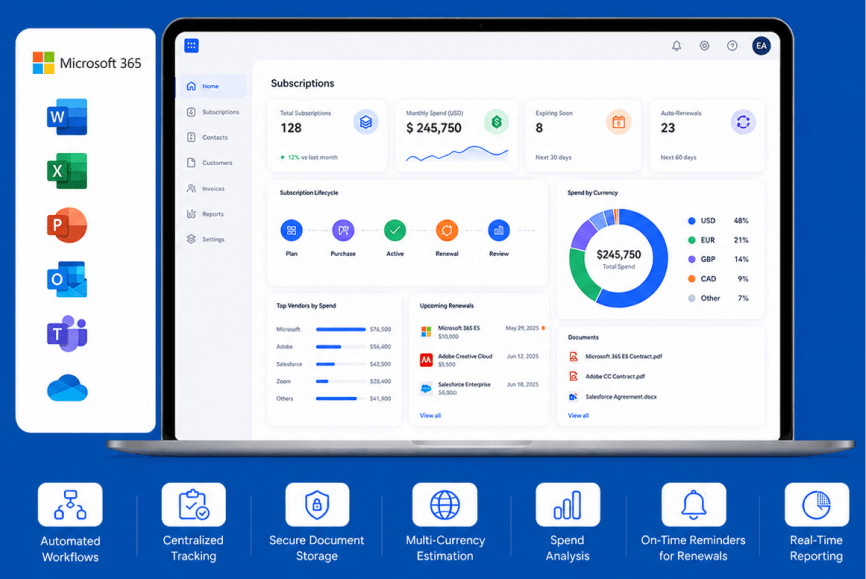
Manage the complete subscription lifecycle with automated workflows, centralized tracking, secure document storage, multi-currency estimation, spend analysis, on-time reminders for license renewals and expirations, and real-time reporting, all inside your existing Microsoft environment.

Trusted by 500+ Microsoft 365 organizations worldwide Built by Beyond Intranet - Microsoft Gold Partner, 17+ years

Book a Free Demo Take 7 Day Free Trial
Subscription Management Software

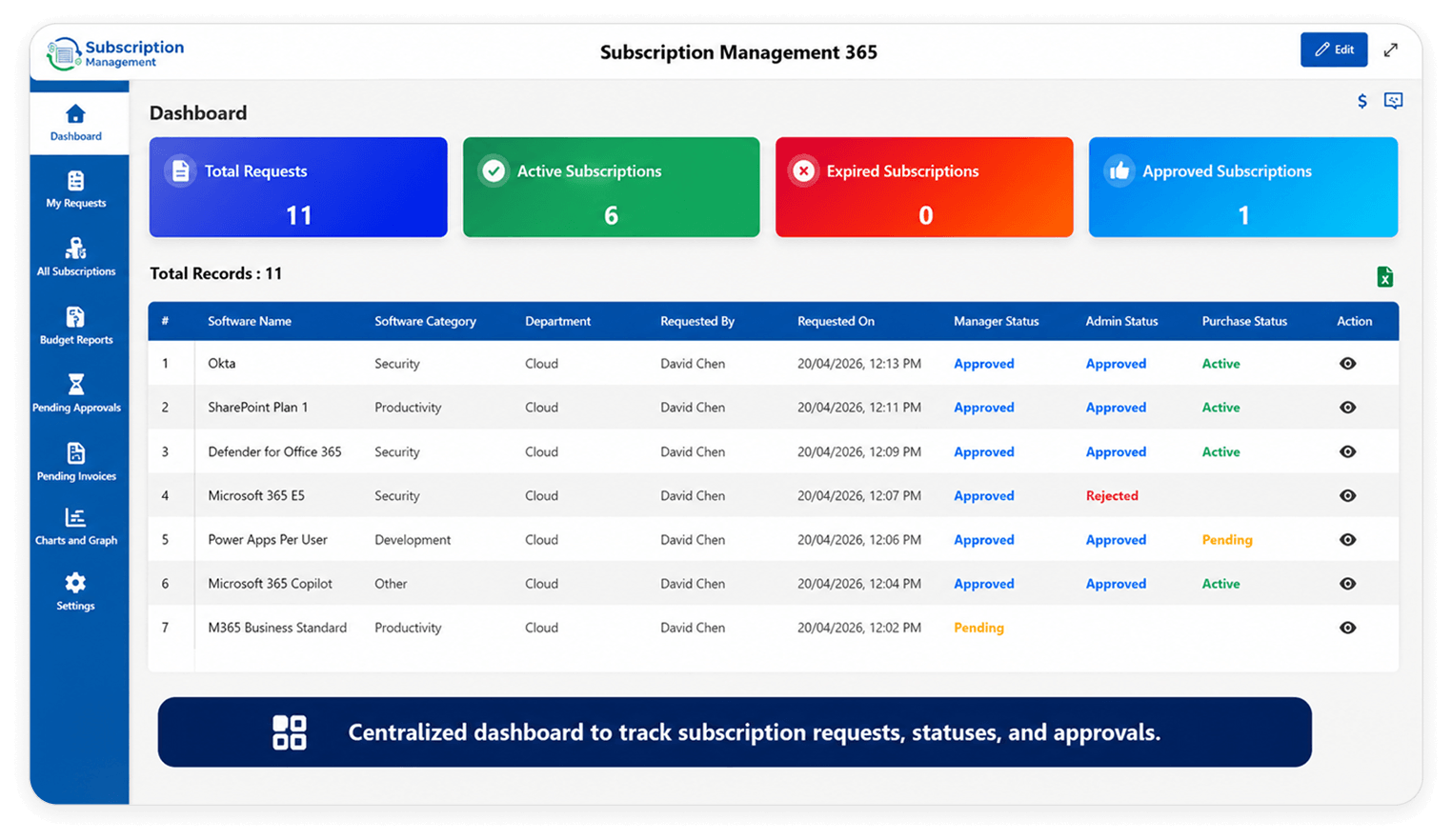
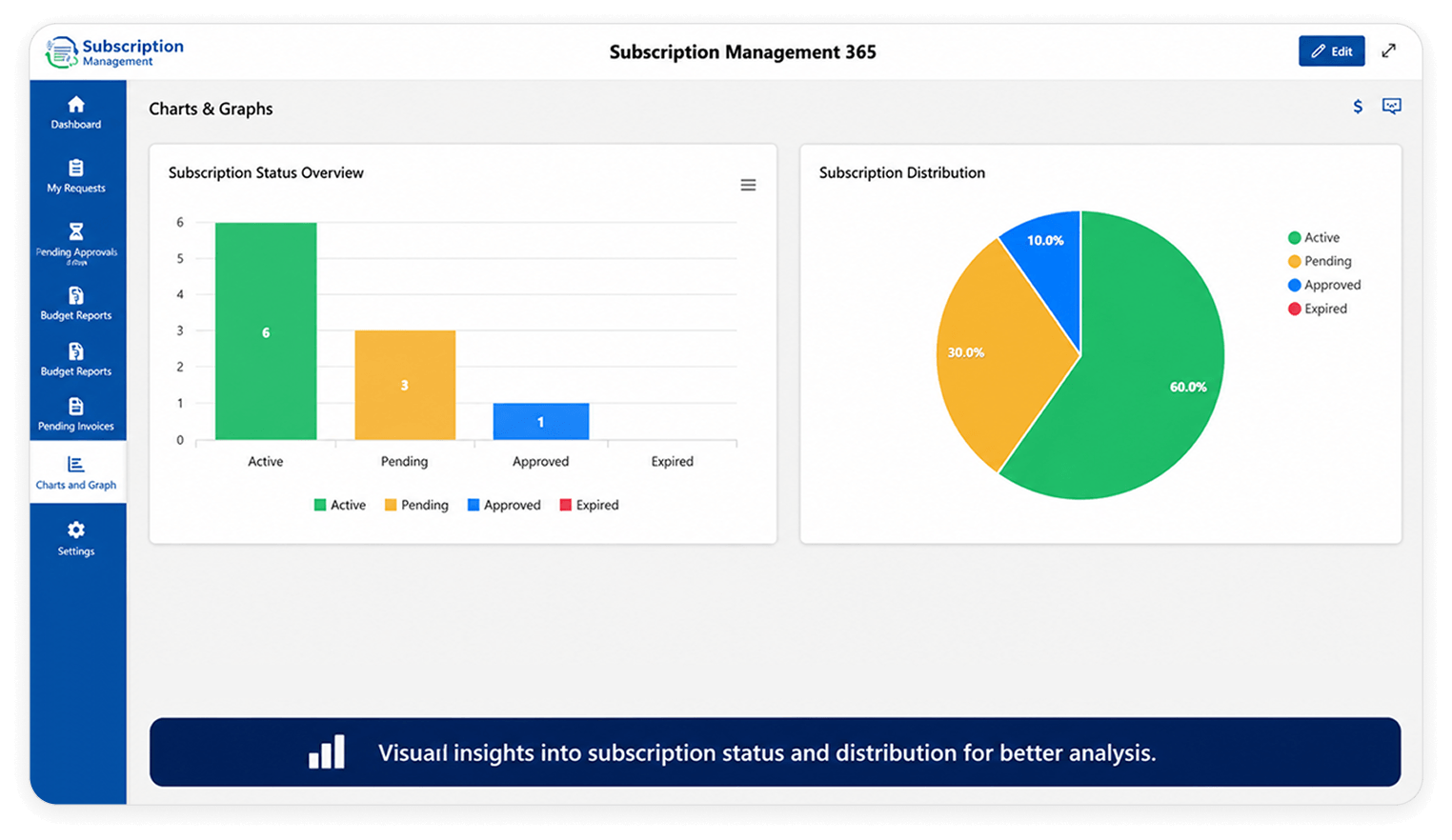
Dashboard View

Certified, Recognized, and Trusted by Industry Leaders

Save Up To 70% Time on Subscription Management

Still managing subscriptions manually, or still paying for licenses that are not even being used anymore?

Here's how automated and centralized subscription management helps you save up to 70% of your time.

01
Problem

Missed Renewals

Renewal dates buried in inboxes and spreadsheets no one owns

Solution

Automated Notifications

Automated reminders and a centralized renewal calendar keep every date visible and actioned on time

02
Problem

Limited Finance Visibility

Unused licenses, duplicate tools, and unapproved upgrades silently drain budgets

Solution

Get A Clear Visibility into Spend

Real-time spend analysis and approval workflows give finance full visibility before costs slip through

03
Problem

No Audit Trail

Contracts and approvals scattered across emails make disputes and audits a nightmare

Solution

Track Every Action

Every action is logged with a full audit trail and documents stored securely in SharePoint

04
Problem

Too Many Platforms

Another tool means another login, another vendor, another security review

Solution

Work within your Microsoft Environment

Built natively inside Microsoft 365 — your team accesses it through SharePoint, zero extra logins

05
Problem

Slow Deployment

Most tools take weeks to implement and configure

Solution

Get Started in Minutes

Deployed quickly and live inside your Microsoft tenant

From Request to Activation — Here's How It Works

From budget allocation to final approval, our subscription management software keeps every license request structured, tracked, and moving all within a centralized environment.

Practice Head

Define software category and allocates budget, so every requestor has a structured path to follow

Requestor

Submits a license request with the desired quantity, giving the team everything they need to take a data-driven decision

Manager

Reviews the request against team needs and budget, then approves it once all the details checked

Subscription Admin

Steps in to validate the approved request, making sure it meets every policy requirement before purchase

Subscription Manager

Closes the loop by purchasing the license, uploading the invoice, and activating access

Tired of Chasing Approvals Across Emails and Spreadsheets?
See How a Structured Workflow Fixes It.

Book a Free Demo Take 7 Day Free Trial

Built to Manage Every Part of the Subscription Lifecycle

Spend Analysis to Keep Your Budget Under Check

With our subscription management platform, the organization can check if the new requested license lies within the budget limits. It offers a detailed budget report with total allotted budget, total subscriptions expense and remaining budget with average utilization. So, you keep your expenses on check.

Spend Analysis to Keep Your Budget Under Check

Estimate Subscription Costs in Multiple Currency

Set your organization's base currency and let the tool do the rest. When a requestor submits a license estimate in any other currency, it's automatically calculated against your base.

Estimate Subscription Costs in Multiple Currency

Version Control for Secure Document Storage

Invoices are securely stored in one place within the SharePoint document library with full version control and full audit trail. Role-based permissions ensure that sensitive documents are only seen by those who need to see them.

Version Control for Secure Document Storage

Enterprise Grade Security and Access Control

The tool integrates with Azure Active Directory and inherits your existing security posture including MFA, conditional access and SSO. It resides in your Microsoft 365 tenant, so there is no separate layer of security to configure and maintain.

Enterprise Grade Security and Access Control

Extend The Subscription Management Software with Powerful Add-On

Get this powerful add-on and take the Subscription management to the next level. Get real-time detailed analytics with Power BI.

Power BI Analytics Dashboard (Add-On)

No more manual report compilation. Finance teams have real-time visibility into MRR, churn, active subscriptions, upcoming renewals, and spend vs budget with a live Power BI dashboard embedded directly in SharePoint.

Automate workflows using Power Automate (Add-on)

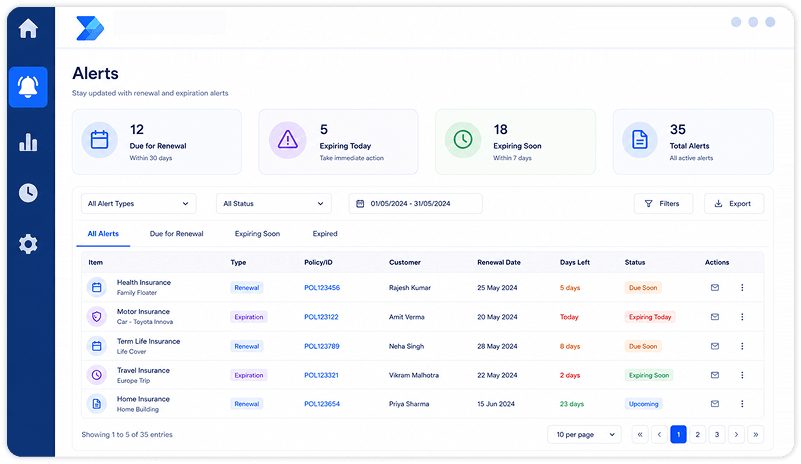
Get automatic alerts on/before renewal dates and expiration reminders with Power Automation Add-On. The organization can stay on updates of their subscriptions and make informed decisions about renewals, helping them avoid spending on licenses that are no longer in use.

One Software Designed to Fit Every Team Managing Subscriptions

Finance

  • Track recurring subscription costs
  • Avoid unexpected renewals
  • Monitor budgets across teams
  • Get visibility into total software spend

IT

  • Manage software access in one place
  • Identify unused tools and licenses
  • Keep track of active applications
  • Simplify onboarding and offboarding

HR

  • Manage employee tool subscriptions
  • Ensure new hires get required software
  • Remove access during employee exits
  • Keep teams aligned on software usage

Operations

  • Standardize subscription workflows
  • Reduce manual tracking in spreadsheets
  • Improve collaboration across departments
  • Keep approvals and renewals on schedule

Comparison with your current process/software:

Spreadsheet Generic Subscription Software Beyond Intranet's Tool
Setup Time Immediate but manual Weeks of implementation Live within 2 minutes
Microsoft 365 Integration None Limited or bolt-on Native — built inside M365
Automation None Partial Via Power Automate
Security & Role-Based Access No governance Separate system Inherited from Azure AD
Audit Trail None Varies Full audit trail built in
Reporting Manual Basic dashboards Live Power BI dashboards
Additional Cost None but high risk New vendor + license fee Tenant-wise cost, not user-wise
Data Residency Uncontrolled Third-party servers Stays inside your M365 tenant

Switching to or adding any third-party SaaS subscription management tool means migrating all the data into a new platform, new security assessment, and the data stored outside your tenant. But with our subscription management your team works within their trusted Microsoft 365 environment with ensured security, data stays in your environment.

Find Out How Much You're Overspending on Licenses and Fix it Now

Most teams discover 15–30% of their software budget goes to unused or duplicate licenses. We'll show you how to surface it, control it, and stop it all within your Microsoft 365 environment.

15-30%

Of overspend license budget is saved via automated notification and reminders

70%

Of time saved on daily admin tasks

2 Min

Average install in your tenant

100%

Native to Microsoft 365

Frequently Asked Questions

Subscription Management Software is a SharePoint-based product that works perfectly with your current Microsoft setup. It offers improved insight into subscription expenditure, automated renewal reminders, and centralized tracking by replacing the need for spreadsheets or manual follow-ups, while allowing companies to save time and money.

Unlike standalone subscription billing software that requires separate installations, additional licensing costs, and complex integrations. Our subscription management platform works directly in your existing Microsoft SharePoint environment.

You get a centralized subscription repository, automated workflows, document storage, and built-in security through Azure Active Directory and role-based access — all in one place. A Power BI add-on also provides real-time analytics for smarter, data-driven decisions.

No, the subscription management solution by Beyond Intranet works with your existing Microsoft 365 license. Which means no extra cost for a Microsoft license. All you need is to buy our subscription management tool and get started in your SharePoint and leverage Power Automation and other features to smartly manage all your subscriptions at one place. [

Yes. The Beyond Intranet's SharePoint subscription management tool offers a centralized repository that is designed to manage all SaaS subscriptions, vendor contracts, renewal dates, payment status and contract ownership. All of it stays in one centralized place and is searchable within SharePoint.

Power BI dashboard is available as an add-on. It gives real-time analytics views directly into SharePoint with detailed metrics such as monthly recurring license cost, active subscriptions, upcoming renewals, and spending versus budget. It is an easy extension to the core tool for organizations that need more detailed and sorted analytics to take better and data driven decisions.

This website uses cookies to ensure you get the best experience on our website.
Accept
Privacy Policy