A practical, vendor-neutral guide for CIOs, IT directors, and digital workplace leaders evaluating SharePoint consulting partners in Australia — including a comparison...
Quick Summary: This guide shows you the different types of SharePoint sites. We explain what they are and, most importantly, when you should use each one. You’ll learn about Team Sites, which are for collaboration (working together). You’ll also learn about Communication Sites, which are for broadcasting information (sharing with many people). We also cover other special sites. Understanding these choices is the very first step. This knowledge helps you build a smart and organized digital workspace for your company.
You need the right tool for the right job. This is true for any work. And it’svery true inside the Microsoft 365 ecosystem (all the connected apps). When you need a new workspace, just asking for “a SharePoint Site” isn’t enough. It’s only the start. Why? Because the platform gives you different site types. Your choice here is big. It will change everything: who can see things (permissions), how the site looks (design), and even how your team works together. To get the most from the platform, you must understand what SharePoint is and its basic setup (its architecture).
What Is a SharePoint Site?
A SharePoint site is a secure online workspace in Microsoft SharePoint where teams can collaborate, share documents, manage information, and communicate effectively. Each site serves a specific business purpose, such as project collaboration, department communication, document management, or company-wide information sharing.
SharePoint sites are part of the Microsoft 365 ecosystem and integrate seamlessly with Microsoft Teams, OneDrive, Outlook, Power Automate, Power BI, and other Microsoft applications. Depending on your organization’s needs, a SharePoint site can be used to build an employee intranet, manage projects, store documents, automate workflows, or publish company news.
Microsoft SharePoint offers different site types to support various collaboration and communication scenarios. Choosing the right site type helps improve user adoption, governance, and information accessibility across your organization.
What Are the Different Types of SharePoint Sites?
Microsoft SharePoint offers three primary site types:
Site Type
Purpose
Best For
Users
Team Site
Collaboration
Projects & Departments
Team Members
Communication Site
Information Sharing
HR, Leadership
Entire Organization
Hub Site
Connect Sites
Enterprise Intranet
Organization-wide
Home Site
Corporate Homepage
Digital Workplace
All Employees
Team Sites are designed for collaboration, Communication Sites are intended for publishing information, and Hub Sites connect multiple sites through shared navigation, branding, and search.
Microsoft SharePoint │ Home Site │ Hub Site ├── HR Communication Site ├── IT Communication Site ├── Finance Communication Site └── Team Sites
Key Features of a SharePoint Site
Every SharePoint site provides a range of built-in capabilities that help organizations manage content and collaborate more effectively, including:
Secure document management with version history
Team collaboration and file sharing
Role-based permissions and access control
Lists and libraries for structured information
News publishing and announcements
Workflow automation with Power Automate
Integration with Microsoft Teams and Outlook
Enterprise search and metadata management
Mobile accessibility across devices
Custom branding and page layouts
Common Uses of SharePoint Sites
Organizations use SharePoint sites for a wide range of business scenarios, including:
Business Need
SharePoint Solution
Team Collaboration
Team Site
Company News
Communication Site
Employee Intranet
Communication Site + Hub Site
Department Portal
Communication Site
Project Management
Team Site
Document Management
Team Site
Knowledge Base
Communication Site
Enterprise Navigation
Hub Site
Why Are There Different Types of SharePoint Sites?
Not every SharePoint site serves the same purpose. Some sites are designed for daily collaboration, while others focus on sharing information with a wider audience or connecting multiple departments under a unified digital workplace.
Microsoft offers different SharePoint site types so organizations can choose the right structure based on how employees work, communicate, and access information.
The four primary SharePoint site types are:
Team Sites – Built for collaboration, document sharing, and project work.
Communication Sites – Designed to publish company news, announcements, and business information.
Hub Sites – Connect related SharePoint sites with consistent navigation, branding, and search to create a unified digital workplace experience.
Home Sites – Serve as the central landing page for your organization’s intranet, bringing together company news, resources, navigation, and personalized content in one place.
Feature
Team Site
Communication Site
Hub Site
Home Site
Collaboration
✓
✗
✗
✗
Company News
Limited
✓
✓
✓
Document Collaboration
✓
Limited
✗
✗
Microsoft 365 Group
✓
✗
✗
✗
Enterprise Navigation
✗
✗
✓
✓
Best For
Teams
Departments
Enterprises
Organization
What Is a SharePoint Team Site Used For?
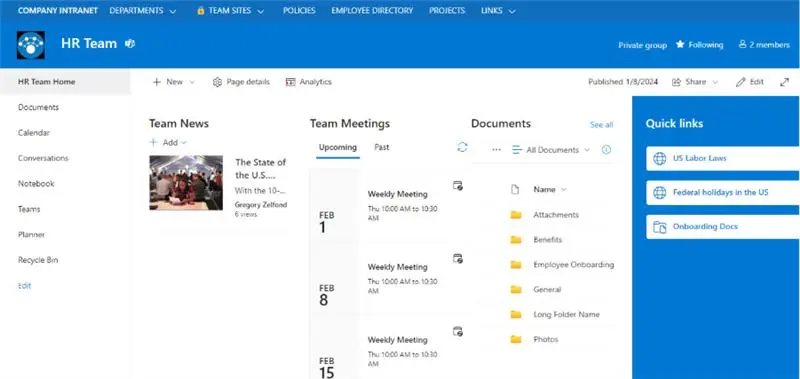
A SharePoint Team Site has one main job: two-way collaboration. This means people working with each other. Think of it as the main office or clubhouse for a group. This group could be working on a project, or it might just be a regular department (like HR or Sales) doing its daily work. These sites are made for talking, sharing files, and managing tasks. And here’s a key part: when you make a Team Site, it’s usually connected to a Microsoft 365 Group. This connection is powerful. It automatically gives your team a bundle (or suite) of connected apps, like a shared calendar in Outlook, a chat space in Microsoft Teams, and a to-do list in Planner.
Key Features of Team Sites:
Shared Workspaces: Gives a special place for departments or project teams. They can organize all their work, files, and chats here.
Collaboration Tools: Lets people work on the same file at the same time (this is co-authoring). It also tracks file versions and helps assign tasks. Everyone stays on the same page.
Microsoft 365 Integration: It connects perfectly with tools like Teams and Planner. This link creates one smooth place for all your teamwork.
So, this type of `sharepoint site` is perfect for a team planning a new product. It’s also great for an HR department that manages private company files. Really, it’s for any group that needs its own private space to work together.
Let our experts help you build, move, and manage your SharePoint setup.
Empower your team with SharePoint. Boost Collaboration and efficiency in your organization
If a Team Site is a workshop, a Communication Site is a stage. Team Sites are for working together. Communication Sites are for sharing with many people. Its main job is one-way broadcasting (like a TV station). Think of your company’s main news page (the intranet). Or a place to post official updates. These sites are made to look beautiful and professional. They are perfect for sharing polished news and final reports. And, a very important difference: making a Communication Site does not create a Microsoft 365 Group. It stands alone.
Ideal Use Cases for Communication Sites:
Company News Portals: Share official news and messages from leaders with everyone.
Resource Centers: A central spot for important files like training guides, company rules, or HR forms.
Event Announcements: Show off details for company parties, big meetings, or important changes.
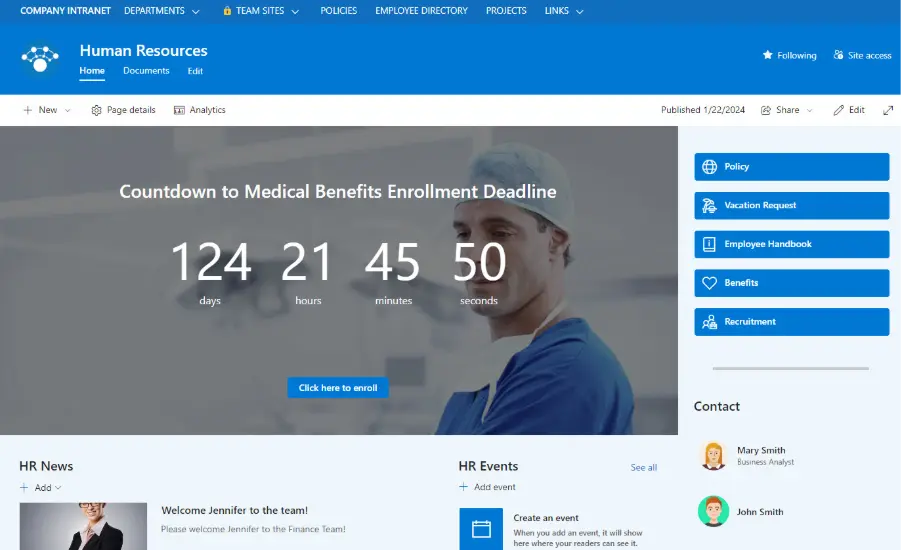
A Communication `sharepoint site` looks different, too. It usually has a wide, full-screen style. The menu (navigation) is at the top. This design is great for showing your information in a clean, professional way.
How Do You Choose Between Different Types of SharePoint Sites?
Choosing the right `sharepoint site` is simple. It all comes down to your main goal. Just ask this one question:
Is my goal to work together in a group? If yes, choose a Team Site.
Is my goal to share information with lots of people? If yes, choose a Communication Site.
For most new projects, you will probably want a modern Team Site. The one connected to a Microsoft 365 Group is the best choice for most teamwork. It gives you the most powerful and connected set of tools. But planning first is so important. Good planning is key. Expert sharepoint consulting can help you build a plan (an architecture) that truly matches what your business needs to do.
What Are Group-Connected vs. Non-Group-Connected Sites?
This difference is very important in modern SharePoint. A group-connected Team Site is the normal, standard choice. It comes with all the good, connected Microsoft 365 benefits we talked about. But, there is another choice. It’s a “hidden” option: a Team Site without a group. This site looks just like a Team Site (it has the menu on the left side). But it does not come with all the extra apps like a shared mailbox or calendar. It’s just the site.
Only an admin can make this special type of `sharepoint site`. They have to go into the SharePoint Admin Center. So, when would you use it? It’s a great choice for a simple file library (a document repository). Or for a file archive (long-term storage). You use it when you don’t need a shared calendar or a Teams channel. It’s simpler. And what if a company wants to control this? Admins can even stop users from creating sites at all.
Yes. Besides the two main types, a few other special sites do specific jobs:
Hub Sites: A Hub Site is not really a new type of site. Think of it more like an umbrella. It’s a feature you turn on. A Hub Site connects your other Team Sites and Communication Sites. It gives them all the same top menu (navigation) and the same look (branding). It also rolls up all the news from the connected sites into one place. This is perfect for building a big portal for a whole department.
Benefits of Hub Sites
Consistent branding
Shared navigation
Cross-site search
News rollups
Audience targeting
Centralized governance
Channel Sites: These sites are special. They get created automatically when you make a private or shared channel in Microsoft Teams. Their only job is to safely store the files for that one channel. You are not supposed to change or build on this `sharepoint site` like a normal one. It just holds the files.
What Is a SharePoint Home Site?
A SharePoint Home Site is a Communication Site that has been designated as the primary landing page for your organization’s intranet. It serves as the central hub where employees can access company news, resources, navigation, and personalized content from a single location.
Unlike a standard Communication Site, a Home Site integrates with Microsoft Viva Connections, allowing employees to access the corporate intranet directly from Microsoft Teams.
Organizations commonly use a Home Site to:
Deliver company-wide announcements
Highlight important resources and policies
Surface news from multiple Hub Sites
Provide quick links to departmental portals
Improve employee engagement across Microsoft 365
For large organizations, a Home Site often acts as the digital front door to the workplace, bringing together communication, collaboration, and enterprise search into one unified experience.
Classic vs Modern SharePoint Sites
Microsoft now recommends using Modern SharePoint Sites for new implementations because they offer a responsive design, better Microsoft 365 integration, and a more intuitive user experience.
Classic Sites
Modern Sites
Publishing Sites
Communication Sites
Team Sites (Classic)
Modern Team Sites
Wiki Sites
Modern Pages
Blog Sites
News Posts
Limited mobile support
Fully responsive
Older UI
Modern experience
If you’re planning a SharePoint migration or building a new intranet, Modern SharePoint Sites provide better performance, stronger security, and ongoing Microsoft feature updates.
Which SharePoint Site Should You Choose?
Choosing the right SharePoint site depends on how your employees collaborate and consume information. Team Sites are ideal for collaboration, Communication Sites are designed for publishing content, Hub Sites connect related sites through shared navigation and branding, and Home Sites act as the central landing page for the digital workplace.
Business Need
Recommended Site
Collaborate on projects
Team Site
Share company-wide news
Communication Site
Build an employee intranet
Communication Site + Hub Site
Connect departmental sites
Hub Site
Create a corporate homepage
Home Site
Manage project documentation
Team Site
Publish HR policies
Communication Site
Knowledge Base
Communication Site
When you understand all the available SharePoint services, you can build a better digital workplace. One that is strong (robust) and can grow with your company (scalable).
Making these choices can be tricky. Working with an expert can really help. We are a long-time Microsoft Solutions Partner. Our certified pros help companies design and build (implement) SharePoint solutions. We make sure the solutions are built correctly (technically sound). But we also make sure they match your business goals. Our focus is to create one central system (an ecosystem) that does many things. A system that helps people work together and get better business results. We want you to get the most value from your money, every step of the way.
Real-World SharePoint Site Examples
Human Resources
Communication Site
Employee handbook
Policies
Benefits
Training
Construction
Team Site
Project documentation
Site inspections
Drawings
Safety documents
Manufacturing
Team Site
Quality documents
Equipment maintenance
SOPs
Finance
Communication Site
Policies
Reports
Compliance documentation
IT
Hub Site
Service desk
Knowledge base
Department portals
SharePoint Site Best Practices
When planning your SharePoint environment, follow these best practices:
Use Team Sites for collaboration rather than company-wide communication.
Create Communication Sites for publishing news and important business information.
Connect related departmental sites using Hub Sites instead of creating deep subsite hierarchies.
Standardize navigation and branding across your digital workplace.
Use metadata and search instead of relying solely on folder structures.
Regularly review permissions to ensure employees have appropriate access.
Keep site navigation simple and mobile-friendly.
Conclusion
Picking the right `SharePoint site` is the first, most important step. It’s the foundation for building a good, organized digital workspace. Team Sites help you work together. Communication Sites help you share your message. Hub Sites help you connect everything. When you understand the job for each site type, you can build a SharePoint setup that makes work easier (streamlines workflows). It will help people communicate better and support your company’s goals. A good, clear plan for your `SharePoint site` structure is the only way to get the full power from the platform.
The easiest way is to look at the menu (the navigation). Team Sites almost always have the menu on the left-hand side. Communication Sites usually have the menu across the top.
SharePoint Online gets the newest modern site types like Communication and Hub Sites. On-Premise supports limited modern features and mostly uses classic sites.
No. A Team Site can work without Microsoft Teams. While most Team Sites are linked to a Microsoft 365 Group, admins can also create standalone Team Sites with no group or Teams connection.
Modern sites are the better choice—they’re faster, more secure, responsive, and work smoothly with Microsoft 365. Classic sites are older and should only be used for legacy needs.
About Author
Taha Siddiqui
Taha Siddiqui writes and plans technical and engaging content for Beyond Intranet as a senior content developer. He holds an engineering degree from Mumbai University and brings 6+ years of professional experience to his work. Over the last three years he has been central to Beyond Intranet’s Microsoft 365 content efforts, focusing on SharePoint, Power Platform and Copilot.