A practical, vendor-neutral guide for CIOs, IT directors, and digital workplace leaders evaluating SharePoint consulting partners in Australia — including a comparison...
An operator’s guide to Microsoft 365 Copilot in 2026 grounded in live deployments, real numbers, and the things vendor slides quietly leave out.
Short answer Microsoft 365 Copilot is an AI assistant built into Word, Excel, PowerPoint, Outlook, and Teams. It pairs a large language model with Microsoft Graph so it can work with your actual organisational content emails, files, meetings, chats while respecting existing permissions, sensitivity labels, and compliance policies. Done right, it typically delivers 3x–8x Year-1 ROI for Microsoft-centric enterprises. Done wrong, it becomes the most expensive shelfware you’ll ever buy.
A real Microsoft 365 Copilot Story to set the tone
A CIO I’ve worked with for years called me in February. Half apology, half SOS. His company had bought 500 Copilot licences back in September. Five months in, adoption was sitting at roughly 16%.
“What did we do wrong?” he asked.
Nothing with the software, as it turned out. They’d done almost everything else wrong. No pilot. No champions. No cleanup of the SharePoint chaos they’d been sitting on since 2018. They’d essentially bought a Ferrari and parked it on a dirt road.
I’m flagging this up front because if you’re reading a guide like this, you’re probably evaluating Copilot yourself or your CEO is, which amounts to the same thing. And the single biggest takeaway from years of watching these rollouts is this: the technology is the easy part. Everything around it is where deployments live or die.
Microsoft’s own data backs this up. In a 2024 Work Trend Index survey of more than 31,000 workers across 31 countries, 75% of knowledge workers said they were already using generative AI at work — but only a fraction of employers had a formal rollout strategy in place. The gap between personal AI usage and enterprise-grade deployment is where value leaks out.
Strip away the marketing and Copilot is this: an AI that lives inside the Microsoft 365 apps your people already use every day. Not a separate website. Not a different login. It’s right there in the corner of your Word doc, your Outlook inbox, your Teams meeting.
The twist that makes it useful and the twist that causes most of the problems we’ll get to later is that it can read your actual work. Your emails. Your files. The meeting you sat through on Tuesday. It uses that context to give answers that are about your business, not about the world in general.
That’s what separates it from ChatGPT. It is the smart stranger you met at a dinner party: articulate, opinionated about everything, knows nothing specific about you. Copilot is more like a colleague who’s been at the company for six months. Doesn’t know everything, but knows where the files are and what got decided last quarter.
One thing I want to be crystal clear about, because this trips people up constantly: Copilot only sees what you’re already allowed to see. If a document is locked down to the finance team and you’re in marketing, Copilot won’t cough it up. The catch? Most companies have no idea what their employees are technically allowed to see. More on that in a bit.
How Microsoft 365 Copilot actually works
You don’t need the full technical rundown to make a buying decision, but a rough mental model helps.
You hit enter in Word and ask Copilot to draft a client update. Behind the scenes, Microsoft Graph effectively the index of everything in your M365 tenant pulls relevant pieces from emails, files, and recent meetings. Only the ones you personally have access to. That context gets bundled with your prompt and sent to the language model (currently GPT-5-class models from OpenAI, with Anthropic’s Claude now available as an option in the Wave 3 rollout).
The model drafts a response. Purview checks it against your sensitivity labels and compliance policies. You get the output back inside Word, usually with small citations showing which files it drew from.
The whole round-trip stays inside Microsoft’s service boundary. Your data isn’t used to train the models. That’s the pitch, and to Microsoft’s credit, it has held up in every audit I’ve seen so far.
The step that matters most here is the grounding step where Graph fetches your data. It’s what makes Copilot useful. It’s also the step that goes sideways most often in real deployments. If your data is a mess, Copilot’s grounding will be a mess. Garbage in, confidently-cited garbage out.
Planning how Copilot will fit into your existing Microsoft stack? See our Copilot integration services covers Graph connectors, Purview policies, and third-party app integrations.
Real Life Use Case : Why the environment matters
We recently worked with an advisory firm that couldn’t get any AI-assisted tooling to behave sensibly because they were still running an older on-premise SharePoint version with years of fragmented content. Before we touched Copilot, we migrated them to SharePoint Online, re organized their site architecture, and tightened permissions. Only then did grounded AI responses start looking like the demos. The lesson: Copilot inherits whatever state your tenant is in. Fix the tenant first. Read the full case study →
What Copilot does inside each app
I’ve read a lot of feature lists for Copilot. Most of them are too polite. Here’s my honest take on where it shines in each app and where it falls flat.
Word
Drafting is where Copilot earns its keep. Feed it a prompt and a few source docs, and it’ll produce a first draft that’s maybe 70% of the way there. Summarising long documents is genuinely useful, especially for anyone who has to read contracts or proposals they didn’t write.
Where it falls short: nuanced editing, voice-matching for senior execs, anything requiring real judgement about tone. Treat it as a capable intern, not a writer. Based on what we’ve seen in enterprise deployments, the teams that get the most out of Word Copilot are the ones who treat every output as a starting point, not a finished draft.
Excel
This is the one that converts sceptics. Ask Copilot in plain English to write a formula, find outliers in a dataset, or build a chart. It does it. For people who’ve always found Excel intimidating which is more people than finance departments like to admit this is the single biggest productivity unlock in the whole suite.
The asterisk: Copilot chokes on messy workbooks. Merged cells, multi-row headers, random notes in column K, mystery tabs. If your spreadsheets look like someone had a meltdown in them, Copilot isn’t the fix. Clean the data first. Or bring in someone who can.
Outlook
Email is where most knowledge workers lose the afternoon. McKinsey’s long-running productivity research has consistently put time spent reading and answering email at around 28% of the average knowledge worker’s week. Copilot summarises long threads, drafts replies that sort of sound like you, and surfaces the three emails in your inbox you actually need to deal with today. Of all the Copilot features, this is the one users fall in love with fastest.
One quiet opinion from someone who’s tested this a lot: the “draft a reply” feature is the one to watch carefully. It’s tempting to let Copilot write everything, but the output has a certain beige quality. Read what it writes. Edit aggressively. Otherwise your clients will notice and some of them will say so.
Teams
Meeting recaps, automatic action items, and the feature that has genuinely changed how people work: “catch me up.” Ask Copilot what happened in a meeting you missed, or what was said about a particular topic across multiple meetings. It cites back to the exact moment in the transcript. For anyone managing a calendar full of overlapping meetings, that’s a small miracle.
The gotcha here is cultural, not technical. If your team finds out every meeting is being transcribed and queryable, some of them will stop saying what they really think. That’s worth knowing and getting ahead of with a clear policy before you flip this on.
Real Life Use Case on Copilot in Teams Boosted Internal Collaboration
A European consultancy firm came to us wanting “AI in Teams.” We pulled them back a step. Their Teams environment had no governance, no file-sharing standards, and no lifecycle policies — the exact environment where Copilot produces unreliable answers and exposes data you didn’t mean to expose. We rebuilt their Teams collaboration layer with proper governance, then layered AI on top. Copilot in Teams is only as good as the collaboration discipline underneath it. Read the full case study →
PowerPoint
Generate a deck from a Word document. Redesign slides. Produce speaker notes. This is the feature that looks dazzling in demos and most disappointing in practice. The decks Copilot produces are structurally fine and visually forgettable. Fine as a starting point. Not a finished product. Don’t believe anyone who tells you otherwise.
Copilot Chat and the agents layer
Beyond the in-app features, there’s Copilot Chat free-form chat window that can reason across all your M365 content. And Copilot Studio, which lets you build custom agents. A procurement agent. An onboarding agent. A contract-review agent.
This is where Microsoft is pouring investment in 2026, and honestly, this is where the real value lives for most enterprises. The in-app features save about an hour a day. A well-built agent can automate a whole workflow. Gartner has predicted that by 2028, 33% of enterprise software applications will include agentic AI, up from less than 1% in 2024 and Copilot Studio is the most direct path into that future for Microsoft-centric organizations.
Real Life Use Case on How M365 Copilot Studio Integration Saved 2x Time for An Global IT Company We helped a global IT services enterprise integrate Copilot Studio with their SharePoint environment to surface knowledge across thousands of sites. The agent replaced what used to be a ticket-based “where is that policy?” workflow with a governed, citation-backed conversational layer. Outcome: measurable reduction in helpdesk volume and faster answers for the people doing the work. That’s what agents are actually for not gimmicks, but workflow compression. Read the full case study →
The business case, honestly
Microsoft’s published data says users save roughly 1.2 hours a week on average. Forrester’s commissioned Total Economic Impact studies have put Copilot ROI anywhere from 52% to 468% depending on the scenario, which is such a wide range it’s almost not worth citing. Early-adopter benchmarks from Microsoft’s own customer research report 2+ hours saved per employee per week in mature deployments.
Here’s the catch with all of these numbers: they assume the rollout went well. Proper training, a decent environment, real adoption. Plenty of companies don’t hit those numbers. Across the rollouts we’ve been close to, a realistic Year-1 ROI lands somewhere between 3x and 8x still solid, but a good distance short of the 12x theoretical maximum that shows up in vendor decks.
The benefits that genuinely show up, in our experience:
The boring time-wins. Email triage, meeting notes, first drafts, status updates. Not glamorous. Adds up fast.
Institutional memory, finally retrievable. “What did we decide about the vendor switch back in October?” used to be a 30-minute search. Now it’s 30 seconds.
Excel and PowerPoint become approachable. People who used to avoid them now use them. For finance-adjacent teams, this is a real unlock.
Onboarding gets faster. New hires ramp roughly 20–30% quicker because “how do we do X here” has an answer that doesn’t require pinging a colleague.
The benefits that don’t show up as often as the sales deck implies: dramatic creative breakthroughs, elimination of specialist tools, headcount reduction. Copilot makes the people you already have more effective. It doesn’t let you fire anyone and any consultant telling you otherwise is selling you a story, not a strategy.
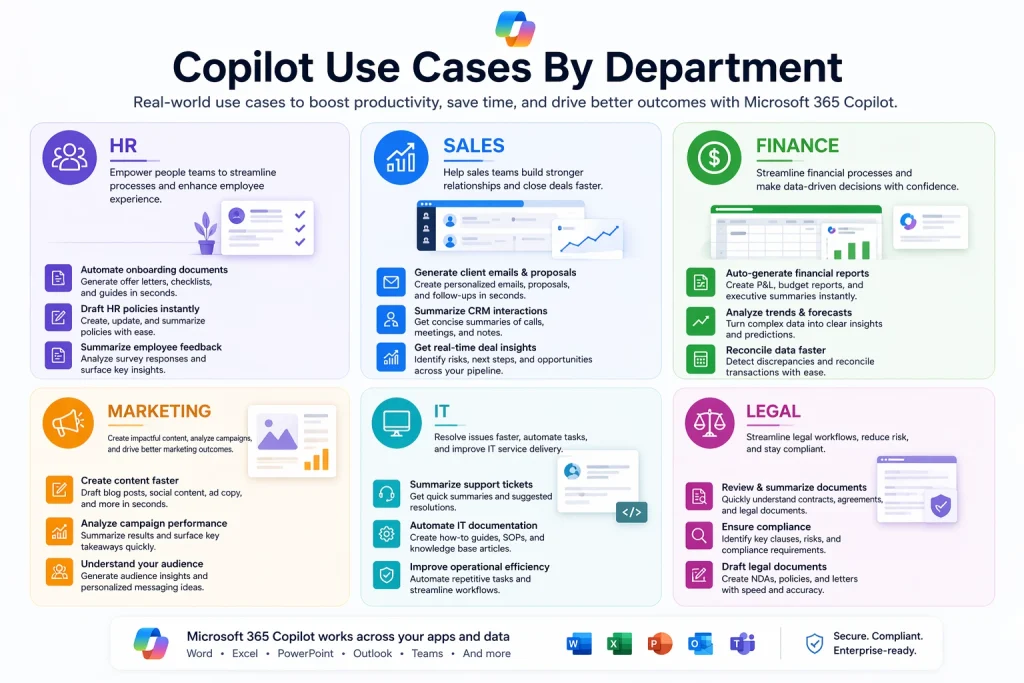
Copilot Use Cases By Department
Abstract benefits are easy to list. Here’s what we’ve seen in real deployments.
HR
Drafting communications policy updates, engagement survey emails, manager talking points. HR teams write the same categories of thing over and over, and Copilot nails the pattern quickly. Summarizing survey results and extracting themes is another common one. Interview-question generation is a nice side benefit.
Sales
Pre-call research is the killer use case. An AE asks Copilot to pull together everything the company knows about a prospect old email threads, meeting notes, CRM data if connected. Forty minutes of prep becomes five. One sales VP we work with actually measured this and clocked his team at 23% more calls per week after rollout. Not because Copilot was dialling. Because the prep time collapsed.
Finance
Variance analysis. Board memo drafting. Budget narratives. Finance teams are the most cautious adopters and they should be the stakes are higher when a hallucination ends up in an audit committee pack. But for well-bounded tasks, the time savings are real.
Real Life Use Case on SharePoint & M365 Copilot Streamlined Document Management
A financial services client was drowning in unstructured document management policies, statements, contracts, correspondence scattered across libraries. Before any serious AI tooling could help, we built them a custom SharePoint-based document management solution with consistent metadata and proper access controls. Once the structure was in place, Copilot’s answers on finance queries went from “confidently wrong” to genuinely useful. Finance is the area where data hygiene pays off fastest. Read the full case study →
Marketing
Content recycling is the big one webinar transcript into a blog post into a newsletter into five social posts. Campaign briefs. Competitive research summaries. The writing is serviceable. It won’t win awards, and frankly, it shouldn’t be asked to. Use it for the grunt work. Keep the actual creative in human hands.
Legal and Contract teams
Contract summarization, clause comparison, redline first-pass. This is one of the highest-leverage Copilot use cases when the underlying document architecture is clean.
Real Life Use Case on How Copilot and Power Automate Streamlined Contract workflow automation Freuds, a well-known communications firm, needed to simplify contract management for their legal team. We built them a SharePoint-based contract management system that standardized intake, review, and approvals. Once that foundation was in place, Copilot and Power Automate could meaningfully accelerate the review cycle because the contracts were finally structured, tagged, and findable. Copilot didn’t replace the lawyers. It cut the non-lawyering out of their day. Read the full case study →
IT and Operations
Documentation, documentation, documentation. Post-incident writeups. Summarizing hundreds of service tickets to find the patterns your L1 team is missing. This is one of the most underrated use cases because it’s invisible until you realize your IT team suddenly has time to work on strategic things instead of rewriting the same runbook for the fifth time.
Operations with agent-driven automation
For process-heavy operations teams, combining Copilot with Power Automate and custom AI solutions is where measurable ROI really lands.
Real Life Use Case on AI-powered invoice processing
Sipcam Agro, a manufacturing business with heavy invoice volume, was losing days every month to manual invoice processing and approval routing. We deployed an OCR-based AI solution on top of SharePoint and Power Automate to extract invoice data, validate it, and route approvals automatically. The same pattern plugs neatly into Copilot Studio as an agent. Result: what used to take days now runs in hours, with a full audit trail. This is the unglamorous middle of enterprise AI — and the part that actually pays the bill. Read the full case study →
Copilot Pricing
The licensing is more tangled than it needs to be, so here’s the clean version.
Plan
Price (USD/user/month)
Who it’s for
Microsoft 365 Copilot (Enterprise add-on)
$30
Enterprises on M365 E3, E5, Business Standard, or Business Premium. Annual commitment.
Microsoft 365 Copilot Business
$18 promo / $21 after
SMBs up to 300 users. Promo runs through June 30, 2026.
Copilot Chat
Free
Web-grounded chat for Entra users. Doesn’t touch your org data.
Microsoft 365 Premium (consumer)
$19.99
Individuals and families.
Copilot Pro (consumer)
$20
Solo professionals. No M365 business integrations.
The honest total for an enterprise: $30 per user per month for Copilot, stacked on top of your M365 E3 ($36) or E5 ($57) licence. That’s $66 to $87 per user per month. For 1,000 people, you’re looking at roughly $800K to $1M a year in licence spend alone — before you factor in the readiness work, training, and governance cadence that actually makes it pay off.
Fair warning: Microsoft is pushing base M365 prices up in July 2026. If you’re already planning a rollout, locking in pricing before then is worth doing.
For smaller companies, the $18 Copilot Business tier is, frankly, the best-priced enterprise AI product on the market right now. If you’re under 300 users and already on M365, there isn’t much to deliberate. Do the maths, run a pilot, move.
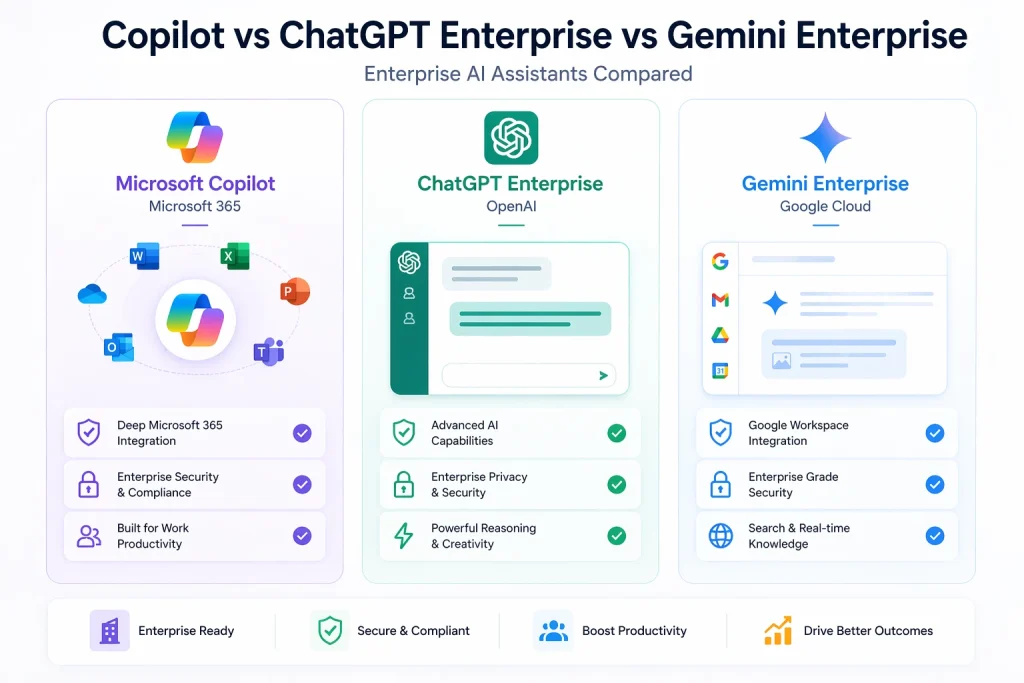
Copilot vs ChatGPT Enterprise vs Gemini Enterprise
This is the question we get asked most. Short version: whichever productivity suite you already use is the one that probably wins. But there’s more to it than that.
Dimension
M365 Copilot
ChatGPT Enterprise
Gemini Enterprise
Embedded in apps?
Yes — Word, Excel, Outlook, Teams
No — standalone
Yes — Gmail, Docs, Sheets, Meet
Grounds on your data
Native (Graph)
Via connectors
Native (Workspace)
Model options
GPT-5 + Claude + others
GPT-5 family
Gemini family
Entry price
$18 (SMB) / $30 (Ent)
~$60
$30
Total incl. base licence
$66–$87/user/mo
$60 + existing stack
$48–$60/user/mo
Best for
Microsoft shops
Mixed stacks, R&D
Google Workspace shops
After watching clients deploy all three:
Pick Copilot if your company lives in Microsoft 365. The embedded experience is a different animal. Purview governance gives you an audit trail the others can’t match without bolting on third-party tooling.
Pick ChatGPT Enterprise if your stack is mixed, or if you have a lot of engineers and researchers who need a sharper reasoning tool. GPT-5 remains the strongest general-purpose model on most benchmarks. You’ll build your own governance layer, though.
Pick Gemini Enterprise if you’re on Google Workspace. Otherwise you’ll burn all the productivity gains on context-switching.
A lot of smart enterprises are running a hybrid now. Copilot for everyone, ChatGPT Enterprise for engineering and R&D. If you can get the budget approved, it’s genuinely a better answer than picking one. The tools are complementary more often than they’re redundant.
The stuff the vendor slides won’t tell you
If you skip every other section, read this one.
1. Copilot will expose your permission mess
This is the single biggest failure mode. Based on what we’ve seen across enterprise rollouts, this issue alone accounts for roughly two-thirds of the deployments that stall or get paused. Copilot surfaces whatever you have access to. In most companies, years of “share link with anyone” and forgotten legacy SharePoint sites mean employees have access to far more than anyone realised.
The nightmare scenario, which is real and which has happened to real organisations: an analyst types “summarise recent executive compensation discussions” into Copilot. Gets a clean, cited answer. Because someone shared a folder carelessly in 2021 and nobody ever noticed.
Run a permissions audit before you turn Copilot on. Not after. We’ve seen rollouts paused in week one because of what surfaced. Don’t let that be your rollout.
2. It still hallucinates
Less than standalone LLMs, because it’s grounded in your real data. But still. Meeting summaries occasionally put the wrong quote in the wrong mouth. Financial calculations sometimes contain numbers that look right and aren’t. If the output is going to influence a decision, a human reviews it. No exceptions. Don’t let anyone on your team form the habit of trusting Copilot blindly.
3. Buying licences isn’t the same as adopting them
This is the one that catches executives who are used to buying software for the IT department. Copilot isn’t infrastructure. It’s behaviour change. If you don’t fund training and I mean actual structured training, not “here’s a help article” your adoption curve will flatline around 15–20%.
The companies that get real value typically budget 3 to 5% of the license cost on change management and champions. The ones that don’t are writing a recurring cheque for tools nobody uses. Gartner has long put the ratio at 1:1 or higher between technology cost and change-management cost for transformation programmes AI rollouts are not the exception, they’re the textbook case.
4. Data residency has some weird edges
In the EU, Copilot falls within the EU Data Boundary. Mostly. There’s a feature called Flexible Routing that can push requests outside the boundary during peak load. Admins can disable it. Most don’t, because they don’t know it exists. If you’re in a regulated industry, put this on your compliance team’s radar before you deploy not during a post-incident review.
5. Lock-in grows quietly
Every agent you build in Copilot Studio, every custom connector, every workflow — that’s switching cost. Not inherently bad. But go in with eyes open. If you’re five years from potentially considering a move off Microsoft, build with portability in mind. If you can’t imagine ever moving, build with the full Microsoft stack in mind. Either answer is fine. Drifting into lock-in unintentionally is not.
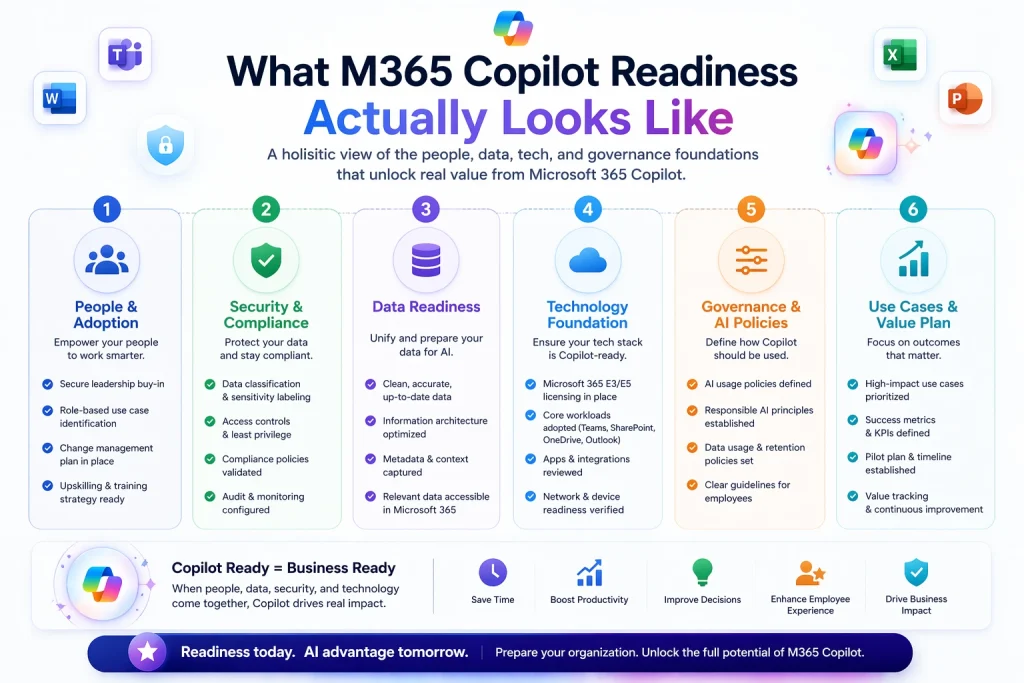
What M365 Copilot readiness actually looks like
The single biggest mindset shift here: M365 Copilot readiness is 80% about your environment and 20% about the technology. The technology works. Your environment might not be ready for it.
The short version of what needs to be in place:
Permissions audit. Find broken inheritance, kill “anyone with link” shares, fix over-privileged accounts. For a mid-size company, budget 4 to 8 weeks.
Sensitivity labels. Deploy Purview labels so Copilot respects what’s confidential. Start with three — Public, Internal, Confidential. Don’t boil the ocean.
Data cleanup. Archive stale content. Old project sites, former-employee OneDrives, duplicate libraries. This stuff pollutes Copilot’s answers and inflates leak risk.
Licence plan. Are you doing a phased rollout or flipping the switch for everyone? We’d strongly push you toward a 50–200 person pilot across three departments before going wide.
Training and change. Structured sessions per department, plus champions who make Copilot visible. Champions matter more than any tutorial — in practice, peer-led adoption runs roughly 2x faster than top-down training alone.
Success metrics. Define what “working” means before you start. Time saved, prompts per user, workflow-specific KPIs. Without this, you’ll be arguing about whether it’s working forever.
Governance cadence. Monthly review of usage patterns for the first six months. Look for spikes in sensitive-topic prompts. Look for users asking things outside their role.
The permissions work is where most companies underestimate the timeline. If you’ve been loose with SharePoint governance for a decade, plan on 6 to 12 weeks before you can turn Copilot on at scale. Skipping this is how rollouts blow up.
Most of the readiness work above permissions audits, label deployment, data cleanup is where outside help pays for itself within the first pilot. If you’d rather not figure it out alone, our Microsoft Copilot consulting team runs this exact playbook end-to-end.
Real Life Use Case on How Copilot and SharePoint Streamlined Document Retrieval Process
An Australian non-profit, Grow, had a decade of accumulated documents spread across shared drives and an ageing SharePoint setup. They wanted better search and, eventually, AI-powered retrieval. We rebuilt their intranet on modern SharePoint with a proper information architecture, metadata, and search configuration. Document find-time dropped dramatically and they now have the kind of structured foundation where Copilot grounding actually returns the right answer. The AI value is gated on the data readiness. Every single time. Read the full case study →
Where this is all heading
A few things I’m reasonably sure about, and one I’m not.
Confident: agents are the real story in 2026 and beyond. The in-app Copilot is useful but it tops out at “saves you an hour a day.” Custom agents that run whole workflows onboarding, procurement, contract review are where the 10x returns live. Microsoft knows this. That’s where the investment is going. IDC has forecast that worldwide spending on AI, including generative AI software and related infrastructure, will exceed $632 billion by 2028, growing at a compound annual rate of around 29% and a meaningful share of that is workflow-level agents, not chat interfaces.
Confident: model choice will matter more. Claude got added as an option in Wave 3. More models will show up. IT admins will start picking different models for different workloads, the same way they pick different databases for different apps.
Confident: pricing floors will keep dropping for SMBs. $18 is already aggressive. A sub-$15 tier for specific SMB segments in the next 12–18 months wouldn’t surprise me.
Not confident: whether Copilot closes the gap with standalone models on pure reasoning. If you’re working a 400-page contract or debugging a hard codebase, ChatGPT or Claude still pull ahead. Microsoft might close this. Or they might stay focused on integration while others chase raw capability. Genuinely unclear.
Final word
Microsoft 365 Copilot is the most capable productivity AI for companies already running on Microsoft 365. It’s not magic. It’s a genuinely useful tool that, with the right groundwork, saves real time. Without that groundwork, it becomes an expensive line item that never pays for itself.
If you’re evaluating a rollout, please don’t start with licences. Start with a permissions audit and a pilot plan. Pick three departments. Give them 50 to 100 licences and three weeks of training. Watch what happens. Scale from there.
The companies that get this right in 2026 will spend the next three years with a quiet productivity edge their competitors can’t easily copy. The ones that rush will spend the next three years wondering why Copilot shows up on the budget every month and nowhere in the results.
Microsoft 365 Copilot is an AI assistant built into Word, Excel, PowerPoint, Outlook, and Teams. It combines large language models with Microsoft Graph to work with your organization's data files, emails, meetings — while respecting existing permissions and compliance controls.
Microsoft 365 Copilot costs $30 per user per month for enterprise customers on an annual commitment, on top of an eligible M365 lisence. Small businesses under 300 users can get Copilot Business for $18 per user per month through June 30, 2026, then $21 after that.
For Microsoft-centric companies with clean governance and a real training budget, yes. Typical Year-1 ROI lands between 3x and 8x. For companies with messy permissions or no adoption plan, licence spend tends to outrun realised value. The tech works. The ROI is about deployment discipline.
Microsoft 365 Copilot uses a mix of OpenAI models — currently GPT-5-class models — with Anthropic's Claude available as a model option in the latest Wave 3 releases. The model behind any given response depends on the task. Microsoft also uses smaller proprietary models (the Phi family) for specific workflows.
ChatGPT is a standalone conversational AI that lives in its own browser tab. Microsoft 365 Copilot is embedded inside Microsoft 365 apps and grounds responses in your organisation's files, emails, and meetings via Microsoft Graph. ChatGPT Enterprise is stronger at general reasoning; Copilot is stronger at productivity work inside the Microsoft stack.
Your data stays inside the Microsoft 365 tenant boundary and isn't used to train foundation models. Copilot respects existing permissions, sensitivity labels, and Purview policies. The real data risk isn't Microsoft — it's the existing permission problems in your tenant that let Copilot surface things to people who technically had access but shouldn't have.
Copilot can access emails in your own mailbox to summarise threads, draft replies, and answer questions. It cannot access other users' private mailboxes. When acting on your behalf, Copilot only surfaces content you personally have permission to see.
Technical deployment is fast — you can enable licences in hours. Readiness work (permission audits, sensitivity labels, training) typically takes 6 to 12 weeks for a mid-size enterprise. Organizations that skip readiness often pause rollout in the first two weeks.
Microsoft Graph is the indexing layer that knows what files, emails, meetings, chats, and people exist in your Microsoft 365 tenant. Copilot uses Graph to ground responses in your real organizational context, which is why it can answer questions about your actual work rather than just giving generic responses.
No. Copilot works with M365 E3, E5, Business Standard, and Business Premium. However, E5 includes Purview and advanced compliance tooling that make Copilot safer to deploy. Most enterprises without E5 end up buying Purview separately anyway.
Yes. Microsoft 365 Copilot Business is designed for organisations with up to 300 users and costs $18 per user per month (promotional rate through June 2026). It works the same way as the enterprise version inside Word, Excel, Outlook, Teams, and PowerPoint.
About Author
Bhupendra Singh
Bhupendra is a Digital Transformation Expert and Microsoft 365 Consultant who helps organizations modernize the way they work using the Microsoft 365 suite of services. As a Microsoft Certified Teams Administrator Associate, with credentials in Microsoft 365 Fundamentals and the Microsoft Service Adoption Specialist assessment, he combines technical expertise with adoption strategies to drive meaningful business change.