
#1 Employee Onboarding Software Built Natively on SharePoint
Automate new hire onboarding, employee transitions, and offboarding workflows across teams with advanced Employee Onboarding and Offboarding software. The Candidate Portal add-on engages new hires by assigning pre-boarding tasks before their first day.
Automated Secure Customizable Engaging Seamless
Book a Free Demo
 4.7 on G2
 4.7 on Microsoft Marketplace
 5.0 on Capterra
Trusted by over 2,000+ organizations in over 40 countries and continuously helping them in HR teams' visualization, managing, and optimizing every employee transition.


Manual onboarding leads to delays, errors, and scattered data. Beyond Intranet’s secure SharePoint-based solution manages onboarding, offboarding, and staff movement in a unified Microsoft environment.
Dashboard View

Enterprise-Grade Security & Compliance, Built-In
Smartly Manage Workspace with Advanced Employee Onboarding Software
Digitize every process from day one to departure. Beyond Intranet’s modern SharePoint based SPFx solution automates onboarding, internal transitions, automatic Active Directory / Entra ID account creation, and offboarding in one secure Microsoft 365 environment. Provide your HR team with smart automation, improve candidate experience, and real-time insights.
-

Unified Lifecycle Workflows:
Use a standardized three-step initiation wizard of employee onboarding system to easily handle entry, exit, and internal transitions like promotions or department changes.
-

Secure Candidate Portal:
Get ready for Day 1 by letting new hires use a secure portal to upload documents, sign policies, and keep track of their tasks using their personal email.
-

Zero-Touch AD Provisioning:
Get rid of manual IT entry by using an integrated "AD Approver" workflow with best HR onboarding software and automatically create user accounts in Active Directory / Microsoft Entra ID.
-

Smart Insights Dashboard:
Get real-time analytics, track overdue tasks, and track department wise performance to take data-driven decisions.
-

Template Hub & Automation:
The online onboarding software offers ready-to-use templates, so you can start working in seconds.
-

Enterprise Security & Compliance:
With employee onboarding and offboarding solution you get full control with role-based access, stay fully compliant with Microsoft security and GDPR guidelines.
-

Data-Driven Reporting:
Onboarding automation software provides full visibility with a single employee directory and detailed activity reports that you can easily export to Excel.
-

Seamless M365 Integration:
The SharePoint employee onboarding improves teamwork with automated Outlook notifications and a special Microsoft Teams plugin that makes things easier for users.
Schedule a guided product demo. Get in touch
Talk to our expert
Master the Complete Employee Lifecycle:
From Hire to Retire with Employee Onboarding Software

Engage New Hires (Pre-boarding):
Connect with new hires via Candidate Portal in seconds. Let them login with their personal email, upload their documents, and sign HR policies before they start their first day. So, the employees can experience and get along with the company culture in advance.

Accelerate Day 1 Readiness:
Digitize all the paperwork with HR onboarding solutions and provide a clear roadmap to the new joiners’ onboarding. Relevant teams will be assigned with onboarding tasks (such as payroll initiation, IT provisioning, and profile updates). This will ensure that new hires have clear insights and easy access to all the things they need to be productive.

Simplify Administration Workflow:
Utilize the Template Hub of employee onboarding software to instantly deploy role-specific checklists. Bridge the gap between HR and IT with AD Automation (AD Approver), which allows for one-click user account creation in your local Active Directory, eliminating manual entry errors.

Streamline the Employee Lifecycle:
With onboarding & offboarding automation, manage the entire employee journey, including staff movement/transitions, plus you can also keep track of their promotions in real-time with detailed insights and analytics.

Configure Personalized Processes:
Create highly personalized journeys with custom forms & tasks lists based on location, role, or department with Beyond Intranet’s employee onboarding platform. Seamlessly manage internal promotions and shifts while maintaining a complete, searchable career history for every employee.

Streamline Compliant Offboarding:
This new hire onboarding software provides your employees with a safe and GDPR compliant exit by automating departure checklists, keeping track of asset recovery, and making sure that HR, IT, and Finance all work together to make the transition go smoothly.
Explore the Pricing!
Get pricing tailored to your organization’s needs. Please fill in the details below: We want to know a little more so that we can share a quote based on your organization’s custom requirements.

Manage Entire Employee Journey with Our
Best Employee Onboarding Software
Simplify every transition with our automated SPFx solution, designed for modern SharePoint and Microsoft 365.
Smart Insights Dashboard
- Real-time monitoring of onboarding, staff movement (crossboarding), and offboarding counts.
- Track new hires’ engagement and progress instantly.
- Graphical views for department-wise overdue tasks and employee movement.
- Advanced task management with intelligent filters for open and pending items.

Process Mastery
- Initiate transitions via an intuitive three-step wizard: details, documents, and tasks.
- Support for external pre-boarding, internal promotions, and secure offboarding.
- Effortless multi-format document uploads with centralized file management.
- Assign mandatory or role-specific tasks tailored to the employee’s journey.

Reports that Matter
- Comprehensive activity reports for all lifecycle stages and transitions.
- Export to Excel for advanced auditing and organizational data sharing.
- Granular search and filters with document history tracking for compliance.
- Visual insights into task completion rates and department performance.

Centralized Task Management
- Standardize tasks for entry, exit, and internal department shifts.
- Set parent-child task dependencies to trigger automated workflows.
- Direct email actions allow users to update task status without leaving Outlook.
- Categorize tasks as Pre-joining, On-joining, or Post-joining for logical flow.

Template Hub
- Deploy role-specific templates (e.g., Marketing Hiring) for instant setup.
- Manage automated email notifications for stakeholders and reporting managers.
- Ensure consistency with reusable offboarding and crossboarding checklists.
- Automate reminders for overdue items to ensure zero-day readiness.

Create Master Data
- Define custom categories, administrative roles (RBAC), and status attributes.
- Centralize management of departments, locations, and job titles.
- Map fields directly to Entra ID (Active Directory) for data consistency.
- Configure employee type classifications (Contractual, Part-time, Full-time).

Personalization and Integration
- Candidate Portal Add-on: Secure external access for document collection and engagement.
- AD Automation: Trigger automated user creation in local Active Directory / Microsoft Entra ID via "AD Approver".
- White-label the app with your company logo and personalized branding.
- Full integration with Microsoft Teams for a streamlined, modern user experience.

Beyond Intranet’s Employee Onboarding Software delivers a modern digital experience through innovative tools like the Candidate Portal for pre-boarding engagement and automated AD provisioning for zero-touch IT setup. By digitizing every milestone—from initial hire and internal Staff Movement to secure, GDPR-compliant offboarding—we provide a seamless, customizable journey that empowers your workforce and accelerates time-to-productivity from day one.
Manage every hire, every move, and every exit, all from a single SharePoint-powered onboarding & offboarding platform. We've got it covered.
Schedule a Call
Candidate Portal
The employee onboarding software offers a Candidate portal which is a specialized pre-boarding add-on that allows new hires to log in using their personal email before their official start date, so they can be well prepared for the first day.
Key Highlights of the Candidate Portal:
Intelligent Personal Dashboard: Empower candidates with a personalized overview of their onboarding journey. The dashboard displays their profile photo and a real-time task summary—categorized by total, completed, pending, and overdue items. Candidates can easily stay on track using advanced filters and search functionality to manage their specific to-do lists.

Comprehensive "My Profile" Section Provide candidates with immediate access to their official records. This section displays critical details including designation, department, employee code, and reporting manager. This transparency ensures candidates remain informed about their role and organizational alignment from the very beginning.

Centralized Document Management Simplify the "paperwork" stage by allowing candidates to securely upload essential files (such as PDFs and Word documents). The portal maintains a complete document history—tracking filenames, descriptions, and upload dates—while also giving candidates access to download vital company resources like HR policies, onboarding terms, and conditions.

Collaborative Task Completion: Make your onboarding an easy to manage task & collaborative experience. Candidates can click on any task to receive clear instructions, leave comments, and attach supporting papers. The integrated system let’s applicants to ask inquiries and offer updates directly from the portal.

Core Modules and Processes
The employee onboarding software is designed around three primary employee lifecycle processes:
Onboarding:
The best employee onboarding software does more than digitize a checklist — it coordinates every department that touches a new hire's first weeks into a single, trackable workflow. IT provisions accounts and hardware, HR handles documentation and compliance paperwork, and Finance sets up payroll and benefits, all without the usual back-and-forth of emails, spreadsheets, and status-check calls. Instead of each team working from its own version of the process, everyone operates against the same timeline, with visibility into what's done, what's pending, and who owns the next step.


Offboarding
An automated offboarding process manages employee exits by closing security gaps and ensuring company assets are returned on a fixed sequence, rather than relying on manual follow-up. The moment an exit is triggered, access is revoked across every system, laptops and badges are tracked until confirmed returned, and compliance documentation is generated automatically for a clean audit trail. The same process runs for every exit — planned or immediate — so nothing depends on a manager remembering the next step.
Staff Movement (Crossboarding):
Staff Movement, or crossboarding, handles the transitions onboarding and offboarding don't cover — an employee moving departments, stepping into a new role, or getting promoted without ever leaving the company. This module tracks that history as it happens, keeping a running record of title changes, department shifts, and role dates over time, so the organization has a clear picture of how someone's career has moved rather than just where they stand today.

Boost Your EOS Productivity with Applicant Tracking System Add-On
Job posting, candidate review, status tracking, and hiring approvals usually live in separate tools, forcing recruiters to manage the real workflow in spreadsheets on the side. Our applicant tracking system brings all of it into one place, so job posts move faster, candidates move through the pipeline without manual chasing, and every hiring manager knows exactly where a role stands at any given moment.
Create Jobs Easily
Build a job post once, using a saved template or from scratch, and mark it for publishing to your careers site, no rebuilding the same fields every time a role opens up.
Structured Hiring Workflow
Every role moves through a workflow built for how your team actually hires, not a generic template. As recruiters move a candidate to the next stage, the right people are notified automatically no manual status emails.
Job Post Review, Approval, and Cloning
Job posts route for review and approval before they go live, with comments captured at every step. A post that's worked before doesn't need to be rebuilt from scratch, clone it, adjust the details, and it's ready to publish.
Dynamic Job Status Management
A role's status changes constantly open, on hold, filled, reopened and the system keeps everyone notified as it happens, so the pipeline reflects where hiring actually stands.
Candidate Engagement
Adding a candidate to a job and tracking them through the process takes a few clicks, and email alerts flag movement a new application, a stage change, a selection or rejection as it happens, instead of leaving recruiters to check in manually.
Job Templates
For roles you hire again and again, templates save the setup work the structure, requirements, and posting details are already there, so opening a new requisition takes minutes, not a rebuild.
Job Timeline
A visual timeline lays out a job's key milestones and audit history in one place, giving hiring managers a clear view of what's happened on that role instead of piecing it together from separate updates.
Automatic Teams Meeting Scheduling
Scheduling an interview shouldn't mean jumping into Outlook and back. Set up an interview in the ATS and it creates a real Microsoft Teams meeting automatically interviewers get it on their calendar, the candidate gets a branded invite with the join link, and rescheduling or cancelling updates everyone's calendar in sync, no manual Teams or Outlook work required.
AI-Powered Resume Parsing
Stop retyping what's already on the resume. Upload a candidate's resume and the system reads it contact details, skills, education, and work history and fills in the application form automatically, so recruiters review and confirm instead of typing from scratch.
AI Job-Description Matching
Not every candidate in your Talent Pool is worth a second look for every role. Pull candidates against an open job and the system scores each one's fit against the job description instantly, with a plain-English reason for the score so recruiters shortlist the right people first instead of reading every resume cold.
Reachout For Free Trial
Experience seamless onboarding, offboarding & staff movement — all in one SharePoint-powered platform.
Try free 7 days trial. No credit card required
Customer Testimonials

Rory Coshan
Cost Effective Solution
We previously used a more expensive application which did not provide all our requirements. SharePoint with the Employee Onboarding application is proving to be a more cost-effective solution and we are looking at other Beyond Key applications for solutions in other areas of our business. Being able to customize the application is key for our business and of course, the integration with SharePoint.
Andre Flexon
IT Admin
Definitely worth a trial!
Nice add-in with good options. Definitely worth a trial! The free version only onboards 5 though! Thinking of buying the paid one.
Alicia Summers
Fast to respond and quick to find the problem
I emailed an issue yesterday and heard back from support within a few hours, they actually arranged a webinar very early in the morning which was a huge help. Support logged onto my PC and found the problem within a few minutes. Very knowledgeable and courteous. I'm very happy with the software and now I'm happy with the support!
IT Administrator
Works great
App Works exactly as advertised. With Great options to personalize and re-brand the app with our company logo and colors. This is definitely a winner in its category.
FAQs
The employee onboarding software module offers a detailed insights dashboard that will provide real-time monitoring of all onboarding, offboarding, and staff movements activities. It includes graphical analytics, overdue task tracking, and department-wise performance insights.
Yes, the employee onboarding app provides a Template Hub that allows you to fully customize the content and HTML of all automated email notifications and reminders. You can use dynamic tags (like receiver name or job title) to ensure information is accurate and even deactivate specific emails that your organization does not require.
Yes, forms are fully customizable to meet your specific requirements, Administrators can add custom fields, define field types.
No, the new employee onboarding software’s Candidate Portal and AD Approver are premium add-on features that are not available by default in the standard installation. You must contact our team to enable these feature, as they require additional configuration and involve extra charges apart from the standard subscription.
Case Studies

A Non-profit institution enhanced volunteers' onboarding experience with a personalized SharePoint solution.
View Case Study
Healthcare agency simplifies hospital nurse staffing process with SharePoint onboarding solution.
View Case Study
A construction firm reinvented Vendor Onboarding & Offboarding in SharePoint Environment.
View Case Study
Online university simplifies and speeds up the student onboarding process with SharePoint onboarding solution.
View Case StudyPopular articles
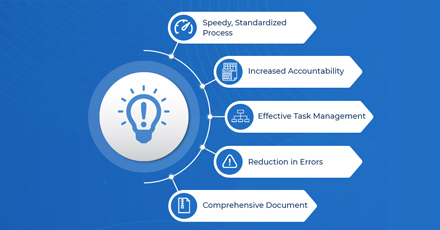 How to Enhance New Employee Onboarding Experiences?
Getting your new employee up to speed can be a difficult task for even the most established companies. It’s a careful balancing act of teaching your newcomer the ropes immersing them in the company culture, and getting them familiar with team processes.
Read More
How to Enhance New Employee Onboarding Experiences?
Getting your new employee up to speed can be a difficult task for even the most established companies. It’s a careful balancing act of teaching your newcomer the ropes immersing them in the company culture, and getting them familiar with team processes.
Read More
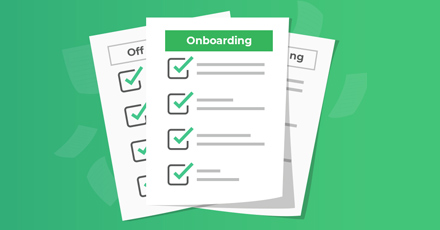 The ideal employee onboarding checklist
Emails get lost in the inbox, physical documents get misplaced, and that’s when management starts to notice the communication issues in the workplace.This is perhaps the primary reason organizations are drawn to SharePoint, as it provides much-needed workflow functionality
Read More
The ideal employee onboarding checklist
Emails get lost in the inbox, physical documents get misplaced, and that’s when management starts to notice the communication issues in the workplace.This is perhaps the primary reason organizations are drawn to SharePoint, as it provides much-needed workflow functionality
Read More
 Employee Onboarding Checklist
Does onboarding new employees feel like a new process every time you bring someone into your organization? If the process seems ripe with confusion, pain, and irritation, then it is time to consider putting a system in place. This starts with an employee onboarding checklist where you go through the steps needed to onboard and offboard employees.
Read More
Employee Onboarding Checklist
Does onboarding new employees feel like a new process every time you bring someone into your organization? If the process seems ripe with confusion, pain, and irritation, then it is time to consider putting a system in place. This starts with an employee onboarding checklist where you go through the steps needed to onboard and offboard employees.
Read More
 Paperless Onboarding System: The Future of Seamless Employee Onboarding
Do you still mail, scan, and file paper documents when you hire new employees? There is a faster and safer alternative: Onboarding without paper. A sound paperless onboarding system will keep all records online in one place, making it easier to find the correct file and keeping sensitive paperwork safe.
Read More
Paperless Onboarding System: The Future of Seamless Employee Onboarding
Do you still mail, scan, and file paper documents when you hire new employees? There is a faster and safer alternative: Onboarding without paper. A sound paperless onboarding system will keep all records online in one place, making it easier to find the correct file and keeping sensitive paperwork safe.
Read More
 Employee Offboarding Best Pratices
No company likes employees leaving the organization when they become assets to the whole system. Inevitably, all organizations lose some people over time. Once an employee has given notice, it also becomes important for HRs to transition them out of the workforce
Read More
Employee Offboarding Best Pratices
No company likes employees leaving the organization when they become assets to the whole system. Inevitably, all organizations lose some people over time. Once an employee has given notice, it also becomes important for HRs to transition them out of the workforce
Read More
 5 Best SharePoint Apps for your business
Did you know that companies with centralized employee information systems experience 50% higher productivity rates?
5 Best SharePoint Apps for your business
Did you know that companies with centralized employee information systems experience 50% higher productivity rates?Discover the game-changing potential of Microsoft SharePoint applications. Say goodbye to scattered data and embrace the power of cloud-based solutions. Read More
