Licensing
Requires Fabric F64 ($5.8K–$8.4K/mo) or PPU ($20/user/mo). **Not** included in Microsoft 365 Copilot's $30/user/mo.






Microsoft Power BI Copilot is an AI-powered assistant that helps users streamline data visualization and analytics. Built on the existing semantic models, Power BI Copilot transforms data into visuals, DAX measures, and narrative summaries using conversational natural language.
Users can simply ask Copilot by typing "provide me details on Q5 revenue generation and compare it with last quarter, while ensuring it is the regional data." Copilot will simply write the DAX, create the visual, and provide an easy-to-understand summary.
Requires Fabric F64 ($5.8K–$8.4K/mo) or PPU ($20/user/mo). **Not** included in Microsoft 365 Copilot's $30/user/mo.

Natural-language queries, DAX/M code generation, narrative summaries, semantic model documentation, and AI-assisted report creation.

2–4 weeks if governance is mature; 6–12 weeks for remediation, plus a 3–6 month enterprise rollout when required.

Copilot exposes whatever users already have permission to access. Overshared data remains the primary governance risk.

Beyond Intranet deployment package: $50K–$150K (8–12 weeks). Zero audit failures across 11K+ enterprise engagements.
Before exploring capabilities, make sure that your environment meets these minimum requirements:

Paid Fabric capacity (F2 or higher) or Power BI Premium (P1 or higher). Trial capacities and free SKUs aren't supported.

The Users can use Copilot and other features powered by Azure OpenAI setting must be on. Copilot is enabled by default, but your admin might turn it off.

Your Fabric capacity must be in a supported region.

Not supported.

For best results, model owners should prep their semantic models for AI before use.
Enterprises choose Power BI Copilot consulting services to help them design the data architecture, manage governance frameworks, and enable secure self-service analytics. A consulting partner helps eliminate common implementation challenges and accelerates enterprise adoption.

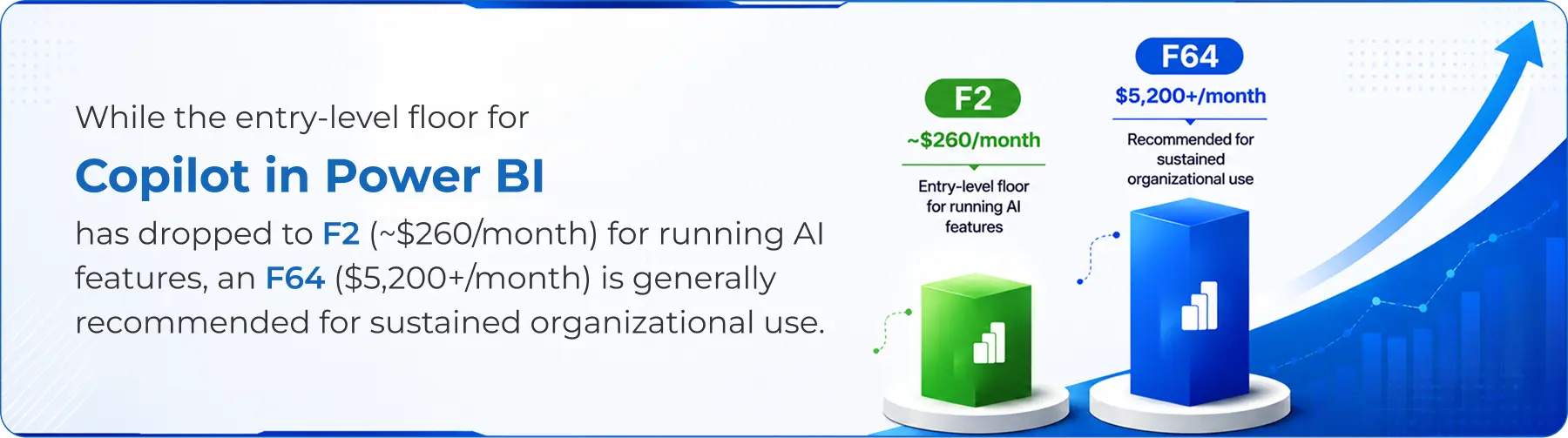
Microsoft Copilot can run on any paid Fabric capacity starting at F2, whereas previously F64 was the minimum requirement. This creates confusion while selecting the correct license. We help organizations choose the right Microsoft licensing based on their workloads and capacity.

Cluttered and inconsistent data reduces Copilot effectiveness. We help organize enterprise data into properly modeled semantic layers with clear relationships, calculations, and metadata for accurate AI-generated insights.

Duplicate records, inconsistent formats, and orphaned relationships frequently result in inaccurate reports and unreliable AI responses. Our readiness assessment identifies and resolves these issues before deployment.

Proper security configuration is essential for Power BI Copilot. We implement row-level security, governance controls, and access policies to ensure sensitive business data remains protected while enabling AI-powered analytics.

Sr. Tech. Specialist - Business Analytics at Beyond Intranet
(A division of Beyond Key)


We review your current semantic models, existing Fabric or Power BI Premium footprint, and reporting workflows to flag what needs to change before Copilot goes live, and give you a realistic cost and timeline picture.

We size the right Fabric capacity tier for your usage pattern, starting from F2 under Microsoft's current requirements, handle the tenant-level enablement, and make sure per-user licensing lines up with who's going to use Copilot.

This is usually the biggest chunk of the work: renaming fields into business language, documenting measures, cleaning up relationships, and restructuring anything that would confuse a natural-language query.

We set row-level security, define what data sits inside versus outside Copilot's reach, and put basic guardrails around what kinds of prompts and outputs are appropriate for your organization.

Copilot is only as useful as people's ability to prompt it well. We run hands-on sessions with actual business users, finance, sales ops, anyone requesting reports—so adoption doesn't stall after a single demo.

Semantic models drift as the business changes. We keep metadata current and revisit Copilot's output quality periodically, so it doesn't quietly degrade six months in.








Analysts use Power BI Copilot to generate variance narratives and month-over-month summaries without manually rebuilding the same commentary slide every close cycle.

Reps and managers ask Copilot for pipeline breakdowns by region or rep without waiting on a BI team ticket, freeing analysts up for harder questions.

Copilot flags and explains inventory or fulfillment anomalies in plain language, which shortens the gap between "something looks off" and someone actually investigating it.

Instead of scrolling through a twelve-tab report, executives get a narrative summary of what changed and why, useful heading into a board meeting when time is short.


Comparing a consultant-led Power BI Copilot rollout against a self-led setup and Tableau AI (Pulse)
|
Factor
|
Power BI Copilot
(with consulting partner)
|
DIY / self-led setup
|
Tableau AI (Pulse)
|
|---|---|---|---|
|
Setup time
|
4–8 weeks typical, depending on model complexity
|
Often 3–6 months due to trial-and-error on model prep
|
Comparable, tied to Tableau's separate licensing cycle
|
|
Semantic model readiness
|
Assessed and remediated up front
|
Frequently skipped, causing poor early results
|
Requires similarly clean data sources
|
|
Governance/security setup
|
Configured as part of implementation
|
Often an afterthought, discovered post-launch
|
Built into Tableau's admin layer, still needs configuration
|
|
Licensing baseline (as of 2026)
|
Fabric capacity from F2, sized correctly from the start
|
Risk of under- or over-provisioning capacity
|
Tableau+ tier required, separate cost structure
|
|
User adoption
|
Structured training included
|
Left to individual teams, adoption uneven
|
Varies by rollout approach
|
Since April 2025, Copilot works on any paid Fabric capacity starting at F2, which changed the cost floor significantly but the total cost still depends on capacity tier, region, per-user licensing, and how much semantic model work is needed.

Fabric capacity is billed either pay-as-you-go or as reserved capacity, and pricing scales with the SKU tier (F2 through F64 and beyond). Reserved terms typically bring the effective hourly rate down for organizations running Copilot continuously.

The biggest variable is the state of your existing semantic model. An organization with a handful of well-documented models will spend far less on remediation than one running a decade of accumulated, undocumented reports across business units.

Budgeting a smaller recurring engagement for metadata upkeep and periodic Copilot output review tends to be cheaper, in the long run, than letting quality drift and re-doing the whole assessment eighteen months later.
Get a straight answer on whether your semantic model is Copilot-ready, and what it would take to get there.
It's a generative AI feature that lets users ask questions in plain English and get back summaries, DAX measures, and report pages built from your semantic model.
As of Microsoft's April 2025 update, Copilot works on any paid Fabric capacity starting at F2, not just F64 as originally required. Total cost depends on capacity tier, region, and per-user licensing, worth verifying against Microsoft's current pricing page before budgeting.
It pays off fastest for organizations with a mature semantic layer and real demand for self-service reporting from non-technical staff. It's a harder case to make if your data model still needs significant cleanup first.
A paid Fabric capacity at F2 or higher (or PPU with a Fabric trial), a clean and well-documented semantic model, and tenant settings that explicitly enable the feature.
By auditing the model, sizing and configuring the right Fabric capacity, cleaning up metadata, setting governance, and training the business users who'll actually rely on it.
Microsoft 365 Copilot works across Word, Excel, and Teams; Power BI Copilot is scoped to your BI semantic model specifically. Most enterprises license and configure them separately.
Yes. Microsoft announced in December 2025 that Q&A will be fully retired by December 2026. Organizations still using Q&A visuals need to migrate to Copilot before then.


201 N Illinois Street,
16th Floor - South Tower
Indianapolis, IN 46204
405 W Superior St, Ste 707 Chicago, IL 60654