A practical, vendor-neutral guide for CIOs, IT directors, and digital workplace leaders evaluating SharePoint consulting partners in Australia — including a comparison...
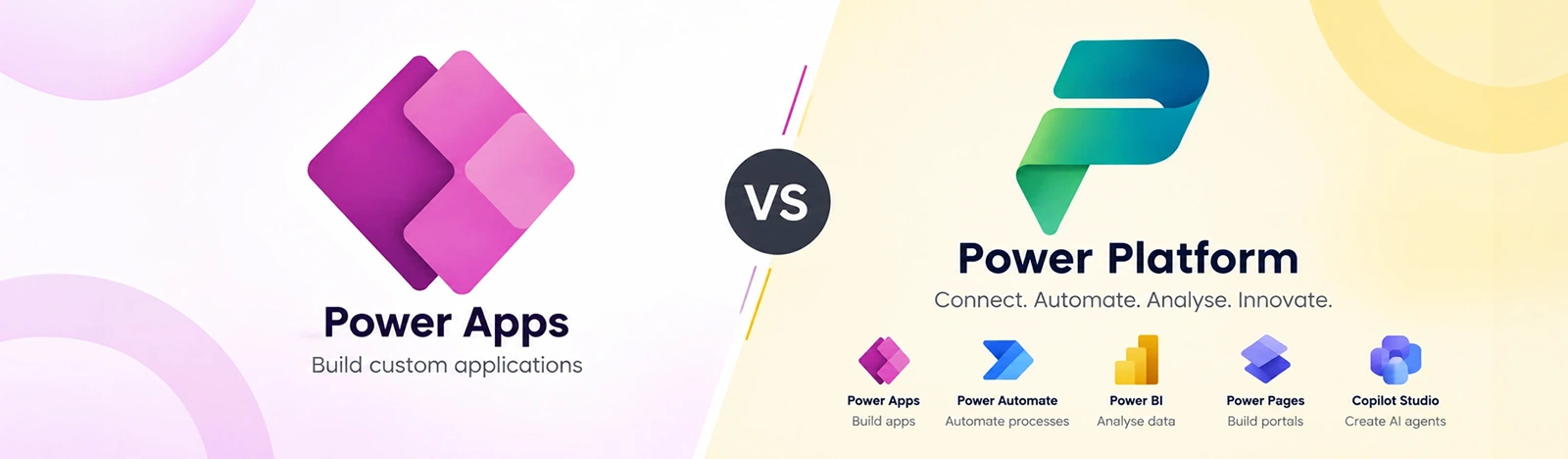
Quick answer: Power Apps is Microsoft’s low-code application development tool, while Microsoft Power Platform is a broader suite that includes Power Apps, Power Automate, Power BI, Power Pages, and Copilot Studio. Power Apps helps you build applications; Power Platform helps you connect applications, workflows, data, analytics, and AI into business solutions. They are not competing products, and you can use Power Apps as part of a larger Power Platform implementation.
The distinction matters when you’re deciding what to build, which components you need, how to approach licensing, and whether your solution should support one business process or multiple departments.
Introduction
Power Apps and Power Platform are often mentioned together, but they serve different purposes. A business might use Power Apps to replace a paper-based inspection form, Power Automate to route approvals, Power BI to analyze performance, and Dataverse to manage the underlying business data.
All of these capabilities belong to Microsoft Power Platform.
So, is Power Apps enough for your business, or do you need a broader Power Platform solution?
The answer depends on the problem you’re trying to solve.
If you need a specific application for a defined business process, Power Apps may be the right starting point. If you need to connect applications, automate workflows, manage shared data, analyze performance, or introduce AI-powered experiences, you may need several Power Platform components working together.
This guide explains the difference between Power Apps and Power Platform, compares their capabilities, and helps you decide which approach fits your business requirements.
What Is Microsoft Power Platform?
Microsoft Power Platform is a low-code business application platform that helps organizations build applications, automate processes, analyze data, create external-facing websites, and develop AI-powered agents.
Its core products are:
Power Apps: Build custom business applications.
Power Automate: Automate workflows and business processes.
Power BI: Analyze data and create reports and dashboards.
Power Pages: Build external-facing business websites and portals.
Copilot Studio: Create AI-powered agents and conversational experiences.
Microsoft Dataverse provides a structured data platform for many Power Platform solutions. It supports business data, relationships, security, and integration across applications.
These components can be used independently or combined into an end-to-end business solution.
For example, a procurement solution might use:
Power Apps for purchase requisition submissions.
Dataverse to store structured procurement data.
Power Automate for approval routing.
Power BI for spend analysis.
Copilot Studio for an AI assistant that answers questions about procurement processes.
That is the broader value of Power Platform: it connects different capabilities around a business requirement.
Microsoft Power Apps is a low-code application development tool that allows organizations to build custom business applications for web, mobile, and other supported experiences.
Instead of developing every application from scratch, teams can use Power Apps to create interfaces, connect to data sources, define business logic, and deliver applications more quickly.
Power Apps is commonly used for:
Replacing paper forms and spreadsheets.
Building internal business applications.
Creating mobile applications for field teams.
Digitizing inspections and data collection.
Managing employee requests and approvals.
Creating applications for operations, finance, HR, and customer service.
Power Apps supports two main application types: Canvas Apps and Model-driven Apps.
Canvas Apps
Canvas Apps give developers and business users control over the application’s interface. You can design screens, add controls, connect to data sources, and create an experience tailored to a specific task.
Canvas Apps are useful when the user experience is a major requirement.
For example:
A field engineer records inspection results on a tablet.
A warehouse employee logs inventory movements on a mobile device.
An HR employee submits and tracks a leave request.
A quality inspector captures production-line defects with photos.
Canvas Apps can connect to sources such as SharePoint, Excel, SQL Server, and other supported connectors.
Model-driven Apps are built around a structured data model, business processes, and Dataverse.
Instead of designing every screen from scratch, you define the data, relationships, forms, views, and business rules. Power Apps then generates much of the application experience from that structure.
Model-driven Apps are useful for applications that manage complex, related business data.
Examples include:
Case management.
Asset tracking.
Procurement.
Customer service.
Project management.
Compliance and operational records.
Canvas Apps and model-driven Apps are not interchangeable. Canvas Apps prioritize interface flexibility, while model-driven Apps are particularly useful when the data model and business process are central to the application.
Is Power Apps Part of Power Platform?
Yes. Power Apps is one of the core products within Microsoft Power Platform.
You can use Power Apps independently for an application, but it can also work with Power Automate, Power BI, Dataverse, Power Pages, and Copilot Studio.
Think of Power Platform as a toolbox and Power Apps as one tool inside it.
You can use the application-building tool on its own. But when your business needs automation, analytics, shared data, or AI, the other tools become relevant.
For example, consider a quality inspection process:
Power Apps lets inspectors record defects.
Power Automate sends notifications when a defect requires attention.
Dataverse stores inspection records.
Power BI shows defect trends by production line.
Copilot Studio could help employees find inspection procedures or answer questions about the process.
Power Apps handles the application experience. Power Platform brings together the broader solution.
Power Apps vs Power Platform: Comparison Table
Dimension
Power Apps
Microsoft Power Platform
Primary purpose
Build custom business applications
Build connected business solutions using applications, automation, analytics, portals, and AI
Scope
Application-level
Solution and platform-level
Main products
Canvas Apps and Model-driven Apps
Power Apps, Power Automate, Power BI, Power Pages, and Copilot Studio
Data
Connects to supported data sources; Model-driven Apps use Dataverse
Supports shared data architecture using Dataverse and other supported sources
Automation
Can trigger Power Automate flows and use app logic
Includes Power Automate for workflow and process automation
Analytics
Can display data and application-level views
Includes Power BI for business intelligence and reporting
External websites
Not its primary purpose
Power Pages supports external-facing websites and portals
AI
Supports available AI and Copilot capabilities
Includes AI capabilities across supported Power Platform products
Typical users
App makers, business analysts, developers, and department teams
Business users, IT teams, developers, administrators, and enterprise architecture teams
Best suited for
A defined application or business process
A connected solution involving multiple business capabilities
Governance
Uses applicable application and platform controls
Supports broader governance through environments, security, policies, and administration
The key point is that Power Apps is a product within Power Platform. Comparing them is therefore not the same as comparing two separate application platforms.
Key Differences Between Power Apps and Power Platform
1. Scope of the Solution
The main difference is scope.
Power Apps focuses on building applications. Power Platform provides the wider set of tools that can support an entire business process.
Suppose a company needs a digital employee onboarding process.
A Power Apps application could collect employee information and display onboarding tasks.
A broader Power Platform solution could also:
Automate approval and notification workflows.
Store onboarding records in Dataverse.
Connect with other business systems.
Provide dashboards for HR managers.
Use an AI agent to answer employee questions.
If the requirement is a specific application, Power Apps may be sufficient. If the requirement is to digitize and connect the entire process, multiple Power Platform components may be needed.
2. Application Development vs Workflow Automation
Power Apps is designed to build the application that users interact with.
Power Automate is designed to automate actions and workflows that happen around that application.
For example, an expense submission application might allow an employee to enter a claim and upload receipts.
The application can collect the information. Power Automate can then:
Send the claim to the correct approver.
Check the approval status.
Notify the employee.
Update a connected system.
Trigger additional actions based on the workflow.
Power Apps and Power Automate can work together, but they are separate products with different roles.
Power Apps can connect to different data sources, including SharePoint, Excel, SQL Server, and other supported connectors.
For simple applications, these sources may be sufficient.
As the solution becomes more complex, you may need a structured data platform that supports relationships, business rules, security, and shared access across applications.
Microsoft Dataverse is designed for this type of requirement.
For example, a procurement system may need to connect:
Suppliers.
Purchase requisitions.
Purchase orders.
Departments.
Approval records.
Budgets.
A structured data model helps maintain relationships between these records and supports consistent business processes.
SharePoint can still be useful for many business applications. The right choice depends on the data structure, scale, security requirements, and the application architecture.
Our SharePoint consulting team can help organizations evaluate and improve their SharePoint data environment.
4. Reporting and Analytics
Power Apps can collect and display business information, but Power BI is the dedicated business intelligence product within Power Platform.
If your stakeholders need dashboards, KPIs, trend analysis, or reporting across multiple business processes, Power BI may be an important part of the solution.
For example, a warehouse application can record stock movements through Power Apps.
Power BI can then help managers analyze:
Inventory levels.
Stock movement.
Warehouse performance.
Product demand.
Operational exceptions.
This is the difference between collecting data in an application and using that data to support business decisions.
5. AI and Copilot Capabilities
Power Platform includes AI capabilities across its products.
Power Apps can support AI and Copilot features within application experiences. Power Automate can support AI-assisted workflow creation and automation. Copilot Studio can be used to build custom AI agents for supported business scenarios.
For example, a customer service solution could include:
Power Apps for managing customer cases.
Power Automate for routing and updating cases.
Power BI for service performance reporting.
Copilot Studio for an agent that helps answer customer service questions.
The exact AI capabilities available depend on the product, configuration, licensing, and supported features.
Power Apps makes it possible to build applications quickly. As more applications and flows are created, organizations need a way to manage them.
Power Platform governance can include:
Environment management.
Security and access controls.
Data loss prevention policies.
Application and flow inventory.
Monitoring and administration.
Development and deployment processes.
Data architecture standards.
The Power Platform Center of Excellence Starter Kit is one resource organizations can use to support governance and administration.
However, governance is not something that should be added only after an organization has built hundreds of applications. It is better to establish appropriate standards before the platform scales.
Power Apps alone may not be sufficient when your solution requires:
Complex multi-step workflows.
Cross-department automation.
Enterprise reporting.
Multiple related applications.
Shared business data across teams.
External-facing portals.
Advanced governance and administration.
These requirements do not necessarily mean you need every Power Platform product. They mean you should evaluate the complete solution rather than selecting an application tool in isolation.
If you’re moving forward with a standalone app, our Power Apps Consulting team can help you get the data model, security roles, and app design right from day one
When Should You Choose Power Platform?
Choose a broader Power Platform solution when your business requirement involves more than application development.
This may include:
An application and automated approval workflow.
A business process with reporting requirements.
Multiple departments sharing structured data.
A customer or supplier portal.
AI-powered business assistance.
Organization-wide governance and administration.
Example 1: Procurement
A procurement solution could use:
Power Apps for purchase requisition entry.
Dataverse for procurement records.
Power Automate for approval routing.
Power BI for spend analysis.
The application is only one part of the solution.
Example 2: Customer Complaint Management
A customer complaint management solution could use:
Power Apps for recording complaints.
Power Automate for assigning cases and sending notifications.
Dataverse for storing case records.
Power BI for tracking resolution time.
Copilot Studio for an AI assistant that answers supported customer service questions.
Example 3: Field Service
A field service solution could use:
Power Apps for job information and mobile sign-off.
Power Automate for notifications and process updates.
Dataverse for service records.
Power BI for operational reporting.
These examples show how the products can work together. The exact architecture should depend on the business requirements, existing systems, data sources, and licensing.
If your initiative involves several Power Platform components, our Power Platform Consulting team can help evaluate the architecture, implementation approach, and governance requirements.
Power Apps vs Power Platform: How to Decide
The following framework can help you choose the right starting point.
Your requirement
Recommended starting point
A simple internal application
Power Apps
A mobile data collection application
Power Apps Canvas Apps
A structured business application
Power Apps Model-driven Apps with Dataverse
An application with approval workflows
Power Apps + Power Automate
An application with business intelligence dashboards
Power Apps + Power BI
A solution with shared relational data
Power Apps + Dataverse
An external-facing business website
Power Pages
A custom AI agent
Copilot Studio
A multi-department business process
Evaluate the relevant Power Platform components together
Ask These Questions Before Choosing
Before starting a project, consider:
What business problem are we trying to solve?
Do we need an application, or do we need to digitize an entire process?
Where will the data come from?
Will the application need to connect to other systems?
Do we need approval workflows or automated notifications?
Do managers need dashboards and reporting?
Will external users access the solution?
Do we need structured data and security roles?
How many users and departments will use the solution?
What governance and licensing requirements apply?
Answering these questions can help you avoid building an application that later needs significant architectural changes.
Business Use Cases for Power Apps and Power Platform
Power Apps and Power Platform can support many industries and business functions. The following examples illustrate how organizations may combine the products to solve operational problems.
Manufacturing: Quality Inspection
Business challenge: Inspectors record quality issues on paper or spreadsheets, making it difficult to review problems quickly.
Possible solution: A Canvas App allows inspectors to record defects, upload photos, and submit inspection results from a mobile device. Power Automate can notify supervisors when certain conditions are met, while Power BI can help analyze defect trends.
Relevant components: Power Apps, Power Automate, Power BI, and potentially Dataverse.
Business challenge: Referral information is managed across emails, phone calls, and spreadsheets, creating difficulties with tracking and coordination.
Possible solution: A model-driven App built on Dataverse can manage referral records, while Power Automate supports routing and notifications. Access controls should be designed according to the organization’s data protection requirements.
Relevant components: Power Apps, Dataverse, and Power Automate.
Business challenge: Store audit results are recorded manually and consolidated later.
Possible solution: A mobile Canvas App allows managers to complete audit checklists and capture photos. Automated notifications and reporting can improve the visibility of audit results.
Relevant components: Power Apps, Power Automate, and Power BI.
Finance: Purchase Order Approval
Business challenge: Purchase order approvals are handled through email, making it difficult to track status and maintain a consistent process.
Possible solution: A Power Apps application collects purchase order information. Power Automate routes approvals, while Dataverse or another suitable data source stores records. Power BI can provide reporting on approval performance.
Relevant components: Power Apps, Power Automate, Dataverse, and Power BI.
Procurement: Supplier Onboarding
Business challenge: Supplier onboarding requires information and documents from multiple parties.
Possible solution: Power Pages can support external supplier submissions. Power Automate can route the information for internal review, and supported integrations can help update business systems.
Relevant components: Power Pages, Power Automate, Dataverse, and Power BI.
A Note About Business Outcomes
The examples above describe possible solution architectures, not guaranteed results. Actual outcomes depend on the process, implementation quality, data, adoption, integrations, and governance.
Licensing is one of the most important considerations when planning a Power Apps or Power Platform project.
However, Power Apps and Power Platform should not be treated as two competing license choices. Power Apps is one product within Power Platform, and the licensing requirements depend on the capabilities used.
The relevant factors may include:
The application type.
The data sources and connectors.
Whether premium capabilities are used.
The number of users.
The number of applications.
Whether Power Automate, Power BI, or other products are needed.
The organization’s existing Microsoft 365 licenses.
Whether external users will access the solution.
Common Licensing Categories
Licensing category
General purpose
Microsoft 365 included rights
Supports applicable Power Apps and Power Automate capabilities within the rights of the specific license
Power Apps per-app licensing
Supports access to a specific application under the applicable licensing terms
Power Apps per-user licensing
Supports broader application use under the applicable licensing terms
Power Automate licensing
Supports applicable workflow and automation capabilities
Power BI licensing
Supports applicable reporting and analytics capabilities
Dataverse capacity and related licensing
Depends on the solution, data requirements, and licensing model
Power Pages licensing
Applies to external-facing website and portal scenarios under the relevant licensing model
Microsoft licensing changes over time, and the requirements can vary by scenario. Do not rely on a generic comparison table to determine the final license purchase.
Determine which Power Platform components are needed.
Identify the users and usage patterns.
Review the applicable licensing terms.
Validate the final architecture and license requirements.
Choosing licenses before understanding the solution can create unnecessary costs or restrict the capabilities you need.
Common Mistakes Businesses Make While Choosing Between Power Apps vs. Power Platform
1. Choosing a License Before Defining the Requirement
The best starting point is the business problem, not the license.
Define what you need to build, which users will access it, and which components are required. Then evaluate licensing.
2. Treating Power Apps as the Entire Solution
Power Apps can solve an application-level problem, but many business processes also require automation, reporting, integration, or structured data.
Consider the complete process before deciding which components to use.
3. Choosing the Wrong Data Source
SharePoint, Excel, SQL Server, and Dataverse serve different purposes.
A simple application may work well with SharePoint. A more complex application with related data and stricter security requirements may benefit from Dataverse.
Evaluate the data model, scale, performance, security, and future requirements before choosing.
4. Ignoring Governance
Organizations that allow applications and flows to grow without standards may face challenges with ownership, security, documentation, and administration.
Establish appropriate governance before scaling.
5. Overlooking Security Requirements
Security should be designed into the solution.
Consider:
Who can access the application?
Which records can each user see?
Which data sources are connected?
Are sensitive fields involved?
Are external users accessing the system?
What policies apply to the organization?
The security approach should match the application, data, and regulatory requirements.
6. Building Without Considering Future Growth
An application designed for one team may later be used by several departments.
Think about future users, data volume, integrations, reporting, and maintenance before finalizing the architecture.
7. Treating Governance as an Afterthought
Governance should not be limited to a final approval step.
Define appropriate standards for application development, data management, security, and deployment from the beginning.
Power Apps is a tool for building custom business applications. Power Platform is the full suite that includes Power Apps, Power Automate, Power BI, Power Pages, and Copilot Studio. Power Apps is one component of Power Platform, you can use it on its own, but Power Platform gives you the complete toolkit for building, automating, analyzing, and governing business solutions.
Yes. Power Apps is one of the five components of Microsoft Power Platform. The others are Power Automate, Power BI, Power Pages, and Copilot Studio. All five components share Microsoft Dataverse as a common data layer and are deeply integrated with Microsoft 365, Teams, SharePoint, and Azure.
Yes. You can license and use Power Apps independently. However, most real-world solutions end up needing at least Power Automate for workflow automation. If you are using canvas apps with SharePoint as the data layer, Power Apps alone may be sufficient. If you need model-driven apps, you also need Dataverse, which is part of Power Platform infrastructure.
Power Platform. Enterprise applications typically need more than just a front-end interface. They need automated workflows, reporting dashboards, a governed data model, security controls, and scalability. Power Platform provides all of this. Power Apps alone is better suited to specific, contained tools rather than enterprise-grade solutions.
Yes. Power Platform is Microsoft's enterprise low-code and no-code development suite. It is designed to let business users and citizen developers build solutions without traditional programming, while also providing the depth for professional developers to extend and customize. The level of code required depends on the complexity of what you are building.
Yes. SharePoint is one of the most common data sources for Power Apps. Canvas apps can connect to SharePoint lists to read, write, and update data. This works with standard Microsoft 365 licenses. For more complex scenarios, multiple related lists, large data volumes, or advanced security requirements, Dataverse is a better data layer than SharePoint.
Choose full Power Platform when your solution needs automation (Power Automate), analytics (Power BI), an external portal (Power Pages), or AI assistants (Copilot Studio) alongside your app. Also choose Power Platform if governance, scalability, and enterprise security are requirements, the CoE Toolkit and Dataverse security model only come with the full platform.
AI Builder is a Power Platform feature that adds pre-built and custom AI models to your apps and flows. Common uses include document processing, object detection, sentiment analysis, and text recognition. AI Builder uses credits that are included in some licenses and available as an add-on in others.
Copilot Studio, previously Power Virtual Agents, is the Power Platform component for building AI-powered chatbots and agents. It is fully integrated with the rest of Power Platform, so a Copilot Studio agent can trigger Power Automate flows, look up data in Dataverse, and surface information from across your Microsoft 365 environment.
A simple Power Apps canvas app can be built in days. A model-driven app with Dataverse typically takes 2–6 weeks depending on complexity. A full end-to-end Power Platform solution, including automation, reporting, governance, and user training, typically takes 2–4 months for a well-scoped project.
Not really a fair comparison, Power Apps is part of Power Platform, so you're not choosing between them cost-wise. A single Power Apps plan is cheaper than licensing multiple components, but you're paying for less capability too.
Power Apps builds the app people interact with. Power Automate handles what happens behind the scenes, approvals, notifications, syncing data between systems. Most real projects end up using both together.
SharePoint works fine for simple, low-volume apps. Dataverse is the better call once you need proper relationships between data, tighter security roles, or you're planning to scale the app across teams.
Yes, and that's actually the most common path. Most businesses start with one app and layer in automation, reporting, or Dataverse as the need grows, no need to rebuild from scratch.
Power Pages is a separate Power Platform product for creating external-facing websites; it isn’t a Power Apps type. It grew from the older “Power Apps portals” feature but is now a standalone product alongside Power Apps, Power Automate, Power BI, and Copilot Studio.
About Author
Sachin Jain
Sachin Jain is a Solution Architect at Beyond Key, based in Dallas, Texas. He specializes in designing and delivering enterprise solutions using Microsoft 365, SharePoint, and the Power Platform. He has led numerous digital transformation initiatives focused on automating business processes, building modern intranet solutions, and integrating enterprise systems with Power Apps, Power Automate, and Power BI.
Passionate about innovation and problem-solving, Sachin focuses on creating scalable, user-friendly solutions that bridge technology and business needs.