A practical, vendor-neutral guide for CIOs, IT directors, and digital workplace leaders evaluating SharePoint consulting partners in Australia — including a comparison...
Three systems hold the same person’s home address. Two of them are wrong.
The payroll system has the current one, because a change of address affects a paycheck and somebody makes sure it lands. The shared spreadsheet still shows where she lived in 2023. Her intranet profile was never completed at all. When a manager needs to reach her outside office hours, the answer depends entirely on which file they happen to open.
None of that is unusual, and none of it is a tidiness problem. It creates payroll corrections. Slow onboarding. Compliance exposure. What follows covers the information worth holding, what belongs on the form that collects it, and how teams keep the whole thing accurate once it exists.
Key takeaways
Employee information covers what an organization holds about each person. Personal and contact data. Employment details. Compensation. An employee information form collects most of it, usually at onboarding, and needs updating whenever key details change. Compensation and tax belong in separate storage with restricted access, as do any health-related fields rather than on a general form. And for teams past a certain size, dedicated directory software and not a spreadsheet, is what keeps the record current.
What is employee information?
What does employee information cover?
It is the data an organization collects and maintains about each person it employs. Contact details and personal data. Employment history. Compensation. Payroll depends on it. So does compliance recordkeeping, internal communication and most of what HR does on an average day.
A useful distinction sits underneath that definition, and organizations regularly collapse it.
Employee information is the underlying data. An employee directory is the searchable, people-facing view built on top of some of it. The first is what you are obliged to hold and keep accurate. The second is what a colleague opens when they need to find somebody. They overlap, but they are not the same asset and they do not have the same audience.
Getting the distinction right early saves an argument later, because the two need different access rules and different owners.
Four categories cover most of what organizations actually hold. The personal and contact group identifies the person and lets you reach them. Employment details describe the role, the reporting line and the dates. Compensation covers pay and benefits, and sits under tighter access rules than the rest. Education and credentials record qualifications, which matter most where licensing or certification is part of the job.
Why scattered employee data costs you more than you think
The cost shows up in four places, and none of them appear as a line item labeled data quality.
Start with payroll and compliance errors. Federal recordkeeping rules require employers to hold accurate identifying and wage information for covered employees. The U.S. Department of Labor’s guidance lists the basic records an employer must maintain under the Fair Labor Standards Act, including full name and home address. Occupation. Pay details. When the authoritative version of an address lives in one system and a stale copy lives in three others, somebody eventually works from the wrong one.
Onboarding slows down next. New hires supply the same details to HR. Then to IT. Then to the facilities team, because no single record feeds the others. That repetition is visible to the new person, and it communicates something about the organization on their first day.
Duplicated data entry is the third cost, and it compounds quietly. Every additional place a detail is stored is another place it can drift, and the effort of keeping four copies aligned grows faster than headcount does.
There is a hidden version of the same cost. When people stop trusting the central record, they build private copies. A manager keeps a spreadsheet for their own team. A coordinator keeps another for a project. The organization now holds more copies than it started with, and nobody governs any of them.
The fourth cost matters most and gets noticed least, which is a poor combination. Emergency contacts. Nobody checks whether they are current until the moment somebody needs them, and by then the answer is whatever was true when the person joined.
What is an employee information form? Key elements to include
What does an employee information form do?
It collects a person’s personal and contact details in one place, along with their employment record. Most organizations complete it during onboarding and revisit it whenever something material changes, such as a move, a role change or a new emergency contact.
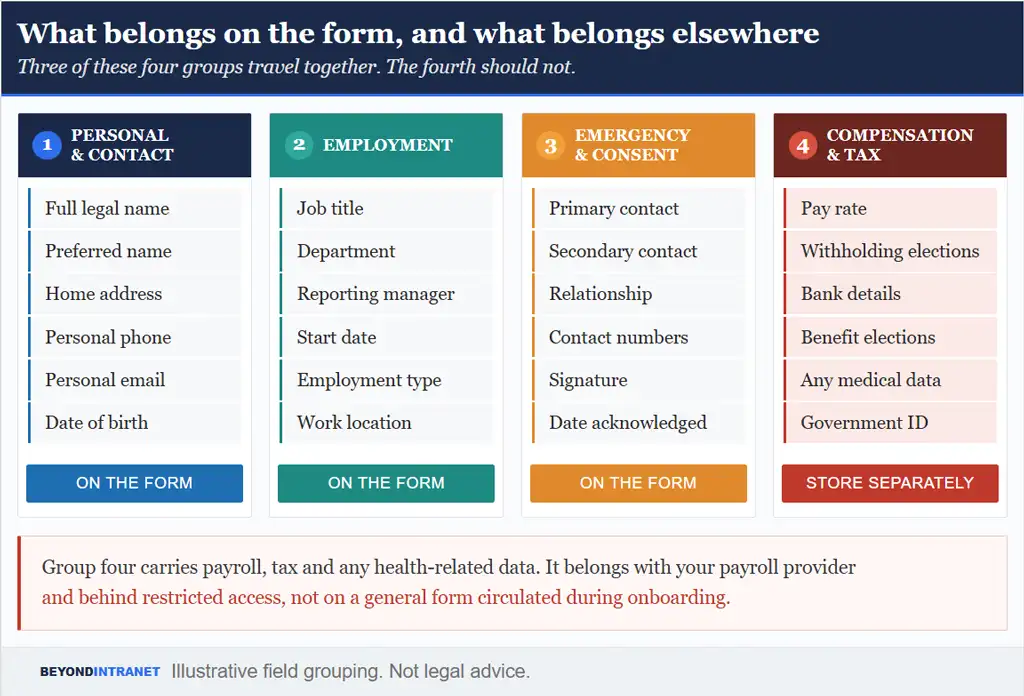
Four groups of fields cover it. Three belong together on the form. The fourth does not.
Three of these four groups travel together. The fourth should not.
Before the fields themselves, one principle governs the whole exercise. Collect what you have a reason to hold and nothing beyond it. Each extra field is something to keep accurate. Something to secure. Something to justify if anybody asks why you hold it.
Personal and contact details
Full legal name and preferred name. Home address. Personal phone and email. Date of birth. These identify the person and let the organization reach them outside work systems. Preferred name deserves a field of its own instead of being handled informally, because getting somebody’s name right is a small thing that people notice.
Employment and compensation details
Job title and department. Reporting manager and start date. Employment type and work location. All of that belongs on the form. Pay rate, tax withholding and banking details do not.
Keep the compensation side with your payroll provider and behind restricted access. Payroll and tax handling varies by state and by circumstance. Treat this article as general guidance, not legal or tax advice, and confirm specifics with your payroll provider or a qualified advisor.
Work location deserves more attention than it usually gets in hybrid organizations. A field that simply says head office tells a colleague nothing about whether the person is reachable in the building today, which is the question people actually have.
Emergency, compliance and consent details
Two emergency contacts, not one, with the relationship and a reachable number for each. A single contact fails the moment that person is unreachable, which is disproportionately likely during the events where it matters.
Add a short acknowledgment section confirming the information is accurate and recording the date. On medical and health-related fields, the safe default is to leave them off a general form entirely. Collect them only where a specific legal requirement applies, store them separately from the main record, and restrict access to the people who genuinely need it.
Building your own employee information form from scratch takes time
It is easy to miss a field you will need later, and harder still to keep the answers current once the form is filed.
Data privacy and compliance: what U.S. employers need to know
What follows is general awareness, not legal advice. Requirements vary by state. A compliance advisor should confirm anything specific to your situation.
Two federal frameworks set the baseline for most U.S. employers. Under the Fair Labor Standards Act, covered employers must keep accurate records for each nonexempt worker, and the Department of Labor is explicit that no particular form is required so long as the information is accurate. Payroll records are preserved for at least three years, and the records supporting wage computations for two.
The Family and Medical Leave Act adds its own layer. Employers covered by FMLA keep leave records in line with the same FLSA recordkeeping approach, and any medical certification associated with leave is held confidentially and separately from the general personnel record.
For organizations with employees or operations in Europe, the General Data Protection Regulation adds three principles worth adopting regardless of jurisdiction. Collect only what you need. Keep it accurate. Do not retain it longer than the purpose requires. The official GDPR text sets these out as data minimization and accuracy, plus storage limitation. They function perfectly well as internal policy for a U.S. company that has never handled an EU record.
Consent belongs in the same conversation. Telling people what you hold and why is good practice everywhere, and in some jurisdictions it is more than that. A short, plain statement attached to the form costs nothing and removes an awkward exchange later.
Retention deserves a sentence of its own. Records held beyond the period that justified collecting them stop being an asset and become exposure, and the practical difficulty is that nothing prompts a review. Deletion has to be scheduled, because it never happens on its own.
All of which points at the same operational requirement. You need to know who can see what, and you need a record of what changed and when. A shared spreadsheet gives you neither. Anyone with the link has the whole file, and version history is not an audit trail.
Five best practices for collecting and maintaining employee information
Five habits separate a record that stays accurate from one that decays quietly. None of them requires new software, which is worth noting before the next section.
Collect at onboarding, not afterward. A new hire is already completing forms and has no established habits to overcome, which makes it the cheapest moment you will ever get. Organizations running an onboarding process that captures this information from day one avoid the chasing exercise that otherwise follows every hire by about three weeks.
Set a refresh cadence and stick to it. Once a year is a reasonable floor for a full review. The point is less the frequency than the fact that it happens on a schedule somebody owns instead of whenever a gap surfaces.
Keep emergency contacts current specifically. They change more often than people report them, and unlike an address, nothing else in the business will surface the error. Prompt for them separately, and do not bury the question inside a general review.
Give the review a named owner. Not HR generally. Work that belongs to a function and not to a person is the work that slips first when a quarter gets busy.
Restrict access by role. Not everyone who needs a colleague’s work email needs their home address, and the difference between those two audiences should be enforced by the system and not left to discretion.
Reduce manual re-entry by designating one source of truth. Every additional place a detail is typed is another chance for the copies to disagree, and the fix is architectural rather than behavioral. Which leads directly to how modern teams handle this.
From spreadsheets to employee directory software
Is employee directory software the same as an HRIS?
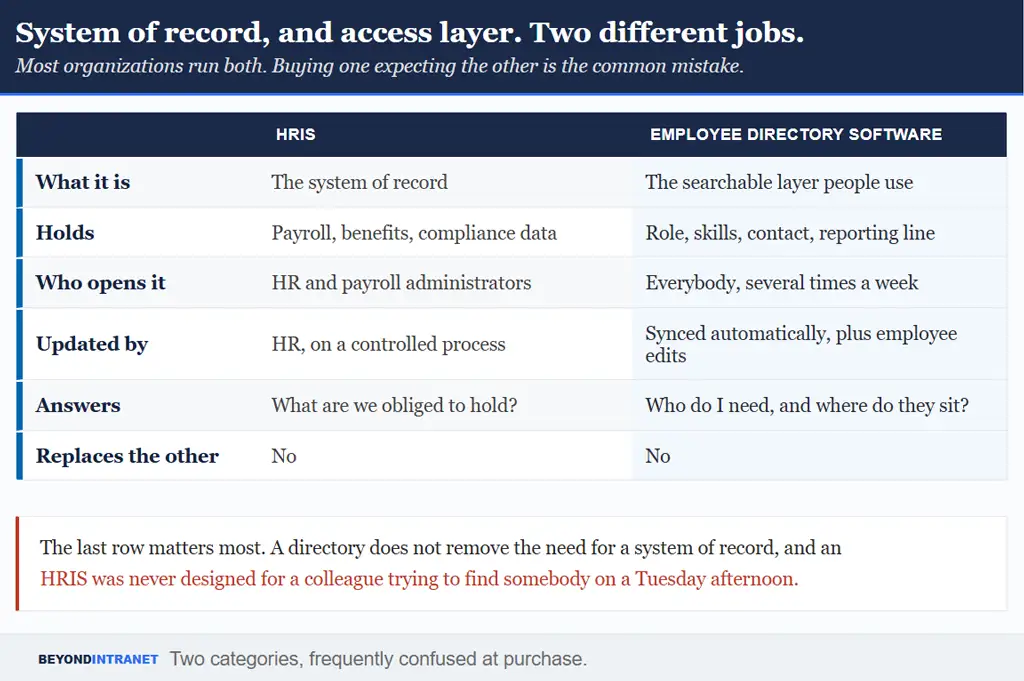
No. An HRIS is the system of record for payroll and benefits, and for compliance data. Employee directory software is the searchable, employee-facing layer people use to find colleagues and understand the org structure. Plenty of organizations run both, and neither replaces the other.
That distinction decides most purchasing mistakes in this category, and it is worth settling internally before anybody sits through a demo.
Two categories, frequently confused at purchase.
Both are legitimate purchases. The mistake is expecting an HRIS to serve as a directory, which produces a system nobody outside HR wants to open, or expecting a directory to satisfy recordkeeping obligations it was never built for.
What to look for
Search and filtering come first, because a directory nobody can search is a list. Name and skill are the baseline filters, with department and location close behind. Skill is the one that answers questions a contact list cannot.
Role-based access matters as much as any feature on the list, given everything covered in the compliance section above. So does mobile access, since a meaningful share of directory lookups happen away from a desk. And automatic sync is what determines whether any of it stays accurate without somebody maintaining it manually.
What to look for
Why it matters
What to ask in a demo
Search and filters
A directory people cannot search becomes a list nobody opens
Filter by skill and location, not just name
Live org chart
Reorganizations happen faster than anyone updates a slide
Where does the hierarchy come from?
Role-based access
Work email and home address need different audiences
Can we hide fields by role?
Mobile access
Many lookups happen away from a desk
Show it on a phone, not a resized browser
Automatic sync
Manual upkeep is what makes directories go stale
Which system does it read from?
Table 1. Five criteria. The last one determines whether the other four stay true in month six.
If you are weighing native SharePoint options against a purpose-built directory
Our team can walk through what fits your setup and where the manual upkeep would sit.
The alternative is a purpose-built directory that reads directly from Microsoft Entra ID, formerly Azure Active Directory, so the record updates itself as your identity system changes. Profiles stay enriched and customizable, presence shows live through Teams, and the org chart builds from the Manager field without anybody drawing it. That approach sits alongside connecting directory, onboarding and workspace data across Microsoft 365 as a broader pattern, not a single tool decision.
Start with personal and contact details. Employment details next. Emergency contacts, plus a consent or declaration section. Compensation and tax sit outside that, as do any medical fields, and are better handled separately with restricted access instead of folding them into the general form everyone completes at onboarding.
Annually at minimum, and immediately whenever a life event changes something material. A move or a marriage. A new emergency contact. A role change. Directory software that syncs from a system like Microsoft Entra ID removes most of that manual burden automatically.
Access should follow role, not seniority. Payroll and compliance data belongs with HR and payroll administrators. Work contact details and reporting lines can be visible across the organization. The two should be governed by different permissions, enforced by the system.
For some fields, yes, and it usually improves accuracy. Contact preferences and skills are best owned by the individual, along with profile details. Anything with a payroll or compliance consequence should route through a controlled process with a record of what changed.
The directory is the searchable view colleagues use to find each other. The HR record is the fuller, restricted file held for payroll and compliance purposes. One is designed for visibility across the company. The other is designed for confidentiality.
Where to start
Pick one detail, such as home address, and check it in every system that holds it. Whatever disagreement you find is the size of the problem you are actually solving.
List which fields your current form collects and mark anything that belongs behind restricted access instead. That review takes an hour and removes most of the risk.
Name the single source of truth before choosing any tool. Without that decision the software cannot fix the underlying problem, because it becomes one more copy.
Accurate beats collected
Most organizations collect employee information competently. Far fewer keep it accurate afterward, and accuracy is where the value sits. A record gathered once and left alone becomes misleading within a year, which is worse than an obvious gap because people trust it. The organizations that get this right treat the record as something maintained, not something filed.
Employee Directory syncs directly with Microsoft Entra ID
Your team’s information stays accurate without manual upkeep.