A practical, vendor-neutral guide for CIOs, IT directors, and digital workplace leaders evaluating SharePoint consulting partners in Australia — including a comparison...
HR software is a digital system that centralizes employee data and automates the administrative work around it. Three things sit at its core. It holds the record. It runs the workflows that read from that record. And it lets employees serve themselves instead of asking HR. The payoff is time returned to the team, fewer manual errors, and decisions made from data somebody can trust.
What is HR software?
What is HR software?
It is a digital system that stores employee information and automates the administrative processes built on top of it. Records and onboarding. Time tracking. Approvals and reporting. All of it in one place. It replaces the spreadsheets and email threads most HR work otherwise accumulates.
You will also see it called human resources software, or HRMS, depending on how much ground the system covers.
What the term describes in practice is narrower than the phrase suggests. Every HR software system does three jobs. It holds a reliable record of who works here. It runs processes that read from that record without anybody retyping anything. And it gives employees a way to see and update their own details.
Everything else in the category is a variation on those three. Which is why comparing products by feature count tells you very little, and why the more useful question is which of your current HR processes you want out of an inbox.
HR software vs. human resources software vs. HRMS
What is the difference between HR software and HRMS?
HR software is the umbrella term for any technology supporting the HR function. HRMS is a specific type within it: an integrated system combining several HR functions in one place. Every HRMS is HR software. Not every piece of HR software is an HRMS.
Human resources software means the same thing as HR software. Different phrasing, same searcher, same category. Nothing turns on which one your organization happens to say.
The HRMS distinction matters more, because it describes scope. A single-purpose onboarding tool is HR software. So is a full system covering records and time, plus tasks and self-service. The second is an HRMS, and the difference shows up in implementation effort and price. For the deeper treatment of that specific category, how HRMS unlocks business efficiency covers it properly.
Core HR software features
What features should HR software have?
Eight recur across the category. Employee data and directory management. Onboarding workflows. Applicant tracking. Task and approval routing. Time tracking. Org-chart visualization. Knowledge management. And self-service access for employees.
What follows describes what these features do and why each one earns its place.
Employee data and directory management
The central record everything else reads from. Contact details and role. Department, reporting line and skills. Location. Held once, searchable by anybody who needs them. Get this wrong and every downstream process inherits the error, which is why a searchable employee directory is usually the first component teams put in place.
Onboarding workflows
Task sequences, document collection and account provisioning handled before day one instead of during it. The difference between a first week spent working and a first week spent waiting is almost entirely operational, and a structured onboarding plan is where it gets decided.
Worth adding one design note. Directory data ages fastest on the fields nobody is required to touch. Role and manager update when HR processes a change; skills and expertise update only if the employee owns them, which is an argument for letting them.
Applicant tracking and recruitment
Candidate pipelines, interview stages and hiring status in one view. Useful in proportion to hiring volume. A team making four hires a year manages fine in a spreadsheet; a team making forty does not.
Task and approval workflows
Requests routed by rule, not by inbox. Approval chains defined once, applied consistently, and visible while they are in progress. This is the feature that removes most of the chasing HR does without anybody noticing it as work.
One caveat on approvals. Routing rules only help if thresholds match how the organization actually works. Set them from real request history, or you get a queue where you wanted a guardrail.
Time tracking
Hours logged against projects or periods, with the reporting built on top. Accuracy matters here beyond convenience, because time records are what wage and hour questions get answered from.
Volume decides most of this. These features pay back in proportion to how often the underlying process runs, so the first question is frequency, not capability.
Org chart visualization
The reporting structure rendered from the underlying data instead of maintained by hand. A chart generated from a live source stays correct through reorganizations. A slide deck version is wrong within a quarter and nobody notices until somebody uses it.
Knowledge management
Policies, process documentation and answers to recurring questions held somewhere searchable. The measure of whether it works is not how many articles exist. It is whether the eleventh person asking the same question finds the answer without asking.
Knowledge management and self-service overlap here, and the overlap is deliberate. An employee who can find the policy does not need to ask, which is the same outcome by a different route.
Self-service and Microsoft 365 integration
Employees updating their own details, checking their own information and submitting their own requests. Where the system runs inside Microsoft 365, that access sits in tools people already open daily, which removes the adoption problem most HR software creates for itself.
Beyond Intranet brings employee data, onboarding, task management and knowledge management together inside the Microsoft 365 environment your team already uses.
No separate platform to host, and no new login for anybody to remember.
Seven categories cover most of the market. HRIS holds core records. HRMS adds daily operations. HCM extends into talent strategy. ATS manages hiring. Payroll handles wage calculation. Onboarding software runs the first-weeks sequence. Self-service portals give employees access to their own data.
Type
What it covers
Who it suits
HRIS
Core employee records and data
Teams needing one reliable record
HRMS
Records plus day-to-day HR operations
Teams running HR work every day
HCM
The full talent lifecycle, including strategy
Enterprises managing talent as a strategic function
ATS
Applicant tracking and the hiring pipeline
Teams hiring at volume
Payroll software
Wage calculation and disbursement
Handled by a separate specialist system in many organizations
Onboarding software
Task sequences and document collection
Teams where the first week goes badly
Self-service portals
Employee-facing access to their own information
Any team spending its week answering lookups
Table 1. Seven categories. The boundaries blur in practice, and most vendors market across several.
Payroll deserves a specific caution, because it appears on most HR software feature lists and is handled by a separate specialist system more often than buyers expect. Ask whether payroll is native, integrated through an interface, or absent entirely before assuming the first.
The categories also blur. A system marketed as an HRMS may hold records and run onboarding without touching recruitment. One marketed as HCM may be a suite of separately licensed modules. Read what the product does rather than what the acronym implies.
If new-hire onboarding is one of the processes eating your HR team’s time
See what a structured, SharePoint-native onboarding workflow removes from the manual follow-up.
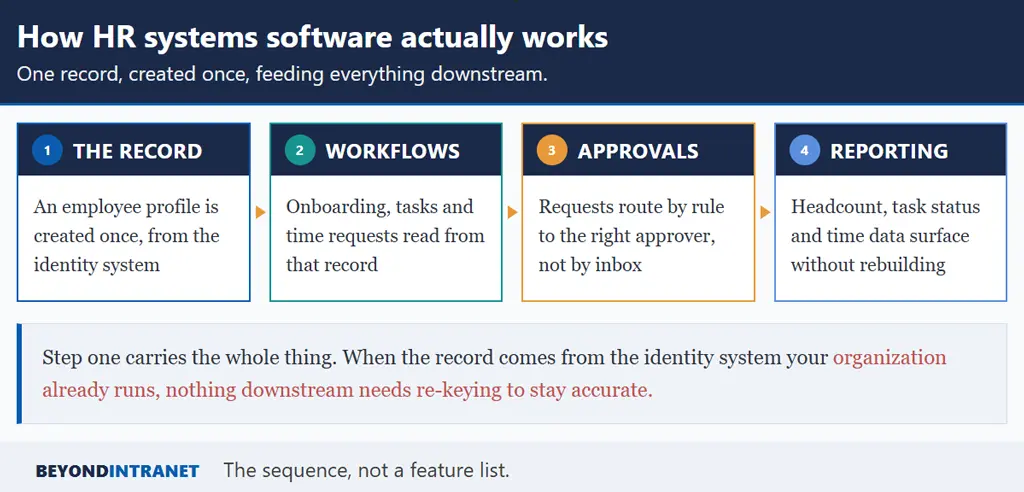
Data capture, then workflow automation, then reporting. An employee record is created once. Processes read from it. Onboarding, leave requests, task assignment. Approvals route by defined rules. Dashboards surface the result without anybody rebuilding a spreadsheet.
One record, created once, feeding everything downstream.
Step 1. The record gets created
Somebody joins, and a profile appears. In a well-built system it comes from the identity directory the organization already runs. Name and role arrive populated, as do department and manager, with no manual entry. This step carries the whole thing, because everything downstream inherits whatever accuracy it has.
A useful test of any HR software demo sits here. Ask what happens when somebody joins. If the answer involves anybody typing a record by hand, the system will drift within a quarter and the maintenance burden grows with every hire.
Step 2. Workflows read from that record
Onboarding tasks assign themselves to the right people. A time request knows who the requester’s manager is. A task routes to the correct department because the record says which one. None of this requires anybody to retype a name.
This is also where the difference between an integrated system and a set of separate tools becomes visible. Separate tools each need their own copy of the record, and the copies drift. One record feeding several workflows does not have that failure mode.
Step 3. Approvals move through defined chains
Requests route by rule instead of by whoever happens to be copied on the email. Thresholds decide who approves what. Status stays visible while the request is in flight, which removes most of the follow-up that HR would otherwise be doing manually.
Step 4. Reporting surfaces the result
Headcount by department, task completion, time logged against projects. These become views instead of projects, which changes how often anybody looks at them. In a Microsoft 365 native system the data sits inside SharePoint, so it reaches Power BI without an export step.
Benefits of HR software
What are the benefits of HR software?
Five carry most of the value. Administrative time returns to the team. Manual errors drop because data is entered once. Employee information becomes centralized and searchable. Self-service reduces dependency on HR for routine questions. And the effort of running HR stops scaling with headcount.
Time returned to the HR team
Every routine lookup an employee answers for themselves is a request HR does not field. Individually trivial, collectively substantial. The same logic applies to the administrative side of hiring, which is where the hidden cost of onboarding a new employee turns out to sit mostly in internal hours, not equipment spend.
Where that time goes matters as much as how much returns. Recovered administrative hours rarely convert into idle capacity. They convert into work nobody had room for previously, which is usually the work HR was hired to do.
Fewer manual errors
Data entered once and read everywhere cannot disagree with itself. The alternative is four copies of an address, three of which are wrong, and nobody able to say which is authoritative until it matters.
Centralized, searchable employee information
One record, one owner, one place the rest of the business reads from. That is the practical argument behind employee database software, and it is worth more than any individual feature on a comparison sheet.
Searchability is the underrated part. A record that cannot be filtered by skill or location answers a question the asker already knew, and leaves the harder one untouched.
Consistency across teams and locations
A policy applied the same way in two offices is a fairness question before it is a compliance one. Systems enforce consistency in a way that written guidance and good intentions do not.
Scalability as headcount grows
Manual HR effort scales with headcount. Systematized effort largely does not. A team of two supporting four hundred people is only possible under the second arrangement, and the gap widens every year the organization grows.
Worth noting where the category is heading. SHRM’s State of AI in HR 2026 research drew on 1,908 HR professionals. Its companion Navigating AI in the Workplace study found that across the organizations of 5,875 surveyed workers, 47 percent have implemented AI in some form. Adoption is real and uneven, which is a reason to get the underlying records right before layering anything clever on top.
How to choose the right HR software
What should I look for when choosing HR software?
Start from your process pain points instead of a feature checklist. Then check integration with the systems you already run. Confirm the self-service depth employees will actually use. Test whether effort stays flat as headcount grows, and bring IT and end users into the decision alongside HR.
Five checks, and the first one eliminates more options than the rest combined.
Check
What to do
What it rules out
Start from pain, not features
List the three HR processes consuming the most time today
Being led by whichever vendor demos first
Check integration
Confirm it works inside your existing stack, not beside it
Another system with another login
Test self-service depth
Have somebody outside HR complete a real task
Portals nobody outside HR opens twice
Confirm scalability
Ask what happens when somebody joins
Anything requiring manual record creation
Involve IT and end users
Include the people who will administer and use it
A tool HR chose alone and nobody adopted
Table 2. Five checks. Writing your pain points before the first demo protects the whole process.
On involving IT early, there is a practical reason beyond politics. IT knows what the organization already runs, and a system duplicating an identity directory you already maintain creates a second source of truth nobody asked for.
On integration specifically, the question is where the software lives. A system inside the tools people already open gets used. A separate destination competes with asking a colleague and loses more often than vendors acknowledge.
Ready to see what an integrated, Microsoft 365 native HR system looks like for your team?
We will walk the modules against your own setup and be clear about where the boundaries sit.
A closing note on sequencing. Teams that fix the record first and add workflows afterward tend to finish. Ones attempting the full suite at once stall in configuration and go live with half of it switched off.
No. Payroll software is one type of HR software, focused specifically on wage calculation and disbursement. The broader category covers employee data and workflows, plus self-service. Plenty of organizations run a dedicated payroll system alongside separate HR tooling.
Usually once manual administration starts consuming a meaningful share of somebody's week. That threshold arrives earlier than most owners expect. Below it, spreadsheets genuinely work. Above it, the reconciliation effort grows faster than headcount does.
HRIS holds the core record. HRMS adds the daily operational work on top of it. HCM extends further into talent strategy and workforce planning. The three nest rather than compete, and most organizations need the middle one.
Microsoft 365 gives you the identity and storage layer, plus collaboration. It does not give you onboarding sequences, org charts or approval routing out of the box. A system built on top of it adds those without introducing a second environment to administer.
It varies more by architecture than by organization size. Platforms needing a separate environment and dedicated IT support run to months. Ones sitting inside systems you already administer are measured in days. Ask for a date, not a range.
In the good implementations, yes, for the fields they know best. Contact preferences and skills are better owned by the individual, along with profile details. Anything with a compliance consequence should route through a controlled process with a record of what changed.
Where to start
Write down the three HR processes consuming the most time this month. That list is your requirements document, and it takes twenty minutes.
Check what your organization already runs before shortlisting anything. If you are on Microsoft 365, a system living inside it removes an entire category of adoption problem.
Ask one question in every demo: what happens when somebody joins? If the answer involves manual record creation, maintenance effort will grow with headcount.
Start from the process, not the product
HR software is a broad term covering several genuinely different categories, and the vocabulary causes more confusion than the technology does. Getting the definition straight is most of the work. After that the decision narrows considerably: which processes do you want out of an inbox, which type of system covers them, and does it live where your people already work.