A practical, vendor-neutral guide for CIOs, IT directors, and digital workplace leaders evaluating SharePoint consulting partners in Australia — including a comparison...
The intranet has quietly become the most important digital surface in the modern enterprise. Email used to be where work happened. Then Teams. Then chat. In 2026, the intranet is where people land first, where AI surfaces what matters, where leaders communicate at scale, and where frontline workers do the bulk of their digital interaction.
This guide is built from fifteen years of designing, building, and rescuing SharePoint intranets across manufacturers, hospitals, professional services firms, banks, and global retailers. It’s organized into ten categories — twenty-five examples in total — and for every example you’ll find what it solves, the SharePoint components behind it, the design logic, the governance and adoption realities, and a clear sense of implementation complexity.
A note on what this is and isn’t. This isn’t a gallery of pretty screenshots. The intranets that show well in screenshots are not always the ones that work in production. The best intranets we’ve ever built are sometimes the least visually interesting because every design decision served a specific employee outcome. That’s the lens we’ll use throughout.
If you are a CIO, an internal communications lead, an HR leader, an IT manager, or anyone planning an intranet modernization in 2026, the examples below should give you a vocabulary, a structure, and a set of decisions to bring back to your team.
Why Intranets Are Being Redesigned in 2026
Three forces are reshaping intranet design this year, and they matter for every example that follows.
Microsoft 365 Copilot has changed the bar. Once Copilot enters an organization, the intranet stops being a place where employees go to find things. Copilot finds things. The intranet becomes the place where employees go to be informed, be connected, and take action. That is a completely different design problem from a 2018 intranet built around navigation menus and document libraries.
Viva Connections turned the intranet into a mobile-first product. The home site is no longer just a webpage. It is a Microsoft Teams experience, a mobile dashboard, and a desktop portal — all running on the same SharePoint backend. Designs that work only on desktop are now half-built.
Frontline workers finally have a real seat at the table. Eighty percent of the global workforce is frontline — manufacturing, retail, healthcare, logistics, hospitality. Most legacy intranets ignored them. Modern SharePoint intranets, with Viva Connections and Microsoft 365 F-series licensing, are designed for the mobile-first, deskless majority.
The intranets in this guide reflect those shifts. They’re not nicer versions of what existed in 2020. They’re a different category of product.
What Makes a Great SharePoint Intranet
Before we get to the examples, here’s the framework we use in every engagement to evaluate whether an intranet is actually good. Hold every example in this article against this list — including the ones in your own organization.
Navigation that reflects how employees think. Not the org chart. Not the SharePoint hierarchy. The mental model of the person trying to find something at 9:14 AM on a Tuesday. Most intranets fail this test on day one.
Information architecture that scales. A flat, hub-based structure with consistent metadata. If your IA depends on every content author remembering rules nobody documented, the intranet is doomed before it launches.
A search experience that returns the right answer, not the most recent document. Microsoft Search is dramatically better than it was, especially with Copilot. But search quality depends on metadata hygiene, content freshness, and properly tuned promoted results.
Mobile responsiveness as a primary requirement, not a checkbox. Viva Connections, audience targeting, and mobile-first card design make this possible. Most intranets we audit still have desktop-only experiences in 2026.
Personalization that’s actually useful. Targeting news to the right people. Surfacing different links for HR vs Engineering vs Sales. Showing different dashboards by region. The intranet should look different to different people because their jobs are different.
Governance that’s lived, not laminated. A real governance model defines who owns what, how content is reviewed, how sites are provisioned, how they’re retired. Without it, intranets become digital landfills inside eighteen months.
Integration with Microsoft 365 that feels native. Teams, Outlook, OneDrive, Power Platform, Viva, Stream, Yammer (Engage), Copilot. The intranet should feel like a layer on top of these, not a separate destination.
AI readiness. Permissions hygiene. Sensitivity labels. Clean metadata. Content lifecycle. These are now Copilot prerequisites — and Copilot will surface the consequences of bad governance loudly.
Content discoverability across surfaces. The intranet content should show up in Microsoft Search across Teams, Outlook, Office.com, and Copilot. If it lives in a silo, employees won’t find it where they actually work.
If an intranet hits eight of these nine, it’s a good intranet. If it hits five, it’s the kind of project that gets rebuilt in three years.
SharePoint Intranet Examples Across Different Categories
Category 1: Employee Communication Intranets
The most common and most often underwhelming intranet category. Communication intranets exist to inform, align, and engage. If done well, they will replace twelve internal email distribution lists, a Yammer/Viva Engage community nobody reads, and three orphaned SharePoint sites. Done poorly, they become a digital newsletter nobody opens.
Who should use this pattern: Internal communications teams, HR leadership, executive offices, mid-to-large organizations with distributed workforces.
Implementation complexity: Moderate. The technology is straightforward. The hard parts are editorial governance, audience targeting strategy, and adoption.
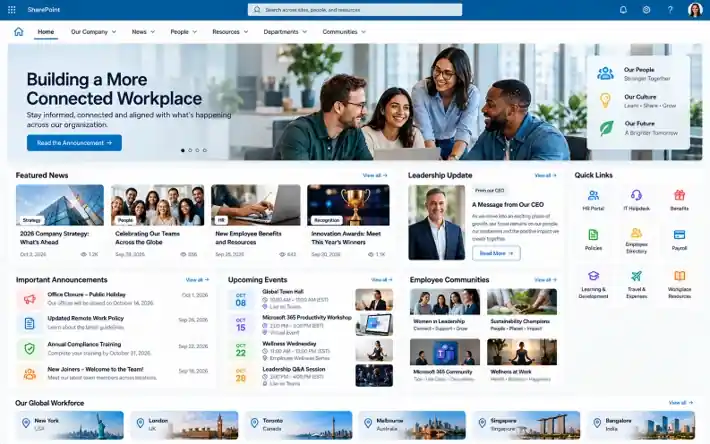
Example 1: The Global News Hub (Multi-Language, Multi-Region)
What it solves: A consistent corporate voice across regions, languages, and business units without a one-size-fits-all message that ignores local context.
Key features: Hero news carousel with audience targeting, regional news sections, language toggle through SharePoint multilingual pages, executive spotlight, leadership videos, Yammer/Engage integration for two-way dialogue, calendar of company-wide events.
SharePoint components: Hero web part, News web part with audience targeting, World Clock web part, Yammer conversations web part, Quick Links, custom Viva Connections cards for mobile.
Why the design works: It treats global communications as a publishing operation, not a static page. Content is tagged by region, role, and language, and the page composes itself differently for each user. A regional manager in Brazil sees Portuguese leadership updates and São Paulo office news; a software engineer in Bangalore sees engineering announcements and India-relevant content first.
Governance considerations: Editorial workflow with approval gates. Translation governance (which content gets translated, by whom, in what SLA). Audience targeting rules documented and reviewed quarterly. Sunset policies for time-bound content.
Mobile experience: Viva Connections dashboard with cards for “Latest news,” “CEO message,” and “What’s happening in your region.” Push notifications for priority announcements.
AI/Copilot readiness: Strong when content is properly tagged. Copilot can summarize the week’s news for any employee, surface relevant items across languages, and answer questions like “what did our CEO say about Q3?”Implementation complexity: High — multi-language adds 30-50% to the build effort and requires ongoing translation governance.
Example 2: The Leadership Communication Portal
What it solves: Direct, video-first executive-to-employee communication at scale. Replaces the “all-hands recording shared via email” pattern that nobody clicks.
Key features: Leadership homepage with video hero, weekly CEO column, town hall recordings library, strategy and OKR visualization, “Ask Leadership” submission form (Power Apps → Teams notification → response loop), executive bios with photos and direct messages.
SharePoint components: Hero web part with video, Stream/Clipchamp embed, Microsoft Forms or Power Apps form, Yammer conversations, custom SPFx component for OKR display.
Why the design works: It centers leadership presence and accessibility. Modern employees do not read 800-word email memos; they will watch a three-minute video. The portal makes leadership consistently visible without burdening leaders with constant communication production.
Governance considerations: Editorial calendar coordination with comms and executive assistants. Video accessibility (captions, transcripts). Submission moderation policy for the Ask Leadership form. Archive policy for old town halls.
Mobile experience: Critical. Most employees watch leadership videos on phones during commute or breaks. Optimize video aspect ratios and caption rendering for mobile.
AI/Copilot readiness: Excellent. Copilot can answer “what’s our company strategy?” with citations to actual executive communications instead of made-up summaries.
Implementation complexity: Medium. The biggest dependency is leadership commitment to consistent participation.
Example 3: The Crisis Communication Intranet
What it solves: A single, trusted source of truth during disruptions — security incidents, weather closures, IT outages, public crises affecting the workforce.
Key features: Always-on emergency banner with toggle, dedicated crisis communications site (pre-built, kept dark until needed), real-time status updates, building/region-specific alerts via audience targeting, employee safety check-in via Power Apps, contact directory for critical services.
SharePoint components: Custom alert banner SPFx extension, audience-targeted news, Power Apps for safety check-in, integration with Microsoft Entra ID for distribution, and Teams adaptive cards for push notifications.
Why the design works: Crisis intranets succeed because they exist before the crisis. The worst time to build emergency communications infrastructure is during the emergency. The best implementations pre-build the site, pre-write template messages, and rehearse the activation process quarterly.
Governance considerations: Clear ownership (usually corporate security or crisis management). Defined activation criteria. Documented escalation chain. Annual drill.
Mobile experience: Non-negotiable. Most crises affect people away from desks. Push notifications via Teams and Viva Connections mobile app are essential.
AI/Copilot readiness: Limited utility during active crisis (real-time human judgment matters more), but Copilot is excellent for post-incident review and timeline reconstruction.
Implementation complexity: Low to medium. The technology is simple; the planning and rehearsal discipline is the real work.
Category 2: HR & Employee Self-Service Portals
The intranets that pay for themselves the fastest. Every HR question answered without an HR ticket is real money. Every onboarding day that doesn’t require a coordinator is real productivity.
Who should use this pattern: HR teams, People Operations leaders, organizations with high transaction volumes (onboarding, benefits enrollment, time-off, internal mobility).
Implementation complexity: Medium to high — depends on integration depth with HRIS (Workday, SAP SuccessFactors, BambooHR, Dayforce).
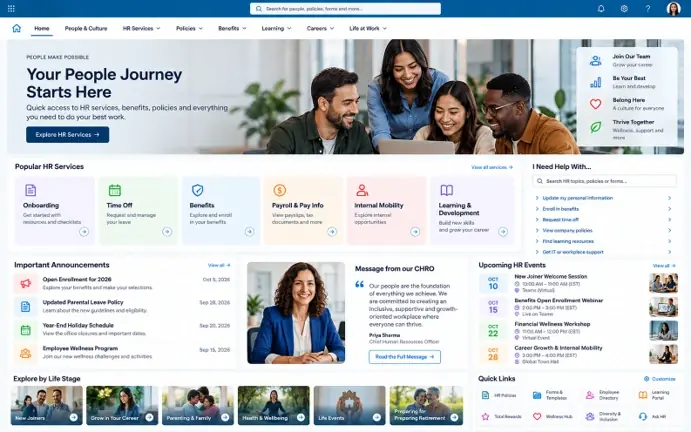
Example 4: The Modern HR Hub
What it solves: A single front door for everything HR — benefits, policies, time off, payroll, learning, internal jobs. Replaces the fragmented “go to Workday for X, intranet for Y, email Sarah for Z” experience.
Key features: Personalized greeting with employee photo and name, benefits dashboard with embedded data from Workday/SAP, time-off balance and request flow (Power Apps), policy library with smart search, learning recommendations, internal job board, HR contact directory by topic.
SharePoint components: Hero web part with personalization, Power Apps embedded forms, Power Automate flows to HRIS, custom SPFx web parts for HRIS data display, Search vertical for policies.
Why the design works: It moves HR from “department you call” to “service you use.” Self-service handles 70-80% of routine questions and frees HR for higher-value work. The data integration — showing the employee their actual PTO balance, their actual benefit elections, converts the intranet from a brochure into a tool.
Governance considerations: Sensitive data handling (PII, salary, medical). Sensitivity labels on policy documents. Strict access controls. Permissions audit before Copilot rollout. Coordination with HRIS team on data flow ownership.
Mobile experience: Essential. PTO requests, benefits questions, and payroll lookups happen on phones. Viva Connections cards for “My PTO balance,” “Recent paystub,” “Submit a time-off request.”
AI/Copilot readiness: High value when permissions are clean. Employees can ask “how many vacation days do I have?” or “what’s our parental leave policy?” and get cited answers from authoritative content.
Implementation complexity: High. Most of the work is HRIS integration, not SharePoint configuration.
Example 5: The New Hire Onboarding Portal
What it solves: A structured, engaging, multi-week onboarding experience that reduces time-to-productivity and increases retention. Replaces the “binder of PDFs” or “Sharepoint folder of links” experience that defines most onboarding programs.
Key features: Day-1 welcome page with welcome video, week-by-week onboarding plan with task completion tracking, IT and equipment status checks, manager introduction module, “Meet your team” people directory, learning paths tied to role, 30/60/90-day check-in surveys.
SharePoint components: Lists with task completion tracking, Power Apps for task UI, Microsoft Forms for check-in surveys, People web part, Stream/Clipchamp embeds for welcome videos, Power Automate for status flow.
Why the design works: Onboarding is one of the highest-ROI use cases in any intranet. A well-designed onboarding portal reduces time-to-productivity by weeks and meaningfully improves first-year retention. The structure prevents managers from forgetting steps and gives new hires a visible sense of progress.
Governance considerations: Content freshness onboarding content goes stale fast. Quarterly review cadence. Manager training on how to use the portal. Integration with HR systems for new hire provisioning.
Mobile experience: Important for pre-boarding (before equipment is issued) and ongoing on-the-go reference.
AI/Copilot readiness: Excellent. A new hire can ask Copilot about anything and get policy-grounded answers — one of the most-loved Copilot use cases we’ve seen in production.
Implementation complexity: Medium. The platform’s work is straightforward; the content design and stakeholder coordination is where projects slow down.
Example 6: The Learning & Performance Portal
What it solves: Continuous learning and performance development as part of daily work, rather than an annual cycle of HR-driven forms. Bridges SharePoint with Viva Learning, LinkedIn Learning, and internal training content.
SharePoint components: Viva Learning integration, Power Apps for performance check-ins, Lists with learning records, custom SPFx components for skills directory.
Why the design works: It positions learning as continuous and integrated, not as a once-a-year HR exercise. When learning lives next to the work, and shows up in Teams via Viva, it gets used.
Governance considerations: Coordination with L&D, HRBPs, and IT. Training content lifecycle. Skills taxonomy ownership.
Mobile experience: Critical for non-desk roles. Viva Learning has solid mobile support.
AI/Copilot readiness: Strong. “Recommend training for my next role” becomes a real Copilot use case when the data is structured properly.
Implementation complexity: Medium-high. Usually requires Viva Suite licensing and meaningful change management.
Category 3: Document Management Intranets
When SharePoint goes back to its roots. Not the prettiest intranets, but often the highest-value ones because compliance, audit, and legal risk reduction translate directly to business outcomes.
Who should use this pattern: Regulated industries (financial services, healthcare, life sciences, legal, government), compliance teams, records managers.
Implementation complexity: High. Metadata, retention, and permissions design dominate the work.
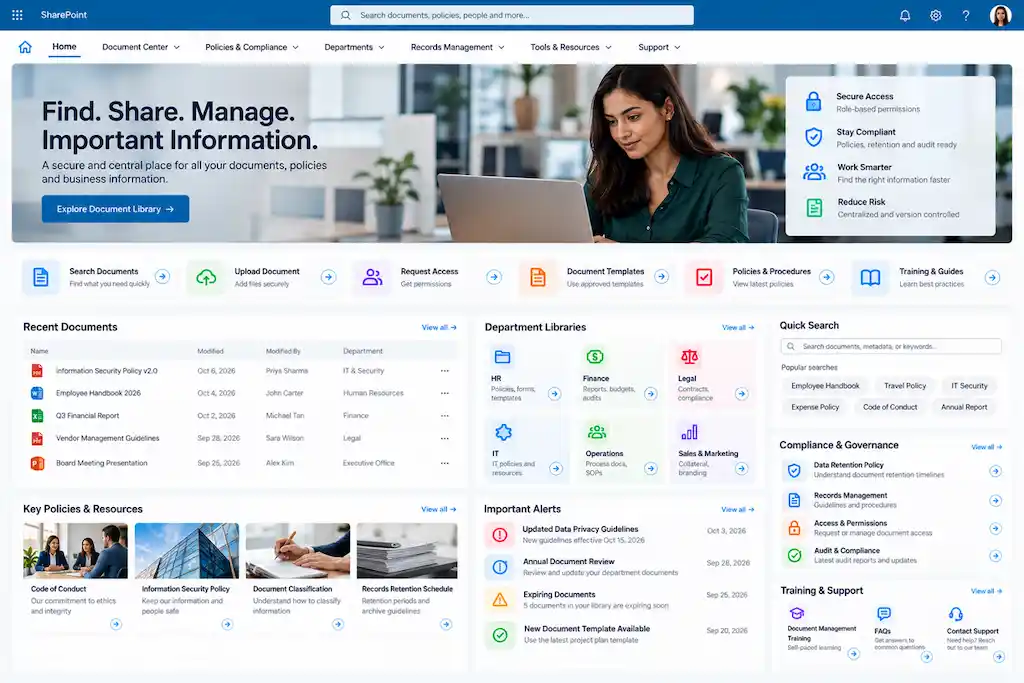
Example 7: The Policy & SOP Center
What it solves: A single, governed, version-controlled source for all corporate policies and standard operating procedures. Replaces the “policy lives in HR’s drive, that procedure lives on Bob’s desktop” reality.
Key features: Policy library with metadata-driven navigation, search with refiners (by department, region, policy type), version history visible to users, mandatory acknowledgment workflows, expiration alerts, sensitivity labeling, retention policies.
SharePoint components: Document libraries with custom content types, retention labels via Microsoft Purview, Power Automate for acknowledgment workflows, Search verticals, Audience targeting.
Why the design works: Policy management is fundamentally about findability, authority, and proof. The design surfaces “the current version of the policy that applies to me” without requiring the user to know SharePoint’s folder structure.
Governance considerations: This is the work. Content types, mandatory metadata, retention schedules, acknowledgment tracking, audit trails. The intranet is the — visible 10%; the governance is the 90%.
Mobile experience: Important for frontline access — a nurse should be able to pull up a procedure on a phone at the bedside.
AI/Copilot readiness: Exceptional. Policy questions are one of the highest-value Copilot use cases in regulated industries. “What’s our policy on X?” with citation to the current version of the right document.
Implementation complexity: High. Compliance environments require careful coordination with legal, records, and audit teams.
Example 8: The Legal & Matter Management Portal
What it solves: A matter-centric workspace for legal teams — contracts, litigation, intellectual property, corporate records with conflict checks, retention, and legal hold management.
Key features: Matter dashboard, document management with strict metadata, legal hold tagging via Purview eDiscovery, conflict-of-interest workflow, contract lifecycle management, client/counterparty directory, integration with practice management or contract systems.
SharePoint components: Custom site templates per matter type, Power Apps for matter intake, Power Automate for approval workflows, Microsoft Purview retention and legal hold, custom search verticals.
Why the design works: It treats SharePoint not as a generic document store but as a matter-aware practice tool. Lawyers don’t think in folders; they think in matters, clients, and obligations. The UX maps to that.
Governance considerations: Confidentiality. Privilege protection. Ethical walls between matters. Information barriers in Microsoft 365.
Mobile experience: Moderate priority — most legal work is desk-based, but mobile access to specific documents is useful.
AI/Copilot readiness: Powerful but risk-sensitive. Permissions and information barriers must be airtight before Copilot is unleashed on legal content.
Implementation complexity: Very high. Often a multi-quarter project with deep legal stakeholder engagement.
Category 4: Departmental Intranets
The unsung middle of every intranet ecosystem. Departmental sites are where actual work happens. They should feel connected to the corporate intranet while remaining distinct from it.
Who should use this pattern: Department heads, function leaders (Marketing, Finance, Sales, Operations), team operations leaders.
Implementation complexity: Low to medium per site, but high in aggregate when you’re rolling out 30+ departmental sites consistently.
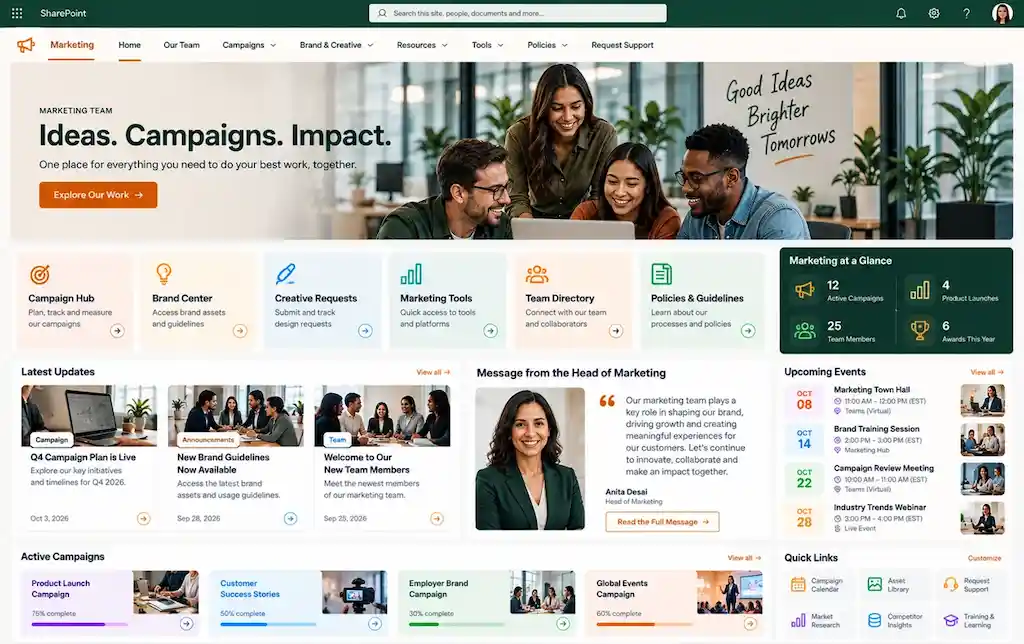
Example 9: The Marketing & Brand Center
What it solves: A controlled, governed source for brand assets, campaign collateral, templates, and approved messaging, accessible to marketing, sales, partners, and increasingly to anyone with Copilot.
SharePoint components: Document libraries with thumbnail views, custom metadata, Microsoft Stream for brand videos, Power Apps for asset request, Power Automate for approval.
Why the design works: Brand consistency is impossible without a single source of truth. The site reduces the “send me the latest logo” Slack messages by 80% in our experience, and prevents off-brand content from circulating.
Governance considerations: Asset retention. Rights management for licensed imagery. Sensitivity labels for unreleased campaigns. Version control on templates.
Mobile experience: Useful for field marketing and sales — quick access to current decks and brand guidance.
AI/Copilot readiness: Strong. Copilot can answer “what’s our current brand color palette?” or “what’s the latest approved company description?” — preventing the most common branding inconsistencies.
Implementation complexity: Low to medium. Mostly a content and metadata project.
Example 10: The Finance & Operations Hub
What it solves: A central destination for finance policies, procurement procedures, expense management, vendor information, and operational dashboards. Replaces the spreadsheet-based “how do I get a PO?” chase that defines most mid-market finance operations.
Key features: Policy and process library, vendor directory, procurement request workflow, expense policy reference, Power BI dashboards embedded for financial visibility, calendar of close cycles and key dates.
SharePoint components: Document libraries, Power Apps for request workflows, Power BI embed web part, Lists for vendor directory, integration with ERP (Dynamics 365 Finance, SAP, Oracle, NetSuite).
Why the design works: Finance and ops are the most process-heavy functions in any organization. The intranet design wraps process visibility around content, making it clear not just where the policy is but how to actually do the thing.
Governance considerations: Sensitive financial data — careful permissioning of dashboards and budgets. Coordination with the finance systems team. Audit trail requirements.
Mobile experience: Useful for expense approvals and on-the-go reference.
AI/Copilot readiness: Strong for policy questions; sensitive financial data should remain behind tight permissions.
Implementation complexity: Medium. Heavily dependent on ERP integration depth.
Category 5: Project Collaboration Portals
Where SharePoint earns its keep as a collaboration platform, not just a content destination. The line between SharePoint sites and Teams blurs here — and that’s intentional.
Who should use this pattern: PMOs, project teams, cross-functional initiative leaders, transformation offices.
Implementation complexity: Low to medium per project; medium to high when standardizing across a PMO.
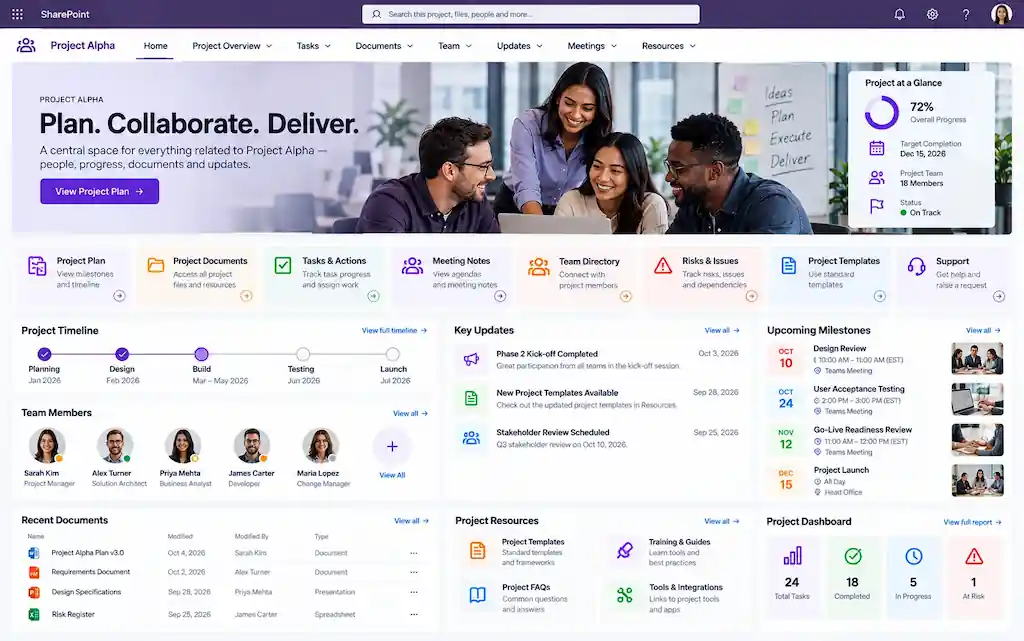
Example 11: The Project Management Hub
What it solves: A consistent project workspace template that gives every project a structured home — charter, plans, status, risks, decisions, artifacts — without forcing project managers to reinvent the structure each time.
Key features: Project charter page, status dashboard with Power BI, risks and decisions log, milestone tracker, document library with project-specific metadata, Teams channel integration, stakeholder directory.
SharePoint components: Site template for new projects (provisioned via Power Automate or Teams Templates), Lists for risks/decisions/milestones, Power BI for status, hub site association.
Why the design works: Consistency. Anyone who has touched a previous project can immediately navigate any new one. The intranet template makes good project management hygiene the path of least resistance.
Governance considerations: Site provisioning automation (avoid sprawl). End-of-project archival policy. Naming conventions. Permissions inheritance from a parent hub.
Mobile experience: Useful for status reviews and quick reference; deeper project work is desk-based.
AI/Copilot readiness: Good for status summaries — “summarize the current state of Project X” becomes a real Copilot use case.
Implementation complexity: Medium when implemented as a templated, governed pattern across a PMO.
Example 12: The Cross-Functional Initiative Portal
What it solves: A coordination hub for major strategic initiatives that span departments — digital transformation, M&A integration, ERP rollouts, regulatory programs.
Key features: Workstream pages, executive dashboard, integrated calendar, governance meeting cadence and materials library, stakeholder map, decision log, communications archive.
SharePoint components: Hub site with workstream subsites, Power BI integration, Lists for tracking, Teams integration for working sessions, Yammer/Engage for broader community.
Why the design works: Major initiatives die from coordination failures, not technical ones. The intranet design surfaces the connective tissue of who’s deciding, who’s affected, and what the next milestone is, which meetings alone can’t provide.
Mobile experience: Useful for executive dashboard access.
AI/Copilot readiness: Powerful for meeting summaries and decision history when content is properly tagged.
Implementation complexity: Medium. Setup is straightforward; sustained discipline is the hard part.
Category 6: Knowledge Base Intranets
The intranets that look most like external websites and that get the most Copilot value when built right.
Who should use this pattern: Knowledge management teams, IT service teams, customer support, technical operations, internal subject-matter experts.
Implementation complexity: Medium. The platform is simple; the content discipline is hard.
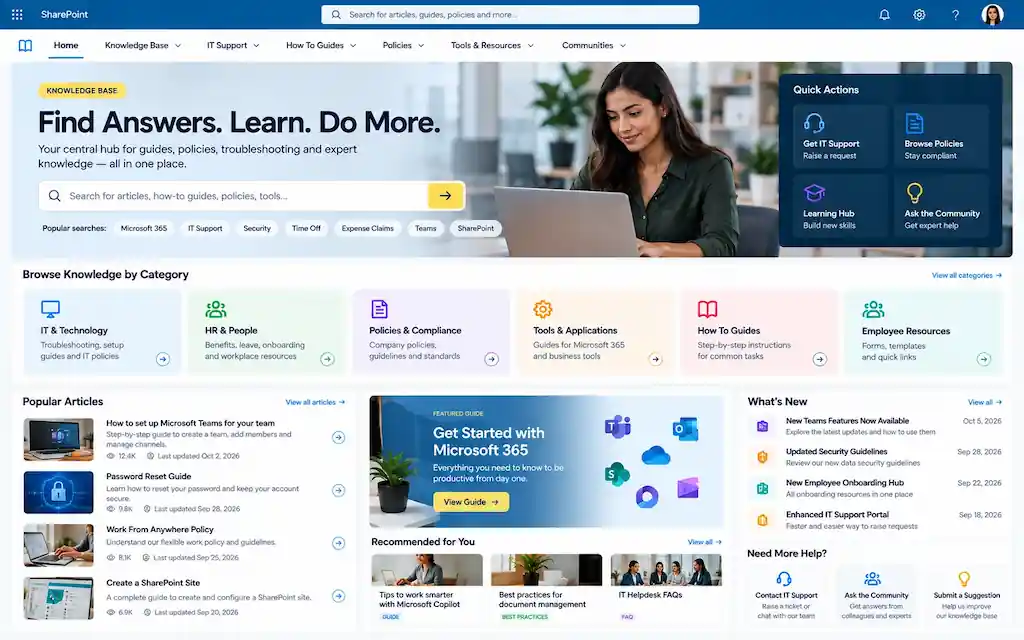
Example 13: The Knowledge Management Hub
What it solves: Centralized institutional knowledge, including best practices, lessons learned, expert directories, and FAQs, that survives employee turnover and accelerates new-hire ramp.
Key features: Searchable knowledge article library, expert directory with skills tagging, FAQ web part, “Ask an expert” workflow, content rating and feedback, topic taxonomy, related-articles surfacing.
SharePoint components: Custom content types for knowledge articles, Search with verticals, People web part with skills, Power Apps for expert lookup, Yammer/Engage Q&A integration.
Why the design works: Knowledge bases fail when they become content graveyards. The best designs prioritize content freshness, ratings, expert ownership, and explicit retirement, keeping the corpus small, fresh, and trusted.
Governance considerations: Content ownership at the article level (every article has a human owner). Review cadence. Retirement policy. Taxonomy governance.
Mobile experience: High priority for field service, retail, healthcare — any context where someone needs an answer in the moment.
AI/Copilot readiness: Among the highest-value Copilot use cases in any organization. A well-built knowledge base becomes a Copilot’s primary citation source.
Implementation complexity: Medium technically; high editorially.
Example 14: The IT Service & Self-Help Portal
What it solves: Tier-zero IT support — articles, videos, common fixes — that deflects tickets and helps employees solve their own problems faster.
Key features: Service catalog, top issues highlighted by analytics, video walkthroughs, ticket submission flow (integrated with ServiceNow, Zendesk, Jira Service Management), status of major systems, password reset and account management links.
SharePoint components: Knowledge base content types, Stream/Clipchamp video embeds, Power Apps for ticket intake, integration via Power Automate to service desk tool, Quick Links.
Why the design works: IT self-service deflects 30-40% of routine tickets in mature implementations. The design success criterion is “did the user solve the problem without filing a ticket?” not “did the user find the article?”
Governance considerations: Article ownership by IT subject-matter experts. Content review tied to system changes. Tight coordination with ITSM tool.
Mobile experience: Critical — most “I can’t log in” moments happen on the phone.
AI/Copilot readiness: Very high. IT support is one of the killer Copilot use cases when content is structured well.
Implementation complexity: Medium. The integration with the service management tool is usually the biggest piece of work.
Category 7: Leadership & Culture Intranets
Where intranets become emotional, not just informational. The hardest category to get right because culture cannot be manufactured by a CMS.
Who should use this pattern: CEO offices, internal communications, HR culture leads, DEI offices, employee experience teams.
Implementation complexity: Low technically; very high in terms of editorial commitment and authenticity.
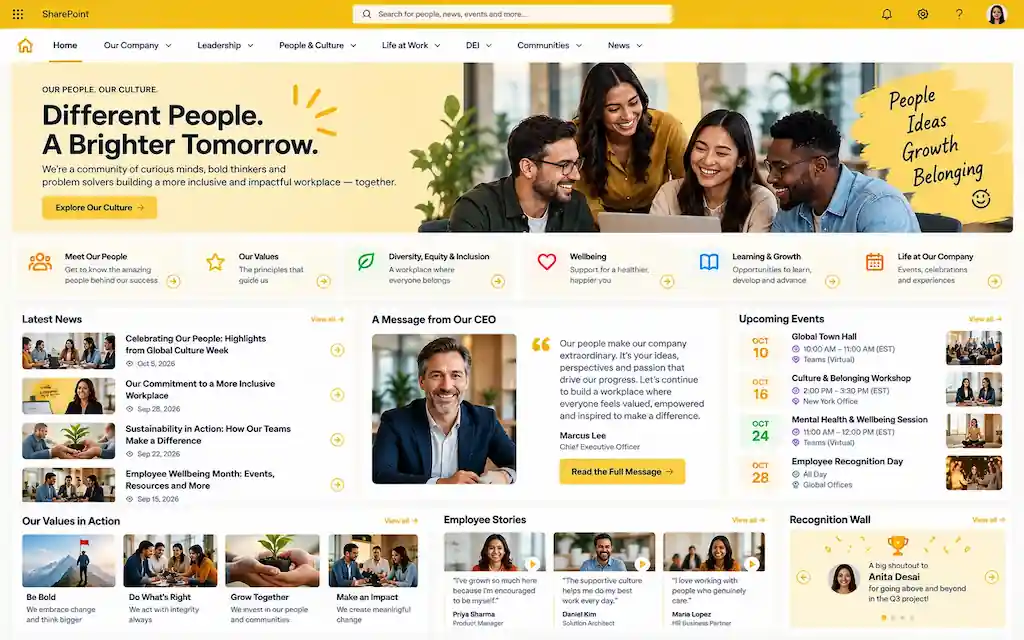
Example 15: The Culture & Engagement Portal
What it solves: A persistent home for culture : values in action, recognition, employee stories, community events, photos, traditions, that gives the company a soul beyond the operational intranet.
Key features: Recognition feed, employee story spotlights, photo galleries from events, values explainer, anniversary and milestone celebrations, community calendar, employee resource group directory.
SharePoint components: News web parts with rich media, Stream for video stories, Yammer/Engage community embed, Microsoft Forms for recognition submissions, image galleries.
Why the design works: Culture intranets succeed by being human, not polished. The best ones look slightly imperfect — real photos, real stories, real voices — because that’s what employees recognize as authentic.
Governance considerations: Editorial sensitivity. Privacy for employees featured. Moderation of submissions. Coordination with comms and HR.
Mobile experience: Important. Culture is consumed casually, often on phones during downtime.
AI/Copilot readiness: Less directly useful. Copilot doesn’t summarize feelings well. But culture content is valuable context for new hires.
Implementation complexity: Low. The technology is the easy part; finding and telling authentic stories every week is the hard part.
Example 16: The DEI & Employee Resource Group Hub
What it solves: A home for diversity, equity, and inclusion programming and for employee resource groups — events, resources, leadership, community.
Key features: ERG directory with leaders and joining workflow, event calendar, learning resources, allyship guides, community discussion forum, executive sponsor visibility.
SharePoint components: Hub site with ERG subsites, Yammer/Engage communities integration, Lists for events, Microsoft Forms for joining/sign-ups.
Why the design works: It signals organizational commitment and provides ERG leaders with self-service tools to run their groups without depending on IT or HR for every change.
Mobile experience: Important for event participation and community engagement.
AI/Copilot readiness: Useful for surfacing ERG opportunities to relevant employees. Implementation complexity: Low to medium
Category 8: Hybrid Workplace Intranets
The category that exploded post-2020 and continues to mature in 2026. The intranet as the digital headquarters for a workforce that is rarely all in one place.
Who should use this pattern: Any organization with hybrid, remote, or distributed work. In 2026, that’s most knowledge-work organizations.
Implementation complexity: Medium. Often involves integrations with workplace systems (booking, IoT, facilities).
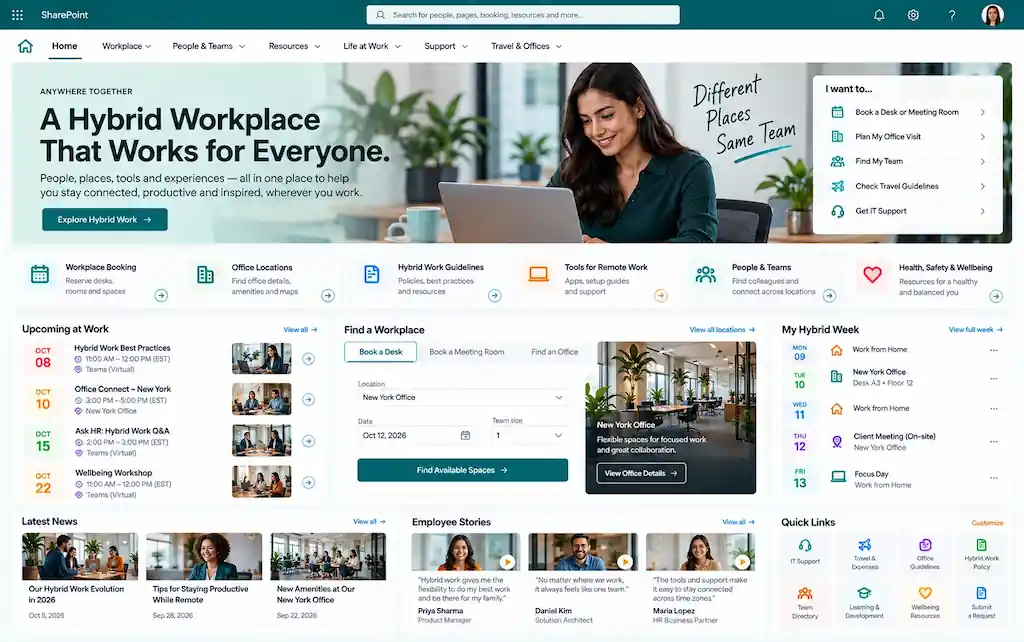
Example 17: The Distributed Workforce Home
What it solves: A unifying digital headquarters for employees who rarely see each other in person, anchoring the experience of belonging when offices are optional.
Key features: Personalized greeting with location and time-zone awareness, team directory with photos and recent activity, “Who’s online today” social feed, distributed coffee chat matching, asynchronous communication spaces, time-zone-aware meeting culture guidance.
SharePoint components: Personalization via SPFx and Microsoft Graph, integration with Teams and Outlook, Yammer/Engage embeds, Power Apps for coffee chat matching.
Why the design works: It treats remote employees as primary, not as exceptions. Designs that center the in-office experience and tack on remote accommodations fail; designs that center the distributed experience and accommodate office work succeed.
Governance considerations: Time-zone inclusivity in communications. Recording norms for meetings. Async-first content design.
Mobile experience: Essential — remote workers often work across devices.
AI/Copilot readiness: Strong for surfacing relevant people and context.
Implementation complexity: Medium. Most of the work is cultural and editorial.
Example 18: The Workplace Services & Booking Portal
What it solves: Office attendance coordination: desk and room booking, parking, visitor management, in-office amenities, facilities requests.
Key features: Desk booking integration (Microsoft Places, Robin, Envoy, Condeco), room availability, building maps, parking reservations, visitor pre-registration, facilities ticket submission, office-day suggestions based on team presence.
SharePoint components: Embeds and iframes for booking systems, custom SPFx for office maps, Microsoft Places integration, Power Apps for facilities tickets, Viva Connections cards for “Book a desk” and “Who’s in today.”
Why the design works: Office-day coordination is one of the highest-frequency intranet interactions in hybrid workplaces. Putting these tools at the top of the intranet, rather than buried in third-party portals, makes the intranet the daily-use destination.
Governance considerations: Privacy (who can see who’s in the office). Booking policies. Integration ownership.
Mobile experience: Critical. Most desk booking happens on a phone the morning of.
AI/Copilot readiness: Practical Copilot use cases — “is my team in the office Thursday?” or “book me a desk near Engineering.”
Implementation complexity: Medium. Booking system integration is usually the bottleneck.
Example 19: The Wellness & Employee Experience Hub
What it solves: A central destination for wellbeing: physical, mental, financial, social — that signals organizational care and makes benefits actually usable.
Key features: Wellness program directory, EAP access, fitness benefits, mental health resources, financial wellness content, employee assistance, recognition and connection programs, Viva Insights integration.
SharePoint components: Content library, Viva Insights cards, Stream for wellness videos, Power Apps for program enrollment, integration with wellness platforms.
Why the design works: Most wellness benefits are dramatically underutilized because employees don’t know they exist. The hub makes the value visible and accessible.
Governance considerations: Sensitive nature of wellness content. Privacy. Compliance with regional laws around health benefits.
Mobile experience: Important.
AI/Copilot readiness: Useful for benefit discovery: “what mental health resources are available to me?”
Implementation complexity: Low to medium.
Category 9: AI-Powered Intranets
The newest and most exciting category, and the one where the gap between aspirational marketing and shipped reality is widest. These are the intranets being built or rebuilt right now in 2026 to take real advantage of Microsoft 365 Copilot and the AI agents ecosystem.
Who should use this pattern: Forward-leaning enterprises with mature Microsoft 365 adoption and clean governance. Organizations that have done the foundational work first including permissions hygiene, sensitivity labels, content lifecycle.
Implementation complexity: Variable. The SharePoint side is often the easy part; readiness work is the hard part.
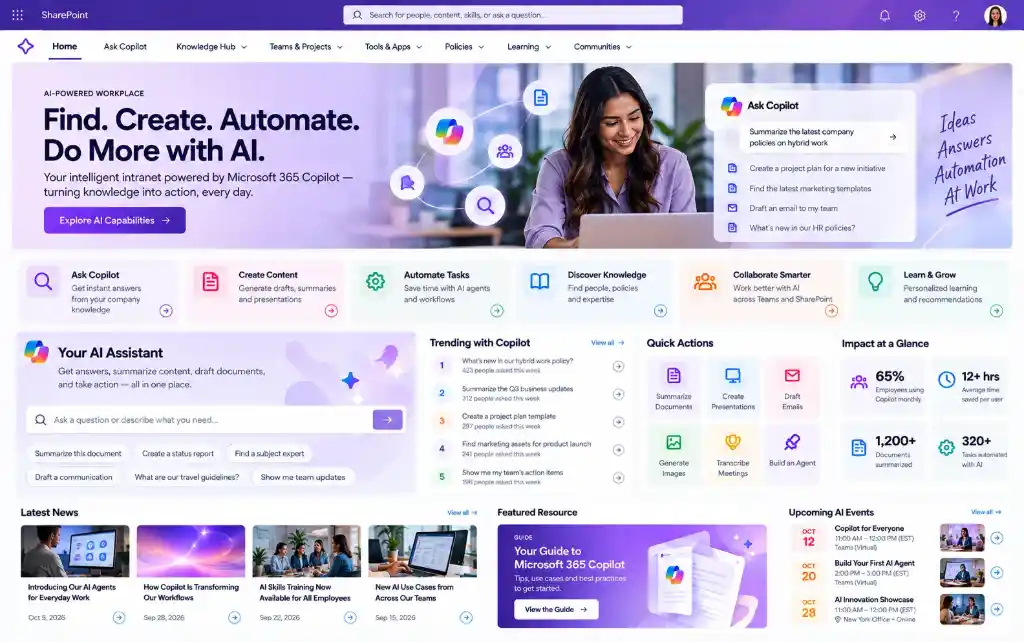
Example 20: The Copilot-Enabled Knowledge Intranet
What it solves: An intranet designed assuming Copilot will be the primary information retrieval surface, optimized for AI grounding, not just human browsing.
SharePoint components: SharePoint Agents (rolled out broadly in 2026), Copilot Studio agents grounded in specific sites, Microsoft Search promoted results, Purview sensitivity and retention labels.
Why the design works: Copilot is only as good as the content it grounds on. The best AI-ready intranets prioritize content quality and authority signals — fewer sources, higher quality, clearer ownership — over content volume.
Governance considerations: Permissions hygiene first (oversharing surfaces fast through Copilot). Content review cycles. Authority signals (owner, last reviewed date, version). Sensitivity labels rigorously applied.
Mobile experience: Less central since Copilot is the primary interaction.
AI/Copilot readiness: This is the AI readiness pattern.
Implementation complexity: Variable. The foundation work — permissions, labels, lifecycle — is the project, not the SharePoint site itself.
Example 21: The Personalized AI Dashboard
What it solves: A homepage that dynamically composes itself based on role, location, recent activity, and AI-inferred relevance, replacing the one-size-fits-all corporate homepage.
Key features: Role-aware hero content, AI-recommended news and learning, personalized Quick Links based on usage, Viva Connections dashboard with personalized cards, Copilot summary of the day, Calendar integration.
SharePoint components: Audience targeting at scale, Viva Connections dashboard with conditional cards, Microsoft Graph for personalization signals, Copilot integration.
Why the design works: Personalization that’s actually useful is the difference between an intranet people use and one they ignore. AI lets personalization scale beyond what manual audience targeting can do.
Governance considerations: Privacy in personalization signals. Fairness across audience segments. Avoiding filter bubbles for company-wide messages.
Mobile experience: Equal priority with desktop.
AI/Copilot readiness: Inherent.
Implementation complexity: Medium-high. Personalization at this level requires careful design and ongoing tuning.
Example 22: The Conversational, Agent-Driven Intranet
What it solves: An intranet where the primary interaction is conversation, not navigation. Employees ask; AI agents grounded in SharePoint answer, route, or act.
Key features: Embedded Copilot interface on the home page, topic-specific SharePoint Agents (HR, IT, Sales, Compliance), agent directory, fallback to human experts when AI is uncertain, conversational form filling.
SharePoint components: SharePoint Agents (2026 GA), Copilot Studio agents grounded in sites, Microsoft Graph connectors for external sources, Teams integration for agent surfacing.
Why the design works: It matches how employees actually try to use intranets: by asking, rather than how intranets have been designed since 1998, through navigation menus.
Governance considerations: Agent ownership. Hallucination risk. Fallback paths. User feedback collection and tuning loops.
Mobile experience: Native fit; conversational interfaces work well on mobile.
AI/Copilot readiness: Inherent. This pattern is impossible without Copilot.
Implementation complexity: Medium-high. The agent tuning loop is ongoing work, not a one-time project.
Category 10: Frontline Worker Intranets
The most important emerging category and the one with the largest unrealized impact. The eighty percent of the workforce that doesn’t sit at a desk has been digitally underserved for two decades.
Who should use this pattern: Manufacturing, retail, healthcare, logistics, hospitality, field service, construction, energy including any industry with a substantial deskless workforce.
Implementation complexity: Medium. The technical complexity is moderate; the change-management work with deskless employees is significant.
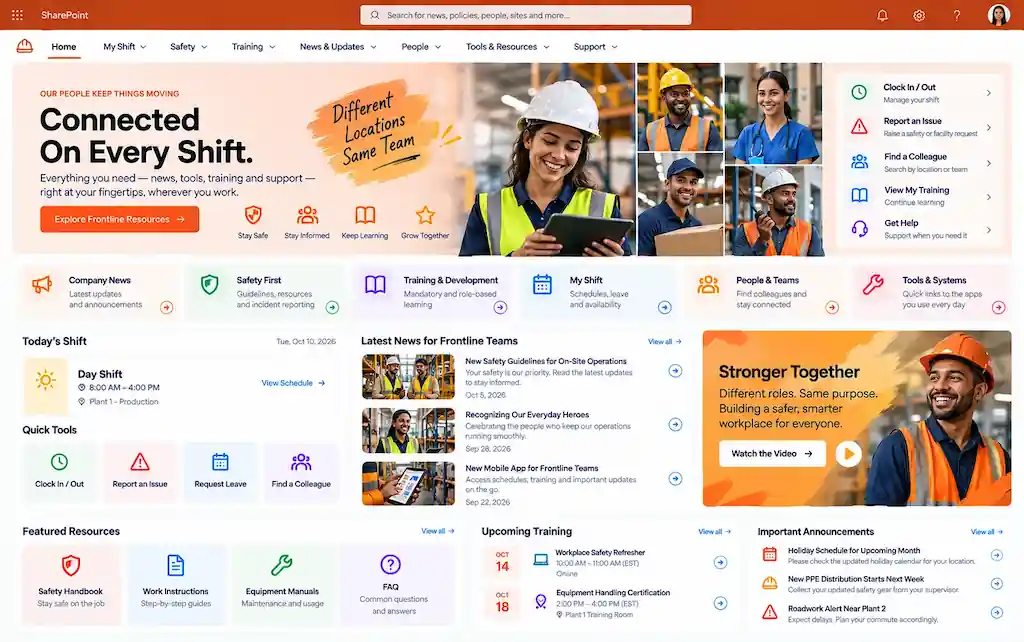
Example 23: The Manufacturing Floor Intranet
What it solves: Shop-floor access to procedures, safety information, shift handover notes, training videos, and communication, on the phones operators already carry.
Key features: Mobile-first Viva Connections experience, shift handover digital boards, SOP library with visual workflows, safety alerts with acknowledgment tracking, training video library, recognition feed, manager-led communication channels.
SharePoint components: Viva Connections dashboard cards, mobile-optimized pages, Microsoft 365 F-series licensing for frontline, Power Apps for shift handovers, Stream for training, audience targeting by shift/site.
Why the design works: It meets manufacturing workers where they are — on phones, in noisy environments, with limited time and limited typing. The card-based mobile experience prioritizes glanceable information over deep content.
Governance considerations: Mobile device management (BYOD vs corporate devices). Multi-language content. Shift-specific targeting. Safety acknowledgment audit trail.
Mobile experience: This is the experience.
AI/Copilot readiness: Strong for safety/procedure lookups when content is properly tagged.
Implementation complexity: Medium. Most of the work is content design and adoption.
Example 24: The Retail Store Communications Portal
What it solves: Store-level access to merchandising guidance, daily huddles, promotions, training, and corporate communications for the retail associates who actually deliver the brand experience.
Key features: Store-specific homepage with audience targeting by region/store, daily huddle materials, merchandising photo guides, sales contests and recognition, training modules, real-time promotional updates, manager broadcast tools.
SharePoint components: Hub site with store subsites, audience targeting at scale, Viva Connections mobile, Power Apps for store-level reporting, Stream for training videos.
Why the design works: Retail communications are notoriously inefficient: district managers forwarding emails, paper memos, end-of-day phone calls. A mobile-first store portal replaces that with structured, targeted, immediate communication.
Mobile experience: This is the experience. Most store associates have only intermittent computer access.
AI/Copilot readiness: Practical use cases include “what’s today’s promotion?” and “how do I process a return for X?”
Implementation complexity: Medium. The biggest dependencies are device strategy and content production scale.
Example 25: The Healthcare Clinical Staff Intranet
What it solves: Bedside and floor-level access to clinical protocols, drug references, policy updates, education, and unit-specific communications for nurses, technicians, and clinical support staff.
Key features: Clinical protocol library with mobile-optimized layouts, drug and procedure reference, unit-specific communications, mandatory training tracking, accreditation documentation, shift handover support, recognition and culture content.
SharePoint components: Document libraries with strict metadata and version control, Purview retention and labels, Viva Connections cards, Power Apps for huddles and reporting, integration with clinical systems where appropriate.
Why the design works: Clinical staff need fast, authoritative answers in high-stakes moments. The design priorities are speed, authority, and clarity — not aesthetics. The best healthcare intranets we’ve built are functionally beautiful, not visually beautiful.
Governance considerations: Significant. Clinical content has patient safety implications. Approval workflows are typically multi-step. Compliance with HIPAA, Joint Commission, regional regulators. Sensitivity labels essential.
Mobile experience: Critical. Most clinical reference happens at the bedside.
AI/Copilot readiness: High-value with strict governance. Clinical Copilot use cases require careful guardrails and clinical sign-off.
Implementation complexity: High. Healthcare intranets are usually multi-quarter projects with deep clinical stakeholder involvement.
Why Most SharePoint Intranets Fail
After fifteen years of doing this work, the failure patterns are remarkably consistent. If your intranet is struggling — or you’re trying to avoid your next one struggling — these are the patterns to watch for.
Treating the intranet as a design project, not a product. The most common failure mode. A consulting firm or agency delivers a beautiful site, a six-month launch happens, and within a year the intranet is showing its age. Intranets are products that need ongoing investment — content, governance, iteration — not one-time projects.
Weak information architecture. Confusing navigation, inconsistent metadata, no clear taxonomy. Symptoms: employees say “I can never find anything, ” which is often what triggers a redesign that doesn’t address the underlying IA.
No content ownership. Every piece of content has to have a human owner. Without that, content goes stale, accuracy drops, trust collapses, employees stop visiting, and the intranet becomes the place where leadership announcements go to die.
Over-customization. Custom SPFx web parts for everything, custom design that fights Microsoft’s update model, integrations that break each quarter. Heavy customization is expensive to maintain and harder to evolve.
No real adoption strategy. Launch communications, a champions network, ongoing usage measurement, iteration. Most intranets get a launch and then are ignored.
Search optimization treated as IT work. Search is content work: metadata, promoted results, page titles. Most organizations never tune search after launch and then complain it doesn’t work.
Desktop-only thinking. A 2026 intranet that doesn’t have a serious mobile and Viva Connections strategy is incomplete. The mobile workforce is real, and Viva Connections is now mature enough to be the primary intranet surface for many employees.
Governance documented but not lived. A governance plan in a PowerPoint isn’t governance. Real governance is staffed, scheduled, and enforced.
Underestimating Copilot’s data exposure risk. Permissions sprawl that was tolerable in a pre-Copilot world becomes a security incident when Copilot surfaces it.
Skipping change management for frontline workers. Frontline adoption requires more — not less — change management than knowledge workers because the digital muscle memory is thinner.
One common mistake we see: organizations conflate the launch with success. Launch is when the work starts, not when it ends. The intranets that are great in year three are the ones that were intentionally tended in years one and two.
Modern SharePoint Intranet Trends in 2026
A condensed view of what’s shaping intranet design this year:
SharePoint Agents are mainstream. Site-grounded AI agents are rolling out broadly. Every well-built intranet section will have at least one agent dedicated to it within twelve months.
Viva Connections is the mobile intranet, full stop. Standalone mobile intranet apps are being retired in favor of Viva Connections as the unified surface.
Personalization through audience targeting at scale. Audience targeting capabilities have matured. Designs that show the same homepage to 10,000 employees are now considered backward.
Video as a first-class communication format. Stream and Clipchamp are deeply integrated. Leadership communications without video are losing relevance.
Hub site architecture as the default. Flat, hub-based structures with consistent metadata have replaced classic hierarchical site collections.
Modern lifecycle policies enforce hygiene automatically. Site retention, archival, and decommissioning are increasingly automated rather than manual.
Sensitivity labels become Copilot prerequisites. Microsoft Purview classification is now part of every serious intranet rollout.
Integration with HRIS, ITSM, ERP, CRM as the norm. Intranets are no longer destinations — they’re orchestration surfaces for the systems behind them.
Multi-language intranets via SharePoint’s native multilingual feature. Translation governance is now part of every global intranet.
Frontline workers are first-class users. Designs that don’t account for the deskless majority are now considered incomplete.
Comparison Tables
Traditional Intranet vs Modern SharePoint Intranet
Dimension
Traditional Intranet (pre-2020 patterns)
Modern SharePoint Intranet (2026)
Primary access
Desktop browser
Desktop + Teams + Viva Connections mobile
Navigation
Deep hierarchical menus
Flat hub architecture, search-first
Personalization
Minimal
Audience targeting + AI-driven
Search
Often unusable
Microsoft Search + Copilot grounding
Content production
IT-gated
Distributed authoring with governance
Integration
Iframes and links
Deep Microsoft 365 + Power Platform
Mobile experience
Afterthought
First-class via Viva Connections
AI readiness
None
Native Copilot integration
Frontline support
Ignored
Designed-in via F-series licensing
Update cadence
Multi-year rebuilds
Continuous improvement
SharePoint Online vs Legacy Intranet Platforms
Capability
Legacy Intranet (custom CMS or older SharePoint)
SharePoint Online in 2026
Hosting
Self-managed or vendor-hosted
Microsoft-managed cloud
Update model
Custom development per release
Continuous Microsoft updates
Microsoft 365 integration
Add-on at best
Native
Cost trajectory
Compounds with maintenance
Predictable per-user licensing
AI capabilities
Custom builds
Copilot built-in
Mobile
Separate app required
Viva Connections built-in
Time-to-launch
9-18 months
8-26 weeks
Total cost (mid-market)
$300k–$1M build, then maintenance
$30k–$200k initial, then iteration
Out-of-the-Box vs Custom Intranet
Factor
Out-of-the-Box
Custom
Time to launch
4-12 weeks
4-9+ months
Cost
$10k–$60k
$100k–$500k+
Brand fit
Microsoft-styled with theming
Full brand expression
Update resilience
Inherits Microsoft updates cleanly
Each update is a regression test
Long-term maintenance
Low
Medium to high
Best for
SMBs, organizations valuing speed
Large organizations with brand-critical experiences
Communication Site vs Hub Site
Element
Communication Site
Hub Site
Purpose
Single-site experience (news, content publishing)
Connector across multiple sites
Audience
Broad organizational audience
Federation across related sites
Navigation
Site-local
Hub-wide consistent navigation
Use case example
Department portal
Corporate intranet front door
Maximum scale
Limited to a single site
Up to 2,000 hubs per tenant
Best for
Self-contained communications
Multi-site intranets
How to Plan a SharePoint Intranet
Governance Checklist
Defined intranet product owner with budget and authority
Site provisioning process with templates and approvals
Content ownership model (owner per site, per page)
Editorial calendar and content review cadence
Taxonomy and metadata standards documented
Audience targeting rules documented
Sensitivity labeling and retention policies applied
Permissions audit cadence (quarterly minimum)
Site lifecycle policies (creation, review, archival)
Search tuning cadence
Analytics and success metrics dashboard
Champions network with named members
Quarterly intranet steering committee
Case Studies from Real Engagements
A handful of representative project outcomes from intranets we’ve helped deliver.
Manufacturing Intranet — Global Industrial Manufacturer (8,000 employees)
Challenge: Fragmented country sites, no consistent corporate voice, frontline workers (60% of workforce) effectively disconnected from corporate communications.
Solution: Hub-based architecture with corporate and country hubs, Viva Connections mobile experience for shop floor, Microsoft 365 F3 licensing for frontline, audience targeting for region and role, multilingual content across nine languages, integration with quality and safety systems.
Outcome: 78% mobile adoption among frontline workers within six months. Reduction in compliance training delays by 40%. First “real” channel for corporate-to-frontline communication.
Challenge: HR team overwhelmed by tier-one questions, fragmented benefits and policy content, no self-service.
Solution: Modern HR hub with embedded Workday data, policy library with smart search, Power Apps for time-off and benefits requests, Copilot integration for policy Q&A.
Outcome: HR ticket volume reduced by 52% year-over-year. Time-to-resolution for benefits questions cut from 2 days to under 4 hours. Employee satisfaction with HR services up 22 points.
Multi-Location Intranet — National Retailer (450 stores, 12,000 associates)
Challenge: Store communications dependent on regional manager email forwards. No consistent visibility into corporate priorities at the store level.
Solution: Hub-based architecture with corporate hub and store sites, store-targeted homepage content, daily huddle digital boards, mobile-first design for associate phones, integration with workforce management system.
Outcome: 91% store-level adoption within ninety days. Daily huddle compliance improved from 60% to 94%. Average sale of new product launches up 14% due to faster, more consistent communication.
Document Management Intranet — Regional Healthcare System (3,200 clinical and admin staff)
Challenge: Policy and procedure content scattered across 27 sites and shared drives. Accreditation audit risk.
Solution: Centralized policy and procedure center with metadata-driven navigation, Purview retention and sensitivity labels, mandatory acknowledgment workflows, mobile access for clinical staff, integration with Joint Commission audit reporting.
Outcome: Passed accreditation audit with zero findings related to policy management. Clinical staff time spent searching for policies reduced by an estimated 6 hours per nurse per month.
Employee Communication Portal — Professional Services Firm (2,200 employees)
Challenge: Internal communications limited to email blasts with declining open rates. No mechanism for cross-region cultural connection.
Solution: Communication intranet with audience-targeted news, leadership video portal, recognition feed, employee story spotlights, Yammer/Engage integration for two-way dialogue.
Outcome: Internal news consumption tripled in the first quarter. Employee engagement survey scores related to “feeling informed” up 28 points. Leadership videos averaging 70%+ completion rates.
Knowledge Management Portal — Global Consulting Firm (4,500 employees)
Challenge: Practice-area knowledge locked in individual consultants’ files and inboxes. Significant rework on engagements.
Solution: Knowledge management hub with curated articles, expert directory with skills tagging, FAQ pattern, content rating, Copilot integration for grounded answers across practice content.
Outcome: 40% of repeat questions deflected to self-service or AI answers. Consultant time savings estimated at 3 hours per week per consultant. Newer consultants ramping 30% faster on engagements
A SharePoint intranet is an internal employee portal built on Microsoft SharePoint Online (part of Microsoft 365) that serves as the digital workplace for communication, content, collaboration, and integration with the Microsoft ecosystem. Modern SharePoint intranets typically combine a corporate home site, departmental and functional hub sites, and integration with Teams, Viva, Power Platform, and Copilot.
The best examples vary by use case: communication intranets for global news, HR portals for self-service, document management for compliance, knowledge bases for institutional memory, hybrid workplace hubs for distributed teams, frontline intranets for deskless workers, and emerging AI-powered intranets built around Copilot. The “best” intranet for any organization is the one that solves its specific employee experience problem — not the prettiest screenshot.
Yes — SharePoint is the most widely used intranet platform in the world. It’s built for it, with communication sites, hub sites, news, audience targeting, mobile via Viva Connections, search, and deep Microsoft 365 integration. Microsoft has invested heavily in SharePoint as an intranet platform in 2025-2026 with new agent capabilities, improved authoring, and deeper Copilot integration.
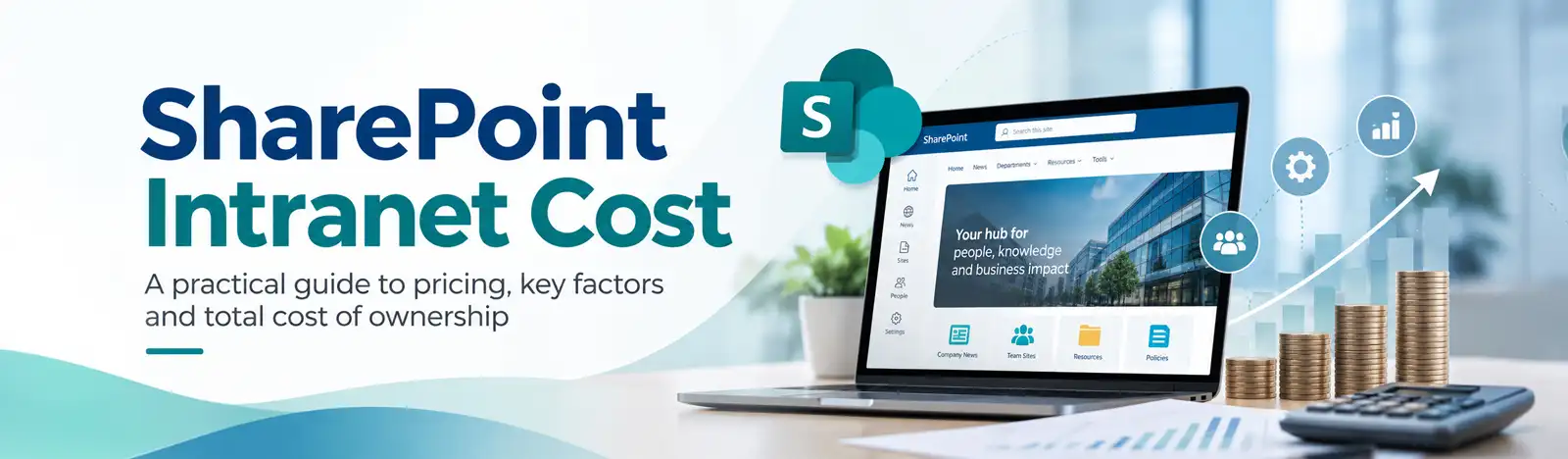
A basic SharePoint intranet runs $10,000–$40,000. A mid-market custom-branded intranet with personalization and integrations typically runs $80,000–$200,000. Enterprise multi-language, multi-region intranets run $300,000–$1M+. Licensing is separate (Microsoft 365 plans range from $7 to $60 per user per month). Ongoing support and content investment is typically 15–25% of initial build cost per year.
A good intranet design is built around employee outcomes, not visual aesthetics. The fundamentals are clean navigation, scalable information architecture, useful search, mobile responsiveness via Viva Connections, personalization through audience targeting, lived governance, and authentic content. Visual design matters, but it’s the last 20% — the first 80% is structure, content, and discipline.
A SharePoint communication site is a single site type optimized for broadcasting content to a broad audience. A SharePoint intranet is a connected network of sites (typically a hub structure with a home site, communication sites, and team sites) that together form the digital workplace. Most modern intranets use a hub site as the corporate home with communication sites and team sites federated underneath.
Yes — SharePoint with Viva Connections is one of the strongest internal communications platforms available. It combines audience-targeted news, video, executive messaging, mobile delivery, two-way dialogue through Engage (Yammer), and analytics. It’s used by most of the Fortune 500 for exactly this purpose.
SharePoint is used by over 250,000 organizations globally, including roughly 85% of the Fortune 500. Notable publicly-discussed implementations span finance, manufacturing, healthcare, consulting, retail, energy, and government. Microsoft maintains a public Lookbook of intranet design examples at lookbook.microsoft.com.
A focused departmental or small-business intranet can launch in 4–8 weeks. A mid-market enterprise intranet with custom branding and integrations typically takes 4–6 months. Large, multi-region or multi-language enterprise intranets usually run 6–12 months. Content migration and governance setup often run longer than the technical build.
Out-of-the-box uses native SharePoint web parts, Viva Connections, and Microsoft templates with theming for brand fit. It’s faster ($10k–$60k, 4–12 weeks), inherits Microsoft updates cleanly, and is sufficient for most SMBs. Custom adds SPFx web parts, custom design systems, and deeper integrations ($100k–$500k+, 4–9 months), suited for organizations with strong brand requirements or unique workflow needs.
Final Thoughts: What to Take Away
A few things worth holding onto after twenty-five examples and a lot of frameworks:
The best intranet for your organization is not the one in this article. It’s the one designed around how your employees actually work, what they actually need, and how your business actually operates. The examples above are patterns, not prescriptions.
Investing in the unsexy fundamentals — information architecture, content ownership, governance, adoption pays back far more than investing in custom design. The most beautiful intranets we’ve ever seen failed because they skipped this. The most boring-looking ones we’ve ever built have driven measurable business outcomes for years.
The 2026 question isn’t “should we build a SharePoint intranet?” It’s “is our SharePoint environment ready for Copilot, Viva Connections, and the shift to AI-grounded employee experience?” If your intranet is more than three years old, the answer is almost certainly no — and that’s a planning problem worth taking seriously.
Frontline workers are the largest unrealized intranet opportunity in most organizations. If you have a substantial deskless workforce, your most impactful intranet investment in 2026 is probably not a redesign of the corporate home page; it’s a Viva Connections mobile experience for the people who don’t have desks.
The best intranets prioritize adoption over design. Always. Without exception.
Where to go from here
If your organization is evaluating an intranet refresh, planning a migration from a legacy platform, building toward Copilot readiness, or trying to understand whether your current intranet investment is actually paying off, these are the moments where experienced consulting earns its keep.
Beyond Key’s SharePoint intranet practice helps businesses design, build, and modernize digital workplaces on SharePoint Online and Microsoft 365. We work across industries — manufacturing, professional services, healthcare, financial services — and across maturity levels, from first SharePoint deployment to Copilot-ready modernization. As a Microsoft Solutions Partner, we bring the full Microsoft 365, Power Platform, and Dynamics 365 stack to every engagement.
If you’re thinking through any of these questions in your business, talk to a SharePoint intranet consultant. We’ll spend the first conversation understanding where you are before we ever suggest where to go.