A practical, vendor-neutral guide for CIOs, IT directors, and digital workplace leaders evaluating SharePoint consulting partners in Australia — including a comparison...
Quick answer: A SharePoint AI Readiness Assessment is a structured evaluation of a Microsoft 365 tenant’s governance, information architecture, content...
SharePoint Online is a cloud-based platform delivered through Microsoft 365, where Microsoft manages infrastructure, updates, and security. SharePoint On-Premises is hosted on an organization’s own servers, offering full control over infrastructure, customization, and compliance.
In 2026, most organizations are moving toward SharePoint Online due to scalability, AI capabilities, and reduced IT overhead. However, SharePoint On-Premises continues to be relevant for highly regulated industries and legacy-heavy environments.
What is the Core Difference? (Beyond Cloud vs Server)
Most comparisons stop at cloud vs on-prem — but the real difference is:
Responsibility vs Control
SharePoint Online → Microsoft owns responsibility
SharePoint On-Premises → You own responsibility
This affects:
Security accountability
Cost predictability
Innovation speed
Maintenance effort
Risk exposure
Strategic Insight:
Organizations today are not just choosing a platform—they are choosing an operating model.
What is SharePoint?
SharePoint is a web-based platform for development that lets people work together to share and sync files. It’s a platform for managing documents and sharing content that helps teams work together on different kinds of content. Because it allows teams to work together, it is also used to make modern intranets and digital workplaces for businesses.
There are two versions of SharePoint available, SharePoint Online, web-based, and SharePoint On-Premises, a locally installed version. Both versions of SharePoint are great options for organizations looking to implement a modern enterprise solution.
SharePoint Online:
SharePoint Online is a cloud-based service that Microsoft offers. It is subscription based, so there is a monthly fee. The most significant advantage of using SharePoint Online is that Microsoft takes care of all the updates and security patches. This means you don’t have to worry about keeping your software up-to-date, which can be time-consuming and expensive. Another advantage is that you can access your data anywhere worldwide, as long as you have an internet connection.
SharePoint On-Premise:
SharePoint On-Premises is a version of SharePoint that is installed on your local servers. SharePoint On-Premises gives you full control over your environment, including the ability to customize and add new features. While SharePoint On-Premises requires initial setup and ongoing maintenance, it can be an excellent option for organizations with specific needs or who want complete control over their data.
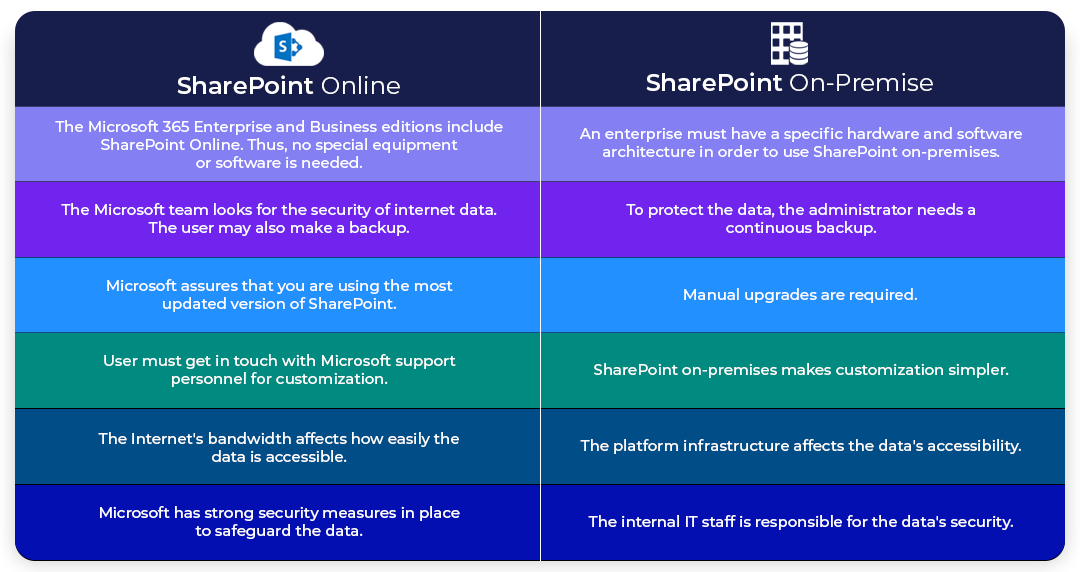
SharePoint Online vs On-Premises: High-Level Comparison
Feature
SharePoint Online
SharePoint On-Premises
Hosting
Microsoft Cloud (Azure)
Local Servers
Maintenance
Microsoft-managed
Internal IT
Cost Model
Subscription (OPEX)
Capital + Operational (CAPEX + OPEX)
Scalability
Elastic
Limited by hardware
Accessibility
Anywhere
VPN/Internal
Updates
Automatic
Manual
Customization
Modern (SPFx)
Deep (Full-trust code)
AI Capabilities
Native
Not available
The decision is less about features and more about business priorities and long-term strategy.
Key factors to keep in mind while deciding between SharePoint On Premise vs Online
Total Cost of Ownership (SharePoint Online vs SharePoint On Premise)
SharePoint Online (3-Year View)
Subscription (₹ / user / month)
Included services:
Teams
OneDrive
Security tools
Lower upfront cost, predictable spending
SharePoint On-Premises (Hidden Costs)
Server hardware: $45K–$75K
SQL licensing: $45K–$90K
IT staff: up to $300K+
Maintenance & upgrades
Over 3 years, costs can reach $500K–$780K depending on scale
Key Insight:
On-Premises is not cheaper — it’s just differently priced upfront vs long-term
Security & Compliance: Reality vs Perception
This is where most decision-makers get it wrong.
SharePoint Online Security
Microsoft-managed security patches
Data encryption (at rest + in transit)
Built-in:
DLP
Conditional access
Threat detection
Microsoft invests heavily in security frameworks
SharePoint On-Premises Security
Full control over:
Firewalls
Encryption
Access policies
BUT:
Manual patching
Higher risk of misconfiguration
Depends entirely on IT expertise
Real Insight:
Control ≠ Better security Poorly managed On-Prem = higher risk
Customization: Flexibility vs Sustainability
On-Premises Customization
Full-trust code
Server-side modifications
Deep system-level changes
Pros:
Unlimited flexibility
Cons:
High technical debt
Upgrade risks
SharePoint Online Customization
SPFx (modern framework)
APIs + Power Platform
No server-side code
Pros:
Upgrade-safe
Scalable
Cons:
Limited deep control
Strategic Insight:
Modern enterprises prefer sustainable customization over unlimited flexibility
Integration & Ecosystem Advantage
SharePoint Online Ecosystem
Microsoft Teams
PowerApps
Power Automate
Microsoft Copilot
Fully integrated digital workplace
On-Premises Integration
Requires custom connectors
Higher development cost
Limited AI integration
Integration is one of the biggest drivers of cloud adoption
Pros and Cons of SharePoint Online and SharePoint On-Premises
There are two versions of SharePoint- SharePoint Online and SharePoint On-premises. Both have their pros and cons that should be considered when planning which version to use.
SharePoint Online
Pros
SharePoint Online is a cloud-based application that allows users to create and manage websites and web-based applications.
It offers users a central repository for storing and managing documents, images, and other files.
It lets users share information and collaborate with others through the use of forums, blogs, wikis, and document libraries.
SharePoint Online integrates natively with Microsoft Office, making it easy for users to edit and share documents.
SharePoint Online offers users a variety of customization options to personalize their experience.
Cons
SharePoint Online can be expensive for some users, as it requires a subscription to Microsoft Office 365.
SharePoint Online can be difficult to learn and use for some users, as it is a complex platform with many features.
Some users may find the default user interface of SharePoint Online to be unappealing or difficult to navigate.
SharePoint On-Premise
Pros
Sharepoint on-premise is highly customizable, so organizations can tailor it to their specific needs and workflows.
Flexible and can be used for a variety of different purposes, from document management to intranet portals
Scalable and can be used by organizations of all sizes
Secure and offers a variety of security features, such as data encryption and user authentication.
Supported by a large and active community of users and developers.
Cons
Complex to set up and use, especially for larger organizations.
Costly to purchase and maintain, particularly for larger organizations.
Limited to Microsoft Windows Server operating systems.
Major variations between SharePoint On Premise vs Online
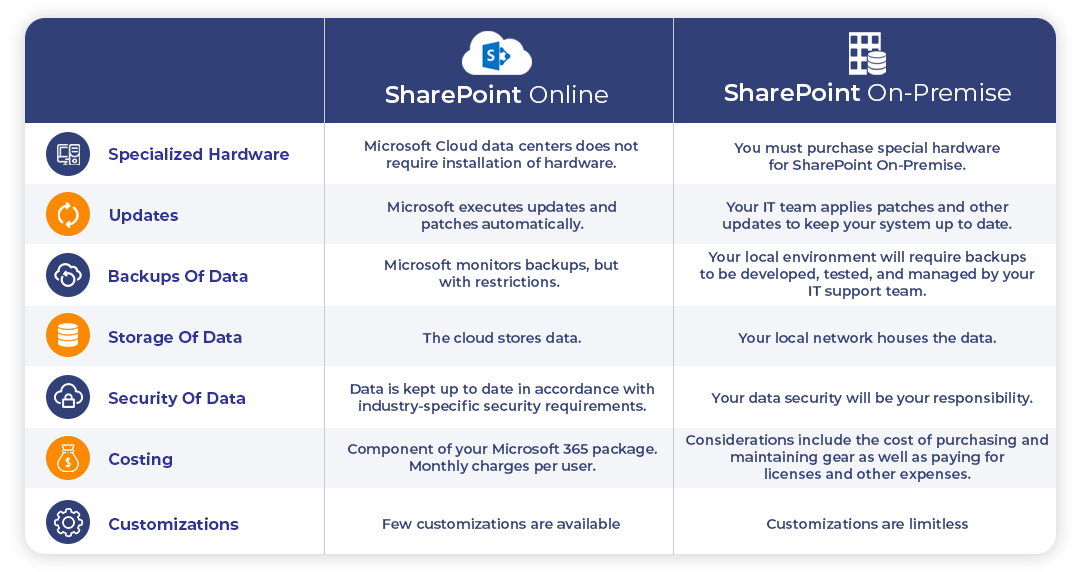
1. SPECIALIZED HARDWARE
SharePoint Online: Microsoft Cloud data centers do not require the installation of hardware. SharePoint On-Premise: You must purchase special hardware for SharePoint On-Premise.
2. UPDATES
SharePoint Online: Microsoft executes updates and patches automatically. SharePoint On-Premise: Your IT team applies patches and other updates to keep your system up to date.
3. BACKUPS OF DATA
SharePoint Online: Microsoft monitors backups, but with restrictions. SharePoint On-Premise: Your local environment will require backups to be developed, tested, and managed by your IT support team.
4. STORAGE OF DATA
SharePoint Online: The cloud stores data. SharePoint On-Premise: Your local network houses the data.
5. SECURITY OF DATA
SharePoint Online: Data is kept up to date in accordance with industry-specific security requirements. SharePoint On-Premise: Your data security will be your responsibility.
6. COSTING
SharePoint Online: Component of your Microsoft 365 package. Monthly charges per user. SharePoint On-Premise: Considerations include the cost of purchasing and maintaining gear as well as paying for licenses and other expenses.
7. CUSTOMIZATIONS
SharePoint Online: Few customizations are available SharePoint On-Premise: Customizations are limitless
To save time and money by choosing this option instead of building the necessary infrastructure.
When should I use SharePoint On-Premise?
If you already have a specific infrastructure in place, on-premise is the ideal option.
High compliance requirements
High demands for customization
Additional storage than what Microsoft provides
Greater flexibility with regard to the design of your SharePoint sites
An intranet will only be accessible through your company’s network.
Why is SharePoint Online a better option?
The following are the main advantages of switching to the SharePoint Online platform:
Integration with Microsoft 365 applications
Advanced security measures
Mobile device compatibility
Simple external user collaboration initiatives
Possibility of building document libraries to improve collaboration
There is an end-of-life for every On-premises version, but not for SharePoint Online. The End of life dates for SharePoint versions are displayed below
Version
End of Life
Sharepoint 2013
Apr 11, 2023
Sharepoint 2016
Jul 14, 2026
Sharepoint 2019
Jul 14, 2026
Real-World Use Cases
SharePoint Online:
Intranet portals
Document collaboration
Workflow automation
On-Premises:
Government systems
Financial institutions
Legacy ERP integration
Where SharePoint Consulting Becomes Critical
Many organizations struggle because this decision is not just technical—it’s strategic.
SharePoint On-Premises = Control + customization + compliance
The right choice depends on business priorities, not just technology
CONCLUSION:
Your choice will ultimately be on your company’s priorities for information security, compliance standards, and business continuity. However, SharePoint on-premises and online are comparable regarding basic functional coverage.
Your internal resources and legal requirements will impact SharePoint On-Premise. You have more direct control over your data and compliance with legal obligations. However, it makes things more complicated. It is easier to set up and maintain SharePoint Online than On-Premise. However, whatever platform or version you use- Microsoft always ensures that you continue to enjoy the unlimited features provided on both versions.
Additionally, there are specific Microsoft Solution Partner companies like Beyond Intranet. We have 18+ years of experience in the Microsoft ecosystem with Gold competency. We excel in all kinds of SharePoint-based custom development, SharePoint migration, and intranet services, along with expertise in Power Platform development. Feel free to reach out to us for any of your consulting needs. And even if you need our help in your SharePoint health check or suggesting you the right platform!
Bhupendra is a Digital Transformation Expert and Microsoft 365 Consultant who helps organizations modernize the way they work using the Microsoft 365 suite of services. As a Microsoft Certified Teams Administrator Associate, with credentials in Microsoft 365 Fundamentals and the Microsoft Service Adoption Specialist assessment, he combines technical expertise with adoption strategies to drive meaningful business change.