A practical, vendor-neutral guide for CIOs, IT directors, and digital workplace leaders evaluating SharePoint consulting partners in Australia — including a comparison...
Before you look for a SharePoint developer for hire, know exactly what you need built. A surprising share of requests can be met with built-in SharePoint features, Power Apps, or Power Automate, with no custom code at all. If custom work is genuinely required, the decision becomes how to hire, and how to confirm that the person or team has hands-on SharePoint Framework (SPFx) and Microsoft 365 experience, plus a working understanding of security, permissions, and governance.
This guide covers what a SharePoint developer does, the skills to check, what hiring costs in 2026, the engagement models available, how to evaluate candidates, and a ten-step process you can follow.
TL;DR
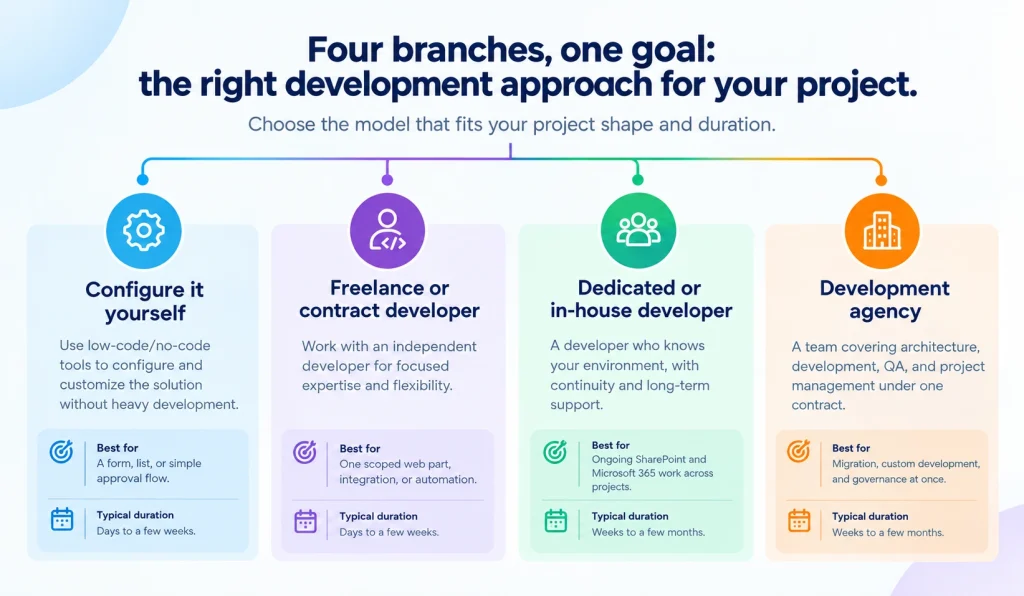
A simple form, list, or approval flow: use Power Apps or Power Automate. You do not need a developer.
One clearly scoped web part, integration, or automation: a freelance or contract developer.
Ongoing SharePoint and Microsoft 365 work across multiple projects: a dedicated or in-house developer.
Migration, custom development, and governance at the same time: a development agency or team.
A SharePoint developer builds the web parts, workflow automations, integrations, and document solutions that SharePoint does not provide out of the box. They create custom functionality on top of Microsoft 365 and SharePoint Online while working inside the platform’s security and governance model rather than around it.
The role is more than writing code. A developer worth hiring can take a business requirement and translate it into a technical approach, weigh in on site and information architecture decisions, build and test the solution, integrate it with other Microsoft 365 or third-party systems, troubleshoot issues after go-live, document what was built, and hand off something another person can maintain. When any of those steps is skipped, the project usually runs into trouble later.
Typical deliverables include SPFx web parts and extensions, custom intranet components, automated workflow solutions, Microsoft 365 integrations with Teams, Outlook, and Viva, Microsoft Graph and REST API integrations with external systems, document management and metadata-driven solutions, migration utilities, and search or navigation enhancements for large or complex sites. A newer category, SharePoint Copilot Apps, lets developers build interactive components that appear inside a Microsoft 365 Copilot conversation; more on that below.
Discover how SharePoint can simplify collaboration, content management, and everyday work.Explore SharePoint services
These three roles are often lumped together, and that is where hiring mistakes start.
Role
Primary focus
Typical deliverables
When to hire
SharePoint developer
Building custom code and integrations
SPFx web parts, APIs, custom workflows
You need functionality SharePoint does not offer natively
SharePoint consultant
Strategy, architecture, governance
Roadmaps, information architecture, governance plans
You need to decide what to build and why before anyone writes code
SharePoint administrator
Day-to-day platform operations
Permissions, site provisioning, tenant configuration
You need someone to run and maintain the environment
A developer builds what has been scoped. A SharePoint consultant helps you decide what should be built and how it should be governed in the first place. Many experienced practitioners do both, but the emphasis differs, and paying developer rates for strategy work, or asking a strategist to ship code, rarely ends well.
One more distinction worth knowing: a “Microsoft 365 developer” is a broader label. It usually means someone who builds across Teams apps, Graph-based services, Office add-ins, and Power Platform, with SharePoint as one surface among several. A SharePoint developer goes deeper on SharePoint specifically: information architecture, SPFx, permissions, and content-heavy solutions. If your project lives mainly in SharePoint, hire for depth. If it spans Teams, Outlook, and line-of-business systems equally, the broader profile may fit better.
Simple approvals often work fine in Power Automate. Multi-stage approvals with conditional logic, external system calls, and audit requirements usually need a developer involved in the design, even if Power Automate still runs the flow.
Connecting SharePoint to an ERP, CRM, or industry system through Microsoft Graph or REST APIs is development work, not configuration. It typically means authenticating with a Microsoft Entra ID app registration rather than a personal account, which is a decision a developer should make deliberately rather than by default. Our SharePoint integration services page describes what these projects usually involve.
Classic pages, InfoPath forms, and workflows built on SharePoint 2013 or 2016 patterns need redesigning for SharePoint Online, not just moving as-is. This is the point where a SharePoint migration becomes a development project as well as a data move.
Employee directories, org charts, personalized news feeds, and branded navigation beyond what SharePoint templates offer typically require custom development. See our SharePoint intranet development work for examples of what this looks like in practice.
Complex metadata models, retention and compliance rules, and document lifecycle automation at scale go beyond default library behavior. Our overview of SharePoint document management explains what a properly built system involves.
Even when your IT team has the skills, it may not have the bandwidth. Bringing in a developer for a defined project can be faster and cheaper than pulling internal staff off other priorities.
Standard site templates, list and library configuration, basic permission structures, and simple approval flows are usually within reach of an experienced SharePoint administrator or a citizen developer using Power Apps and Power Automate. If your requirement is a form with a few fields and an approval step, Power Apps consulting or in-house configuration will likely get you there faster and cheaper than a custom SPFx build. Reaching for custom development before ruling out configuration is one of the more common and avoidable ways SharePoint projects end up costing more than they needed to.
What we see on real projects. [CONFIRM with practice lead] A recurring pattern in scoping calls is a request for a “custom approval web part” that turns out to be a three-step Power Automate flow plus a list view. The reverse also happens: an “easy” Power Apps form that needs to write to two external systems with role-based visibility, which is a development project wearing a low-code costume. The first hour of any engagement should be spent deciding which of these you have.
Yes, but the work is shifting. Low-code tools and Copilot now handle straightforward forms, basic workflow automation, and routine configuration well enough that fewer requests need a developer at all. Integration, security, and AI extensibility work increasingly do.
Power Apps, Power Automate, and Copilot Studio have closed the gap on simple, repetitive requests: a status-tracking app, a basic approval chain, a standard site built from a template. Gartner forecast in December 2022 that by 2026, developers outside formal IT departments would make up at least 80 percent of the low-code user base, up from 60 percent in 2021. Whether or not that exact figure holds, the direction is clear. It describes who builds simple apps, not the disappearance of professional development work.
What still needs a developer: custom user interfaces beyond a basic canvas app, integrations through Microsoft Graph or REST APIs, enterprise-scale performance, proper application lifecycle management (ALM) and CI/CD, and tenant-level governance.
The newest example is SharePoint Copilot Apps, which entered public preview on 9 July 2026 as part of the SPFx 1.24 preview. They let developers build interactive components (approval panels, data grids, multi-step forms, dashboards) that appear directly inside a Microsoft 365 Copilot conversation, using the same SPFx tooling, TypeScript, packaging, and app catalog deployment as a normal web part. Microsoft has said general availability is targeted for later in 2026 and that details may change before then, so treat this as a direction to plan for rather than a feature to ship into production today.
The developer role is not going away. It is moving toward integrated, architectural, AI-enabled work rather than isolated components.
Case study: A global IT services enterprise worked with Beyond Intranet to integrate Microsoft Copilot Studio with SharePoint for natural language search across its knowledge base, the kind of AI-extensibility project that still needs developers who understand SharePoint permissions and architecture.
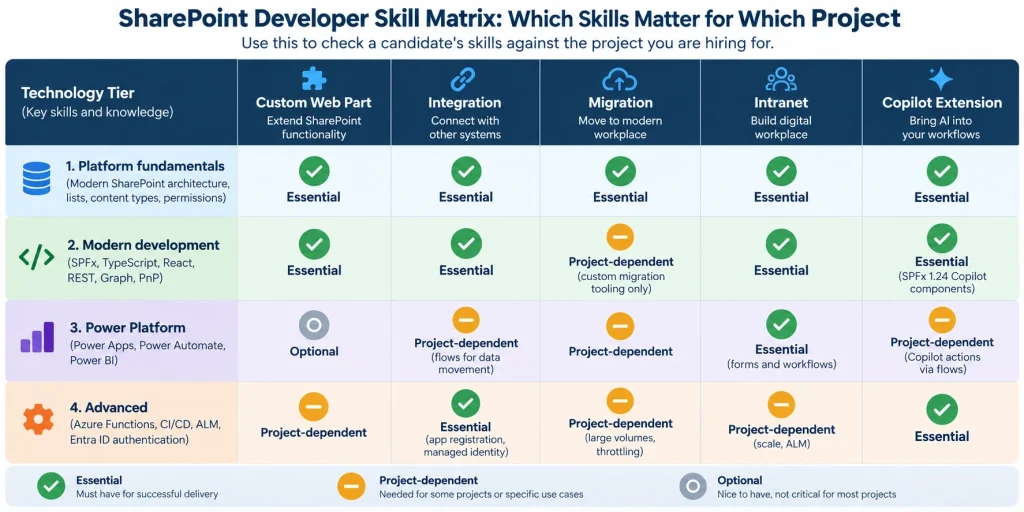
You want a blend of platform knowledge, modern development skills, fluency in the Power Platform, and, for larger projects, governance and DevOps experience. A developer who can only demonstrate one of these groups is a narrower hire than most organizations actually need.
Modern (not classic) SharePoint architecture, site and hub structure, lists and libraries, content types, metadata, and permissions. Permissions deserve special attention: every site, library, folder, and item inherits access from its parent by default, and breaking that inheritance to grant unique permissions should be the exception, not the norm. If a developer cannot explain that in plain language, they probably have not worked on a governance-conscious project.
SPFx (scaffolded through the Yeoman generator), TypeScript, React (function components and hooks rather than class-based patterns), REST APIs, Microsoft Graph, and PnP (PnPjs and, where relevant, PnP PowerShell), the toolkit almost every current SharePoint customization is built on.
Power Automate, Power Apps, Teams integration, Viva, and an understanding of how SharePoint fits into the wider Microsoft 365 ecosystem rather than standing alone.
Azure Functions for backend logic. CI/CD pipelines (typically Azure DevOps or GitHub Actions) that automatically package and deploy .sppkg files to the tenant app catalog instead of uploading them by hand. ALM across separate development, test, and production sites. Entra ID based authentication for API calls, preferably with a certificate or managed identity rather than a stored client secret. And, increasingly, Copilot extensibility for teams building AI-enabled experiences.
Experience with SharePoint 2013 or 2016 development does not transfer automatically to SharePoint Online. Farm solutions, sandboxed solutions, full-trust code, InfoPath, and SharePoint Designer workflows have no place in a modern build. A candidate whose portfolio is entirely on-premises needs to show SPFx work before you treat them as a SharePoint Online developer.
Each skill group matters for a different reason: platform knowledge prevents rework, modern development skills determine what is actually buildable, Power Platform fluency stops a developer from reinventing what low-code already solves, and the advanced skills separate a one-off script from a solution your organization can run for years.
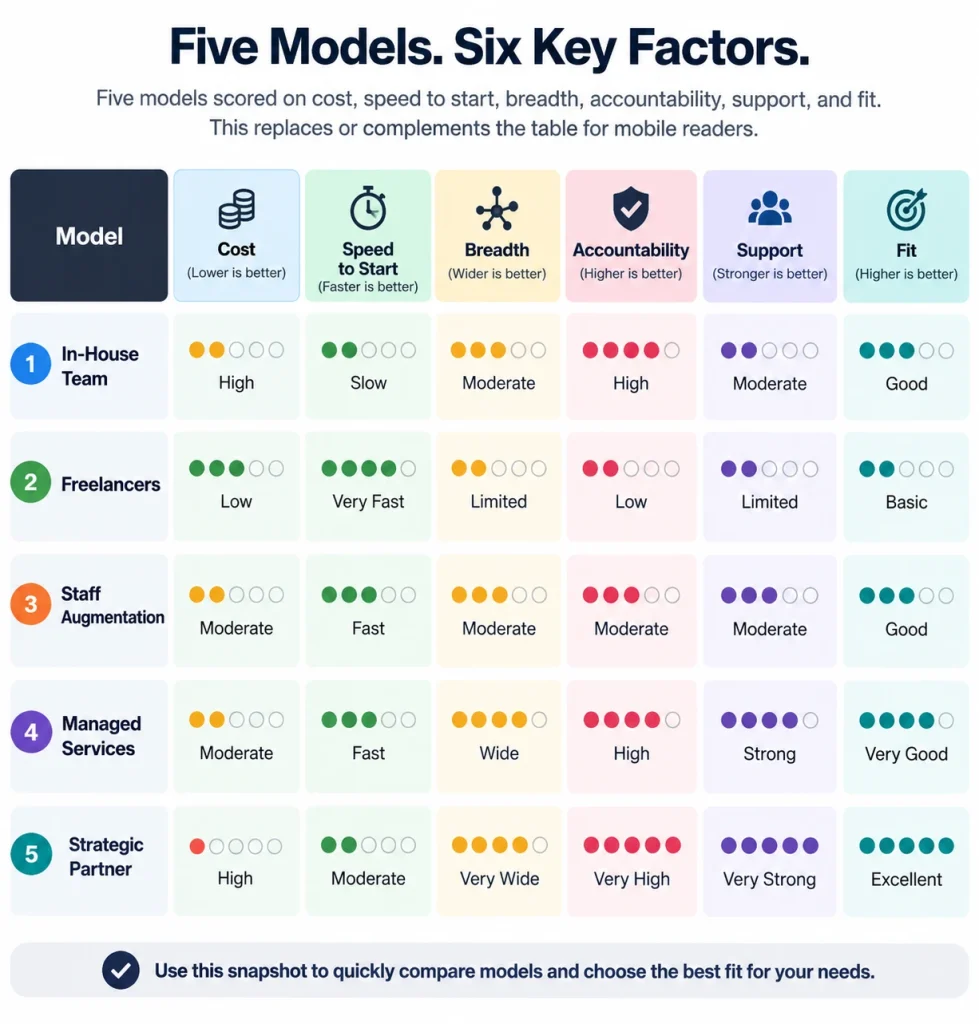
There is no single best engagement model. The right one depends on the size of the project, its urgency, and how much ongoing work you expect. Treat the following as a decision framework, not a rule; your own risk tolerance and internal capacity will shift the answer.
Best for a small, well-defined project with a clear scope. Quality varies a lot at this end of the market, so check recent SPFx portfolio work, ask for references, and make sure you understand how they handle testing and handoff.
Best for a steady stream of SharePoint and Microsoft 365 work rather than a one-off project. Onboarding and retention costs are real, so this model pays back over time, not on day one.
Best for a defined project or a temporary capacity gap: covering a busy migration period or a specific integration build without a long-term commitment.
Best for ongoing development needs where you want continuity and institutional knowledge of your environment without carrying a full-time employee on payroll.
Best for larger or higher-risk engagements that span development, migration, and governance at once, where you want architecture, development, QA, and project management under one contract, and continuity if an individual leaves. A SharePoint development company is usually the safer choice once a project stops being a single deliverable.
Case study: JSC Consultants engaged Beyond Intranet as a team to build a custom SharePoint solution for risk and action management supporting ISO 27001 compliance, a project spanning requirements, custom development, and ongoing governance.
Model
Cost structure
Speed to start
Breadth of skills
Accountability
Ongoing support
Best-fit project size
Freelancer
Lowest hourly rate
Fastest
Narrow (individual)
Individual only
Often limited
Small, single-scope tasks
In-house hire
Salary plus benefits
Slowest (recruiting)
Depends on hire
Direct, internal
Full-time by default
Continuous, long-term work
Contract developer
Mid-range
Fast
Narrow to moderate
Individual, contract-bound
Usually ends with contract
Defined projects, capacity gaps
Dedicated remote developer
Mid-range, predictable
Fast
Moderate
Individual, ongoing relationship
Typically included
Ongoing project work
Development agency or team
Highest, but bundled
Moderate
Broad (multi-discipline)
Contractual, company-level
Usually structured and available
Complex, multi-phase projects
A single skilled freelancer is often enough for a well-scoped, standalone web part or integration. A development company reduces delivery risk when the project touches architecture, migration, security, and long-term support at the same time. A single point of failure, one person leaving or one skill gap, matters far less when accountability sits with a team.
According to Glassdoor’s 2026 compensation data, average US SharePoint developer pay is around $69 an hour (about $143,800 a year), with a typical range of $59 to $83 depending on experience. Salary.com reports a slightly lower average as of July 2026, $59 an hour, with most falling between $55 and $64. [CONFIRM both figures on publication date]
Both figures cover salaried, US-based roles. Freelance and offshore rates run lower: freelance listings on Upwork typically range from $20 to $50 an hour depending on experience and location, with senior specialists and enterprise work costing more. We could not find reliable rate data broken out by region beyond the US market, so we are leaving that gap open rather than guessing.
Hourly billing handles scope changes well but needs active management, or you pay for runaway hours. Project-based (fixed-price) billing protects budget predictability but only works when requirements are locked down up front; scope changes get expensive fast. Dedicated hiring (a developer or team retained monthly) suits ongoing work where steady capacity matters more than negotiating a new statement of work for each request.
The main drivers are project scope, customization requirements, number of integrations, content migration, security and compliance needs, testing requirements, documentation, and whether ongoing support is part of the price or a separate service.
A credible estimate spells out scope and explicit assumptions, deliverables, milestones, a realistic timeline, the testing approach, the deployment plan, documentation commitments, post-launch support terms, how change requests will be priced, and, critically, who owns the source code and intellectual property once the project is delivered. If an estimate is missing any of these, ask before signing.
The market benchmarks above reflect general industry pay data, not Beyond Intranet’s own pricing, which is scoped per project based on requirements.
What we see on real projects. The estimates that go wrong are rarely wrong on the build. They are wrong on what surrounds the build: content cleanup before migration, permission remediation nobody scoped, and UAT cycles that stall on stakeholder availability. Asking “what is excluded?” is a better question than “what is included?”
Use the table below as an interview framework. The middle column is what separates a governance-aware developer from one who has only worked in loosely managed environments.
Requirement
What to ask
What a strong answer sounds like
Red flag
Hands-on SharePoint experience
“Walk me through the last three SharePoint solutions you built.”
Specific problems, specific decisions, specific outcomes. Names the SharePoint version and whether it was Online.
A generic skills list; talks about SharePoint only as “part of the stack”
Modern SharePoint and SPFx
“Which SPFx version did you last ship on, and how did you package and deploy it?”
Names a recent SPFx version, the app catalog, and a packaging step. Knows the difference between classic and modern.
Portfolio is all SharePoint 2013 or 2016 full-trust or InfoPath work
API and integration
“Describe a Microsoft Graph or REST integration you delivered, including authentication.”
Explains an Entra ID app registration, the permission scopes used, and why they chose a certificate or managed identity.
Cannot explain authentication, or authenticated with a user account
Power Platform judgment
“When would you refuse to write custom code for a request?”
Gives a concrete example where Power Apps or Power Automate was the better tool.
Defaults to custom code for everything, or has never used Power Platform
Security and governance
“How do you handle permission inheritance in what you build?”
Explains inheritance, why breaking it is the exception, and how their solution avoids creating unique permissions at scale.
Cannot explain inheritance in plain terms
Testing and deployment
“What happens between ‘works on my machine’ and production?”
Describes separate dev, test, and production sites, a CI/CD pipeline, and a rollback approach.
Manual uploads, no test environment, no repeatable process
Enterprise scale
“What broke at scale that did not break in testing?”
Has a real story about throttling, large lists, search latency, or permission sprawl.
Has only worked on small departmental sites
Case studies
“What exactly did you build on that project, not just where you worked?”
Can separate their own contribution from the team’s.
Vague on individual contribution
Documentation and communication
“What did you leave behind on your last project?”
Architecture notes, deployment runbook, admin guide. Offers to show a sample.
“The code is self-documenting”
Post-launch support
“If something breaks in week three, what happens?”
Defined support window, response times, and a named path for escalation.
No defined process, or support is “best effort”
Certifications are useful evidence of baseline knowledge, but on their own they do not confirm hands-on SPFx competence. Check them alongside project work, not instead of it.
See how a custom SharePoint solution helped a financial services company simplify and secure document management.View the case study
Define the business requirement. Start with the outcome (“reduce time spent searching for contracts”), not a list of technologies. This keeps the project scoped to a real problem.
Determine the required role. Decide whether the requirement needs a developer, a consultant, an administrator, or a combination. Getting this wrong is one of the most common and expensive hiring mistakes.
Define technical skills. Map the requirement to specific skills: SPFx and React for a custom web part, Microsoft Graph for an integration, and Power Automate for a workflow.
Choose an engagement model. Match freelance, contract, dedicated, in-house, or agency to your project’s size, duration, and risk tolerance using the comparison above.
Shortlist candidates or providers. General software experience matters less than experience with SharePoint and Microsoft 365 specifically.
Validate technical experience. Review actual solutions the candidate built, the architecture decisions behind them, code samples where possible, and how they approached testing.
Review security and governance practices. Ask how they handle permissions, tenant security, and deployment so that today’s build does not become tomorrow’s governance problem.
Discuss scope, timeline, and cost. Get assumptions and exclusions in writing, not just agreed verbally.
Define support and ownership. Settle source code and IP ownership, documentation deliverables, who holds credentials and access, who is responsible for maintenance, and what post-launch support looks like before work starts.
Start with a clearly defined engagement. For larger or less certain projects, begin with a discovery phase, a pilot, or a well-defined first deliverable before committing to a full program. This limits your exposure if the fit is wrong and gives both sides a real basis for the next phase.
Turn your SharePoint requirements into a secure, scalable, easy-to-manage solution.Discuss your project
Timelines depend heavily on scope. As a planning guide, basic configuration takes days, a single custom web part typically runs a few weeks, and a full intranet or migration project can take several months.
Requirement clarity has an outsized effect; vague requirements almost always take longer than expected. Beyond that, the number of integrations, the volume and complexity of content being migrated, internal approval cycles, security review requirements, and the depth of testing and user acceptance testing all add time. Stakeholder availability is an underrated factor: projects stall as often from slow internal sign-off as from technical issues.
What we see on real projects. The single most reliable predictor of a late SharePoint project is not technical complexity. It is whether a named business owner is available for weekly decisions. Projects with one usually land inside the range above; projects without one usually do not.
This section describes Beyond Intranet’s own stated experience and services, not independent third-party research.
For organizations weighing a freelancer against a development company, the practical value of a team is accountability that does not depend on one individual staying available and a single point of contact across development, migration, and governance rather than coordinating separate vendors for each. That is a fit consideration, not a guarantee; the right choice still depends on your scope and internal capacity.
US salaried SharePoint developer pay averages roughly $59 to $69 an hour as of 2026, per Salary.com and Glassdoor data, while freelance rates on platforms such as Upwork typically run $20 to $50 an hour depending on experience and location. Actual project cost depends on scope, integrations, and engagement model.
The main routes are freelance marketplaces such as Upwork and Toptal for individual contractors, staffing agencies for contract or in-house placements, and specialist SharePoint development companies for dedicated developers or full teams. The right route depends on project size and risk: marketplaces suit small, well-scoped tasks, while a development company suits work that spans architecture, migration, and support.
A developer builds the solution: code, integrations, custom components. A consultant helps define what should be built, how it should be governed, and how it fits your broader Microsoft 365 strategy. Many experienced practitioners do both, but the skill emphasis differs.
Not for standard use. SharePoint Online covers document storage, team sites, basic forms, and simple approvals through configuration and the Power Platform. You need a developer when you require custom SPFx web parts, integrations through Microsoft Graph or REST APIs, complex metadata and lifecycle solutions, or modernization of legacy customizations.
A single custom web part often takes two to six weeks; a full intranet or complex integration project can take several months. The real driver is requirement clarity and scope, not the technology itself.
Microsoft does not currently offer a certification titled “SharePoint Developer.” Relevant Microsoft 365 and Power Platform certifications provide useful evidence of baseline knowledge, but they are not a substitute for reviewing actual SPFx project work, references, and a portfolio.
For simple forms, approvals, and departmental apps, yes. For custom components, complex integrations, large-scale solutions, or Copilot extensions, you will still need a SharePoint developer, often working alongside the Power Platform rather than instead of it.
Yes. SharePoint Online development is done against a cloud tenant, so location rarely affects the technical work. What matters more is time zone overlap for meetings and decisions, secure access to your environment through properly scoped accounts, and clear communication routines. Dedicated remote developers and agencies work this way by default.
It depends on more than cost. Onshore hiring generally means more time zone overlap and easier real-time communication, which matters most for complex, fast-moving projects. Offshore hiring can lower direct cost but adds coordination overhead and may need a tighter security review depending on your compliance requirements. Many organizations use a hybrid: onshore architecture and stakeholder management, offshore build capacity.
Conclusion
Hiring a SharePoint developer comes down to a short decision path: figure out exactly what needs to be built, determine what level of SharePoint and Microsoft 365 expertise that actually requires, choose an engagement model that matches the size and risk of the work, and verify modern development skills, security practices, governance awareness, IP ownership, and post-launch support before you sign anything. Skipping any one of those steps is usually where hiring mistakes come from.
Gartner, “Gartner Forecasts Worldwide Low-Code Development Technologies Market to Grow 20% in 2023” (13 December 2022), which includes the 2026 low-code user-base forecast
Microsoft Learn, Overview of the SharePoint Framework (SPFx)
Microsoft 365 Developer Blog, “SharePoint Copilot Apps Now in Public Preview” (9 July 2026)
Sachin Jain is a Solution Architect at Beyond Key, based in Dallas, Texas. He specializes in designing and delivering enterprise solutions using Microsoft 365, SharePoint, and the Power Platform. He has led numerous digital transformation initiatives focused on automating business processes, building modern intranet solutions, and integrating enterprise systems with Power Apps, Power Automate, and Power BI.
Passionate about innovation and problem-solving, Sachin focuses on creating scalable, user-friendly solutions that bridge technology and business needs.