A practical, vendor-neutral guide for CIOs, IT directors, and digital workplace leaders evaluating SharePoint consulting partners in Australia — including a comparison...
Nobody shortlisting this software is confused about what it is.
They have sat through three demos. All three looked competent. All three produced a comparison sheet with a hundred and forty rows and green ticks running down every column, and somewhere around row sixty the exercise stopped meaning anything.
Which is the actual problem. Not understanding the category. Working out which handful of capabilities carry real weight, and which are there because a competitor listed them first.
So this is written for the shortlisting stage. Which tools you are really buying, which features hold the process up, where buyers go wrong, and how to test any of it before committing.
Key takeaways
eSourcing software is not one tool. It is a bundle of separate ones, and most buyers genuinely need three of them, not all five. The features that decide whether a platform works are supplier experience, auditability and integration, none of which shows up well on a feature count. And a short pilot with one real RFQ will tell you more than any demo, because a demo is a rehearsed path through software that has never met your suppliers.
What eSourcing software is, briefly
What is eSourcing software?
eSourcing software runs the supplier-selection stage of procurement digitally. RFx creation, bid collection, evaluation, competitive auctions. Most platforms bundle several distinct tool categories rather than being one system, which is exactly why comparing them by feature count goes wrong.
Deliberately short, that. If you want the full picture, including the process itself and how each RFx instrument differs, the complete guide to what eSourcing is covers it properly and this piece will not repeat it. Everything below assumes you already have that grounding and want help choosing.
The core categories of eSourcing tools
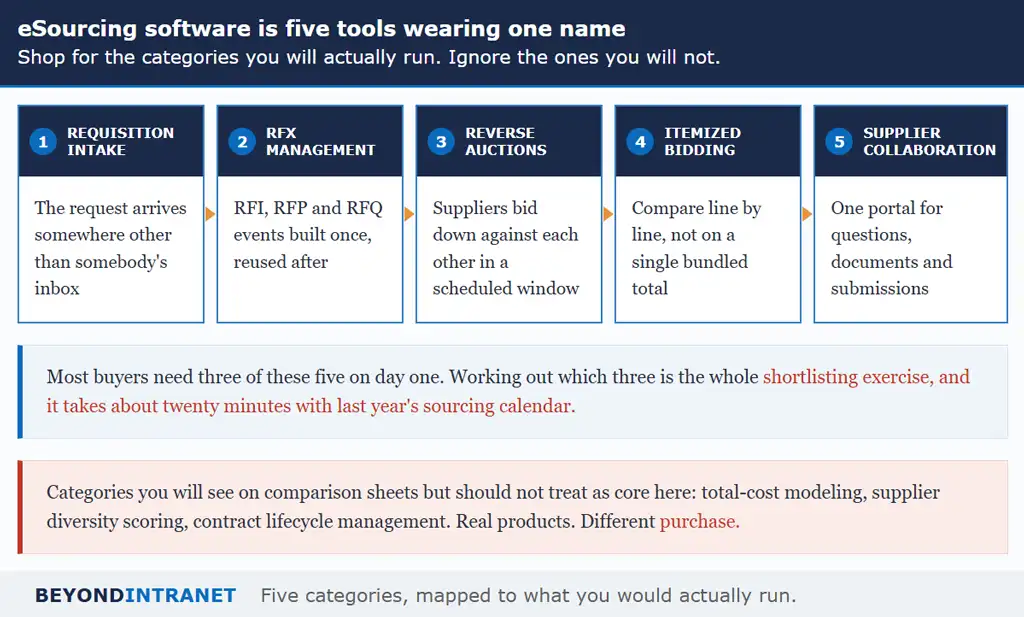
Five categories sit under the name. Understanding which ones you will genuinely use is the single most useful thing you can do before opening a comparison sheet.
Shop for the categories you will actually run.
Requisition and intake
Somebody needs something. Where does that request land? In most organizations the honest answer is an inbox, which is why nobody can say what is in flight. Intake tooling gives the request a home with a status attached, and the better versions convert an approved requisition straight into a sourcing event instead of a purchase order.
RFx management
The workhorse. RFI, RFP and RFQ events built once and reused, with responses arriving in a structure you defined rather than five formats you have to reconcile. RFQ software is where most teams spend the bulk of their platform time, and it is worth weighting accordingly during evaluation.
Reverse auctions
Suppliers bidding downward against each other inside a scheduled window. It suits categories with a settled specification and several willing suppliers, and it is poorly suited to almost everything else. Reverse auctions are a specific instrument rather than a general upgrade. Treating them as the latter is how teams end up running one on a category with two incumbents and wondering why nothing moved.
Itemized bidding
Underrated, and the one most buyers overlook until they need it. Itemized bidding breaks a quote into individual lines so you can see who is cheapest on item seven even when their total looks unremarkable. Split awards become possible. Without it you are comparing bundled numbers and hoping the mix is similar.
One more thing about auctions worth saying plainly. This is the feature most likely to be demonstrated impressively and least likely to be used weekly. Weight it against your actual calendar, not against how good the demo looked.
Supplier collaboration
One place where suppliers register, ask questions, upload documents and submit. Sounds administrative. It is actually the part that determines whether your supplier field is eight companies or three, because friction on this side is invisible to you and decisive to them.
A quick way to work out which three you need. Open last year’s sourcing calendar and put each event against one of these five. The pattern appears fast, and it is usually narrower than anyone expected.
Worth naming what is not on this list. Total-cost modeling, supplier diversity scoring and contract lifecycle management all appear on comparison sheets under the eSourcing heading. Real products, solving real problems. Also a different purchase, and treating them as core categories here will push you toward a platform sized for a much larger organization than yours.
See how requisition, RFx, auctions and itemized bidding sit in one platform
The four categories most teams actually run, in a single Microsoft 365 based environment.
Must-have features when evaluating eSourcing software
What features should eSourcing software have?
Look past the length of the list. What matters is a supplier portal people will use without training, weighted or AI-assisted evaluation, a complete audit trail, integration with your ERP and supplier data, and recognized security certifications such as SOC 2, GDPR and ISO 27001.
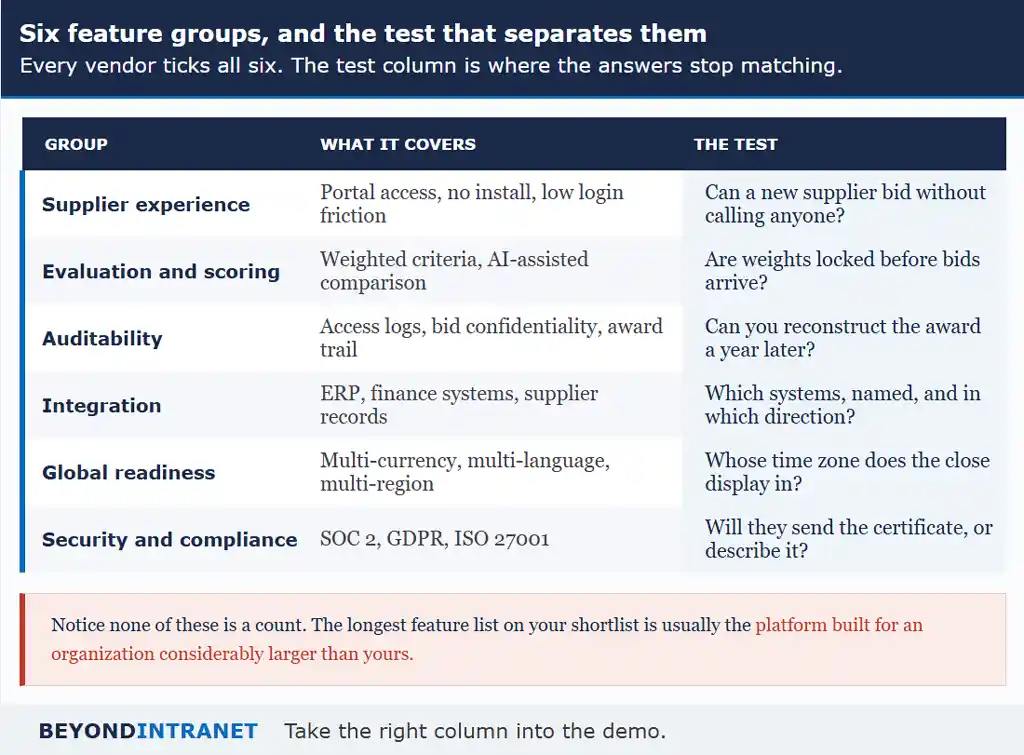
Six groups, and a test for each that separates the vendors who have built the thing from the vendors who have listed it.
Every vendor ticks all six. The test column is where answers stop matching.
Supplier experience
Start here, because it is the feature buyers weight lowest and suppliers weight highest. A supplier who has to install something, or call your team to work out where to bid, will frequently decide the opportunity is not worth the twenty minutes. You never hear about that. You just get a thinner field and assume the market was tight.
Evaluation and scoring
Weighted criteria matter more than raw scoring capability. Being able to say that price carries forty-five percent, delivery twenty and service level the rest, with those weights fixed before any bid arrives, is what makes an award defensible. Weights that can be edited afterward are not criteria. That is justification wearing a criteria label.
Auditability
This is the group that matters least during evaluation and most eleven months afterward, which is precisely why it gets underweighted.
Ask something specific here. Can you reconstruct, a year from now, who was invited, what they submitted, who scored what and why the winner won? Access logs, bid confidentiality during the event and a complete award trail are what make that answer yes.
Integration
Every vendor says yes to integration. The useful follow-up is which systems specifically, and in which direction. Pulling requisition data in is the easy half and the half you will see demonstrated. Pushing an awarded event back out to finance is the half that quietly does not exist, and you find that out around month three when somebody is still retyping.
Global readiness
Multi-currency, multi-language and multi-region support sound like enterprise concerns until you invite a supplier in Monterrey to an event that closes at two o’clock without saying whose two o’clock. Then they become very immediate concerns.
Security and compliance
SOC 2, GDPR and ISO 27001 are the recognized markers, and the test is simple. Ask for the certificate. A vendor holding current certification sends it within the hour. A vendor describing their security posture instead has answered a different question, and you should notice which one you got.
eSourcing tools vs. eSourcing strategy
What is the difference between eSourcing tools and eSourcing strategy?
Tools are the software you use to run RFx events, auctions and bid evaluation. Strategy is the plan behind that usage: which categories go through which instrument, which suppliers get invited, and when. Good tools support a strategy. They do not supply one.
This distinction gets blurred in sales conversations, usually without anyone intending it. The demo shows the tool doing something well, and the doing quietly stands in for the deciding.
A platform can run a reverse auction beautifully and still be pointed at a category where an auction was the wrong choice. Deciding that packaging goes to auction quarterly, that professional services goes to a weighted RFP annually, and that MRO gets consolidated to three suppliers first, is planning work. No software does it for you, and any vendor implying otherwise is selling something they have not built.
The practical implication for evaluation is worth stating. Bring your sourcing calendar to the demo. If you cannot say which categories will run through the platform in the next two quarters, you are not ready to choose between platforms yet.
What is eSourcing in procurement?
What is eSourcing in procurement?
eSourcing is the digital, structured version of finding and selecting suppliers. Email threads and spreadsheets get replaced by RFx events, a supplier portal, and built-in evaluation with an audit trail, all before a purchase order is raised.
Short version, for anyone who landed here without the background. The complete guide to what eSourcing is has the full treatment, including where each RFx instrument fits and what the end-to-end process looks like.
Common mistakes when choosing eSourcing software
Five patterns come up repeatedly. The first one tends to cause most of the others, which is why it is worth naming before the rest.
The mistake
What it looks like
What it costs
Judging by feature-list length
Scoring vendors on how many rows they tick
A platform built for an organization twice your size
Ignoring the supplier side
Nobody in the evaluation ever logs in as a supplier
Thin fields on every event, and no obvious reason why
Demo instead of trial
A rehearsed path through prepared data
Surprises in month two, on your data
Integration left until later
Raised after commercial terms are agreed
Manual re-keying that quietly becomes permanent
Choosing on recognition
The familiar name feels safer
Buying scale you will not use
Table 1. Five patterns. The first one tends to produce the other four.
Trials get skipped for an understandable reason. They take effort, the demo already looked fine, and there is pressure to decide. But a demo runs on prepared data through a path somebody has walked fifty times. Your first real event runs on your line items, your approval chain and suppliers who have never seen the thing.
Pick the trial category carefully, incidentally. Something that matters enough that people take it seriously, and not so critical that a hiccup causes real damage. A recurring MRO line or a print run works. Your largest annual contract does not, because nobody will let you experiment with it and the evaluation quietly becomes a demo again.
The supplier-side mistake deserves particular attention because it is so easy to avoid. During any trial, have somebody outside procurement register as a supplier and submit a bid. Twenty minutes. If that person struggles, your suppliers will struggle, and they will not call to tell you about it.
On recognition: familiarity is a genuine signal about longevity and it is a poor signal about fit. The larger the platform, the more likely it was designed around a procurement function with dedicated operations staff, and the more of it you will pay attention to without using.
How to evaluate eSourcing software: a simple framework
How do you evaluate eSourcing software before buying?
Start from your own must-have features rather than the vendor’s list. Shortlist platforms covering the tool categories you will genuinely run, then put a real RFQ through a trial, including the supplier-facing side, before checking integration, security and how fast your team can go live.
Most evaluations run these in roughly the reverse order, starting with demos and arriving at requirements. That is how vendor sequence ends up shaping what a buyer thinks is important.
Six steps, in this order, because each one narrows the field cheaply before the next one costs you time.
Step
What to do
What it rules out
1. Write your must-haves first
Before any demo, list what your events actually need
Being led by whichever vendor you meet first
2. Shortlist on tool-category fit
Match to the three or four categories you will run
Platforms carrying five modules you will not open
3. Run a real RFQ in a trial
Your category, your line items, real suppliers
Anything that only works on prepared data
4. Test the supplier side
Register and bid as an outsider would
Friction you would otherwise discover live
5. Confirm integration and security
Named systems, both directions, current certificates
Claims that dissolve under a specific question
6. Weigh time to first live event
Days or weeks, with a date attached
Implementations that outlast the sponsor’s attention
Table 2. Six steps. Steps one and two cost nothing and remove most of the field.
On that last step, Beyond Intranet publishes a go-live inside a week. Basic setup in hours; custom work a few weeks. Our own published customer figures sit alongside it. Competitive bidding delivering 15 to 30 percent savings. Manual sourcing effort cut roughly in half through the six-step process. Customers reporting a 30 percent drop in communication time and a 20 percent improvement in the prices vendors quote. And MJH Life Sciences saving $90,000 in a year. Every one of those is ours, not independent research, which is precisely why step three exists. Go test them on the eSourcing platform with one of your own categories.
One note on who should be in the room. Whoever will actually build events week to week needs hands on the trial, not just the person signing. Buyers who delegate the trial to a manager and the decision to a director tend to discover in month two that the daily experience was never assessed by anybody who has to live in it.
Want to run your own RFQ through it before deciding?
Bring a real category and real suppliers. That is the only evaluation that tells you anything.
No, though the terms get used loosely. Procurement software is the broad family covering everything from requisition to payment. eSourcing is the supplier-selection slice of it, which is why an eSourcing platform will not necessarily handle invoicing or contract management.
Almost certainly not. Look at last year's sourcing calendar and count what you actually ran. Most teams find three categories cover the bulk of it, and buying the other two costs attention they never recover.
It varies more by vendor architecture than by your organization. Platforms requiring a separate environment and a dedicated IT resource run to months. Ones that sit inside systems you already administer are measured in days. Ask for a date, not a range.
It should not, and be cautious about any product suggesting it does. Useful AI on this side of the table flags gaps and outliers for somebody to interrogate. It does not choose a winner, because you cannot defend a decision whose reasoning you cannot reconstruct.
Then the portal is probably asking too much of them. Resistance is usually a design signal and not an attitude problem. Test the registration path yourself before concluding otherwise.
Where to start
Pull last year’s sourcing calendar and mark which of the five tool categories each event would have used. That list is your shortlisting criteria and it takes twenty minutes.
Write your must-have features before booking a single demo, so the vendor sequence cannot shape what you think matters.
In any trial, register as a supplier yourself and submit a bid. Whatever frustrates you in those twenty minutes will cost you suppliers later.
The right platform is the one your suppliers will use
Feature counts are easy to compare, which is why everyone compares them. They are also close to meaningless once three vendors have ticked the same hundred and forty rows. What separates platforms in practice is whether suppliers engage without help, whether an award stands up to scrutiny a year later, and whether your team can be running a real event this month rather than next quarter.
Choose on those three. The comparison sheet gets a great deal shorter, and the decision gets easier to defend to whoever signs it. Nobody has ever been asked to justify a purchase on the grounds that it ticked a hundred and forty boxes.
Ready to see the evaluation and audit trail on your own data?
Bring a category, run the event, and look at what the record shows afterward.