
SharePoint Org Chart Software for Your Organization
Microsoft Approved App User-Friendly UI Easily Customizable
Effortlessly create an org chart in minutes with our SharePoint organisation chart software designed for UK businesses and public sector teams.
Give every colleague a simple way to see who does what, with an org chart in SharePoint that sits inside your existing Microsoft 365 environment.
Request Free Trial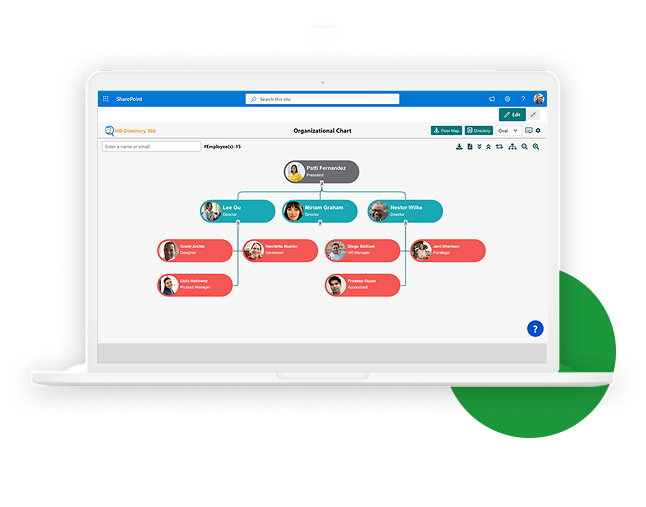
Get a clear flowchart-style view of your organisation’s structure, from top to bottom. Each profile card gives quick access to staff details right from the org chart app inside SharePoint.
Multiple View Options for Your SharePoint Org Chart
Different teams across the UK prefer to see structure in different ways. Our organisational charting software lets you switch views so HR, managers, and staff can each use the layout that makes the most sense to them.

Sky View
A clean layout that clearly shows reporting lines from the top level down.

Circle View
Compact and modern, ideal when you want to fit more people into a small space.

Oval View
A more traditional org chart layout that feels familiar to most users.

Expand/Collapse Lines
Open up or hide parts of the hierarchy so you see just the levels you need.

View Employee Profiles Instantly
Click any name to see key details such as role, department, and contact information.
Key Features That Make Our SharePoint Organisation Chart Stand Out
See Organisation Structure & Profiles
See how your teams connect at a glance. The SharePoint organization chart shows reporting lines and profile details such as name, department, job title, and photo right on the chart. This is the kind of clear view people expect from the best org chart software, without leaving SharePoint.
Employee Directory and Org Chart in One
Get a full employee directory that links directly to the chart. It is part of the HR Directory Software, so finding people and understanding structure both happen in one place inside SharePoint.
Microsoft-Approved and Secure Org Chart Software
Because it is built on SharePoint, the software follows the same security, governance, and compliance controls you already rely on. Your SharePoint organisation chart grows smoothly as your UK teams grow.
Easy Integration with Other Apps
Connect the chart to Microsoft Teams and other HR systems. This keeps structure visible where people already work, without switching between separate tools or re-entering data.
Explore the Pricing!
Get pricing tailored to your organization’s needs. Please fill in the details below: We want to know a little more so that we can share a quote based on your organization’s custom requirements.
Org Chart Features That Help You Work Better

Custom Views
Choose layouts like a compact chart, rotate the view, zoom in or out, or filter by employee to focus on the people and teams that matter.

Always Current
The SharePoint organisation chart updates on its own using SharePoint and Azure AD data, so everyone sees the latest structure without manual edits.

Simple Setup
Set who sits at the top of the chart, hide inactive users, choose default views, and control access so the right people see the right information.

Different Views
Pick from oval, circle, sky, or your previous view styles. Switch between them in a click to suit different audiences.

Collapse/Expand
Show or hide levels of your hierarchy as needed. Stay focused on one division, or open out the full view when you need the big picture.

Export Options
Export selected levels of your hierarchy in one click to SVG or PDF so you can share, print, or include diagrams in reports and slides.

Personalize It
Adjust layout and colours so the chart matches your brand and feels at home in your SharePoint intranet.

Why Use This SharePoint Org Chart Software?
Managing structure can get messy, especially as teams grow and new sites open. A SharePoint organisation chart keeps it clear and easy to understand.
Instead of redrawing boxes every time a team changes, this organizational charting software refreshes itself from your existing data, so UK managers and staff always see the same, trusted picture.
Because it is built for SharePoint and approved by Microsoft, you know it fits your existing security and compliance approach. And because it is designed for HR use, it is simple to manage and share.
Whether your organisation is growing fast or you just need a better view of your current setup, this tool is here to make work easier, not harder.

Transform Your Company Structure with SharePoint Organisation Chart
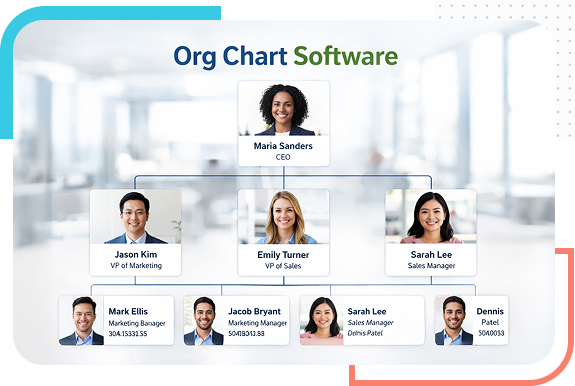
This SharePoint organisation chart software helps you see your entire company structure in one place. The layout is clean, interactive, and built to make sense straight away.
It uses data from your SharePoint user profiles, so your SharePoint org chart always reflects real roles, managers, and teams without extra admin work.
Build a SharePoint organisation chart in just a few minutes. Because it uses your existing profiles, the structure stays accurate and current without duplicate effort.
The chart works across your Microsoft 365 platforms, so people can open it wherever they already work.


FAQs
Popular Blog
 Why is the SharePoint Organisation Chart Important for Modern Enterprises?
SharePoint organisation charts, sometimes called organograms, are not new, but their value is clearer today as organisations focus on clear roles and reporting lines.
Read More
Why is the SharePoint Organisation Chart Important for Modern Enterprises?
SharePoint organisation charts, sometimes called organograms, are not new, but their value is clearer today as organisations focus on clear roles and reporting lines.
Read More
 5 Best SharePoint Apps for Your Business
Centralising employee information and workflows can raise productivity. See how a focused set of SharePoint apps can support your teams and make daily work simpler.
Read More
5 Best SharePoint Apps for Your Business
Centralising employee information and workflows can raise productivity. See how a focused set of SharePoint apps can support your teams and make daily work simpler.
Read More
 What Is HR Software and How HR Apps Empower HR Teams
Discover how modern HR software reduces paperwork, keeps records in one place, and supports people teams as they respond to changing workforce needs.
Read More
What Is HR Software and How HR Apps Empower HR Teams
Discover how modern HR software reduces paperwork, keeps records in one place, and supports people teams as they respond to changing workforce needs.
Read More
We’re here to help
If you would like to see the software in action or ask a question, send us a message and
our team working in UK time zones will be in touch.
