A practical, vendor-neutral guide for CIOs, IT directors, and digital workplace leaders evaluating SharePoint consulting partners in Australia — including a comparison...
An HR manager at a construction firm in Houston told us she rewrote their welcome email four times before it stopped making her cringe. The first draft was corporate filler. The second was too casual for senior hires. The third buried the start date in the fourth paragraph. Version four finally landed: the new person knew when to show up, who to ask for, and what their first day would look like. Under 200 words.
That’s what good onboarding email templates actually do. Good onboarding email templates do the same thing. They handle the logistics the new person is quietly stressing about. Ten emails in this article, organized by when your team should send them. Copy them, swap the variables, send. If you’re building a full sequence alongside your 30-60-90 day onboarding plan, these are the emails that carry it.
What Actually Makes an Onboarding Email Good?
After reviewing onboarding emails from dozens of companies, the pattern is clear. The ones people actually read share five traits. The subject line is specific enough to find again two weeks later. The greeting uses a real name from a real person, not an alias. Logistics come before company history. There’s one next step, not a wall of options. And the sign-off has a direct number because new hires have questions at 9pm and need a human to call.
Every template below follows that pattern. But each one sounds different because the context is different. The email you send the day someone accepts an offer should feel nothing like the 30-day feedback survey.
10 Onboarding Email Templates Your Team Can Use Today
Before Day 1: The Emails That Set the Tone
Your new hire signed the offer. Now they’re in limbo. Checking email constantly, half-expecting something from you, half-wondering if everything is actually confirmed. A week of nothing and that buzz starts turning into second thoughts. Three emails close this gap.
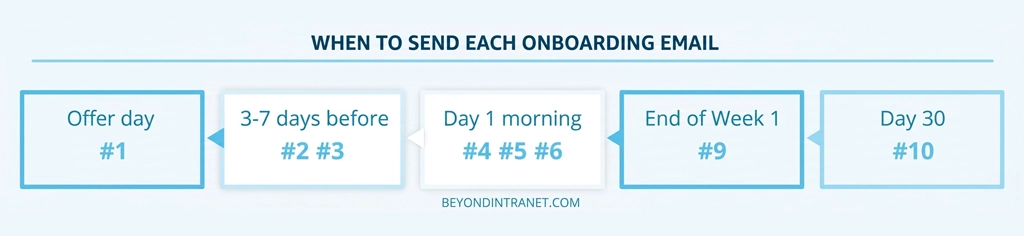
1. The “Welcome, You Made the Right Call” Email
Same day they sign. Not next week. Not after the weekend. The day the ink is dry (or the DocuSign clears). Subject: “Welcome to the team, {{first_name}}” or “{{first_name}}, glad you said yes.”
Hi {{first_name}},
Welcome to {{company_name}}. Glad you’re joining the team.
Your start date is {{start_date}}. Before then, expect a pre-boarding email with paperwork and logistics in the next few days. Your manager {{manager_name}} will reach out to introduce themselves, and your onboarding buddy {{buddy_name}} will be your go-to for anything.
Questions before Day 1? Reply here or call me at {{hr_phone}}.
{{hr_name}}
Swap: first_name, company_name, start_date, manager_name, buddy_name, hr_phone, hr_name. Notice the buddy and manager are named in the first email. Not “someone from your team.” Actual people with actual names. That specificity is what makes the person feel like they’re joining a real team, not filing paperwork with an institution.
2. The Pre-Boarding Checklist Email
This is the one that saves your Day 1. Skip it and the new person walks in with half their forms unsigned, which means somebody from HR spends the morning chasing paperwork instead of running orientation. Subject: “A few things to take care of before {{start_date}}.”
Hi {{first_name}},
Your first day is {{start_date}} and there are a few things worth getting sorted before you arrive.
Please complete these before {{deadline_date}}:
1. Sign and return the employment agreement (attached).
2. Complete tax and direct deposit forms at {{forms_link}}.
3. Upload your photo for the employee profile and badge.
4. Review the first-day schedule (attached).
If anything isn’t working, reply to this email. We’d rather sort it out now than on your first morning.
{{hr_name}}
{{hr_phone}}
Swap: first_name, start_date, deadline_date, forms_link, hr_name, hr_phone. Numbered tasks with a deadline mean the paperwork actually arrives complete.
3. The “Here’s What Monday Looks Like” Email
Send this one to two days before they start. This is the new employee welcome email that kills first-day anxiety. Subject: “Everything you need for {{start_date}}.”
Hi {{first_name}},
Looking forward to seeing you on {{start_date}}.
• Arrive at {{office_address}} by {{arrival_time}}. Ask for {{greeter_name}} at reception.
• Morning: tour, team intros, tool setup with IT.
• {{lunch_time}}: lunch with {{manager_name}} and the team.
• Afternoon: one-on-one with {{manager_name}} about your first week.
Dress code: {{dress_code}}. Bring a government ID for your badge.
Questions? Text me at {{hr_phone}}.
{{hr_name}}
The person now knows where to go, who to find, and what happens hour by hour. That’s what a welcome email to new employee should actually deliver
Day 1 and Week 1: The Emails That Make It Real
4. First-Day Agenda
Send the night before or at 8am on Day 1. Subject: “Your Day 1 schedule, {{first_name}}.”
Hi {{first_name}},
Welcome to Day 1. Here’s the plan:
9:00 AM: Meet {{greeter_name}} at reception. Badge and laptop.
9:30 AM: Office tour with {{buddy_name}}.
10:30 AM: IT setup with {{it_contact}}.
12:00 PM: Team lunch at {{lunch_spot}}.
1:30 PM: One-on-one with {{manager_name}}. Bring questions.
3:00 PM: Open time. Settle in, explore tools, read docs.
Your buddy {{buddy_name}} sits nearby. Grab them any time.
{{hr_name}}
Ending at 3pm with free time is intentional. Nobody absorbs eight straight hours of new information.
5. New Joinee Introduction Email (to the Team)
This one goes to the team, not the new hire. Send it Day 1 morning before or right as they arrive. The subject should be simple: “Please welcome {{first_name}} to the team.”
Hi team,
{{first_name}} {{last_name}} is joining us today as {{job_title}}, reporting to {{manager_name}}.
They join us from {{background}} and will focus on {{initial_area}}.
Worth knowing: {{icebreaker}}.
Say hello when you see them. They’re at {{desk_location}}, reachable at {{new_hire_email}}.
{{sender_name}}
That’s a new joinee introduction email that gives the team something to talk about beyond small talk. The icebreaker line does more work than you’d expect.
6. IT Access and Systems Email
From IT, not HR. Day 1 morning. Subject: “Your accounts are ready, {{first_name}}.”
Hi {{first_name}},
You’re set up. Here’s everything:
Email: {{work_email}} (sign in at outlook.office365.com)
Teams: Added to {{teams_channels}}.
SharePoint: Onboarding hub at {{sharepoint_link}}.
Temp password: {{temp_password}} (you’ll change it on first login).
Something not working? Ping me on Teams. I’m faster there than email.
{{it_contact_name}}
One email, every login, every link. Prevents the “where do I find…” loop that eats up the first morning.
Remote Hires Need More, Not Less
7. Remote Onboarding Welcome
For remote starters, send this one to two days before Day 1. They need more detail than in-office hires, not less. Subject: “Your remote start at {{company_name}}: here’s the plan.”
Hi {{first_name}},
You start on {{start_date}}, working remote.
Your laptop and gear ship to {{shipping_address}}. Expected arrival: {{delivery_date}}. If nothing shows up by that evening, email me right away.
Day 1 starts at {{start_time}} {{timezone}} on video: {{meeting_link}}.
Your buddy {{buddy_name}} will be on the call to walk you through the team and the tools.
We work async. You don’t need to be online every second.
{{hr_name}}
{{hr_phone}}
Two things kill remote starts: the laptop doesn’t arrive and the new person doesn’t know whether they’re expected online for eight straight hours. This email handles both.
8. Virtual Week 1 Schedule
Sent evening before Day 1 or first thing Monday. Remote hires can’t ask the person next to them what’s happening next. A blocked calendar for the whole week fixes that. Subject: “Your Week 1 schedule, {{first_name}}.”
Hi {{first_name}},
All times {{timezone}}.
Monday:
9:00 AM: Welcome call with {{hr_name}}
10:30 AM: IT setup with {{it_contact}}
12:00 PM: Virtual coffee with {{buddy_name}}
2:00 PM: Manager 1:1 with {{manager_name}}
Tue-Thu:
Mornings: Role training modules in SharePoint.
Afternoons: Shadowing sessions.
Friday:
10:00 AM: Week 1 check-in with {{manager_name}}.
PM: Open.
All meetings have calendar invites with links.
{{hr_name}}
After Week 1: The Emails Everyone Forgets to Send
Most companies nail the welcome email and then go silent. These two close the gap.
9. End-of-Week-1 Check-In (from the Manager)
Friday afternoon of Week 1. Sent by the manager, not HR. Subject: “How was your first week, {{first_name}}?”
Hi {{first_name}},
1. Week 1 is done. Before the weekend, three quick questions:
2. Do you have access to everything you need? Anything still missing?
3. Is anything unclear about the role or what’s expected?
4. How are you feeling about the team and the pace?
No wrong answers. This is a pulse, not a review. Reply here or grab 15 minutes on my calendar.
{{manager_name}}
“How’s everything going” gets you “fine” every time. Numbered questions give the person permission to actually say what’s on their mind.
10. The 30-Day Feedback Survey Email
Day 28 to 30. Most companies skip this entirely, which means their onboarding process never improves. Subject: “Your 30-day feedback, {{first_name}}.”
Hi {{first_name}},
You’ve been here a month. We’d like your honest take on how onboarding went.
The survey takes about 5 minutes: {{survey_link}}
Your responses go directly to HR. Your manager does not see individual answers.
It covers tools, training, team connection, and what you’d change for the next person who starts.
{{hr_name}}
Mentioning that the manager can’t see individual answers is the single change that doubled our response rate on these surveys.
Turning Templates Into Emails That Feel Personal
The fastest way to ruin a template is sending it without changing anything except the name. Match the company’s actual voice. If your Slack channels run on emojis and first names, a stiff corporate email creates a jarring disconnect. Swap merge fields for real context where you can: instead of just {{manager_name}}, mention what the manager’s team is working on. Adjust formality by seniority. The VP email should sound different from the junior analyst email.
One more thing: add your logo and brand colors to the email header if your system supports it. A branded email feels intentional. An email from noreply@company.com with no logo and no formatting tells the new person they’re transaction number 47, not a person the company is excited about.
Five Email Mistakes That Cost You Goodwill Before Day 1
The single-email trap. Your HR coordinator sends one “welcome aboard” message the day the offer is signed and considers onboarding communication handled. Then the new person hears nothing for two weeks and shows up on Day 1 not knowing where to park.
I’ve seen welcome emails that open with 150 words of company history before mentioning when and where to show up. The person skimmed past it. They had to email HR the night before asking “wait, what time am I supposed to arrive?”
Vague promises instead of real names. “Your team will be in touch soon” is meaningless. “Sarah Chen, your manager, will call you Thursday at 2pm” gives the person something to expect and someone to hold accountable.
Writing the welcome email in the same tone as a compliance document. The person just accepted a job. They’re excited. Match that energy.
Having no system to send them on time. Writing the templates is the easy part. Sending all ten to every new hire, on the right day, without somebody forgetting? That’s what actually breaks.
Sending the Whole Sequence Automatically Through SharePoint
No system behind the sequence. Writing ten emails is the easy part. Making sure all ten actually go out, to the right person, on the right day, when you’re onboarding four people at the same time and the HR coordinator is on PTO? That’s where it falls apart Employee onboarding software turns the manual sequence into an automated workflow.
You configure the triggers once: offer signed, three days out, Day 1 morning, Friday of Week 1, Day 30. After that, the system handles delivery. The manager sees what’s gone out. HR sees completion across every active hire. Nobody builds a reminder in their calendar.
Think of it as the full email sequence a new hire receives from the day they say yes through their first month or two. Welcome notes, logistics, team intros, manager check-ins. One email doesn't qualify as onboarding. A planned series of five to eight over 30 days does.
Make the subject line searchable. Nobody will remember "Exciting news from the People Team" when they're looking for their start time two weeks later. Open with their name. Put the date and location up front. Include one action item, not seven. Sign off with a real phone number. The templates above show what this looks like in practice.
The new person's name, role, and who they report to. A one-line background. Their desk location and email. And one icebreaker detail that gives the team something to talk about in the first conversation. Template 5 in this article is a new joinee introduction email you can send as-is.
Five to eight over the first 30 days. Pre-boarding takes two or three. Day 1 needs two or three. Then the cadence tapers: a Week 1 check-in and a 30-day survey. Automation makes this easy to run at scale without someone tracking it manually.
Absolutely. Beyond Intranet's Employee Onboarding Software triggers each email based on the start date, role, and location. Pre-boarding emails fire automatically. The Day 1 agenda lands on the right morning. The 30-day survey goes out on schedule. It runs inside Microsoft 365 and SharePoint.
The welcome email is the first thing a new hire reads from your company after they say yes. These ten onboarding email templates cover every touchpoint from offer day through Day 30. Copy them. Personalize them. Get them into a system that sends them on time. See how Beyond Intranet’s Employee Onboarding Software sends the whole sequence automatically inside SharePoint.
Automate Your Onboarding Emails
10 emails triggered inside Microsoft 365. No manual sends. No missed touchpoints.