A practical, vendor-neutral guide for CIOs, IT directors, and digital workplace leaders evaluating SharePoint consulting partners in Australia — including a comparison...
Quick answer: A SharePoint AI Readiness Assessment is a structured evaluation of a Microsoft 365 tenant’s governance, information architecture, content...
Somebody in HR answered the same parental leave question eleven times last month.
Not eleven variations on a theme. The same question, about the same policy, from eleven different employees who could not find the answer anywhere and defaulted to asking. Each response took a few minutes and was accurate. Collectively they consumed the better part of a working day, and the twelfth person will ask next week.
A knowledge base would have absorbed all eleven. Building one is not complicated, but it is more structured than most teams expect, and the parts organizations skip are consistently the same parts. What follows is the definition. Then an eight-step build sequence, worked examples, and a vendor-neutral view of what the software needs to do.
Key Takeaways:
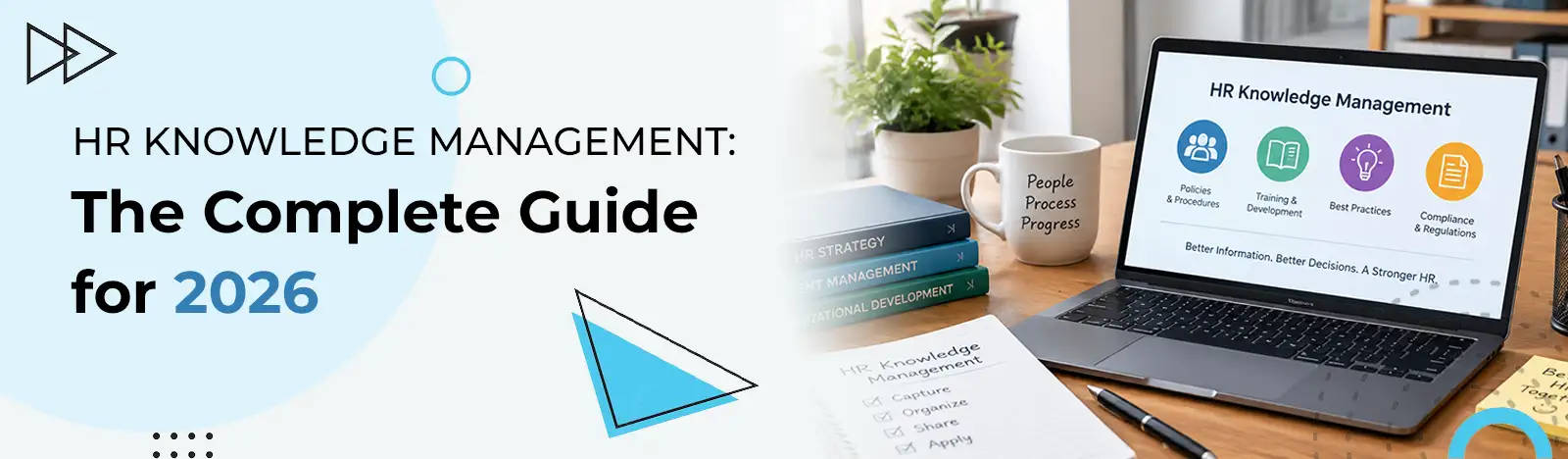
HR knowledge management is the practice of capturing what an HR function knows, then organizing it and sharing it, so people can find answers without asking. It reduces repetitive query load and protects institutional knowledge when experienced staff leave. Two kinds of knowledge are in play. Written policy that already exists somewhere, and the undocumented judgment that lives in people’s heads. This guide covers the definition, an eight-step build, worked examples and what to look for in software.
What is HR knowledge management?
What does HR knowledge management mean?
It is the practice of capturing the information an HR function holds, then organizing it so people can reach it. The point is that employees so employees and HR staff can find answers on their own. Policies and procedures sit inside it. So does the accumulated know-how that has never been written down anywhere.
That last sentence contains the harder half of the problem.
Explicit HR knowledge is anything already recorded. The employee handbook. A leave policy. The onboarding checklist somebody built in 2023. It exists in a file, which means it can be found. Moved. Improved.
Tacit HR knowledge is the part nobody wrote down. Why the relocation policy has an exception for the Cleveland site. Which manager to involve before escalating a grievance. What the company actually did the last time somebody requested unpaid leave in a way the policy did not anticipate. Ask any HR generalist with eight years of service and you will find a considerable amount of this, none of it searchable.
The distinction matters because most knowledge management projects only address the first kind. They gather documents, publish them, and declare the job finished. Meanwhile the judgment that makes those documents usable stays exactly where it was.
There is a practical consequence. Capturing explicit knowledge is a filing exercise, and capturing tacit knowledge is an interviewing one. The second takes more effort and returns more value, which is the opposite of how most projects allocate their time.
A working system covers policies and procedures, FAQs, compliance guidance and process documentation. It also, deliberately, captures institutional know-how before the person holding it moves on.
Why HR knowledge management matters
Why is HR knowledge management important?
Three reasons carry most of the weight. It removes the repetitive query load that consumes HR capacity. It keeps policy applied consistently, which matters for fairness and compliance. And it protects institutional knowledge that would otherwise leave with the people who hold it.
Each of those has a measurable version, and the first is the easiest to observe.
It cuts repetitive query volume
The eleven parental leave questions are the visible tip. Every HR team fields a long tail of answerable-in-writing queries, and each one interrupts something else. Self-service content absorbs them without anybody having to be available.
The scale of that shift can be substantial. Neocase, an HR service delivery vendor, publishes that BNP Paribas resolves roughly half of employee requests directly through portal content following a centralized HR portal deployment. That is one organization’s result under one vendor’s implementation, so treat it as an illustration of what is achievable and not as a benchmark.
Be precise about what self-service removes. It absorbs the answerable questions. Anything requiring judgment still reaches HR, which is the intended outcome.
It speeds onboarding
New hires generate more questions per head than anybody else, and most of those questions have permanent answers. A structured knowledge base means the answer exists before the person needs it.
It standardizes how policy gets applied
Two managers interpreting the same policy differently is a fairness problem before it is a compliance one. Written guidance with a single authoritative version narrows that gap considerably.
Managers who can check a written answer stop improvising, and improvised policy is where most fairness complaints begin.
It protects knowledge through turnover
When somebody with a decade of context resigns, the notice period is when the tacit knowledge either gets captured or disappears. Organizations with an established knowledge base treat that as a documented handover. Ones without it discover the gap in month three.
It supports self-service and better decisions
Employees prefer finding an answer at eleven at night to waiting until Monday. HR gets the same benefit internally, because consistent reference material means less time reconstructing what was decided last time.
Core components of an HR knowledge base
Five categories of content cover most of what an HR knowledge base needs to hold.
Lets somebody follow a process without being shown
Templates and checklists
Reusable forms, letters, structured task lists
Prevents each manager reinventing the same document
FAQs and how-to content
Plain-language answers to recurring questions
Absorbs the repetitive query load directly
Contacts and escalation
Who owns what, and who to involve when
Turns a policy into something actionable
Table 1. Five components. The last one is the most frequently omitted and the most immediately useful.
The escalation component deserves the attention it rarely gets. A policy tells somebody what the rule is. It does not tell them who to approach when their situation sits outside the rule, and that is the moment most people give up and email HR.
Before you start building your own strategy from scratch
It is worth seeing what a purpose-built HR knowledge base looks like in practice, with centralized policies, controlled access and instant search, all inside the Microsoft 365 environment your team already works in.
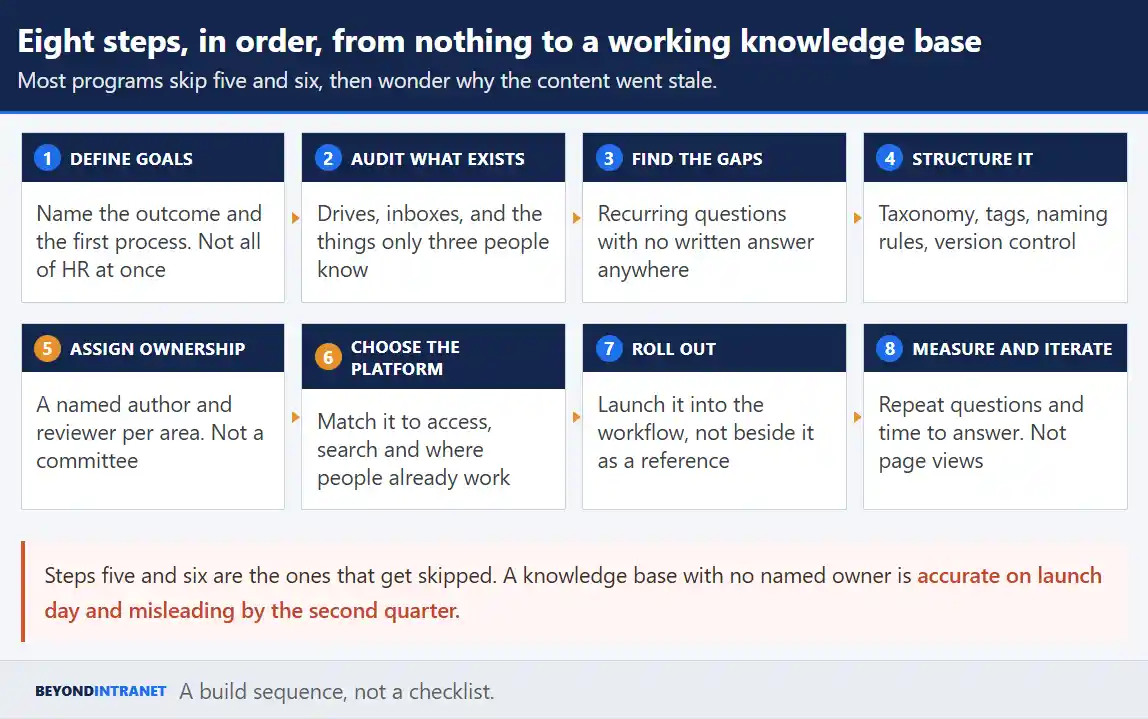
Eight steps, in sequence. Two of them get skipped almost universally, and skipping them is why so many knowledge bases are accurate at launch and unreliable within a year.
Most programs skip five and six, then wonder why the content went stale.
Step 1. Define goals and scope
Name the outcome you want before naming the content you will write. Faster onboarding, lower ticket volume, audit readiness. Then pick one HR process and one employee group to start with. Attempting all of HR simultaneously is the most common way this stalls.
Step 2. Audit the knowledge you already have
Inventory what exists and where. Shared drives and inboxes. The wiki somebody built two years ago. The folder on a departing manager’s desktop. Include the material that is not written down at all, because knowing it exists is the first step to capturing it.
Step 3. Identify the gaps
Pull your recurring questions from wherever they arrive and look for the ones with no written answer. Then ask a different question. Which knowledge would create a real problem if the person holding it resigned next month? Those two lists are your priority order.
Both lists tend to be shorter than expected. Ten well-chosen articles covering the highest-volume questions will absorb more query load than eighty covering everything, and they get written in a fortnight instead of a quarter.
Step 4. Structure and categorize the content
Decide the taxonomy before you publish anything. Categories, tags, naming conventions and a version control approach. Retrofitting structure across two hundred existing articles is considerably harder than imposing it on the first ten.
Step 5. Assign ownership and governance
Every area needs a named author and a named reviewer. Not a working group. Alongside that, set a review cadence so content gets revisited on a schedule instead of when somebody notices it is wrong. This is the step organizations skip most often and regret most reliably.
Step 6. Choose the platform
Match the tool to the access control and search you actually need, and to how people collaborate. The section below covers the criteria. What matters most at this stage is picking something people already open, because a knowledge base in an unfamiliar tool competes with asking a colleague and loses.
Step 7. Roll out and drive adoption
Launch it into the workflow, not beside it. Link articles from the places questions get asked. Encourage contribution from HR staff who hold the tacit knowledge, and make contributing quick enough that they do it. Adoption is won in the first six weeks.
Contribution needs to be easy or it does not happen. If adding an article requires a form, an approval and a formatting guide, the tacit knowledge stays where it is.
Step 8. Measure and iterate
Track the outcomes rather than the output. Repeat questions, time to answer, failed searches. Page views tell you what people found, and failed searches tell you what they could not, which is considerably more useful.
HR knowledge management examples
What are examples of HR knowledge management in practice?
Six common ones. Onboarding content in one place. Leave and attendance self-service. A searchable directory tied to the knowledge base. An HR help center for routine queries. Offboarding and knowledge-transfer checklists. And a policy archive that makes audit preparation straightforward.
Use case
What lives there
What it replaces
Onboarding hub
Checklists, first-week FAQs, training content, policy links
A manager answering the same twelve questions each hire
Plain-language answers to the highest-volume questions
The repetitive query load described at the top
Offboarding and handover
Exit checklists, knowledge-transfer templates
Institutional knowledge leaving with the person
Policy archive
Historical versions with effective dates
Reconstructing what the policy said in March
Table 2. Six use cases. Most organizations start with the fourth and expand outward.
The directory example is worth expanding, because it connects two things teams usually build separately. A searchable employee directory answers who, and the knowledge base answers what. Pair them and somebody with a question can reach either the written answer or the right person without a detour through HR.
The onboarding case works the same way. Structured employee onboarding software handles the task sequence, and the knowledge base holds the reference material a new hire needs alongside it. Neither one does the other’s job well.
Best practices for HR knowledge management
Four practices separate a knowledge base people use from one they abandoned in month four.
Prioritize by demand and by risk
Fix the highest-traffic and highest-risk gaps first. A rarely consulted policy written beautifully is worth less than a plain answer to the question forty people ask. Compliance-sensitive areas earn priority regardless of traffic.
Separate employee-facing guidance from internal HR logic
Employees need plain language and a clear answer. HR needs the decision reasoning, the precedents and the exceptions. Publishing both into one article serves neither audience, and role-based access is what lets you hold both without confusing anybody.
A related habit. Write for somebody who has never worked here. Institutional shorthand makes an article readable to the person who wrote it and opaque to the new hire who needed it most, and the author is the last person able to spot that.
Review on a defined cadence
Set a review date when an article is published, not afterward. Content without a review date does not get reviewed, and stale HR guidance is more dangerous than absent guidance because people act on it.
Measure outcomes, not article count
Publishing eighty articles is an activity metric. Fewer repeat questions and faster resolution are outcome metrics. Report the second kind, because the first kind can rise while the experience gets worse.
What should I look for in HR knowledge management software?
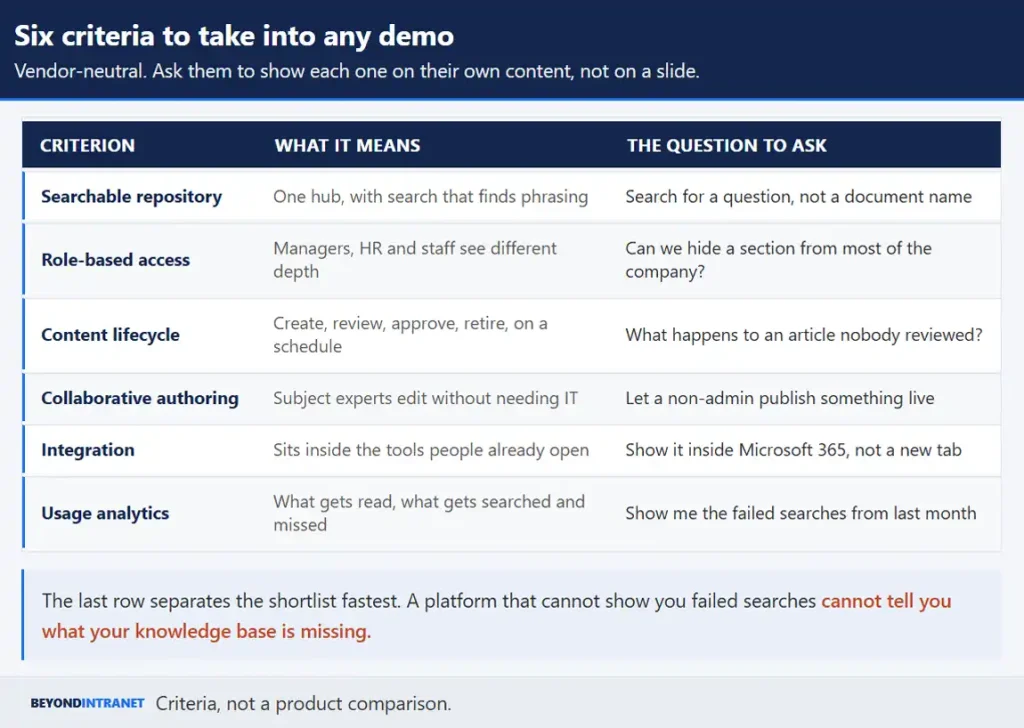
Six things. A centralized repository with search that works on questions. Role-based access. Content lifecycle management. Collaborative authoring for non-technical staff. Integration with the systems people already use. And usage analytics that show what is missing.
Vendor-neutral. Ask them to show each one on their own content.
Search deserves the most scrutiny during a demo. Ask to search for a question in the phrasing an employee would use, not for a document title you already know. Most platforms handle the second and struggle with the first.
Role-based access is what makes the employee-facing and HR-facing distinction workable in practice. Without it you either publish everything to everybody or maintain two separate systems, and both options degrade quickly.
Content lifecycle management is the feature that prevents the staleness problem. Creation and review. Approval. Updates. All handled as a governed sequence with alerts when something is due. Knowledge management software built on SharePoint and Microsoft 365 has an advantage here, because the content sits inside the environment people already open rather than in a separate destination they have to remember.
On usage analytics, ask specifically to see failed searches. If a platform cannot show you what people looked for and did not find, it cannot tell you what to write next. For a broader survey of the category, our guide to the best knowledge management software goes through the wider field.
If your team is ready to move HR policies, FAQs and institutional know-how out of scattered folders
Our team can walk you through how a governed, searchable hub fits your existing Microsoft 365 setup.
Log every question HR answers for two weeks and mark which ones had a written answer somewhere. The unmarked ones are your first ten articles, in priority order.
Name one owner and one reviewer for your highest-risk policy area before writing anything. Governance is easier to establish at ten articles than at two hundred.
Ask a recent hire to find three specific answers using whatever exists today. Watch where they get stuck. That is your search and structure problem, demonstrated.
Capture it before it walks out
HR knowledge management is less about documentation than about access. The policies mostly exist somewhere already. What is missing is a governed place to keep them, a structure that makes them findable, and a habit of capturing the judgment that never made it into a file. Get those three right and the eleventh person finds the answer without asking.
A strong HR knowledge management strategy only pays off once the right platform is behind it
See how Beyond Intranet centralizes and secures HR knowledge for your organization.
Explicit knowledge is already written down. Policies, handbooks, process documents. Tacit knowledge is the undocumented judgment experienced HR staff carry, such as why an exception was granted or who to involve before escalating. The second kind is harder to capture and more costly to lose.
HR owns the content, and every area within it needs a named author and reviewer. IT usually owns the platform. Programs that assign ownership to a committee tend to produce a launch and then very little maintenance, because shared responsibility is nobody's deadline.
Set a review date at publication and honor it. Annually works as a floor for stable policy, and anything touching compliance or regulation needs a shorter cycle. The trigger matters more than the frequency, since content without a scheduled date rarely gets revisited at all.
Track repeat questions, time to answer and failed searches. Those three tell you whether people are finding what they need. Article counts and page views describe activity without confirming that anybody got an answer.