A practical, vendor-neutral guide for CIOs, IT directors, and digital workplace leaders evaluating SharePoint consulting partners in Australia — including a comparison...
Quick answer: A SharePoint AI Readiness Assessment is a structured evaluation of a Microsoft 365 tenant’s governance, information architecture, content...
The spreadsheet stopped working at about sixty people. Nobody noticed for another year.
It had been fine at twenty. One tab, one owner, a column for each thing anybody needed. Then a second office opened. Contractors were added. Somebody built a copy for their own team, and the version everyone treated as authoritative became whichever one had been edited most recently. HR still produced answers when asked. They just took longer, and increasingly they were qualified with a caveat about checking.
That progression is where most organizations start looking at employee database software. What follows covers what the category actually is and how it differs from an HRIS. Then the features worth insisting on, and how to choose without buying something considerably larger than the problem.
Key takeaways
Employee database software centralizes profile and organizational data in one searchable system. Expect it to hold current records, make them findable, show the reporting structure and let employees maintain their own details. The mistake buyers make most often is treating it as interchangeable with a full HRIS. That category adds payroll, benefits and leave, which is a larger purchase and a different problem. Knowing which one you need is most of the decision.
What is employee database software?
What does employee database software do?
It centralizes employee profile and organizational data in one searchable system. Records live in a single place rather than across spreadsheets and inboxes, and colleagues can find who they need without asking. Payroll and benefits sit outside its scope, in a separate system of record.
Manual tracking does not fail suddenly. It degrades.
A shared workbook holds twenty people comfortably because one person maintains it and everyone knows who that is. At sixty, ownership becomes ambiguous. At two hundred, the reconciliation work exceeds anybody’s tolerance, and the practical response is usually a private copy rather than a fix. That is the point at which employee data management software stops being an upgrade and starts being the only way to hold accurate records.
Employee database software vs. HRIS vs. employee directory
How is an employee database different from an HRIS?
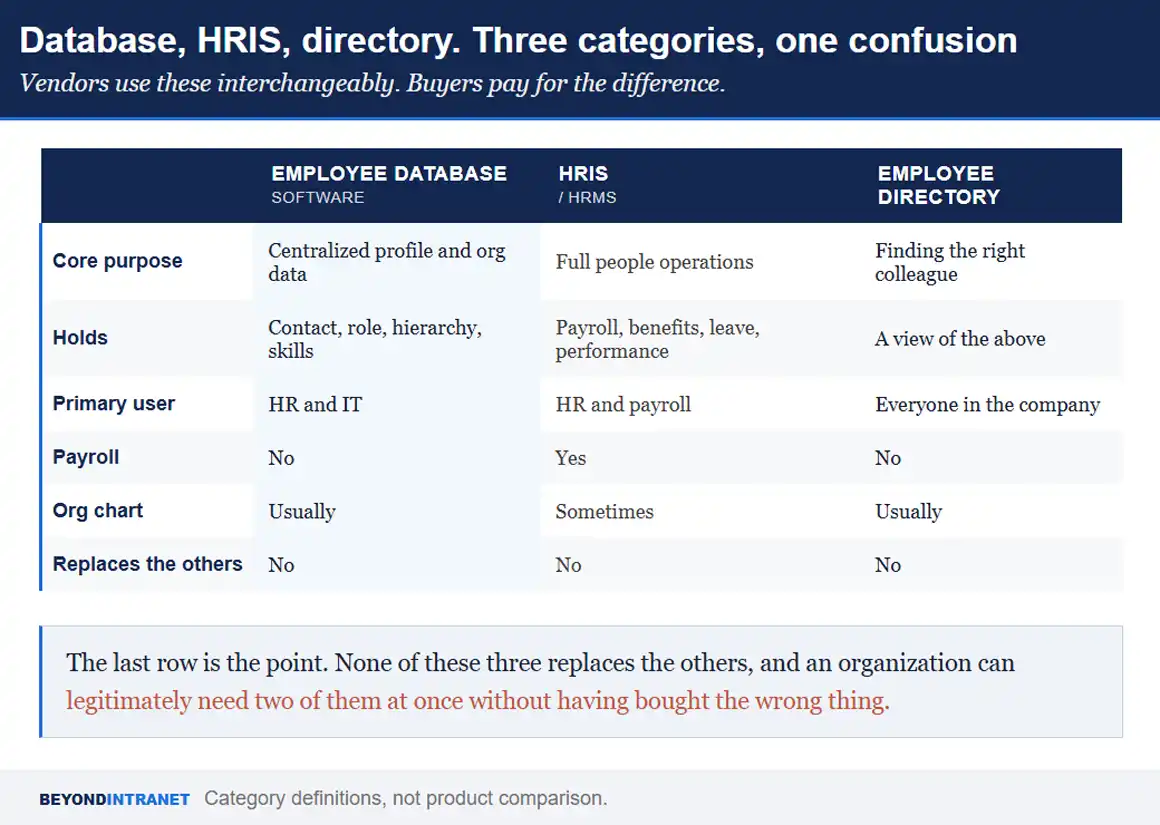
An employee database holds centralized profile and organizational data. An HRIS goes further. It adds payroll and benefits, then leave and performance management. An employee directory is narrower still, functioning as the people-finding layer built on top of the database. Many organizations run more than one.
Three terms, used interchangeably by almost everybody, describing three genuinely different things.
Vendors use these interchangeably. Buyers pay for the difference.
Human resources database software is the broader umbrella term, and it is where the confusion originates. Most content using that phrase is describing a full HRIS, because the companies producing it sell payroll. That framing pulls the definition toward compensation data and away from the thing most organizations are actually searching for, which is a reliable, searchable record of who works here and what they do.
A second reason the confusion persists. Any HRIS genuinely does hold employee profile data, so the categories overlap rather than sitting cleanly apart. The distinction is one of purpose. A payroll platform stores the profile because it needs it; a directory exists so people can use it.
The practical consequence is a mismatch at purchase. A team that needed a current directory with an accurate org chart buys a platform sized for payroll processing, implements maybe a fifth of it, and concludes that HR software is heavy. It was. Just not necessarily the software they needed.
If payroll, timesheets or leave management are genuinely on your list, those belong in a separate layer rather than being folded into a directory. Beyond Intranet handles them through HRMS 365 and HR Timesheet 365 as distinct products, which is the honest architecture. Meanwhile employee directory software stays focused on the profile and org data layer.
What should an employee database include?
Which data belongs in an employee database?
Five categories cover it. Personal and contact details identify the person. Job and department data describe the role. Organizational hierarchy shows reporting lines. Documents hold what needs storing. Skills and expertise make the record searchable for something other than a name.
The fifth is the one organizations skip and later wish they had not.
Category
What it typically holds
Why it earns its place
Personal and contact
Name, preferred name, work contact details, location
The baseline for identifying and reaching somebody
Job and department
Title, team, employment type, start date
Establishes what a person does and since when
Organizational hierarchy
Reporting manager, direct reports
Turns a list of people into a structure
Documents
Records that need central storage and controlled access
Removes the shared-drive problem
Skills and expertise
Capabilities, systems, specialisms, languages
The only field that answers who knows about this
Table 1. Five categories. The first four are standard; the fifth is what separates a database from a contact list.
Documents deserve a caveat. Central storage suits handbooks, signed acknowledgments and role documentation. It is not the right home for anything requiring restricted access, which needs a separate permission model rather than a folder in the same system.
Compensation, benefits and leave records are also employee data, and they are deliberately absent from that table. They belong in a system of record with tighter access controls and different retention obligations. Holding them in the same layer that the whole company can search is a governance problem waiting to be discovered during an audit.
Key features of an employee database management system
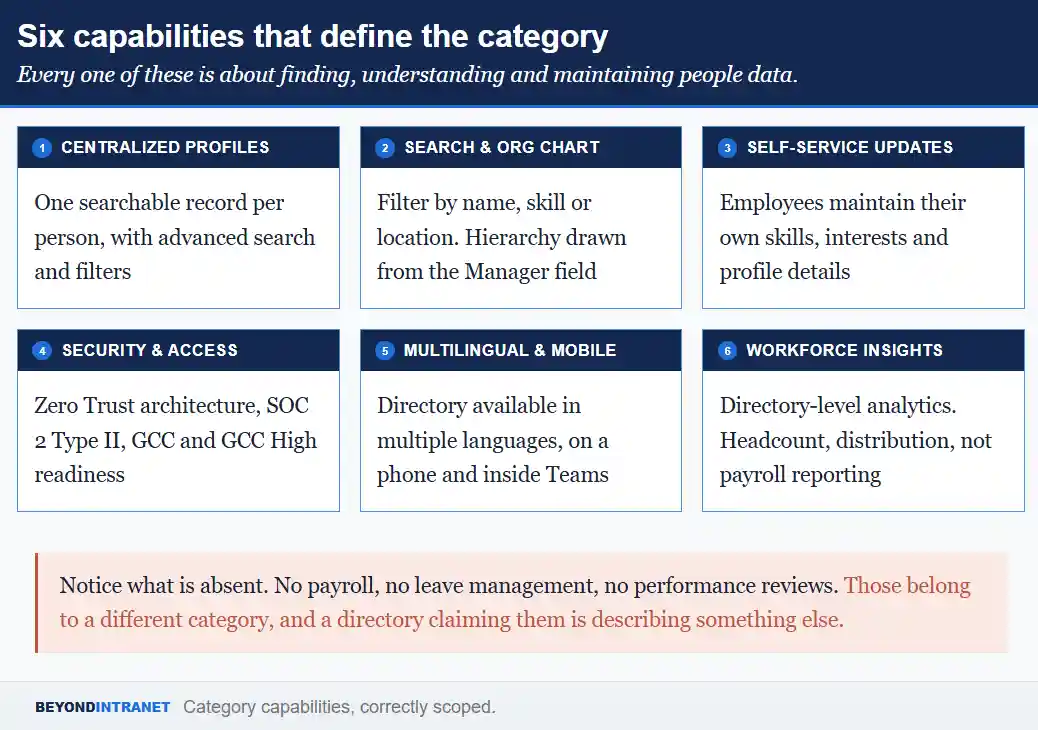
Six capabilities define a serious employee database management system. Each one is about finding, understanding or maintaining people data rather than processing transactions.
Every one of these is about finding, understanding and maintaining people data.
Check each against your own situation rather than treating the list as a scorecard. An organization with one office and forty people weights these differently to one running four locations in three languages.
Centralized, secure profiles
One record per person, held in a single place, with advanced search and filters over it. The word doing the work is single. Two authoritative records is the same problem as none, because somebody has to decide which one is right and that decision gets made from memory.
Search, filters and org chart visualization
Filtering by name is table stakes. Filtering by skill, department or location is where a database earns its keep. Alongside that, organizational chart software that draws the hierarchy from the Manager field in Microsoft Entra ID stays correct through a reorganization, which a hand-maintained version does not. Export to SVG or PDF matters more than it sounds when somebody needs it in a board pack.
Employee self-service updates
Employees maintaining their own skills, interests and profile details is the single highest leverage feature in the category. Nobody in HR can accurately describe what a colleague has become good at over two years, and asking them to try produces a field that is stale from the day it is written.
Security, access controls and compliance readiness
Insist on specifics rather than assurances. Zero Trust architecture, SOC 2 Type II certification and readiness for GCC and GCC High environments are checkable claims. A vendor holding current certification produces the documentation quickly, and one describing their security posture instead has answered a different question.
Multilingual and mobile access
A directory used only from a desk misses a meaningful share of the moments people need it. Mobile access and availability inside Microsoft Teams put the record where the question gets asked. Multilingual support matters as soon as an organization operates across more than one language, which happens earlier than most plans assume.
Reporting and workforce insights
Directory-level analytics rather than payroll reporting. Headcount by department, distribution across locations, presence patterns. Useful for planning conversations, and categorically different from the compensation analysis an HRIS produces.
Once you know what to look for, seeing it beats reading about it
A short walkthrough shows how centralized profiles, search and the org chart behave on real data rather than in a feature list.
Five returns, and the first one is the easiest to underestimate.
Time comes back to HR first. Every lookup a colleague can answer for themselves is a message HR does not field, and those requests are individually trivial and collectively substantial. A team of three answering fifteen a week is spending real capacity on work no one budgeted for.
Data accuracy improves for a structural reason rather than a behavioral one. When the record syncs from Microsoft Entra ID, a change made once propagates rather than being retyped into three places. Accuracy stops depending on somebody remembering.
Transparency changes how people work together. Seeing the reporting structure, knowing who owns what and being able to find the right colleague without an intermediary removes friction that nobody logs as a problem but everybody experiences.
Engagement gets a small but genuine lift from visibility. Birthday and work-anniversary reminders, along with new-joiner announcements, give people reasons to acknowledge each other that are not tied to work. Pairing that with employee onboarding software means a new hire appears in the directory as a person rather than a name that materialized on the org chart.
Compliance readiness sits underneath all of it. Knowing who can see which fields, and being able to demonstrate that, is materially easier when access rules live in one system than when they depend on who has the link to which file.
Scalability is the last one and the reason the category exists. A system that syncs automatically costs the same effort at four hundred people as at forty. A spreadsheet does not, which is the whole story of the intro.
Employee profile software: building better employee profiles
What is employee profile software?
It is the narrower part of an employee database concerned with the individual record. Rather than a name and a title, an enriched profile carries skills and expertise. Department and photo. and live presence, so colleagues can tell not just who somebody is but whether they are the right person.
The difference between a thin profile and an enriched one shows up in how people use it.
Enrichment has a ceiling worth respecting. A profile asking for twenty fields gets abandoned partway through, leaving half-complete records that look worse than short complete ones.
A thin profile answers a question somebody already knew the answer to. They knew the name, they wanted the extension. An enriched profile answers a question they could not otherwise resolve, which is who in this organization has done this before. Skills and expertise are what make that possible, and real-time presence tells them whether it is worth reaching out now or later. Photographs deserve a mention because they look cosmetic and are not. In distributed organizations where colleagues meet rarely, recognition matters, and a directory of blank avatars quietly signals that nobody maintains it. HR Directory 365 supports enriched profiles of this kind, with employees able to keep their own details current rather than routing every change through HR
How to choose the right employee database software
What should I look for when choosing employee database software?
Start with where it lives. Software inside the tools your organization already uses avoids creating another silo. Then check security certifications and self-service capability. multilingual and mobile support, and whether the effort of maintaining it grows with headcount or stays flat.
Five questions settle most shortlists, and the first one eliminates more options than the rest combined.
Question
What a good answer looks like
What it rules out
Where does it live?
Inside Microsoft 365, reading from Entra ID
A separate database somebody has to maintain
Which certifications?
SOC 2 Type II, plus GCC readiness if relevant
Assurances offered without documentation
Can employees self-serve?
Yes, for skills and profile details
Every change routed through an HR ticket
Multilingual and mobile?
Both, without a separate app to deploy
Desktop-only tools in a distributed company
How does it scale?
Effort stays flat as headcount grows
Anything requiring manual record creation
Table 2. Five questions. Ask them in writing, because written answers are more precise than demo answers.
The first question deserves elaboration. An organization already running Microsoft 365 has an identity system holding most of this data, so a directory that reads from it inherits accuracy rather than recreating it. The alternative is assembling native components yourself, and there is how to build a SharePoint employee directory if you want to weigh that route honestly before deciding.
Ask about deactivation too, since it is the mirror image and gets less attention. When somebody leaves, their record should disappear from the directory without anybody filing a ticket. A directory still listing former employees is a directory nobody trusts.
On scaling, ask specifically what happens when somebody joins. If the answer involves anybody creating a record manually, the maintenance burden grows with headcount and you have bought a better spreadsheet. If the record appears because the identity system changed, it does not.
Worth noting one optional extra. Some directories offer a virtual floor map and desk booking as an add-on module, which is genuinely useful in hybrid offices and is not a default part of the category. Treat it as a separate decision rather than a differentiator.
For teams ready to compare their shortlist against a Microsoft 365 native option
A live walkthrough answers questions a feature list cannot, particularly around how the sync behaves in your own environment.
No. The database holds centralized profile and organizational data. The HRIS layer adds payroll, benefits, leave and performance management on top of that foundation. Organizations frequently run both, and neither one makes the other unnecessary.
For profile and organizational data, yes, and that is the point. Records that carry payroll or compliance obligations belong in a system built for them. The realistic outcome is fewer spreadsheets rather than none, with the remaining ones serving a defined purpose.
Through synchronization rather than discipline. When the directory reads from an identity system such as Microsoft Entra ID, a change made once appears everywhere. Anything relying on people remembering to update a second system drifts within a quarter.
Ask for SOC 2 Type II certification and confirm the access model is role-based rather than all-or-nothing. Organizations in regulated or government-adjacent sectors should also ask about GCC and GCC High readiness, which is a specific claim rather than a general one.
The good implementations let them, for the fields they know best. Skills, expertise and personal details are better owned by the individual. Role and reporting data should come from the identity system so it stays consistent with everything else.
Where to start
Count how many places a single employee’s job title currently appears. That number is your reconciliation burden, and it is usually higher than anyone estimates.
Write the five buying questions from the table above and send them to every shortlisted vendor in writing. Comparing written answers is more useful than comparing demos.
Decide before any demo whether you need payroll. That single answer determines whether you are shopping for a database or an HRIS, and it prevents the most expensive mistake in this category.
Buy the size of the problem
Most organizations looking at employee database software do not need a payroll platform. They need a current, searchable record of who works here and what they do. Who reports to whom. Held somewhere that maintains itself. Getting the category right is most of the decision, and it is a decision that costs nothing to make correctly and a great deal to make twice.
Still have questions specific to your Microsoft 365 environment or rollout timeline?
Our team can walk through how the sync, the permissions and the org chart would work on your own tenant.