A practical, vendor-neutral guide for CIOs, IT directors, and digital workplace leaders evaluating SharePoint consulting partners in Australia — including a comparison...
Quick answer: A SharePoint AI Readiness Assessment is a structured evaluation of a Microsoft 365 tenant’s governance, information architecture, content...
Somebody in operations needed a colleague who had worked on the Ohio vendor contracts, and the company directory gave her eleven people in the operations function, each with a job title and a phone extension. Nothing in that list indicated who had touched Ohio, who had been there long enough to remember, or who was the right first call. She asked her manager instead, which is what people do when a system stops being useful.
The directory was working exactly as designed. It listed employees. What was missing was the layer underneath each entry, and that layer is the employee profile.
Key takeaways
An employee profile is the structured record that summarizes who a person is and what they do inside an organization. Every useful one carries identity and role. A reporting line. Contact details. Skills. Enough background to make sense of the first four. The term workers profile means the same thing. And a profile is not a directory. The directory is the list; the profile is the record sitting behind each entry on it.
What is an employee profile?
What does an employee profile contain?
It is a structured record, digital or on paper, that summarizes one person’s role inside an organization. Contact details sit alongside skills, work history and often personal interests. HR systems use it. So do intranets and org charts, which rely on it to show colleagues who does what.
The word doing the work in that definition is structured.
Plenty of organizations hold employee information. Few hold it in a consistent shape. Capture the same fields for everybody in the same way and the record becomes searchable and comparable rather than something you read one person at a time.
You will see the term workers profile used interchangeably in some HR contexts. It refers to the same record. The variation is regional and habitual rather than technical, and nothing turns on which phrase an organization happens to use.
Employee profile vs. employee directory
How does a profile differ from a directory?
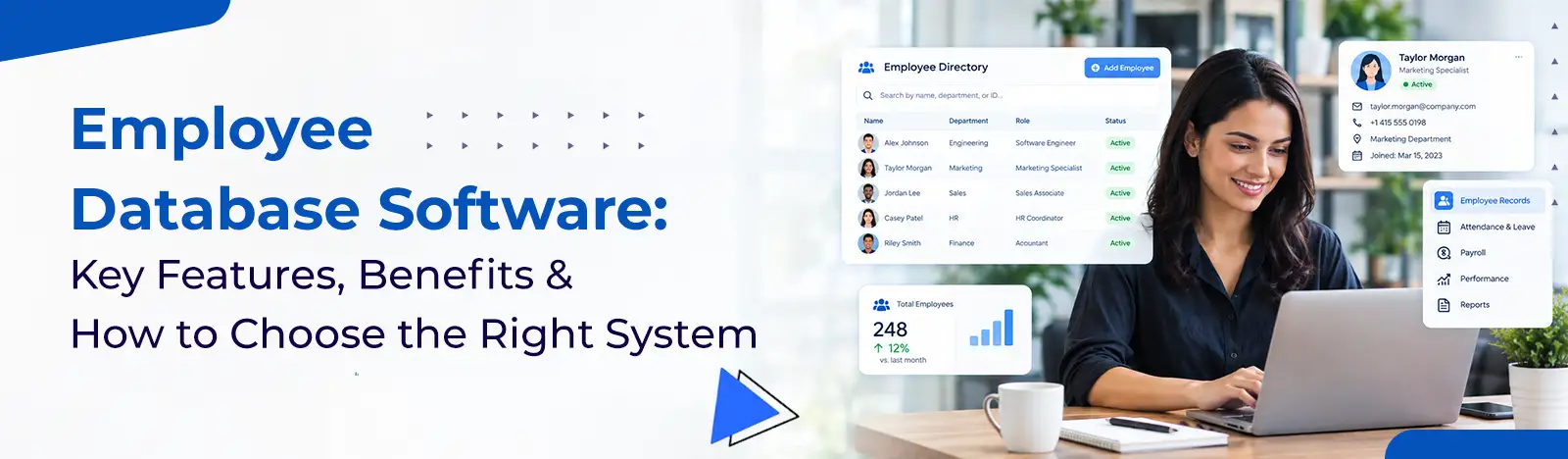
A directory is a searchable list of employees carrying basic contact details. A profile is the fuller record behind each entry on that list, holding skills, history and role context. One helps you locate a person. The other helps you understand whether they are the right person.
The distinction matters because organizations frequently buy the first and expect the second.
Directories answer a lookup question. Who works here, what is their extension, which office are they in. That is genuinely useful and it is where most implementations stop. The problem surfaces the moment somebody needs to answer a harder question, which is the one that started this article. Who knows about this.
Profiles turn a list into something closer to an internal knowledge map. Think of the directory as the interface. The profile is the substance behind it, and neither works well without the other.
If your team’s profiles currently live in a spreadsheet or a bare-bones directory
A purpose-built HR directory can hold the fuller picture, with fully editable employee profiles built in, without extra admin work.
Five carry the weight. Identity, meaning name, title and photo. The reporting line, meaning department and manager. Contact details. Skills and areas of expertise. And enough work history to give the rest context. Everything after those five is refinement.
Here is what each one earns its place for.
Component
What it holds
Why it earns a place
Name and job title
Full name, preferred name, current title
The minimum needed to identify somebody correctly
Photo
A current headshot
Recognition in hybrid teams where people rarely meet
Contact details
Work email, phone or extension, location
Removes the step where somebody has to ask around
Department and reporting line
Team, manager, direct reports
Shows where a person sits and who to escalate to
Skills and expertise
Capabilities, systems, specialisms
The field that answers who knows about this
Work history and tenure
Start date, previous internal roles
Signals depth and who remembers the last time
Education and certifications
Qualifications relevant to the role
Matters most in regulated and technical functions
Personal interests
Ask me about, short bio, languages
Optional, and often the field colleagues use most
Table 1. Eight components. The first five are structural; the last three are what make a profile feel human.
Notice that the first five are structural and the last three are contextual. A profile carrying only the structural fields functions as a slightly richer directory entry. The contextual fields are what make it worth searching.
Skills is the field organizations most often leave out and most often need. Without it, a directory can tell you that somebody works in finance. It cannot tell you which of the fourteen people in finance has actually built a rolling forecast before.
Personal interests deserve a defense, because they look decorative and are not. In distributed teams, an ask-me-about field gives people a reason to make contact that has nothing to do with hierarchy, and those contacts are how informal networks form.
Types of employee profiles
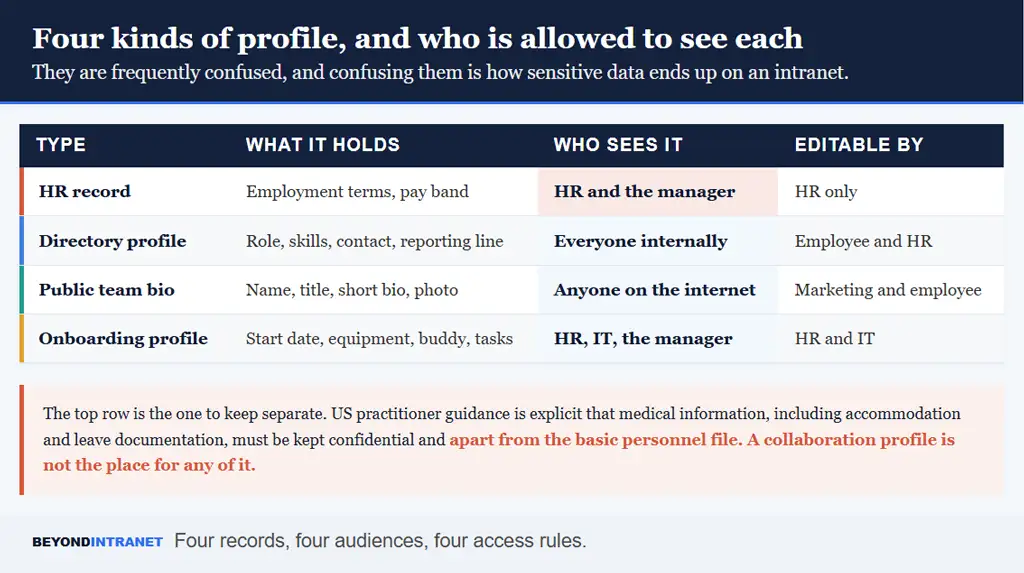
Four variants exist in most organizations, and confusing them causes real problems.
Four records, four audiences, four access rules.
Each serves a different audience under a different access rule, which is the reason the distinction is worth drawing carefully.
The HR record
Employment terms, compensation band, performance documentation. Confidential by default, maintained by HR, and governed by rules that do not apply to anything else on this list.
The directory or intranet profile
The collaboration-facing record, visible across the organization, holding role and skills and contact details. This is the profile most of this article is about, and the one employees should be able to edit parts of themselves.
The public team bio
Name and title. A short biography and a photograph. It lives on a website and is written for people outside the company, which makes it a marketing asset that happens to describe an employee.
The onboarding profile
A temporary working record covering start date, equipment, buddy assignment and the tasks that need completing before somebody is productive. It usually sits inside employee onboarding software and feeds the permanent profile once the person has started.
Four returns, and none of them require a survey to observe.
The first is speed of collaboration. Every hour someone spends identifying the right colleague is an hour not spent on the work, and in a distributed organization that lookup happens constantly. Good profiles convert a series of messages into a single search.
The second is onboarding. New hires spend their first weeks working out who does what, and they do it by asking, which costs two people’s time each occasion. A populated directory shortens that period considerably without anybody running a session.
Third is internal mobility. Organizations routinely recruit externally for skills they already employ, because nobody has a searchable view of what people can do. Profiles with a real skills field make internal candidates visible, and pairing them with SharePoint org chart software shows where those people sit and what a move would actually involve.
Fourth is connection, which is softer and still real. People who can see who their colleagues are, what they work on and what they care about behave differently toward them than people looking at a name in a list.
How to create an employee profile
What is the process for building employee profiles?
Six steps. Pick the platform the profile will live in. Define which fields are required. Build a consistent template. Collect the information, ideally during onboarding. Review it for accuracy before publishing. Then keep it current as roles change.
Most organizations manage the first three and abandon the last one, which is why so many directories are quietly out of date.
Worth deciding early who owns the process. Profiles sit across HR, IT and internal communications, and a project without a single owner tends to produce a template everyone agreed with and nobody launched.
1. Choose where the profile will live
Pick the system people already open daily. Records held in a tool nobody visits form an archive rather than a directory, however complete they are. For most organizations that means the intranet or the collaboration platform rather than a standalone HR system.
2. Define the required fields
Decide what is mandatory and what is optional before anybody starts filling anything in. Making too much mandatory produces resistance and low-quality entries. Making too little mandatory produces profiles that vary so much they cannot be compared.
3. Build a consistent template
Same fields, same order, same format across the organization. Consistency is what allows filtering and search to work at all, and it is much easier to impose at the start than to retrofit across four hundred existing records.
4. Collect the information
Onboarding is the natural moment, because a new hire is already completing forms and has no existing habits to overcome. For current employees, a short window with a clear deadline works better than an open-ended request that never quite closes.
5. Review before publishing
Somebody should check for accuracy and for anything that does not belong in a company-visible record. This step takes an afternoon and prevents the two problems that damage trust in a directory, which are wrong information and information people did not expect to be public.
6. Keep it current
Attach profile updates to events that already happen. A role change, a team move, a promotion. Relying on people to remember spontaneously does not work, and an annual refresh campaign means the data is wrong for eleven months of the year.
Building profiles by hand in SharePoint gets slow past a handful of employees
See what an editable, SharePoint-native profile with skills, interests and contact details looks like at scale.
At minimum, full name and job title. Department and reporting manager. Contact details and a start date. Stronger templates go further. They add skills and work history. Certifications. A photo. Those extras turn a contact record into something worth searching.
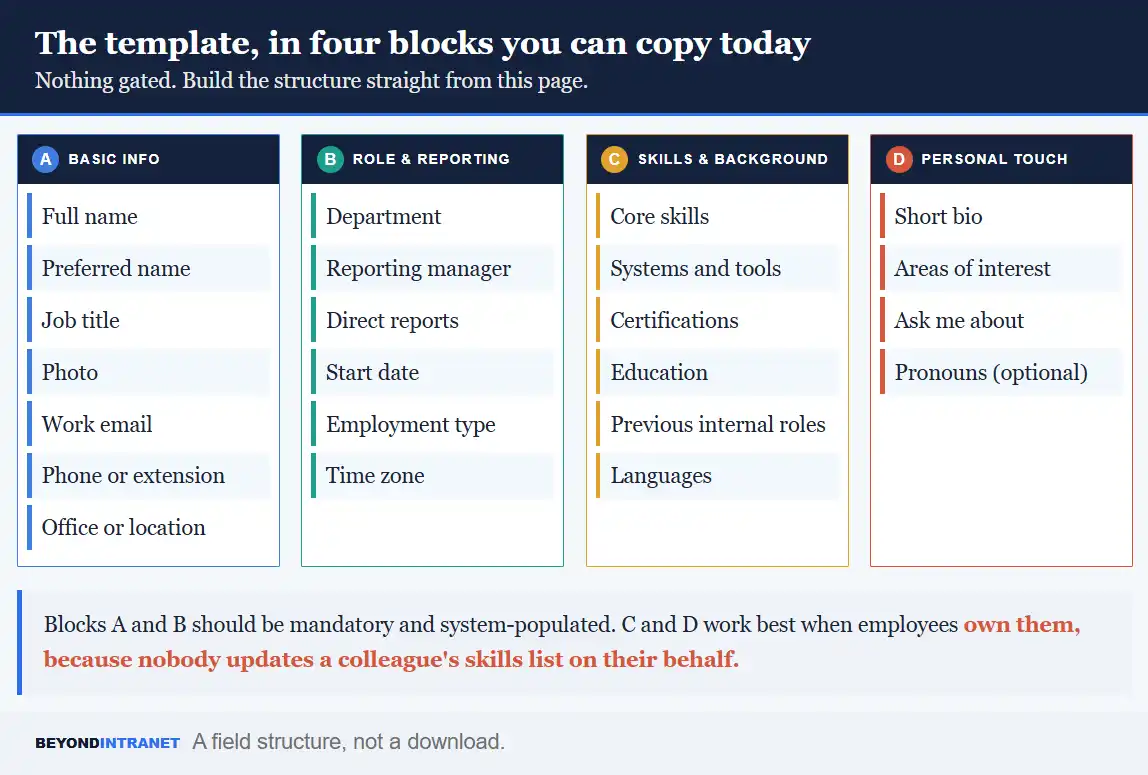
Four blocks cover it. Copy the structure directly from here rather than hunting for a download.
A field structure, not a download.
Block
Fields
Notes on setup
A. Basic info
Full name, preferred name, job title, photo, work email, phone or extension, office or location
Mandatory. Populate from your identity system so it stays current automatically
B. Role and reporting
Department, reporting manager, direct reports, start date, employment type, time zone
Mandatory. The manager field is what generates a working org chart
C. Skills and background
Core skills, systems and tools, certifications, education, previous internal roles, languages
Optional but high value. Use a controlled list for skills or search will not work
D. Personal touch
Short bio, areas of interest, ask me about, pronouns
Entirely employee-owned. Never mandatory, and adoption tells you something
Table 2. Four blocks. A and B should be system-populated; C and D work best when employees own them.
One design decision matters more than the rest. Use a controlled vocabulary for skills rather than free text. Twelve people writing project management, Project Management, PM and programme management will produce a field that looks populated and searches like nothing.
Keep the total field count under about twenty. Longer templates get abandoned partway through, which leaves you with a directory of half-finished records that is arguably worse than a short complete one.
Employee profile examples
Two composite examples, built from roles rather than named organizations.
A sales profile
Territory and account history do most of the work here. Take a regional account manager in Dallas. Her profile might show the industries she covers and the accounts she has held longest. The CRM and quoting tools she works in. The languages she sells in. A colleague pricing a deal in the same territory needs all of that before they need her phone number.
An engineering profile
The useful fields shift entirely. Technology stack, systems she has worked on, certifications and previous internal projects. When something breaks in a service nobody has touched for two years, the question is who built it, and a profile carrying past project history answers that in one search rather than four Slack threads.
A third pattern shows up in field and frontline roles. Shift-based employees often need location, certification currency and shift pattern far more than they need a bio, which is a useful reminder that one template rarely serves an entire workforce equally well.
What both examples share is that the differentiating information sits in the skills and history blocks. Name, title and extension are identical in structure across every profile in the company. The blocks people actually search are the ones organizations most often leave empty.
Employee profile best practices
Four rules, learned mostly from directories that went stale.
Standardize fields across the whole organization rather than letting each department invent its own. Departmental variation feels accommodating and destroys search, because a filter only works when everyone answered the same question.
Tie updates to role changes rather than to a calendar. The moment somebody moves team is the moment their profile is wrong, and that is also the moment a system can prompt them.
Let employees own the parts that are theirs. Skills, interests and bio should be self-managed. Nobody in HR can accurately describe what a colleague has become good at over the last two years, and pretending otherwise produces a stale field.
Protect the sensitive material with role-based access. The collaboration profile and the confidential HR record should not share a permission model, and the separation needs to be structural rather than a matter of who remembers to be careful.
Yes. Both terms describe the same individual record, and HR teams use them interchangeably depending on habit and region. Nothing about the structure or purpose changes with the label, so pick whichever your organization already says and stay consistent.
Partly. Identity and reporting fields should come from the system of record so they stay accurate. Skills, bio and interests are better left to the individual, because those change faster than HR can track and nobody else can describe them properly.
Event-driven beats scheduled. Prompt an update whenever someone changes role, manager or location. If you want a periodic sweep as well, twice a year is enough, and it works best when it takes a person two minutes rather than twenty.
Anything belonging in a confidential file. Compensation and performance documentation. Medical or accommodation information. Personal identifiers such as a home address or government ID number. The collaboration profile and the HR record serve different purposes and different audiences.
Where to start
Open your current directory and try to answer a real question, such as who has worked on a specific system or client. Whatever you cannot answer is the gap your template needs to close.
Write the four blocks from the table above into a document and mark which fields are mandatory. That decision takes an hour and determines everything downstream.
Decide what will prompt updates before you launch anything. Any system without an update trigger is accurate on day one and misleading by month six.
The record behind the row
Directories answer who exists. Profiles answer who knows, who owns, and who to ask. The difference between them is a handful of well-chosen fields and a habit of keeping them current, which is far less work than the alternative of asking a manager every time somebody needs to find the right colleague.
Want to see what a fully editable employee profile looks like inside your own Microsoft 365 environment?