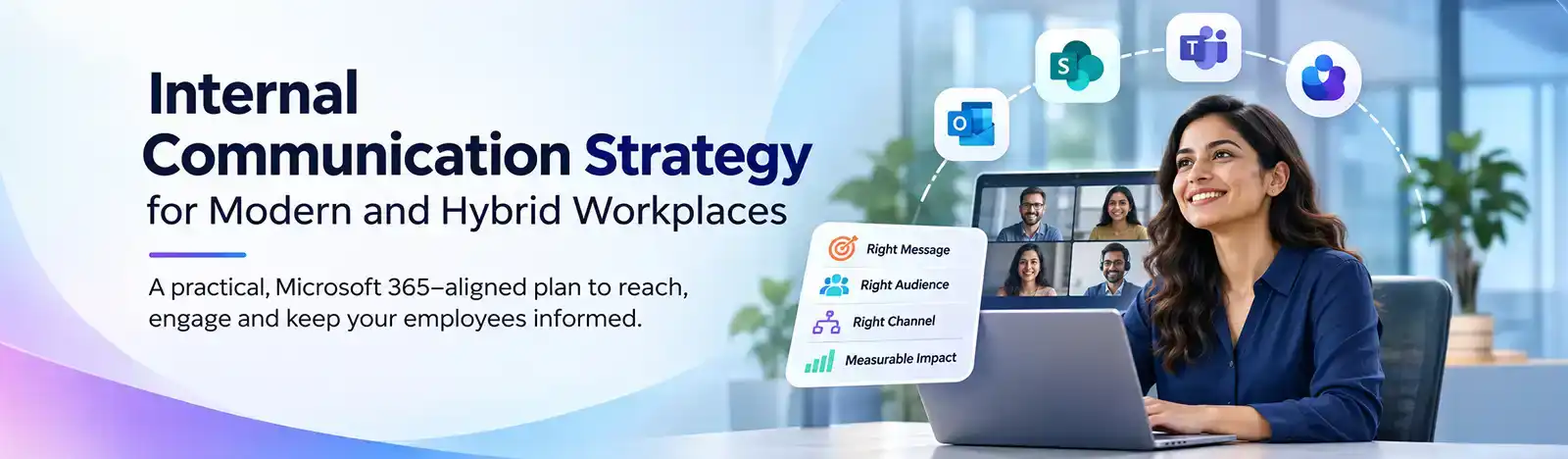
Quick answer: An internal communication strategy is a written plan that defines who tells employees what, through which channel, how often, and how you confirm it worked. A strong plan sets outcomes, audits channels, matches each message to the right channel, assigns owners, runs on an editorial calendar, and measures understanding, not just opens.
Most employees do not lack information. They lack the right information at the right moment. Microsoft’s 2025 Work Trend Index found that the average worker on Microsoft 365 gets about 117 emails and 153 Teams messages a day.Your announcement is one small voice in that noise.
The pressure shows up in management, too. Gallup reports that 48% of leaders and managers name communication as a top challenge in hybrid work. Hybrid is now common, not rare. Gallup found that 52% of remote-capable U.S. employees work hybrid.2
This guide gives you a plan you can start this quarter. It is written for internal communications, HR, corporate communications, digital workplace, and IT leaders who work across Microsoft 365.
In this guide
- What an internal communication strategy must achieve
- Audit current communication channels
- Match audience and message to channel
- Create communication governance
- Use SharePoint and Teams together
- Build an editorial calendar
- Measure effectiveness
- Common communication failures
- FAQs
What an internal communication strategy must achieve
Start with outcomes, not tools. If you pick channels first, you will end up defending the channels. Pick the results you want, then choose what gets you there.
Five outcomes cover most plans:
- Clarity: People understand what is happening and what it means for them.
- Alignment: Teams work toward the same priorities.
- Timely information: People hear it before they need it, and before the rumor does.
- Connection: Remote, hybrid, and frontline staff feel part of one company.
- Less channel confusion: People know where to look, and where to ask.
Three kinds of communication, three different jobs
Teams mix these up all the time. That is where many problems begin.
- Announcements push information out. Think policy updates, results, and leadership messages. One voice, many readers.
- Two-way feedback pulls information in. Think pulse surveys, Q&A sessions, and manager check-ins. Many voices, one listener.
- Collaboration is shared work. Think project chats, co-authoring, and team channels. Many voices, working together.
An announcement posted in a chat thread gets buried. A feedback request sent as a mass email gets ignored. Name the job first. The channel follows.
Audit current communication channels
You cannot fix what you cannot see. Spend two to three weeks building an inventory before you change anything.
List every channel in use, official or not:
- Email, including distribution lists and shared mailboxes
- The intranet and any department sites
- Teams chats, channels, and team spaces
- Meetings: all-hands, team huddles, and leadership briefings
- Newsletters and digests
- Town halls and live events
- Frontline channels: shift briefings, kiosks, posted notices, mobile apps, text groups
For each channel, capture four things: the owner, the audience, how often it runs, and what it is meant for. Then look for four problems.
What to look for in a channel audit?
| Problem | How it shows up | Question to ask |
Duplication | The same news appears in email, a newsletter, and a Teams post with different wording | Which channel is the source of truth? |
Overload | Employees report skimming or ignoring most messages | Which messages could be merged, delayed, or dropped? |
Missed audiences | Frontline, part-time, new hires, or non-native speakers hear late or not at all | Who has no company email, no desk, or no reliable access? |
Unclear ownership | Nobody can say who approves or retires a message | Who is accountable for this channel today? |
Match audience and message to channel
This is the heart of the plan. No channel is best for every message. A policy change, a system outage, and a team celebration each need a different path.
Judge each message on five points: type, audience, urgency, interaction needed, and how long people will need to find it. Then pick the channel. Here is a starting matrix. Adjust it to your tools, your regions, and your workforce.
| Message type | Audience | Urgency | Interaction | Recommended channel |
Safety or security incident | All affected staff, including frontline | Critical | Acknowledgment required | Approved alert path: push notification, SMS or mobile alert, supervisor briefing; confirm receipt |
System outage | Affected users | High | Low; updates needed | Teams post or alert, with an intranet status page for details |
Policy change | All staff or a defined group | Medium | Questions expected | SharePoint news or page as the source of truth, plus targeted email or Teams pointer, plus manager talking points |
Leadership update | All staff | Low to medium | Discussion helpful | Live town hall or recorded video, with a Viva Engage or Teams thread for questions |
Business results | All staff | Low | Q&A helpful | Monthly digest with an intranet page and a live Q&A |
Team project work | Project group | Varies | High | Teams channel and shared files |
Campaign or program | Defined audience | Low | Participation sought | Intranet campaign page, Teams or Viva Engage community, manager nudge |
Employee story or recognition | All staff | Low | Reactions welcome | SharePoint news with comments or reactions, shared in Teams or Viva Engage |
Shift or schedule notice | Frontline teams | High | Confirmation needed | Shift tool or mobile app, supervisor huddle |
Urgent messages need a defined path
Critical messages should never depend on someone’s memory or a lucky inbox. Write the escalation path down before you need it. It should name who can declare an urgent message, who approves it, which channels fire, how fast, and how you confirm that people got it.
For safety, security, or legal notices, ask for acknowledgment. That can be a click, a reply, a supervisor sign-off, or a headcount at a shift start. If you cannot confirm that a message landed, you have only confirmed that you sent it. Test the path twice a year, the same way you test a fire drill.
Create communication governance
Governance sounds heavy. It is really just answering a few plain questions in advance: who writes, who approves, who publishes, and who fixes things when they go wrong.
Define these roles, even if one person holds several:
- Owners are accountable for a channel or topic area.
- Approvers sign off on content that needs it, such as HR, Legal, or an executive sponsor.
- Editors check clarity, tone, accuracy, and accessibility.
- Publishers post the content and apply audience targeting.
- Champions are local voices in teams, sites, and shifts who relay messages and bring back questions.
Then add the working parts: an editorial calendar, a review cadence for old content, accessibility standards, and the escalation path above. Keep a one-page policy that says which channel is used for what. Short beats thorough here. If nobody reads the governance document, it is not governance.
Accessibility belongs in the process, not in a final check. Use plain headings, real alt text, captions on video, readable color contrast, and plain language. Do not rely on color or images alone to carry meaning. If a message cannot be read by a screen reader, part of your audience did not get it.
Use SharePoint and Teams together
SharePoint and Teams do different jobs. Treat them as partners, not rivals.
SharePoint is where information lives. News posts, policy pages, how-to guides, and department sites sit there. The content is structured, searchable, and stays findable next month. That is what you want for anything people will need to look up again.
Teams is where people talk and work. It suits quick questions, project threads, meetings, and day-to-day coordination. It moves fast. That is its strength and its weakness. A good decision posted in a busy channel can vanish in a day.
Email still has a place. It works well for targeted distribution, formal notices, and people who do not sit in Teams all day. Use it with care, and avoid sending a full message when a short pointer to the source page will do.
Microsoft’s Viva Connections links the two. It is an employee experience app in Teams that draws on SharePoint, Viva Engage, and other Microsoft 365 content, so people can see news and resources where they already work. Microsoft also describes it as built to serve both information workers and frontline workers.Microsoft lists targeted announcements and push notifications among its features. Check licensing and admin settings with your IT team before you promise these features to leaders.
Build an editorial calendar
A calendar turns good intentions into a rhythm. It also exposes collisions early, such as three departments planning an all-staff message for the same Tuesday.
Aim for balance. Too little, and people hear rumors first. Too much, and people stop reading. Set a baseline rhythm, then add role-specific messages only where they are relevant to the reader.
Sample month: editorial calendar (adapt to your size and rhythm)
| Week | Content type | Example | Primary channel | Follow-up |
Week 1 | Leadership update | CEO monthly note on priorities | SharePoint news and short video | Teams or Viva Engage thread for questions |
Week 1 | Policy change | Updated hybrid attendance guidance | SharePoint policy page | Targeted email, manager talking points |
Week 2 | Business update | Quarterly results summary | Digest and live Q&A | Recording and FAQ on the intranet |
Week 2 | Campaign | Security awareness month kickoff | Intranet campaign page | Teams community, manager nudge |
Week 3 | Employee story | Frontline team spotlight | SharePoint news | Reactions and comments, shared in Viva Engage |
Week 3 | Feedback | Three-question pulse survey | Teams or intranet link | Results shared the next week |
Week 4 | Campaign wrap-up | Security awareness results | Intranet | Thank-you note and next steps |
Week 4 | “You said, we did” | Actions taken from last month’s feedback | SharePoint news | Manager huddle talking point |
How often is often enough?
There is no magic number. A steady rhythm matters more than a high count. Many teams settle on one leadership update and one business digest a month, plus role-specific notices when needed. Then they watch the signals. If people ask the same questions twice, you are too late or too unclear. If they stop opening anything, you are probably sending too much.
Keep a “quiet” rule. If a message is not relevant to a group, do not send it to that group. Audience targeting in SharePoint and Viva Connections can help here. It is better to reach fewer people with the right message than everyone with a vague one.
Measure effectiveness
Measurement is where many plans go soft. Teams count what is easy to count. Opens, views, and clicks are easy. Understanding is harder.
Here is the key point. An open rate tells you someone saw a subject line. A click tells you someone was curious. Neither proves that anyone understood the message or did what you asked. Microsoft’s own Work Trend Index research warns against treating activity as progress.The same applies to communication.
Measurement table: activity versus outcome
| Measure | Type | What it tells you | What it does not tell you |
Reach (who could see it) | Activity | Whether the message was delivered to the right audience | Whether anyone read it |
Readership (page views, read time) | Activity | Interest and attention | Whether they understood |
Clicks and opens | Activity | Curiosity about the subject line or link | Comprehension or action |
Feedback (comments, questions, reactions) | Early outcome | What is confusing, welcome, or missing | Views of people who stayed silent |
Comprehension (quick check, pulse question) | Outcome | Whether people can say what changed and why | Whether they will act on it |
Action completion (form submitted, training done, policy acknowledged) | Outcome | Whether the message led to the intended step | Whether they agree or feel supported |
Sentiment (pulse survey, listening sessions) | Outcome, where appropriate | How people feel about a change or a channel | Root causes, without follow-up conversation |
Choose two or three measures per message, and decide them before you send. A policy change might use acknowledgment rate and a two-question comprehension check. A culture campaign might use participation and a pulse score.
A practical example: communicating a hybrid attendance policy change
This example is illustrative. It shows how the pieces fit when a policy affects everyone, including people who rarely open email.
The situation. A company with office, hybrid, and warehouse staff updates its hybrid attendance guidance. Office and hybrid staff are affected directly. Warehouse staff are not, but supervisors will get questions.
- Two weeks before. HR drafts the policy. Legal reviews it. The Internal Comms lead builds a one-page summary, a short FAQ, and manager talking points. The executive sponsor approves.
- Day 1. The full policy goes live on a SharePoint page. This is the single source of truth. A SharePoint news post explains the change in plain language, with targeting for affected groups.
- Day 1, same hour. A short targeted email and a Teams post point to the page. They do not repeat the policy.
- Day 2. Managers hold a short team huddle, using the talking points. Supervisors brief warehouse teams on what does and does not change for them, at shift start.
- Days 3 to 10. A Teams or Viva Engage thread collects questions. The Internal Comms lead updates the FAQ twice a week.
- Day 10. A two-question pulse check asks: “Can you explain what changed?” and “Do you know where to find the details?” Acknowledgment completion is reviewed by team.
- Day 30. A “you asked, we answered” post closes the loop and notes any change to the guidance.
Notice what is missing. There is no 3,000-word email. There is no single “best” channel. Each step has a job.
Common communication failures
Six common failures and practical fixes
| Failure | What it looks like | Fix |
Overusing email | Every message goes to everyone by default | Use email as a pointer or for targeted notices. Publish the full content once in SharePoint. |
Inconsistent messages | HR, IT, and leaders describe the same change in different words | Write one approved master version. All channels use it or link to it. |
Late announcements | Staff hear about a change from a colleague first | Set a lead-time standard. Plan the message before the decision is final, and name the release date. |
Too many owners | Five people can send, nobody can stop | One accountable owner per channel and topic. Publish the owner list. |
Inaccessible content | Images with no alt text, uncaptioned video, dense jargon | Add an accessibility check to the editor step. Write in plain language. |
No feedback loop | People cannot ask questions or never see answers | Add a Q&A path to every major message and close the loop with a “you said, we did” post. |
These six problems show up again and again. Most are fixable with small changes.
Late announcements deserve a note of their own. The pull to wait until everything is final is strong. But silence is itself a message. A brief “here is what we know, here is what we do not, and here is when we will update you” beats a perfect message that arrives too late.
Ready to fix how your organization communicates?
Our team helps Internal Communications, HR, and IT leaders plan channels, governance, and Microsoft 365 intranet improvements that employees actually use.
Frequently Asked Questions
It should include clear outcomes, a channel audit, a channel-selection matrix, governance with named owners and approvers, a SharePoint and Teams operating model, an editorial calendar, an escalation path for urgent messages, and a measurement plan that tracks outcomes as well as activity.
No single channel is best for every message. Use SharePoint for durable, searchable information. Use Teams for conversation and collaboration. Use email for targeted distribution. Use meetings and town halls for dialogue. Use mobile, huddles, or kiosks for frontline staff. Match the channel to the message type, audience, urgency, and need for interaction.
SharePoint holds news, policies, and pages that people can find later. Teams supports quick questions, meetings, and team work. Viva Connections can surface SharePoint news and other content inside Teams, so employees see it where they already work. Neither replaces every other channel.
Track reach, readership, clicks, feedback, comprehension, action completion, and sentiment where appropriate. Opens and clicks show attention, not understanding. Pair them with a short comprehension check and completion data. Use aggregate data, and review privacy and policy rules first.
There is no universal number. Set a steady rhythm, such as one leadership update and one business digest per month, plus role-specific notices when needed. Judge frequency by relevance. Repeated questions suggest messages are late or unclear. Ignored messages suggest you are sending too much.