Choosing a SharePoint consulting company in Australia involves more than comparing service lists. The right partner needs relevant project experience,...
Quick answer: The right Azure consulting partner holds current Microsoft Solutions Partner designations, shows named references in your industry, and...
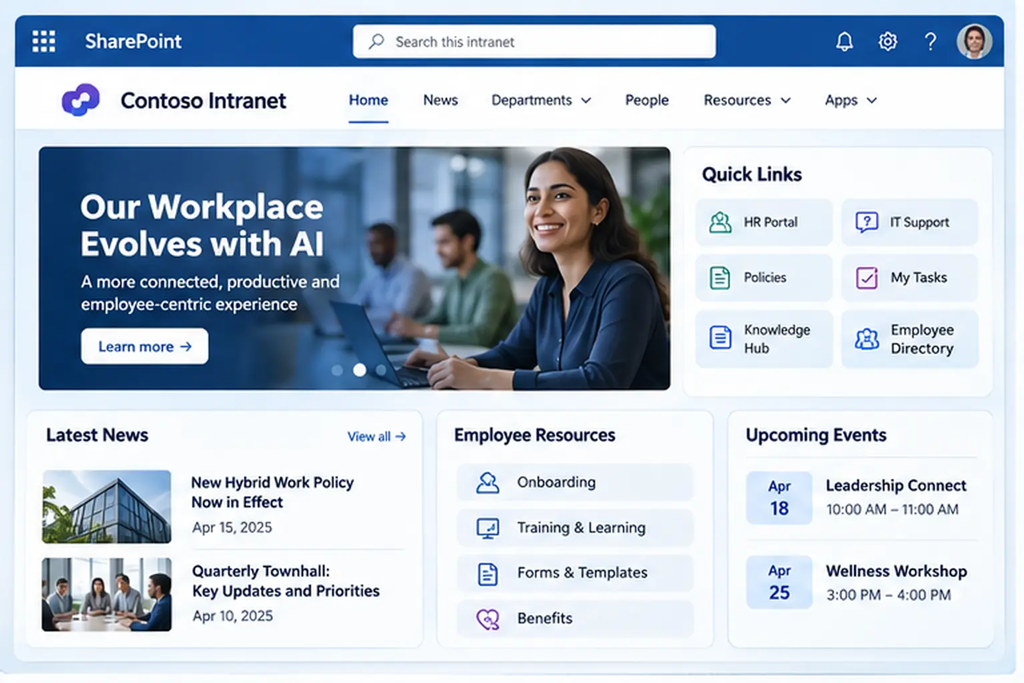
A modern SharePoint intranet is much more than a collection of pages, widgets, and add-ins. It is a connected digital workplace that helps employees access information, collaborate with colleagues, discover organizational knowledge, and complete everyday tasks efficiently.
Traditional SharePoint intranets focused primarily on customization and add-ins to provide features such as employee directories, knowledge repositories, task management, and internal communication. Today, organizations are combining Microsoft 365, SharePoint, Power Platform, and AI capabilities to create more intelligent and connected employee experiences.
With Microsoft 365 Copilot, AI-powered search, SharePoint agents, and intelligent automation, employees can go beyond browsing pages and searching for documents. They can ask questions, discover relevant information, create content, and automate repetitive processes.
However, AI alone cannot make an intranet effective. A well-organized information architecture, accurate metadata, appropriate permissions, and strong governance are essential for building an AI-ready SharePoint environment.
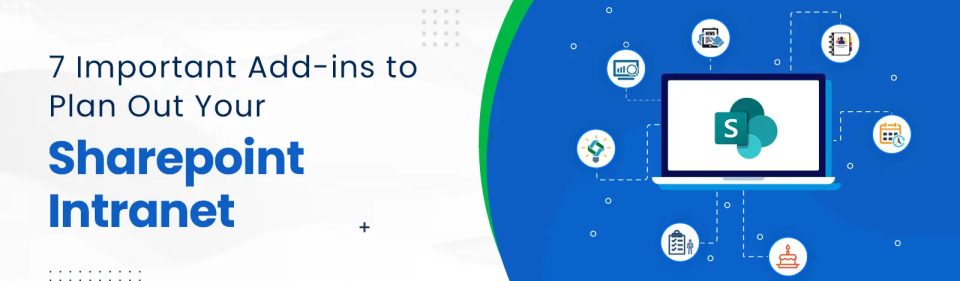
In this article, we explore seven essential SharePoint intranet capabilities, how AI is changing the modern digital workplace, and what organizations should prioritize when preparing their intranet for AI.
How SharePoint Intranet Requirements Have Changed
A decade ago, organizations primarily used SharePoint intranets as centralized portals for company announcements, employee information, documents, and internal communication.
The focus was on building an attractive portal with customized features such as image sliders, employee directories, discussion boards, and task management tools.
While these capabilities remain useful, employee expectations have evolved.
Today, employees want to find information quickly, collaborate across departments, access company knowledge, and complete tasks without navigating multiple systems. IT leaders also need better governance, security, and control over organizational information. This has changed how modern SharePoint intranets are designed.
Traditional SharePoint Intranet
Modern AI-Ready SharePoint Intranet
Customized portal with add-ins
Connected Microsoft 365 digital workplace
Manual document searches
AI-assisted information discovery
Static knowledge repositories
Searchable organizational knowledge
Manual workflows
Automated business processes
Generic employee experience
Audience-targeted and personalized experiences
Traditional content management
AI-assisted content creation and management
A modern intranet brings together four important components:
Microsoft 365: Connects employees, documents, communication, and productivity applications.
SharePoint: Provides the foundation for intranet sites, pages, document libraries, and knowledge management.
Power Platform: Enables organizations to build applications, automate workflows, and streamline business processes.
The objective is not to replace every existing intranet feature with AI. It is to make existing capabilities more useful through better integration, information management, and intelligent experiences.
7 Essential Add-Ins for a Modern SharePoint Intranet
Even with the introduction of AI, traditional intranet capabilities continue to play an important role in employee engagement, collaboration, and information management.
Here are seven capabilities that organizations should consider when building or modernizing their SharePoint intranet.
1. Image Slider and News Highlights
An intranet homepage is often the first place employees visit to access company information. It should help them quickly identify important announcements, events, updates, and organizational news.
A slider or banner component can highlight important information through rotating images, promotional banners, and featured announcements.
What it does:
A SharePoint Slider add-in displays rotating banners and featured content on the intranet homepage. Organizations can use it to showcase company announcements, new initiatives, internal events, and important updates.
Business benefits:
Highlights important company announcements.
Makes the intranet homepage more engaging.
Improves visibility of internal campaigns and events.
Helps employees discover important updates.
AI opportunity:
AI can support the content creation process by helping communication teams draft announcement headlines, summarize company updates, and suggest relevant messaging.
For example, a communications team can use Microsoft 365 Copilot to prepare an initial draft of an employee announcement before reviewing and publishing it.
The slider itself is a traditional intranet component. AI assists with the content that appears within it.
2. Knowledge Management
Organizational knowledge is one of the most valuable resources within a company. However, important information often remains scattered across documents, SharePoint sites, email conversations, and individual employees’ knowledge.
A SharePoint knowledge management capability provides a centralized way to organize and access organizational information.
What it does:
A knowledge management solution brings together useful documents, articles, discussions, policies, procedures, and other organizational resources in an accessible knowledge repository.
Business benefits:
Makes important organizational information easier to find.
Reduces dependency on individual employees for routine information.
Helps new employees understand company processes.
Encourages knowledge sharing across departments.
Preserves valuable organizational knowledge.
AI opportunity:
AI can make an organized knowledge repository more useful by helping employees discover information through natural-language questions.
For example, an employee joining the HR department might ask: “What is the company’s employee leave policy?”
Instead of manually browsing multiple folders and documents, an appropriately configured Microsoft 365 Copilot experience or SharePoint agent can help locate relevant information from approved sources, subject to the employee’s existing access permissions.
For organizations looking for a dedicated AI-powered knowledge discovery experience, Beyond Intranet also offers AIKA 365, a separate generative AI knowledge search assistant for SharePoint.
3. Employee Directory
In large organizations, finding the right colleague can be challenging, particularly when teams operate across different offices, departments, and geographical locations.
An employee directory helps employees identify colleagues, understand their roles, and connect with the right people.
What it does:
A SharePoint Employee Directory organizes employee information, including names, profile pictures, designations, departments, and contact details. Depending on the implementation, it can also include additional profile information such as skills and areas of expertise.
Business benefits:
Helps employees find colleagues across departments.
Improves collaboration between distributed teams.
Makes organizational information more accessible.
Helps new employees identify the right contacts.
Supports better internal communication.
AI opportunity:
Accurate employee profiles can support more relevant people discovery.
For example, an employee could ask an appropriately configured Microsoft 365 Copilot experience: “Who works on our Microsoft Dynamics 365 implementation projects?”
The usefulness of the response depends on the availability, accuracy, and accessibility of employee profile information and connected organizational data.
Organizations should maintain updated employee profiles and establish appropriate controls over personal information.
4. Task Manager
Managing daily responsibilities, assigning ownership, and tracking deadlines are essential for maintaining productivity.
A task management capability within a SharePoint intranet helps employees and managers organize work and monitor progress.
What it does:
A SharePoint Task Manager allows employees to create tasks, assign responsibilities, establish priorities, and track deadlines. Depending on the solution, automated notifications can remind employees about upcoming or overdue tasks.
Power Automate, Power Apps, and Copilot Studio can support more intelligent task management workflows.
For example, when an employee submits an IT support request through a form, a Power Automate workflow can automatically route the request to the appropriate team.
AI capabilities can also help extract information from incoming requests, classify them, and assist with prioritization where suitable.
Copilot can help summarize project updates and meeting discussions, allowing managers to identify outstanding tasks and follow-up actions.
The level of automation depends on the workflow design, connected applications, and available licensing.
5. Birthday and Employee Celebration Reminders
Employee engagement is not limited to business announcements and work-related activities. Small moments of recognition can help create a more connected workplace.
Birthday reminders and employee celebration features help organizations acknowledge important personal milestones.
What it does:
A Birthday Reminder add-in displays employee birthdays using available profile information. It can show employee names, profile pictures, and birthday announcements on the intranet homepage.
Business benefits:
Encourages employee recognition.
Creates opportunities for informal interaction.
Supports a positive workplace culture.
Helps distributed teams stay connected.
AI opportunity:
AI can assist employees in drafting personalized birthday greetings, appreciation messages, and celebration announcements.
For example, an employee can use Copilot to draft a friendly birthday message for a colleague.
Organizations should ensure that employee information is displayed only in accordance with their privacy policies and individual preferences.
6. Search and Search Analytics
Employees often spend considerable time looking for documents, policies, project information, and other organizational resources.
As organizations accumulate more content across SharePoint sites and document libraries, an effective search experience becomes increasingly important.
What it does:
A search capability helps employees find relevant documents, people, sites, and other organizational information.
Search analytics can provide insights into popular search queries and unsuccessful searches, helping administrators identify information gaps and improve the overall search experience.
Business benefits:
Reduces time spent searching for information.
Helps employees locate relevant documents.
Improves access to organizational knowledge.
Identifies frequently searched topics.
Highlights content gaps through unsuccessful search queries.
AI opportunity:
AI-powered search can go beyond traditional keyword matching by helping employees find information using natural-language questions and contextual signals.
For example, instead of searching for a document using its exact filename, an employee might ask: “Find the latest project proposal we prepared for the manufacturing client.”
Microsoft 365 Copilot Search and other appropriately configured AI search experiences can help employees discover relevant organizational information.
Search analytics also provides an opportunity to identify what employees struggle to find. Organizations can use these insights to improve document organization, metadata, and knowledge management before expanding AI-powered search experiences.
7. Chat Board and Employee Discussions
Internal communication plays an important role in building a collaborative workplace.
A discussion board or chat-based intranet component gives employees a place to share ideas, ask questions, and participate in conversations.
What it does:
A Chat Board provides a centralized space for employees to post discussions, share updates, ask questions, and exchange ideas.
Business benefits:
Encourages knowledge sharing.
Gives employees a platform to exchange ideas.
Supports communication across departments.
Helps surface common questions and organizational challenges.
Creates opportunities for employee participation.
AI opportunity:
AI can help employees understand lengthy discussions by summarizing relevant conversations in supported Microsoft 365 applications.
For example, a manager returning from leave could use an available Copilot experience to summarize a lengthy Teams conversation and identify important updates.
Organizations should choose the appropriate communication platform and ensure that employees can access discussion information according to their permissions.
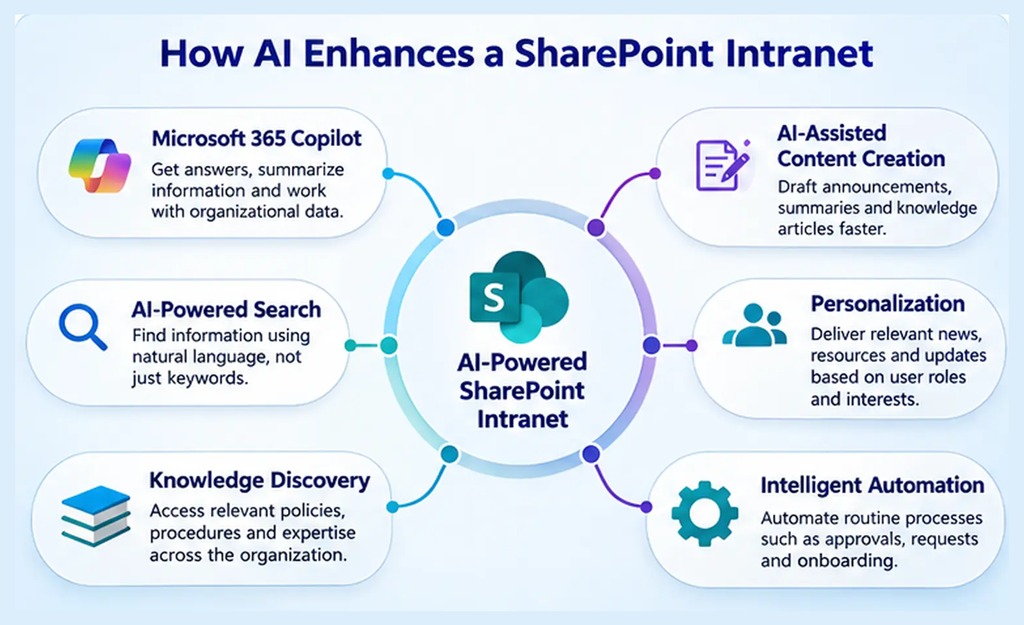
How AI Is Changing SharePoint Intranet Development
The development of modern SharePoint intranets is no longer limited to deciding which features should appear on the homepage.
Organizations are also considering how employees can interact with company information, discover knowledge, and automate everyday tasks using AI.
Here are six important ways AI is changing SharePoint intranet development.
1. Microsoft 365 Copilot
Microsoft 365 Copilot brings AI assistance into supported Microsoft 365 applications and experiences.
It can help employees draft content, summarize information, answer questions, and work with organizational data, subject to applicable licensing, configuration, and access permissions.
For SharePoint intranet administrators, this introduces an important responsibility: ensuring that organizational content is accurate, well-structured, and appropriately secured.
For example, an HR employee could use an eligible Copilot experience to find information about company policies or summarize relevant internal documents.
The quality of the experience depends heavily on the quality of the underlying organizational information.
2. AI-Powered Search
Traditional search experiences often depend on keywords and document titles. Employees may struggle when they do not know the exact name of a document or the terminology used within it.
AI-assisted search allows employees to express their information needs in natural language.
For example:
Traditional search: “Employee onboarding policy.”
Natural-language question: “What steps should a new employee complete during their first week?”
Depending on the search experience, available content, and permissions, AI can help identify relevant information and provide a more contextual response.
Microsoft 365 Copilot Search is one example of this evolving search experience.
3. Knowledge Discovery
Organizations generate large amounts of information through documents, project discussions, policies, reports, and internal communications.
The challenge is not simply storing this information. It is making it useful and accessible when employees need it.
SharePoint agents and Copilot Studio agents can help employees interact with selected organizational knowledge sources through conversational experiences.
For example, a sales employee could ask: “What are the key requirements we need to follow when preparing a proposal for a manufacturing client?”
An appropriately configured agent can help retrieve relevant information from selected SharePoint sites and libraries.
This makes knowledge discovery more conversational and reduces the need for employees to navigate multiple information repositories manually.
4. AI-Assisted Content Creation
Internal communication teams regularly create company announcements, policy updates, employee newsletters, knowledge articles, and intranet pages.
Creating and maintaining this content can require considerable time and coordination.
Microsoft 365 Copilot can assist with drafting, summarizing, and improving content in supported applications.
For example, a communications team could use Copilot to:
Draft an internal announcement.
Summarize a lengthy policy document.
Prepare an initial employee newsletter.
Convert meeting notes into an organized update.
Improve the readability of existing content.
AI-generated content should always be reviewed by a human before publication. Employees remain responsible for accuracy, tone, context, and organizational approvals.
5. Personalized Employee Experiences
Employees have different information requirements depending on their roles, departments, locations, and responsibilities.
A generic intranet homepage may display the same announcements and resources to everyone, even when certain information is more relevant to specific employee groups.
SharePoint audience targeting and Microsoft 365 profile information can help organizations present relevant news, links, and resources to different audiences.
For example:
HR employees can access relevant HR announcements and resources.
Sales teams can see sales enablement resources.
IT employees can access technical documentation and support information.
Regional teams can view location-specific updates.
AI-assisted recommendations may further improve content discovery as organizational data and capabilities mature.
However, personalization should be based on reliable information and appropriate data governance.
6. Intelligent Automation
Many everyday business processes still involve repetitive manual work, including approval requests, employee onboarding, document reviews, and internal service requests.
Microsoft Power Platform provides tools that organizations can use to automate these processes.
Power Automate can trigger workflows based on specific events, while Power Apps can provide customized business applications. Copilot Studio can help organizations build conversational agents and automated experiences.
For example, an employee submitting a purchase request through an intranet application could trigger an approval workflow that automatically routes the request to the appropriate manager.
AI capabilities can also support information extraction, request classification, and other suitable workflow activities.
The combination of SharePoint, Power Platform, and AI can help organizations reduce repetitive work and improve process efficiency.
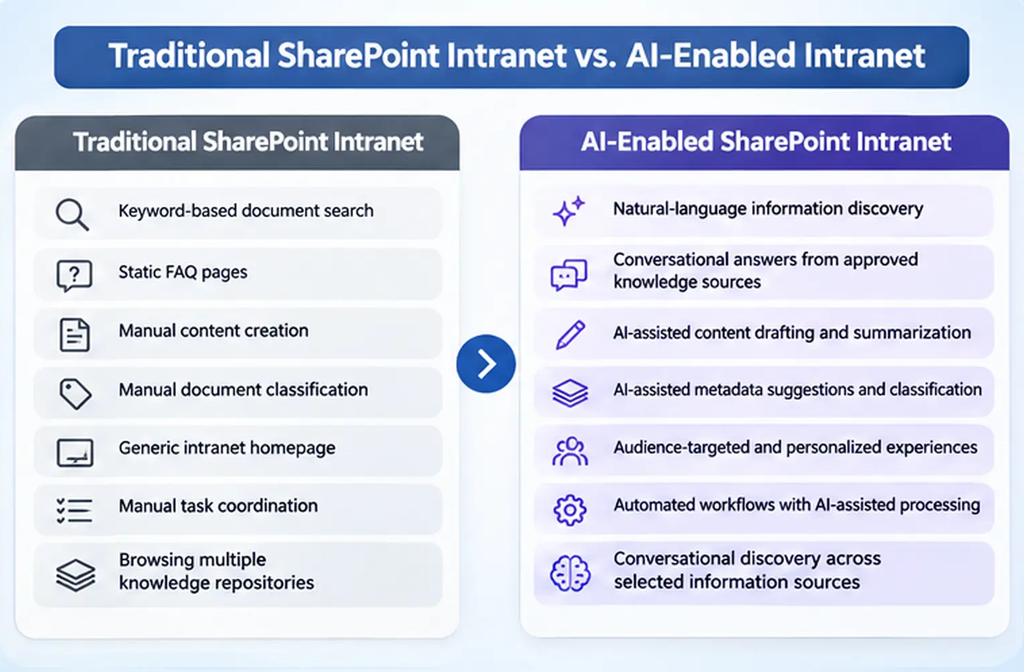
Traditional SharePoint Capabilities vs. AI-Enabled Experiences
AI does not eliminate the need for traditional SharePoint capabilities. Instead, it creates opportunities to make them more intelligent, accessible, and useful.
The following comparison highlights how familiar intranet experiences can evolve.
Traditional capability
AI-enabled experience
Keyword-based document search
Natural-language information discovery
Static FAQ pages
Conversational answers from approved knowledge sources
Manual content creation
AI-assisted content drafting and summarization
Manual document classification
AI-assisted metadata suggestions and classification
Generic intranet homepage
Audience-targeted and potentially AI-assisted experiences
Manual task coordination
Automated workflows with AI-assisted processing
Browsing multiple knowledge repositories
Conversational discovery across selected information sources
Consider an employee looking for the company’s travel reimbursement policy.
Traditional experience: The employee opens the intranet, navigates to the HR section, searches through policy documents, and opens the relevant file.
AI-enabled experience: The employee asks an appropriately configured AI assistant: “What is the company’s travel reimbursement policy, and what documents do I need to submit?”
The assistant can help identify relevant policy information and supporting documents from accessible organizational sources.
The difference is not simply the addition of AI. It is the ability to make organizational knowledge easier to discover and use.
What Should You Prioritize When Building an AI-Ready SharePoint Intranet?
Implementing AI in an intranet without preparing the underlying environment can create unnecessary complexity and information risks.
Before introducing AI-powered search, Copilot, or knowledge assistants, organizations should establish a strong information management foundation.
Here are six important areas to prioritize.
1. Information Architecture
A well-organized SharePoint information architecture helps employees understand where information belongs and how different sites and departments are connected.
Poorly structured sites, duplicate documents, and inconsistent navigation can make information difficult to discover.
What should you do?
Organize SharePoint sites around business functions and information requirements.
Establish clear navigation and site ownership.
Identify duplicate or outdated content.
Create a logical structure for document libraries.
Define how information should be maintained across departments.
2. Metadata Management
Metadata provides context about documents and organizational content.
Information such as document owner, department, content type, project, and review date can make it easier to organize and retrieve information.
What should you do?
Define consistent metadata fields.
Establish required columns for important document libraries.
Use managed metadata where appropriate.
Assign content owners and review dates.
Evaluate available AI-assisted tagging capabilities.
Well-maintained metadata improves content organization and provides useful context for search and AI experiences.
3. Permissions and Security
Permissions are particularly important when introducing AI into a SharePoint environment.
Microsoft 365 Copilot respects the access permissions of the user. This means it does not automatically make restricted documents accessible to everyone.
However, if sensitive information has already been shared too broadly, an AI experience may make that information easier for users with existing access to discover.
What should you do?
Review SharePoint site and document permissions.
Identify sites with overly broad access.
Remove unnecessary permissions.
Review external sharing settings.
Establish appropriate access controls for sensitive information.
Align information protection practices with organizational security policies.
Permission reviews should be completed before expanding AI access across the organization.
4. Search Optimization
An effective search experience depends on the quality, organization, and accessibility of the underlying content.
Before introducing more advanced search experiences, organizations should understand what employees are searching for and where they are struggling.
What should you do?
Review popular employee search queries.
Identify unsuccessful searches.
Improve document titles and descriptions.
Ensure important content is discoverable.
Review outdated and duplicate documents.
Identify the SharePoint sites and information sources that should be available to AI experiences.
Search analytics can help administrators identify gaps and improve the overall intranet experience.
5. Governance and Content Management
An intranet is not a one-time development project. It requires ongoing content management, ownership, and governance.
Without clear governance, organizations can accumulate outdated documents, duplicate information, and inconsistent content.
This can reduce employee trust in both traditional search and AI-generated answers.
What should you do?
Assign owners to SharePoint sites and important content.
Establish document review schedules.
Define content publishing and approval processes.
Create policies for archiving outdated information.
Align sensitivity labels and information protection with Microsoft Purview.
Establish guidelines for AI-generated content review.
Strong governance helps maintain the quality and reliability of organizational information.
6. Copilot Readiness
Organizations should approach Copilot adoption with a clear business objective rather than introducing AI simply because the technology is available.
A structured rollout helps identify useful applications, address information risks, and build employee confidence.
What should you do?
Identify high-value use cases across departments.
Review licensing and technical requirements.
Assess information architecture and permissions.
Select a small group for initial testing.
Train employees on effective prompting and responsible AI usage.
Evaluate the quality and usefulness of AI-generated responses.
Expand adoption based on feedback and measurable outcomes.
For example, an organization could begin with an HR knowledge assistant that helps employees locate approved HR policies and frequently requested information.
Once the experience is validated, the organization can evaluate additional use cases across IT, operations, and other departments.
Final Thoughts: Build a Smarter SharePoint Intranet
SharePoint intranets have evolved significantly from traditional employee portals and customized add-ins.
Today, organizations need connected digital workplaces that help employees communicate, collaborate, access information, and complete everyday tasks efficiently.
Traditional capabilities such as knowledge management, employee directories, search, and task management continue to provide value. When combined with Microsoft 365, Power Platform, and AI, they can support more intelligent and productive employee experiences.
However, successful AI adoption starts with the fundamentals: structured information, accurate metadata, appropriate permissions, effective search, and strong governance.
Organizations that establish these foundations can create a more reliable environment for introducing Microsoft 365 Copilot, AI-powered search, and intelligent automation.
Modernize Your SharePoint Intranet for an AI-Ready Workplace
Building a modern intranet requires more than adding features and customizing SharePoint pages. It requires the right information architecture, structured content, secure permissions, effective search, and seamless Microsoft 365 integration.
Beyond Intranet helps organizations design, develop, and modernize SharePoint intranets that improve employee collaboration, knowledge discovery, and workplace productivity.
Looking to modernize your SharePoint intranet?
Connect with our SharePoint experts to discuss your intranet requirements.
AI is changing SharePoint intranet development by making organizational information easier to discover, understand, and use. Microsoft 365 Copilot, AI-assisted search, SharePoint agents, and Power Platform capabilities can help employees find information, create content, and automate business processes.
No. Organizations can prepare their SharePoint intranet for AI without immediately purchasing Microsoft 365 Copilot licenses. Improving information architecture, metadata, permissions, search, and governance provides a strong foundation for future AI adoption. Specific AI experiences may require additional licensing and configuration.
Not necessarily. Traditional intranet add-ins such as employee directories, sliders, task managers, and discussion boards provide specific functionality. AI capabilities come from technologies such as Microsoft 365 Copilot, SharePoint agents, and Power Platform integrations, or from separately developed AI solutions.
Microsoft 365 Copilot respects the permissions of the user accessing organizational information. It does not automatically grant access to restricted documents. However, organizations should review existing permissions because broadly shared sensitive information may become easier for authorized users to discover through AI experiences.
Organizations should begin by reviewing their SharePoint information architecture, document permissions, metadata, and content governance. They should also identify outdated or duplicate information, evaluate search quality, and select appropriate business use cases before beginning a controlled Copilot rollout.
AI can support more relevant employee experiences when combined with Microsoft 365 data and appropriate configurations. SharePoint audience targeting already allows organizations to present relevant news and resources based on employee groups. Additional AI-assisted recommendations depend on the available products, data, and configuration.
Yes. SharePoint can work with Power Automate, Power Apps, and Copilot Studio to support business process automation. Examples include employee onboarding, document approvals, IT support requests, and internal service workflows. AI can assist with suitable activities such as information extraction, classification, and conversational interactions.
A traditional SharePoint intranet primarily provides access to company information, documents, announcements, and collaboration tools. An AI-ready intranet builds on these capabilities with well-organized information, secure access, AI-assisted knowledge discovery, content creation, and intelligent automation.