A practical, vendor-neutral guide for CIOs, IT directors, and digital workplace leaders evaluating SharePoint consulting partners in Australia — including a comparison...
Microsoft Copilot is an AI assistant built on GPT-4 and integrated across Microsoft’s entire product ecosystem.
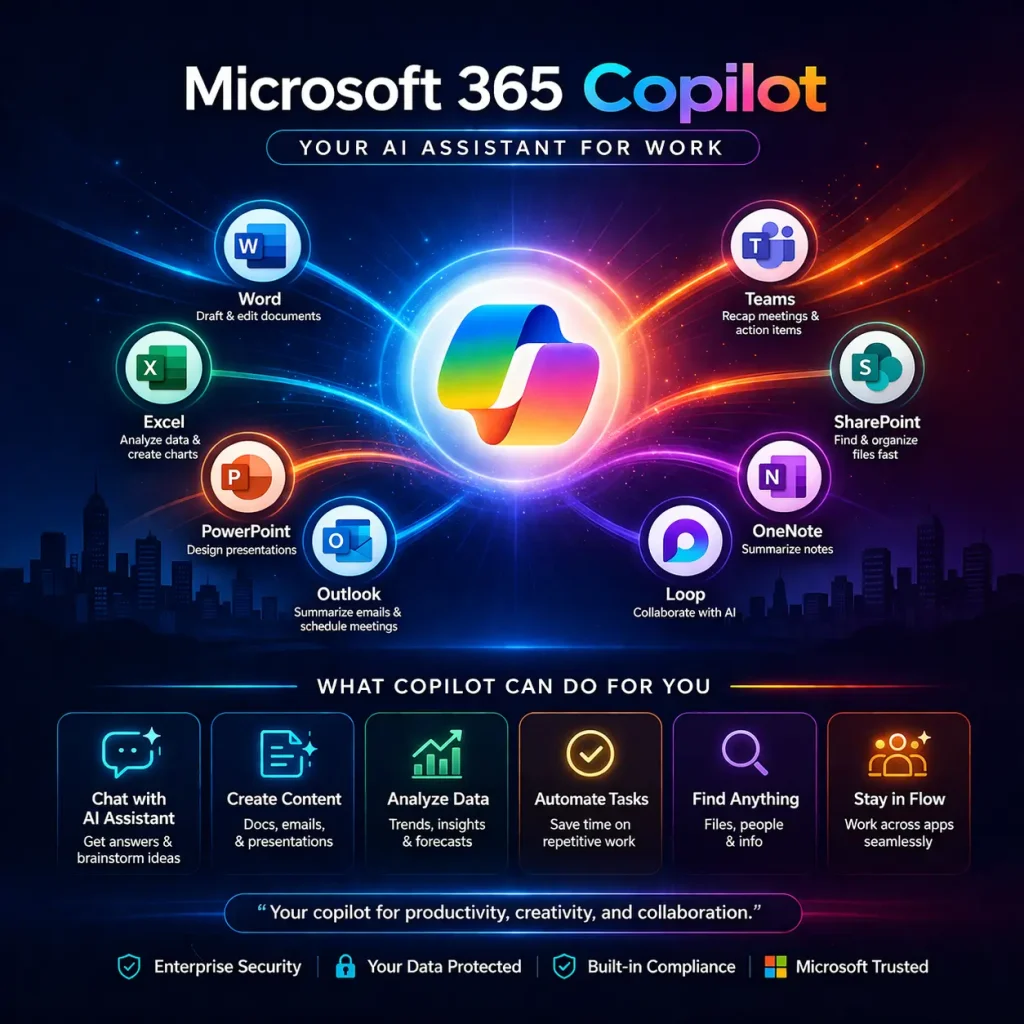
Microsoft 365 Copilot ($30/user/month add-on) works inside Word, Excel, Teams, Outlook, and PowerPoint — using your company’s own data via Microsoft Graph.
Unlike ChatGPT, M365 Copilot operates within your organization’s security and compliance boundary.
Real enterprise value comes from automating repetitive knowledge work — not replacing people, but freeing them from low-value tasks.
Current limitations include licensing costs, a real learning curve, and the need for clean underlying data.
Copilot Studio allows businesses to build custom AI agents without deep coding knowledge.
What Is Copilot?
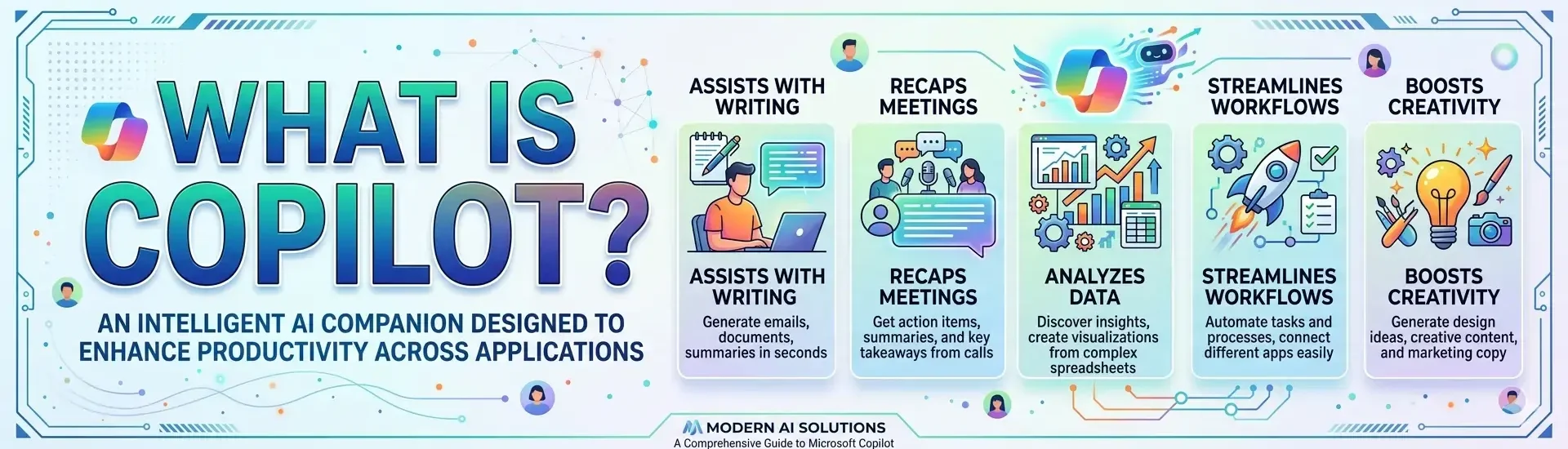
Copilot is Microsoft’s AI assistant — a technology layer built on OpenAI’s GPT-4 large language models (LLMs) and woven into virtually every Microsoft product. Whether you encounter it inside Windows 11, Bing Search, Microsoft 365 apps like Word and Teams, or enterprise development tools like GitHub, Copilot refers to the same underlying AI system adapted for different contexts and user needs.
At its core, Copilot understands natural language. You can type or speak to it in plain English — “Summarize this 40-page contract and flag any unusual liability clauses” — and it returns a useful, context-aware response. That’s the practical value proposition: reducing the time people spend on repetitive, low-complexity knowledge work so they can focus on decisions that actually require human judgment.
This guide is written specifically for business decision makers in the United States who are evaluating Microsoft Copilot for enterprise adoption. We’ll cover what it is, how it works, what it costs, where it delivers real value, and where it still falls short.
What Is Microsoft Copilot?
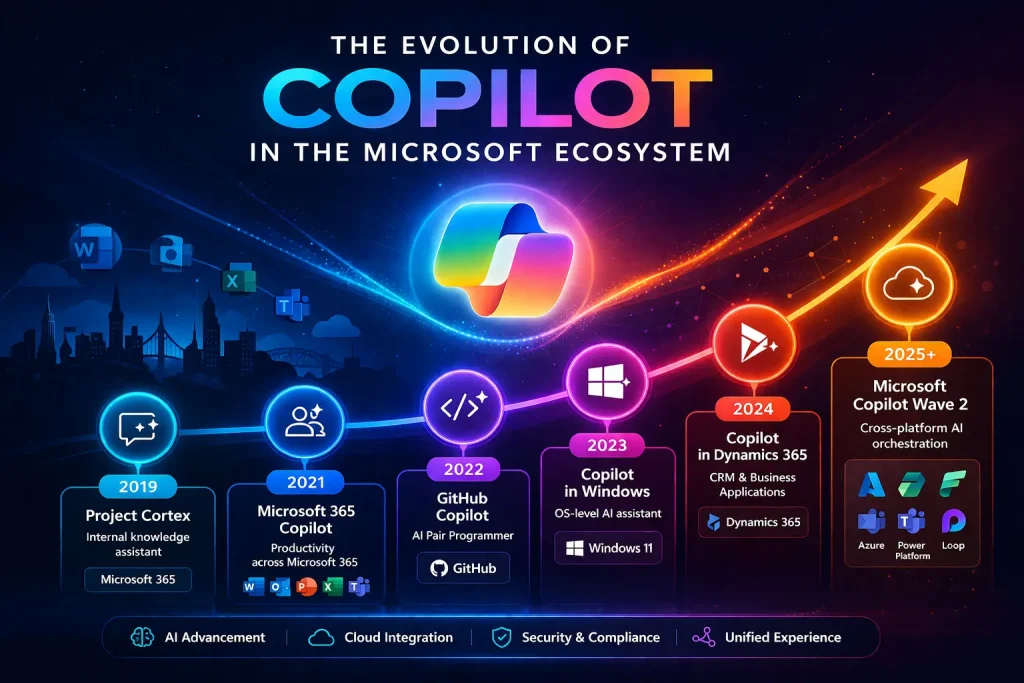
Microsoft Copilot is the brand name for Microsoft’s AI assistant technology. The name first appeared publicly in 2021 with GitHub Copilot — a code-completion tool for developers — and Microsoft has since rolled it out across its entire product portfolio.
Think of Copilot as an intelligent assistant that sits alongside your existing software. It doesn’t replace your applications. Instead, it understands what you’re working on and responds to natural language instructions to help you accomplish tasks faster.
Where Does Microsoft Copilot Appear?
Microsoft has deployed Copilot across multiple surfaces:
Windows 11 Copilot — Built into the Windows taskbar; handles system-level tasks and general questions via web search.
Bing Copilot (now just ‘Copilot’ at copilot.microsoft.com) — A web-grounded AI chat experience available free to anyone.
Microsoft 365 Copilot — The enterprise-grade version integrated inside Word, Excel, Teams, Outlook, and PowerPoint.
GitHub Copilot — AI-powered code suggestions and completions for software developers.
Copilot Studio — A platform for building custom AI agents and automations using a low-code interface.
Dynamics 365 Copilot — AI features embedded in Microsoft’s CRM and ERP applications.
Azure AI / Copilot in Azure — Assistance for cloud infrastructure management and DevOps workflows.
The common thread across all of these is the same: natural language interaction with software using LLMs. What varies is the context, the data the model can access, and what actions it can take on your behalf.
The Evolution of Copilot in the Microsoft Ecosystem
Microsoft’s move into AI-assisted productivity didn’t happen overnight. The company has had an AI research division for decades, and its early work on features like Smart Compose in Outlook (2019) and Ideas in Excel (2018) laid the conceptual groundwork for what Copilot would become.
The real turning point came in early 2023, when Microsoft announced a multi-billion dollar investment in OpenAI and began integrating GPT-4 into its products at scale. GitHub Copilot, launched in 2021, had already demonstrated that developers were willing to pay for AI-assisted coding — it reportedly reduced coding task time by 55% in internal studies at Microsoft.
By March 2023, Microsoft announced Microsoft 365 Copilot in a widely covered event that framed AI as the next major shift in office productivity since the introduction of the PC. The product entered limited preview for enterprise customers through 2023, became generally available in November 2023, and has been expanding rapidly since.
For IT leaders, this timeline matters for one practical reason: this technology is still maturing. The capabilities available in early 2024 are meaningfully different from what exists today, and the roadmap suggests continued rapid development. Buying decisions made now should account for both current utility and near-term trajectory.
What Is Microsoft 365 Copilot?
Microsoft 365 Copilot sometimes shortened to M365 Copilot is the enterprise-specific version of Copilot that integrates directly into the Microsoft 365 application suite. This is the product most relevant to corporate IT and business leaders.
Unlike the free Copilot experience available at copilot.microsoft.com, M365 Copilot has access to your organization’s internal data: your emails, documents, meeting transcripts, calendar, chat history, and more all through a Microsoft technology called the Microsoft Graph.
That data access is what makes M365 Copilot fundamentally different from a general-purpose AI chatbot. When a consultant at a professional services firm asks Copilot to “prepare a briefing on the Henderson account before my 2 PM meeting,” Copilot can actually pull from recent emails with Henderson, relevant documents shared on Teams, and notes from past meeting recordings to generate something genuinely useful. A standalone chatbot with no access to that context simply cannot do this.
Copilot Integration in Microsoft 365: What You Need to Know
Copilot integration is where the real value of AI begins for enterprises. Rather than functioning as a standalone tool, Microsoft 365 Copilot integrates directly into your existing Microsoft 365 ecosystem—connecting with emails, documents, meetings, and business workflows through Microsoft Graph. This allows organizations to embed AI into everyday operations, from drafting documents in Word to analyzing data in Excel and summarizing meetings in Teams. However, successful integration goes beyond simply enabling the feature; it requires structured data governance, clear use cases, and user training to ensure meaningful adoption. When implemented strategically, Copilot integration transforms productivity by automating repetitive tasks, improving decision-making, and enabling teams to focus on high-value work that drives business outcomes.
What Requires the M365 Copilot License?
To access Copilot inside Word, Excel, PowerPoint, Outlook, and Teams with full Microsoft Graph integration, organizations need to purchase the Microsoft 365 Copilot add-on license. As of 2025, this is priced at $30 per user per month on top of an existing qualifying Microsoft 365 subscription.
How Does Microsoft 365 Copilot Work?
Understanding how M365 Copilot actually works — at a conceptual level — helps business leaders set realistic expectations and ask the right questions during vendor evaluations. The technology rests on three interconnected layers.
Layer 1: The Large Language Model (LLM)
At the foundation is GPT-4, OpenAI’s large language model. This is the engine that understands natural language and generates coherent, contextual responses. The LLM itself has been trained on vast quantities of text data and has broad knowledge of the world — but it has no knowledge of your company’s specific information on its own.
Layer 2: Microsoft Graph
Microsoft Graph is an API that provides access to data and intelligence across Microsoft 365 services. It knows who you are, who you work with, what files you’ve opened recently, what meetings are on your calendar, and what emails you’ve exchanged with specific colleagues. When M365 Copilot needs to answer a work-specific question, Microsoft Graph supplies the relevant context.
Critically, Microsoft Graph respects your organization’s existing permissions. Copilot will not surface a document to an employee who doesn’t already have access to it. The AI is not bypassing your security controls — it operates within them.
Layer 3: Microsoft 365 Applications
The third layer is the application surface itself — Word, Excel, Teams, and so on. Copilot is embedded directly into these apps. You interact with it in context: while drafting a document in Word, presenting data in Excel, or running a meeting in Teams. The result is a tightly integrated experience rather than a separate AI tab you have to switch to.
The Process in Practice
When you type a prompt into Copilot, your request is processed through what Microsoft calls an “orchestration layer” (the Semantic Kernel). This layer interprets your intent, retrieves relevant context from Microsoft Graph, passes everything to the LLM, and surfaces the response back inside your application — all in a few seconds.
Rather than listing every capability, here are the features that have shown the most practical value in enterprise deployments:
Natural Language Document Drafting and Editing
Copilot can draft documents, emails, and presentations from a brief prompt. More usefully, it can rewrite existing content — adjusting tone, condensing length, or restructuring arguments — which is often more practical than starting from scratch.
Meeting Summarization and Action Item Extraction
Copilot in Teams can automatically transcribe meetings, generate a structured summary, and list agreed-upon action items. For organizations running 10+ hours of meetings per week, the time savings here are measurable. Microsoft has reported that early adopters saved an average of 1.2 hours per week just on meeting-related tasks.
Data Analysis in Excel
Copilot in Excel can interpret natural language queries against your spreadsheet data — “Which product lines had the highest margin variance in Q3?” — and generate charts, pivot tables, or plain-language summaries. This is particularly valuable for business analysts and finance teams who spend significant time on ad-hoc reporting.
Email Drafting and Inbox Management
Copilot in Outlook can draft replies, summarize long email threads, and even flag emails that require a decision. In a high-volume email environment — think a VP of Sales managing 200+ emails a day — the inbox management features alone can justify the investment.
Presentation Creation from Outlines
Copilot in PowerPoint can generate a full slide deck from a text prompt or a Word document. The initial output typically requires editing, but starting from a structured draft is meaningfully faster than starting from a blank slide.
Copilot Studio: Building Custom Agents
For organizations that want more than the out-of-the-box features, Copilot Studio provides a low-code environment to build custom AI agents. A manufacturing company, for example, could build an agent that answers technician questions about equipment specifications by connecting to their technical documentation library. These agents can then be deployed inside Teams, on a website, or within internal applications.
Microsoft 365 Copilot Across Applications: Where It Shows Up
Copilot in Microsoft Word
Draft documents from a prompt. Summarize long reports. Rewrite sections in a different tone. Compare two versions of a document and surface the differences. For legal, consulting, and marketing teams that produce large volumes of written content, Word is often the highest-ROI application for Copilot.
Copilot in Microsoft Excel
Ask questions about your data in plain English. Generate charts and visualizations. Identify trends and outliers. Copilot cannot yet replace a skilled data analyst on complex modeling tasks, but it significantly reduces the time required for standard reporting and exploratory analysis.
Copilot in Microsoft PowerPoint
Create a presentation from a document or outline. Suggest slide layouts. Summarize the key points of an existing deck. One real-world use case worth noting: a national consulting firm reported that its associates were using Copilot to convert client-facing research reports into presentation decks, reducing a task that previously took 3–4 hours to under 45 minutes.
Copilot in Microsoft Outlook
Summarize email threads. Draft replies with context-appropriate tone. Schedule follow-ups. The email coaching feature — which suggests ways to improve a message’s clarity or professionalism before sending — is particularly useful for customer-facing teams.
Copilot in Microsoft Teams
Real-time meeting notes. Post-meeting summaries with action items. Catch-up summaries for meetings you missed. Chat-based Q&A against meeting content. Teams Copilot has consistently ranked as the highest-value application in enterprise deployment surveys.
Real-World Use Cases: How US Businesses Are Using Copilot
Financial Services: Faster Regulatory Reporting
A regional bank in the Midwest deployed M365 Copilot specifically for its compliance team. Analysts were spending 6–8 hours per report week synthesizing regulatory updates, internal policy documents, and audit findings into reports for the board. With Copilot, they can ask it to “draft a compliance summary for Q2 based on these three audit documents” and get a structured draft in minutes. The team uses the time saved for review and judgment — the work that actually requires human expertise.
Healthcare: Clinical Documentation Support
A hospital network in Texas piloted Copilot for administrative staff in its Revenue Cycle Management department. Staff were using Copilot in Word and Outlook to draft prior authorization letters, summarize patient correspondence, and respond to payer inquiries faster. The organization saw a 20% reduction in response time to payer requests over a 90-day pilot period. Note: clinical documentation tools with direct EHR integration require Microsoft’s specific healthcare compliance configurations.
Consulting: Accelerating Client Deliverables
A mid-size strategy consulting firm in New York rolled out M365 Copilot to all senior consultants. The primary use case was proposal generation: using Copilot to pull from previous winning proposals, case study documents, and methodology frameworks stored in SharePoint to draft initial proposal sections. Senior consultants then edited and refined. The firm estimated a 30% reduction in proposal preparation time during the first six months.
Manufacturing: Internal Knowledge Retrieval
A manufacturing company in Ohio with 6,000 employees used Copilot Studio to build an internal assistant that answered employee HR and IT policy questions. The agent was trained against the company’s SharePoint-based policy library and deployed in Teams. Within 60 days, the HR help desk saw a 35% reduction in routine policy inquiry tickets — freeing HR staff for higher-complexity employee relations work.
Benefits of Using Microsoft Copilot in Business
Time recovery on knowledge work: Microsoft’s own research indicates Copilot users save an average of 1.2 hours per week, with power users reporting significantly more.
Reduced context-switching: Because Copilot is embedded in the apps people already use, there’s no workflow disruption from switching to a separate AI tool.
Faster onboarding and ramp-up: New employees can use Copilot to get up to speed on internal processes, past project work, and company knowledge — reducing the productivity gap during onboarding.
Consistency in communications: Copilot helps maintain consistent tone and quality in external-facing documents and emails, particularly valuable for distributed teams.
Enterprise-grade security: Data processed through M365 Copilot stays within your Microsoft tenant. Your data is not used to train OpenAI’s base models.
Scalable automation through Copilot Studio: Organizations can build and deploy custom AI agents without standing up a dedicated AI engineering team.
Limitations and Honest Considerations
Any thorough evaluation of M365 Copilot needs to account for its current limitations. The technology is genuinely useful, but it is not without real constraints.
The Learning Curve Is Real
Copilot’s output quality is directly tied to prompt quality. Users who don’t know how to write effective prompts will get mediocre results and conclude the tool isn’t valuable. Microsoft and most implementation partners now recommend structured prompt training as a standard part of any Copilot rollout. Budget for it.
Garbage In, Garbage Out
If your SharePoint environment is disorganized — outdated documents, poor folder structures, inconsistent naming conventions Copilot will surface that disorganization in its outputs. Before deploying M365 Copilot broadly, organizations should conduct a data hygiene assessment. Several enterprises have delayed full deployment specifically because their content governance wasn’t ready.
Licensing Costs Are Significant
At $30 per user per month, M365 Copilot is not a small budget line. For an organization of 1,000 users, full deployment costs $360,000 annually. Most organizations are taking a phased approach starting with high-ROI user groups (executives, analysts, customer-facing teams) and expanding from there as they build the business case.
Accuracy Is Not Guaranteed
Copilot can generate plausible-sounding but incorrect information — a phenomenon sometimes called hallucination in LLM literature. For any output that will be used in a formal business context (regulatory filings, client deliverables, financial reports), human review is not optional. Copilot should be positioned as a first-draft assistant, not a final-output engine.
Data Privacy Governance
While Microsoft maintains strong data privacy commitments (your data stays in your tenant; it is not used to train base models), organizations in heavily regulated industries — healthcare, financial services, government — need to carefully review Microsoft’s data processing agreements and ensure their specific compliance requirements are met. Microsoft offers specific compliance configurations for healthcare (HIPAA BAA) and government (GCC High) workloads.
Copilot Pricing and Licensing Overview (U.S. Market)
Here is a practical overview of Copilot pricing options as of mid-2025. Prices are in USD and subject to change — verify with Microsoft or a licensed reseller for current terms.
Plan
Monthly Price (Per User)
Key Inclusions
Microsoft 365 Copilot
$30 add-on
Full Copilot in Word, Excel, Teams, Outlook, PowerPoint
Microsoft 365 Business Premium
$22 (base)
M365 apps; Copilot add-on available
Copilot Free (Windows 11)
Free
Web-grounded chat only; no M365 integration
Copilot Pro (Personal)
$20/month
Priority model access; limited M365 integration
Copilot Studio
Pay-as-you-go
Build and publish custom Copilot agents
For most enterprise organizations, the relevant entry point is the Microsoft 365 Copilot add-on at $30/user/month. This requires an existing Microsoft 365 Business Premium, E3, or E5 subscription. Organizations on legacy Office 365 licenses may need to upgrade their base plan first — a consideration that can meaningfully affect the total cost of adoption.
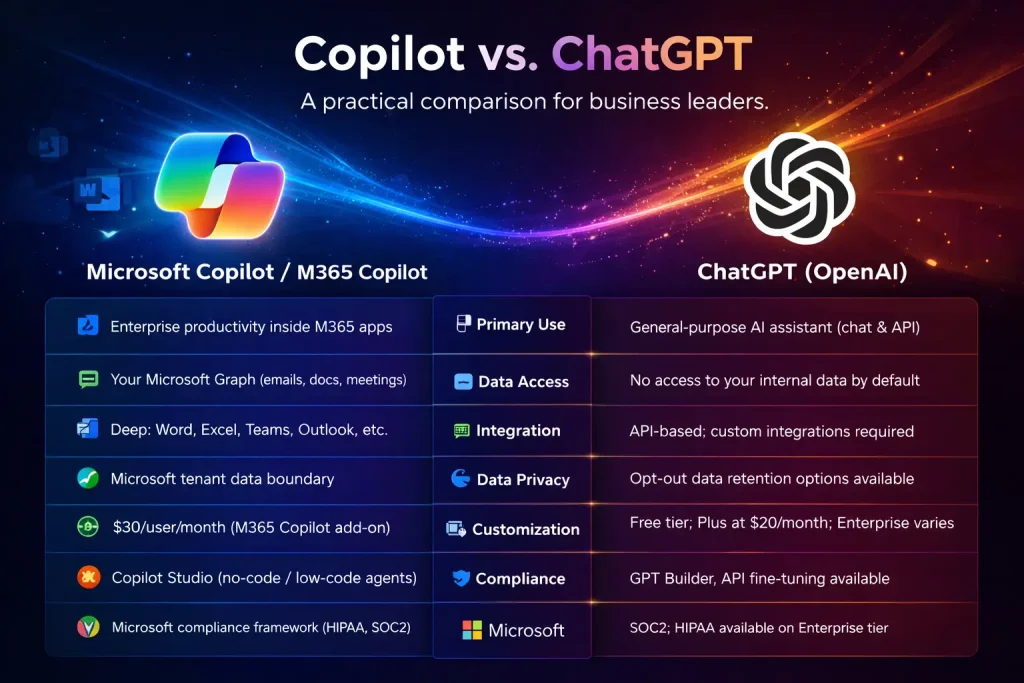
Copilot vs. ChatGPT: A Practical Comparison
This is one of the most common questions business leaders ask. The short answer: ChatGPT and M365 Copilot are built on similar underlying technology but are designed for fundamentally different use cases. Here’s how they compare across the dimensions that matter most for enterprise decision makers.
Feature
Microsoft Copilot / M365 Copilot
ChatGPT (OpenAI)
Primary Use
Enterprise productivity inside M365 apps
General-purpose AI assistant (chat & API)
Data Access
Your Microsoft Graph (emails, docs, meetings)
No access to your internal data by default
Integration
Deep: Word, Excel, Teams, Outlook, etc.
API-based; custom integrations required
Data Privacy
Microsoft tenant data boundary
Opt-out data retention options available
Pricing (2025)
$30/user/month (M365 Copilot add-on)
Free tier; Plus at $20/month; Enterprise varies
Customization
Copilot Studio (no-code / low-code agents)
GPT Builder, API fine-tuning available
Compliance
Microsoft compliance framework (HIPAA, SOC2)
SOC2; HIPAA available on Enterprise tier
Ideal For
Organizations already in the Microsoft 365 ecosystem
Standalone AI tasks, developers, broad use cases
The practical conclusion for most U.S. enterprises already on Microsoft 365: if your primary goal is to make your existing Microsoft 365 workflows faster and more productive, M365 Copilot is the right tool. If you’re building custom AI products, need flexibility across multiple platforms, or want to experiment with AI outside the Microsoft ecosystem, ChatGPT or another standalone LLM may be more appropriate. Many organizations use both.
The Future of Copilot in Business Productivity
Microsoft’s roadmap for Copilot points in a clear direction: toward greater autonomy, deeper application integration, and more sophisticated multi-agent workflows.
Autonomous Agents
Copilot agents are already available in preview through Copilot Studio — these are AI systems that can take multi-step actions on your behalf, not just generate text. An agent might monitor your inbox, identify sales opportunities from inbound emails, update your CRM, and draft a follow-up email — all without manual intervention at each step. This moves Copilot from assistant to autonomous workflow participant.
Cross-Application Reasoning
Microsoft is steadily expanding Copilot’s ability to reason across multiple data sources simultaneously. The goal is to allow Copilot to answer genuinely complex business questions — “What are our three largest contract renewal risks in Q4 based on recent communications, deal stage, and customer support history?” — by pulling from multiple systems in real time.
Voice and Multimodal Input
Integration with voice input — already available in limited form through Microsoft Teams Phone and Azure AI — is expected to expand significantly. Multimodal capabilities (analyzing images, charts, and PDFs alongside text) are also being rolled out progressively across M365 applications.
Industry-Specific Solutions
Microsoft has begun building vertical-specific Copilot configurations for healthcare, financial services, retail, and manufacturing. These solutions arrive pre-configured with industry-relevant data connectors, compliance settings, and specialized vocabulary — reducing the implementation burden for organizations in regulated sectors.
For IT leaders doing multi-year technology planning, Copilot is not a feature to evaluate in isolation. It is Microsoft’s core investment thesis for the next decade of enterprise software, and its capabilities will compound significantly over the planning horizon. Organizations that build early competency in AI governance, prompt strategy, and data readiness will be better positioned to capture that value.
Copilot is Microsoft's AI assistant. It understands natural language instructions and helps you complete tasks inside Microsoft products like drafting emails, summarizing meetings, analyzing spreadsheets, and creating presentations — faster than you could on your own.
They are related but not the same. Both use OpenAI's GPT-4 technology as a foundation. However, Microsoft 365 Copilot is specifically integrated into Microsoft 365 apps and has access to your organization's internal data through Microsoft Graph. ChatGPT is a standalone AI chatbot with no access to your company's internal information by default.
As of 2025, Microsoft 365 Copilot costs $30 per user per month as an add-on to a qualifying Microsoft 365 subscription (Business Premium, E3, or E5). Pricing is subject to change — contact Microsoft or a certified Microsoft partner for current quotes and volume licensing options.
Yes, with appropriate configuration. Your organization's data stays within your Microsoft tenant and is not used to train OpenAI's base models. Copilot operates within your existing Microsoft 365 security and compliance controls, including role-based access permissions. Organizations in regulated industries should review Microsoft's compliance documentation and data processing agreements for their specific requirements.
Microsoft 365 Copilot is currently available in Word, Excel, PowerPoint, Outlook, Teams, OneNote, and Loop, with continued expansion across the Microsoft 365 suite. Copilot is also available in Microsoft Viva (employee experience), Dynamics 365, and through Copilot Studio for custom agent development.
Yes. Microsoft 365 Copilot is available for organizations of any size that hold a qualifying Microsoft 365 subscription. Small businesses on Microsoft 365 Business Premium can add the Copilot license. The $30/user/month pricing is the same regardless of organization size, though Microsoft does offer volume licensing discussions for larger deployments.
Microsoft Copilot refers to the AI assistant built into Microsoft 365 applications. Copilot Studio is a separate, low-code development platform that allows organizations to build their own custom AI agents and chatbots connecting to specific data sources, business systems, and workflows and deploy them inside Teams or other surfaces. Think of Copilot as the out-of-the-box product and Copilot Studio as the platform for building customized AI solutions on top of Microsoft's infrastructure.
About Author
Bhupendra Singh
Bhupendra is a Digital Transformation Expert and Microsoft 365 Consultant who helps organizations modernize the way they work using the Microsoft 365 suite of services. As a Microsoft Certified Teams Administrator Associate, with credentials in Microsoft 365 Fundamentals and the Microsoft Service Adoption Specialist assessment, he combines technical expertise with adoption strategies to drive meaningful business change.