TL;DR: A SharePoint intranet is a modern internal company portal built using Microsoft SharePoint in Microsoft 365. It helps organizations share news, manage documents, and create a centralized digital workplace for employee communication and collaboration.
SharePoint remains a top enterprise intranet in 2026 for organizations using Microsoft 365 because it provides native Microsoft 365 integration, enterprise-grade security and compliance, and a highly extensible architecture. Use SharePoint when your organization needs deep Office and Teams integration, granular governance, and long-term scalability. Consider a dedicated SharePoint intranet platform if you require a faster, out-of-the-box employee experience with minimal customization.
What is a SharePoint Intranet in 2026?
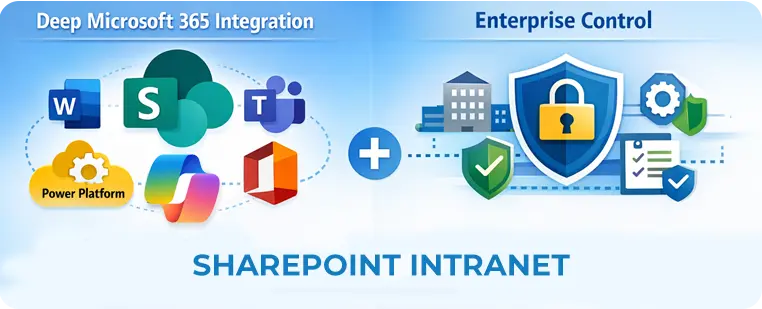
A SharePoint intranet is an internal digital workplace built on Microsoft SharePoint (Modern) and Microsoft 365 services to centralize knowledge, communications, and collaboration. In 2026 the modern SharePoint intranet typically includes:
Hub sites & site collections for organizational structure
Integrated search powered by Microsoft Graph and AI (Copilot + AI search)
Viva modules for employee experience (Viva Connections, Topics, Engage)
Extensibility via SPFx, Power Platform (Power Automate, Power Apps), and M365 connectors
Short: SharePoint = deep Microsoft 365 integration + enterprise control
Why Enterprises Choose SharePoint as Their Intranet (2026)
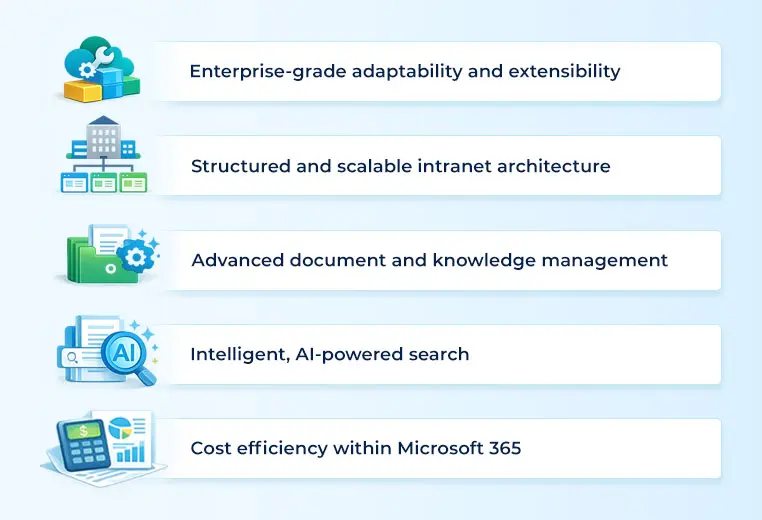
Enterprises choose SharePoint as their intranet because it combines native Microsoft 365 integration, enterprise-grade security and compliance, scalable information architecture, and extensibility through Power Platform and custom development.
1. Enterprise-grade adaptability and extensibility
Microsoft continuously invests in SharePoint as part of Microsoft 365, enabling organizations to adapt their intranet as business needs evolve.
- Out-of-the-box components for rapid deployment
- SPFx and Power Platform for advanced customization
- Cloud-native scalability without infrastructure overhead
This makes SharePoint suitable for both mid-sized and large enterprises with complex requirements.
2. Structured and scalable intranet architecture
SharePoint’s modern architecture helps enterprises maintain clarity and governance as the intranet grows:
- Team sites for departmental collaboration
- Communication sites for organization-wide messaging
- Hub sites to unify navigation, branding, and search
This structure prevents content sprawl — one of the biggest enterprise intranet challenges.
3. Advanced document and knowledge management
SharePoint provides a centralized, secure document management system that supports:
- Real-time co-authoring
- Version history and audit trails
- Metadata-driven organization
- Retention and compliance policies
This enables a single source of truth across the organization.
4. Intelligent, AI-powered search
Modern SharePoint search leverages Microsoft Graph and AI to surface relevant information across:
- Sites, pages, libraries, and files
- Document metadata and content
- User context and permissions
Employees spend less time searching and more time executing.
5. Cost efficiency within Microsoft 365
For organizations already licensed with Microsoft 365:
- SharePoint is included — no separate intranet license required
- Cloud delivery eliminates on-prem infrastructure costs
- Predictable per-user pricing supports long-term scalability
This significantly lowers total cost of ownership compared to standalone intranet platforms.
Why enterprises in the USA still choose SharePoint
Native Microsoft 365 integration: Seamless Office, Teams, OneDrive, and Azure AD single sign-on.
Security & compliance: Support for FedRAMP, NIST guidance, DLP, eDiscovery, and conditional access — critical for US federal, healthcare, and financial sectors.
Scalability: Designed for global tenants and large user bases with controlled site architecture.
Customization & extensibility: SPFx + Power Platform provide unlimited customization for complex needs.
When it’s the best fit (USA examples):
- A national healthcare provider needing HIPAA-aware document classification and retention.
- A financial firm requiring audit trails, fine-grained access control, and integration with Microsoft Purview.
- A federal contractor needing FedRAMP + Azure compliance.
SharePoint intranet architecture (enterprise blueprint)
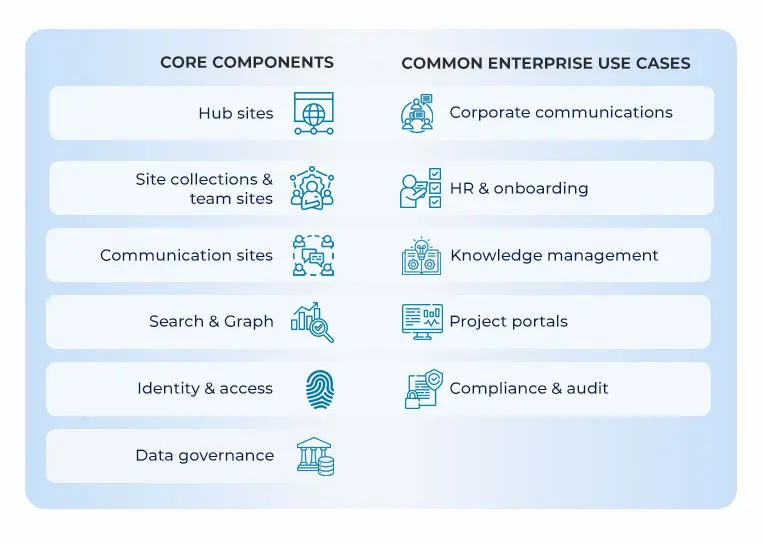
Below is a concise architecture overview every CTO/CIO should use as a starting point.
Core components
- Hub sites: Top-level navigation & shared services.
- Site collections & team sites: Departmental content and collaboration.
- Communication sites: Executive news, corporate policy, and announcements.
- Search & Graph: AI-enabled semantic search, Microsoft Graph integration.
- Identity & access: Azure AD, Conditional Access, PIM (Privileged Identity Management).
- Data governance: Microsoft Purview, retention labels, DLP.
Common enterprise use cases (short US-centric examples)
- Corporate communications: Central executive announcements integrated with Teams and email digests — example: Fortune 100 company consolidating leadership comms.
- HR & onboarding: Centralized policies + onboarding checklists with Power Automate flows for provisioning.
- Knowledge management: Tagging and Viva Topics enabling subject-matter discovery across the enterprise.
- Project portals: Secure cross-team collaboration hubs with document libraries and automated retention policies.
- Compliance & audit: Central retention and eDiscovery for regulated industries.
SharePoint vs modern dedicated intranet tools — comparison table
| Criteria | SharePoint (Modern) | Dedicated Intranet Tools |
|---|
| Microsoft 365 integration | Native | Often limited |
| Time to launch | Medium (requires setup) | Fast (templates) |
| Customization | High (SPFx, Power Platform) | Medium (configurable) |
| Governance & compliance | Enterprise-grade | Varies; may require workarounds |
| Employee UX out-of-the-box | Requires design work | Polished templates |
| Cost (long-term) | Efficient if already on M365 | Additional license often needed |
Guideline: If you’re heavily invested in Microsoft 365 and need enterprise compliance, choose SharePoint. If you need a fast, polished UX without heavy customization, evaluate dedicated intranet platforms.
Governance, security & USA compliance considerations
Must-have governance elements
- Information architecture & taxonomy: Clear hub/site taxonomy, metadata, and navigation.
- Permissions model: Principle of least privilege, groups over individuals. Use Azure AD groups and dynamic membership where possible.
- Retention & records: Implement retention labels via Microsoft Purview.
- Access control: Conditional Access policies and MFA.
- Audit & eDiscovery: Enable auditing, retention logs, and legal holds.
US compliance checklist
- Healthcare: HIPAA compliance and BAAs for cloud vendors.
- Finance: SOX controls for financial document retention.
- Government contracting: FedRAMP authorization & NIST SP 800-53 mapping.
- Data residency: Understand cross-tenant sharing and export controls.
Adoption & change management best practices (2026)
1. Executive sponsorship — Appoint an executive champion and regular governance board.
2. Role-based journeys — Create onramps for common roles (HR, Sales, IT) with prebuilt site templates.
3. Training + microlearning — Short Viva Engage micro-lessons and in-product telemetry.
4. Measure and iterate — Track adoption metrics: active users, search success rate, content decay. Use MS Graph and Power BI dashboards.
5. Launch plan — Pilot → roll-out → enablement → feedback loop.
Tip: Use Copilot for content creation templates and for generating adoption insights from telemetry.
Common mistakes enterprises make (and fixes)
- Mistake: Over-customizing front-end and breaking upgrade paths.
Fix: Use SPFx best practices and prefer configuration where possible. - Mistake: No governance or unclear ownership.
Fix: Create a governance playbook with content owners and SLAs. - Mistake: Ignoring search tuning and metadata.
Fix: Invest in taxonomy and curated search verticals; train content authors. - Mistake: Launching without adoption plan.
Fix: Start with pilot groups and create role-based training.
Decision checklist — Is SharePoint right for your organization?
| Question | Yes → keep SharePoint | No → consider alternatives |
|---|
| Do you use Microsoft 365 extensively? | ✅ | ❌ |
| Do you need enterprise compliance (FedRAMP/SOX/HIPAA)? | ✅ | ❌ |
| Do you need tight Teams/Office integration? | ✅ | ❌ |
| Do you have internal resources to customize/govern? | ✅ | ❌ |
| Need a quick, out-of-the-box UX with minimal customization? | ❌ | ✅ |
If you answered mostly ✅ — SharePoint is a strong fit.
If you answered mostly ❌ — Evaluate a dedicated intranet tool or hybrid approach.
SharePoint Intranet Implementation roadmap (60/180/365 days)
60 days (Pilot)
180 days (Rollout)
365 days (Optimize)
Frequently Asked Question About SharePoint Intranet in 2026
Deep Microsoft 365 integration (Teams, Viva, Copilot), enterprise compliance, and extensibility via Power Platform and SPFx.
A basic pilot can launch in 6–8 weeks; enterprise rollouts typically take 3–9 months depending on complexity.
SharePoint Online is part of Microsoft 365 which offers compliance frameworks; specific workload compliance (FedRAMP/HIPAA) depends on configuration and contractual agreements.
Yes — Viva improves engagement, knowledge discovery (Viva Topics), and employee experience when integrated with SharePoint.
Yes. Use migration tools (SharePoint Migration Tool, third-party migrators) and plan for IA, metadata, and content cleanup.
Implement metadata, configure search verticals, use Microsoft Graph signals, and add query rules + promoted results. AI search tuning (semantic ranking) helps too.
How Enterprises Build a Modern SharePoint Intranet (2026 Framework)
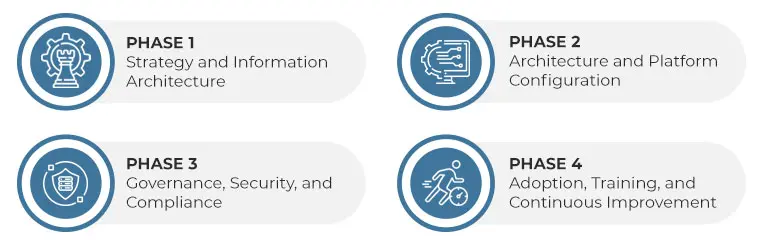
Enterprises build a modern SharePoint intranet by defining information architecture, governance, and adoption strategy first, and then configuring hub sites, communication sites, search, and security within Microsoft SharePoint to support long-term scalability and compliance.
Unlike basic CMS intranet setups, enterprise SharePoint intranets are not built as a single site. They are designed as a governed digital workplace ecosystem that evolves with the organization.
Phase 1: Strategy and Information Architecture
A successful SharePoint intranet starts with strategy — not technology.
Enterprises should first define:
- Business objectives (communications, knowledge sharing, employee experience)
- Primary audiences (HR, leadership, operations, IT, frontline teams)
- Content ownership and lifecycle expectations
- Success metrics (engagement, search success, content usage)
At this stage, information architecture is mapped:
- Site hierarchy and navigation model
- Metadata and taxonomy standards
- Global vs department-level content boundaries
This prevents content sprawl and ensures the intranet remains usable as it scales.
Phase 2: Architecture and Platform Configuration
Once strategy is defined, the technical architecture is designed using modern SharePoint components:
- Hub sites to provide global navigation, branding, and shared search
- Communication sites for corporate news, policies, and executive messaging
- Team sites for department and project collaboration
- Search configuration using metadata, verticals, and promoted results
Enterprises also configure:
- Role-based permissions using Azure AD groups
- Secure external sharing (where applicable)
- Integration with Microsoft Teams, OneDrive, and Viva
This phase focuses on building a flexible but controlled foundation rather than over-customizing early.
Phase 3: Governance, Security, and Compliance
Governance is what separates an enterprise intranet from a basic internal site.
A modern SharePoint intranet should include:
- Clear site and content ownership models
- Publishing and review workflows
- Retention and records management policies
- Access control and conditional access rules
For enterprises in the USA, this phase often aligns with:
- HIPAA requirements for healthcare organizations
- SOX controls for financial institutions
- FedRAMP and NIST-aligned governance for government contractors
Using Microsoft Purview, retention labels, and audit logs ensures compliance without sacrificing usability.
Phase 4: Adoption, Training, and Continuous Improvement
Even the best-designed intranet fails without adoption.
Enterprise adoption strategies typically include:
- Pilot launches with representative user groups
- Role-based onboarding experiences
- Short, contextual training instead of long manuals
- Feedback loops using analytics and user input
Ongoing optimization is driven by:
- Usage and search analytics
- Content performance metrics
- Employee feedback and behavior trends
Modern intranets are never “finished” — they continuously evolve based on how employees actually work.
Key Takeaway of SharePoint Intranet for Enterprise Leaders
Building a modern SharePoint intranet in 2026 is not a one-time IT project. It is a long-term digital workplace strategy that balances flexibility, governance, and user experience.
Organizations that invest in architecture, governance, and adoption from day one consistently achieve:
- Higher employee engagement
- Faster access to information
- Stronger compliance posture
- Better return on Microsoft 365 investments
An intranet on SharePoint is a boon for remote working teams
Remote working has become the new normal for many organizations. Because it is still new for many companies, they are looking for new ways to organize their operations.
A robust and intuitive SharePoint intranet can help your remote working team;
- Intranet can become a virtual hub where your team meets to communicate effectively
- It helps collaborators change documents simultaneously without interferences
- Co-authoring is a great way to get real-time feedback on your work and ideas
- You can store crucial documents.
- The advanced search feature ensures users can find the right data
- Provide a central platform where team members can post their innovative ideas, chats, pictures, and more
- With SharePoint Mobile and SharePoint Online, you can use your device to access company data from anywhere in the world.
Related article: 5 reasons why SharePoint Intranet can help your remote teams work better
Build your Intranet On SharePoint with Beyond Intranet
We have read the benefits of the intranet on SharePoint are numerous. That said, implementing a SharePoint intranet will differ based on every business’ requirements. Companies must overcome various challenges such as:
- Incorporating the intranet into the work culture and processes
- Incentivize widespread adoption across the organization
- Offering the latest content on the intranet
Choosing the right platform ensures your intranet on SharePoint becomes a one-stop solution for information, communications, tools, and applications to make your entire digital workplace successful.
SharePoint keeps on raising the bar to make the platform better. The new features and upgrades, functionalities, and powerful tools to boost internal communications, employee engagement, and collaborations make SharePoint intranet the best choice for your organization.
Beyond Intranet is in SharePoint intranet development with 16 + years of experience. Contact us today, so we can help you with your specific intranet needs.

About Author
Bhupendra SinghBhupendra is a Digital Transformation Expert and Microsoft 365 Consultant who helps organizations modernize the way they work using the Microsoft 365 suite of services. As a Microsoft Certified Teams Administrator Associate, with credentials in Microsoft 365 Fundamentals and the Microsoft Service Adoption Specialist assessment, he combines technical expertise with adoption strategies to drive meaningful business change.