
Best Employee Onboarding Software in 2026: Top 15 Tools Reviewed & Compared
By Sohan Jha / March 11, 2026
15 Best Employee Onboarding Software Picks for 2026 (With Reviews & Features) Onboarding a new employee is a tedious task....
Read More

A comparison for leaders who need predictable seat availability, cleaner space data, and calmer office mornings without dismissing the trade–offs that come with any platform.
Ratings below reflect breadth of capabilities for flexible offices, not a universal “best.”
| # | SYSTEM | RATING (OUT OF 5) | BEST-FIT SNAPSHOT |
| 1 | YAROOMS | ★★★★☆ (4.7/5) | Workplace platform depth: desks + rooms + signage + analytics. |
| 2 | Beyond Intranet | ★★★★★ (4.9/5) | Microsoft 365-native experience with floor plans, member locator, parking, and governance. |
| 3 | Archie | ★★★★☆ (4.6/5) | Resource-based pricing with strong maps, analytics, and modular workplace tools. |
| 4 | Envoy | ★★★★☆ (4.5/5) | Unified workplace platform with strong visitor + desk flows and integrations. |
| 5 | Robin | ★★★★☆ (4.5/5) | Enterprise-ready desk + room booking with AI-assisted patterns and analytics. |
| 6 | Skedda | ★★★★☆ (4.4/5) | Policy control, booking rules, and space-based scaling for many environments. |
| 7 | Deskbird | ★★★★☆ (4.4/5) | Clean UI, floor plans, and coordination features for hybrid teams. |
| 8 | Kadence | ★★★★☆ (4.3/5) | AI suggestions and embedded booking in common collaboration tools. |
| 9 | Dibsido | ★★★★☆ (4.3/5) | Fast onboarding with strong essentials and transparent pricing for SMBs. |
| 10 | WorkInSync | ★★★★☆ (4.2/5) | Broader suite plus analytics for regulated or high-traffic workplaces. |
Hybrid work didn’t just change where people sit; it changed how predictable the office is. A leadership team can announce “three days in,” and still face peaks and valleys that make capacity feel either wasteful or tight. CBRE’s 2024 Americas Office Occupier Sentiment Survey highlights the disconnect: many organizations have attendance policies, but enforcement and actual show-up patterns vary, which keeps utilization uneven.
That’s the real job of a hot desk booking system in 2026: not novelty, but stability. Your workplace needs a shared truth about availability, a fair way to reserve space, and data you can trust when you’re deciding whether to add seats, redesign zones, or stop paying for emptiness.
The simplest answer to what are hot desks is: seats that aren’t permanently owned. People reserve them when they’re onsite, and release them when they’re not. The nuance is cultural: done well, it reduces friction and supports collaboration; done poorly, it becomes a daily competition.
Offices also experience “midweek gravity.” Kastle’s occupancy reporting shows weekday concentration and peak-day behavior, which reinforces why planning for the average can backfire. See the context in Kastle’s Peak Day Data.
Align booking rules with Microsoft 365 identity, calendars, and floor plans without rebuilding workflows
When people can see availability and reserve early, office days stop feeling like a gamble. This is especially important when teams coordinate for collaboration days, and when accessibility needs require specific equipment or locations.
With policies like booking windows, zones, and check-in rules, you can reduce conflicts and smooth demand. A mature hot desking software setup gives you a governance layer; not merely a calendar overlay.
If you’re still explaining to new hires what are hot desks using spreadsheets, you’re carrying operational risk. The right system standardizes the experience so that policies are enforced by design, not by someone chasing people in chat.
Most organizations don’t suffer from a lack of seats; they suffer from a lack of usable seats. “Booked but empty” is a known pattern across shared resources. For meeting spaces, workplace analytics vendors commonly discuss no-show behavior and its operational cost; Worklytics summarizes research ranges such as 25–35% of meeting room reservations resulting in no-shows. While desks and rooms are different, the operational lesson is similar: without check-in and auto-release, your inventory looks smaller than it is.
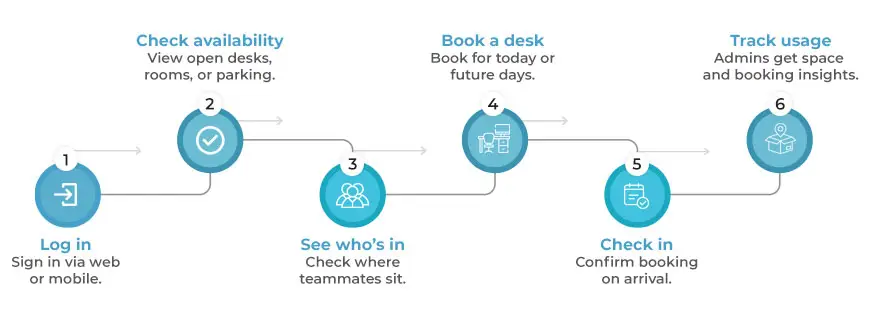
This is where office hoteling software earns its keep: it turns shared seating into a controlled flow; reserve, arrive, confirm, release—so your occupancy story matches reality.
Buying features is easy; buying outcomes is harder. A platform can look polished and still fail your org if it can’t adapt to your work model. If you want a deeper decision lens, a practical way to evaluate trade-offs is outlined in decision criteria that reduce rework during rollout.
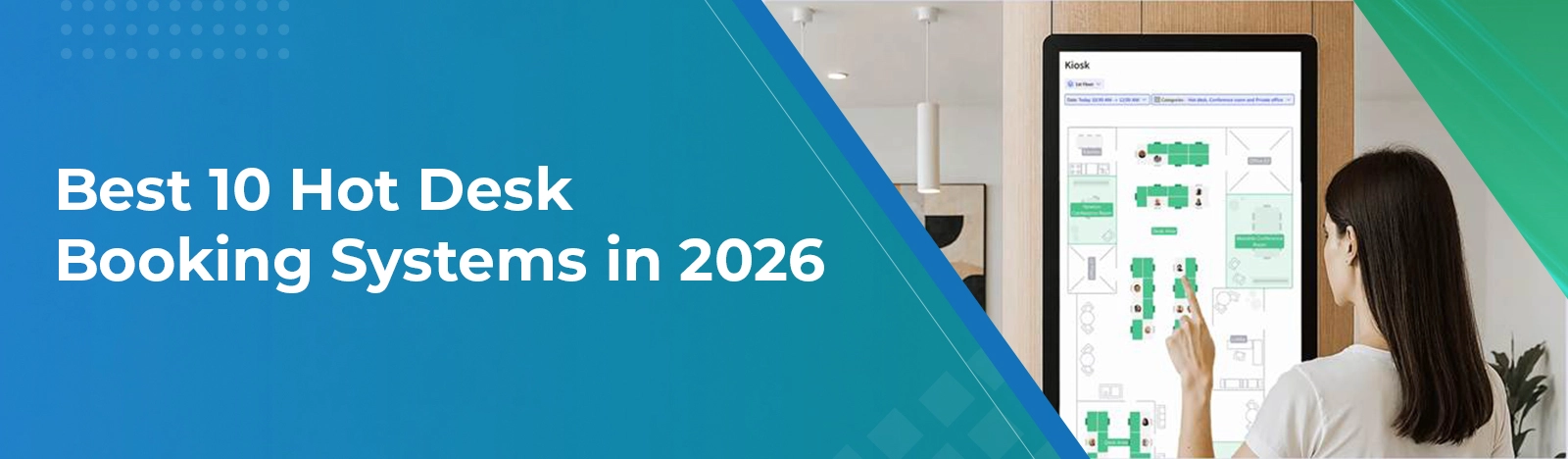
Maps reduce cognitive load. People should be able to glance, pick a seat, and understand proximity to teammates. A good hot desk booking software experience makes “where am I sitting?” a two-click answer.
If you enforce check-in too aggressively, you create anxiety. If you never enforce it, you create ghost inventory. The best systems let you calibrate rules by zone, office, or role.
People don’t reserve “a desk.” They reserve a setup: monitor, quiet area, collaboration zone, or a neighborhood near their project team.
Utilization is only useful if it drives action: which days peak, where bottlenecks are, and what to change next quarter. That’s the difference between dashboard theater and operational insight.
Turn floor plans into governed bookings, so peak days stop causing last-minute seat chaos
Below is a practical comparison of 10 strong options. Treat it as a shortlist builder: each tool is credible; the right pick depends on how you value Microsoft 365 alignment, analytics depth, visitor flows, pricing model, and rollout complexity. For many teams, a hot desk booking system succeeds or fails based on adoption – so usability and integration matter as much as feature breadth.
Best for: mid-to-enterprise teams that want desks plus a broader workplace platform.
A platform-style approach with maps, booking, and analytics in one place.
Best for: organizations standardizing desk booking inside Microsoft 365 (SharePoint + Teams) with governance and visibility.
Interactive floor plan booking within a Microsoft 365-oriented experience.
Member locator supports collaboration by showing where teammates are seated.
Best for: growing hybrid teams that prefer resource-based pricing and modular expansion.
Maps and booking tools designed for teams scaling flexible seating.
Best for: companies combining desk booking with visitor-focused workplace operations.
Desk booking positioned alongside wider workplace operations capabilities.
Best for: larger organizations that want AI-assisted booking plus strong analytics.
AI-oriented booking within a broader workplace platform approach.
Best for: teams that prioritize booking rules, access control, and policy depth.
Policy-heavy controls that can suit multi-department scheduling needs.
Best for: hybrid teams that want a clean UI, maps, and lightweight coordination.
A UI-forward approach that emphasizes visibility and coordination.
Best for: teams that value proactive suggestions and embedded booking experiences.
AI suggestions and collaboration-tool integrations for hybrid coordination.
Best for: small to mid-sized organizations that want quick onboarding and strong essentials.
Focused on quick time-to-value with the core booking workflow.
Best for: workplaces that need a broader suite and usage analytics across multiple resources.
Suite-style tooling designed for visibility and controlled resource usage.
Start with your hybrid reality, not a demo script. If Tuesdays and Wednesdays are peak days, your system must handle bursts and still remain trustworthy. CBRE notes that utilization differs sharply between peak days and the weekly average for many organizations (see the discussion in CBRE’s 2024 survey).
Then ask a plain question: “If we remove humans from enforcement, do our policies still work?” The right hot desk booking software should encode your rules so the office runs even when admins are busy.
If you need a simple baseline explainer to align stakeholders on terminology and expectations, a clear primer is useful for leveling-set conversations.
Finally, don’t skip the identity-and-integration layer. Strong SSO, directory syncing, and calendar connections decide whether your office hoteling software becomes habitual—or ignored.
A product team standardizes attendance on Tuesdays. Without zones and booking windows, early arrivers “claim” the best clusters and late arrivals scatter. With neighborhood rules and map-based selection, the team sits together by default. The hidden win is reduced chat noise about seating.
People reserve desks “just in case,” then stay remote. If your workflow doesn’t verify arrival, availability becomes fictional. Check-in plus auto-release restores trust. That’s why many leaders treat a hot desk booking system like inventory control: confirm usage or free it.
If someone asks again what are hot desks in your company, the best answer is visible: a map, a rule, and a reservation that either becomes real—or disappears automatically.
Reduce ghost bookings with check-in logic and analytics that match your return-to-office rhythm
In 2026, the best systems don’t just “book desks”; they stabilize hybrid operations with visibility, rules, and trustworthy data. Choose the platform that fits your integrations, culture, and planning cadence, and treat rollout like change management. A strong office hoteling software approach turns seat sharing into a predictable experience.