
Intranet Adoption Trends in 2026: Insights for Modern Digital Workplaces
By Bhupendra Singh / March 3, 2026
TL;DR Intranet adoption in 2026 means getting employees to consistently use the intranet as the primary hub for...
Read More
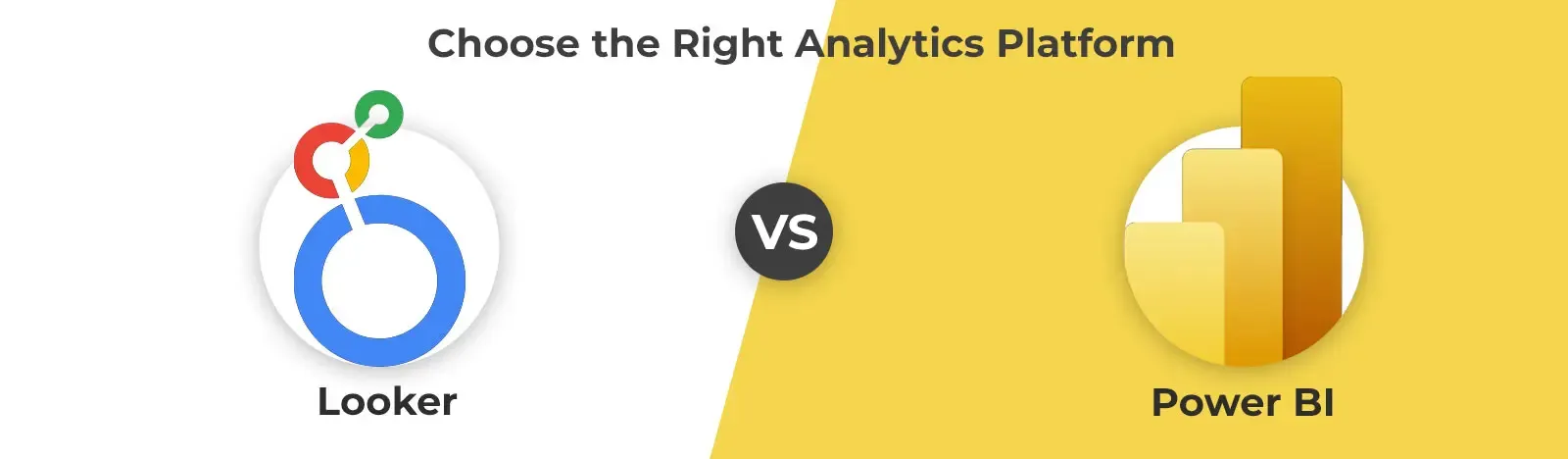
This guide helps you compare Microsoft Fabric and Power BI. We will look at the key differences between them. You will see what each tool is. You will also see its main features. Then, we will talk about when to use one over the other. This will help you understand which solution is the best fit for your business needs. It helps you choose if you need simple reports or a full data platform.
Businesses have a lot of data. In the world of data, Microsoft gives you powerful tools to help make sense of all that information. Two of the biggest names are Power BI and the newer Microsoft Fabric. Many people are talking about them. They wonder: what is the difference in the Microsoft Fabric vs Power BI debate? It’s a good question.
Power BI has been a leader in business intelligence for years. But Microsoft Fabric offers a much bigger, all-in-one approach. They have different jobs. Understanding their distinct roles (their specific jobs) is key. This understanding is what you need to build the right data strategy for your company.
Let’s start with Microsoft Fabric. Before we compare Microsoft Fabric vs Power BI, it is important to get a clear Microsoft Fabric overview. So, what is it? Fabric is a complete data platform. It is AI-powered. It was designed to handle every part of a company’s data needs, all in one place.
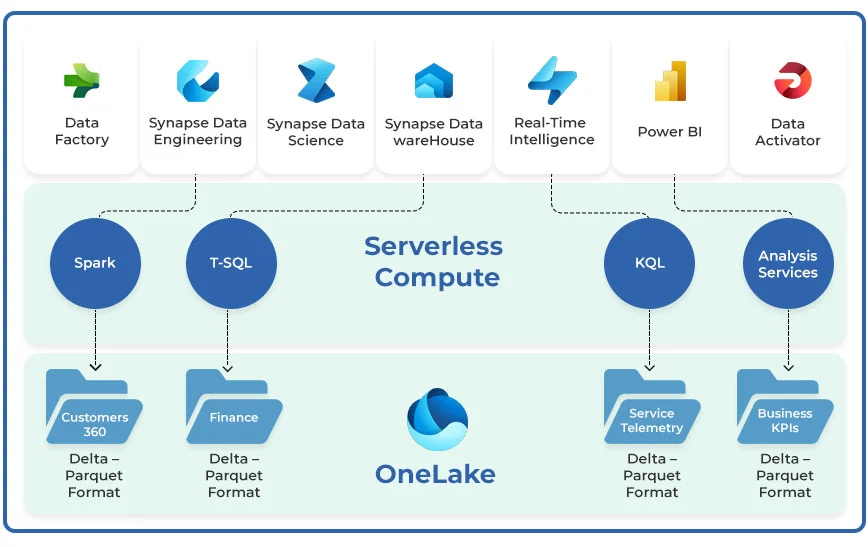
You can think of it as a unified system. This system brings together three big areas: data engineering, data science, and business intelligence. This means Fabric is not just one tool. It is a suite of services (a group of services) that all work together. This approach makes hard data tasks simpler. It simplifies them by giving teams a single environment for everything, from data collection all the way to analysis.
How does it work? Fabric is built on a foundation. This foundation is called OneLake. OneLake acts as a single, logical data lake for the whole organization. (A data lake is just a big place to hold data). This means all your data is stored in one place. It’s stored in an open format. This makes the data easier to manage and access. The platform itself also integrates (connects) key Microsoft services. These include Data Factory, which is for data integration. It also includes Synapse Analytics for data warehousing and real-time analytics. And, it includes Power BI for visualization. This tight integration is a core part of how Fabric works. It allows teams to move smoothly from one data task to the next. They can do this without switching between different applications.
So, what’s the main benefit? The primary advantage (the main good thing) of Fabric is that it’s all-in-one. This is one of the key Microsoft Fabric benefits. It combines many tools that used to be separate. This combination can reduce complexity (make things less hard) and lower costs. Fabric supports the entire data lifecycle. This means it helps with everything, from ingesting raw data (bringing data in) to creating predictive models.
It is also a Software as a Service (SaaS) platform. This is important. Because it is SaaS, it simplifies deployment (getting it started) and management (keeping it running). The Microsoft Fabric analytics capabilities are very big. They allow for everything from real-time data processing to advanced machine learning projects. This makes Fabric a powerful choice. It’s for organizations that want a complete data solution that can scale (grow) with their needs.
Unlock your data's full potential with a tailored, end-to-end analytics strategy.
Get a Free ConsultationNow, let’s look at Power BI. For a complete Power BI overview, it helps to think of it as a specialized tool. It’s Microsoft’s specialized tool for business intelligence and data visualization.
What is its main purpose? Its main job is to turn raw data into something easy to understand. It takes data from many sources. It then makes clear, interactive, and nice-looking reports and dashboards. For many years, Power BI has been the go-to choice for companies. These are companies that need to understand their data using charts, graphs, and maps. This tool empowers users. It helps people (even those without a technical background) to explore data. They can then find actionable insights, which are ideas they can act on.
Power BI is made of several components, or parts, that work together. One part is Power Query. This helps connect to and transform (change) data from hundreds of sources. Another part is Power Pivot, which is used for data modeling. There is also DAX. DAX is the formula language you use to create custom calculations. The final product you make is often a Power BI dashboard. A dashboard is a single-page summary of key metrics (important numbers). Or, it could be a multi-page report that lets you explore the data more deeply. The main focus of Power BI analytics is to present data. It presents it in a way that is easy to understand and easy to share.
The core Power BI benefits are simple. They are its ease of use and its powerful visualization capabilities. (Visualization just means making pictures, like charts). Its interface is user-friendly. This allows people all across an organization to create their own reports. They can do this without having to rely on IT departments. This self-service approach is a big deal. It makes Power BI a great tool for Power BI for business intelligence.
Another major benefit is its strong integration. It connects very well with other Microsoft products, like Excel and Azure. The tool offers a wide range of standard and custom visuals. This allows you to make reports that are highly tailored, or made just for your needs. For businesses that are focused only on understanding and presenting their data, Power BI is a great choice. It provides a cost-effective and powerful solution.
Transform complex data into clear, interactive reports that drive smarter business decisions.
Design Your DashboardThis is the big question. Power BI is now a part of Microsoft Fabric. That’s true. But, they still serve different primary purposes. And you can still use them separately. So the choice between Microsoft Fabric vs Power BI really depends on your data needs. It depends on the scale (how big) and scope (how wide) of those needs.
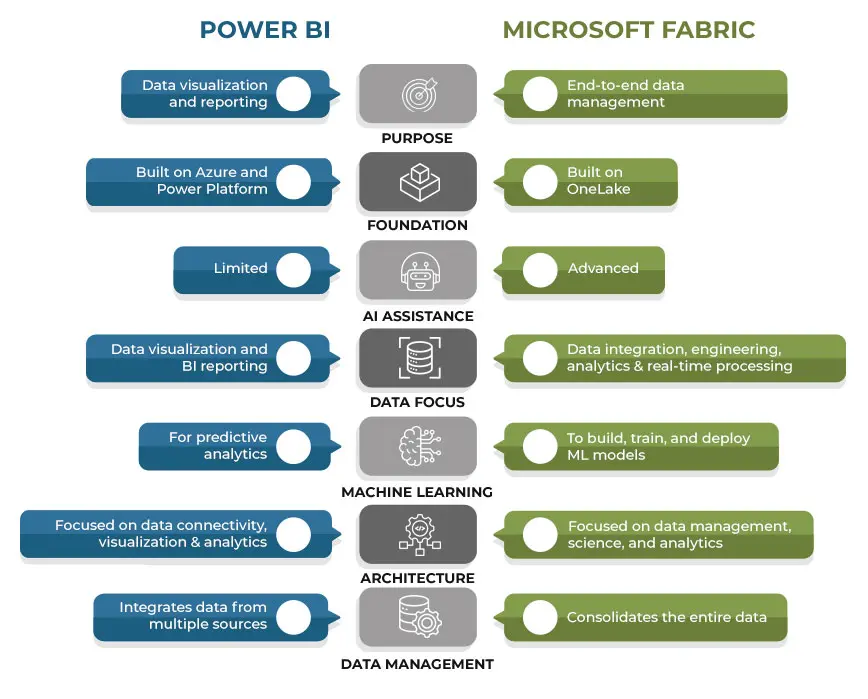
Here’s the simple difference: Power BI is a tool for visualization. Fabric is a complete platform for the entire data journey. The conversation about Power BI vs Microsoft Fabric often comes down to this: Do you need a specialized reporting tool? Or do you need a unified analytics ecosystem (a whole system that works together)?
This table below will help. It breaks down the core differences. This should help clarify the Microsoft Fabric vs Power BI discussion.
| Feature | Microsoft Fabric | Power BI |
| Scope and Functionality | A complete data platform. It handles the full data lifecycle. This includes ingestion (getting data), storage (saving data), transformation (changing data), and analysis (understanding data). | Mainly focused on one job. That job is data visualization (making charts) and business intelligence reporting. |
| Primary Audience | Technical users. This includes data engineers, data scientists, and business analysts who are all working together (collaboratively). | Business users. This includes analysts and decision-makers. These are people who need to see and visualize data. |
| Data Management | Has advanced tools inside. These are for data engineering, real-time processing, and data science. | Offers basic data modeling. It also has basic transformation (using Power Query). This is all done for the purpose of visualization. |
| Integration | Deeply connected (integrated) with Azure services. This provides a high-performance, scalable infrastructure. A key feature is its Microsoft Fabric data integration. | Connects to many data sources. This includes Azure. But it has less direct infrastructure integration than Fabric. |
| Ease of Use | This platform is more complex. It has a steeper learning curve (it takes longer to learn). This is because it has very broad functionality (it does many things). | Very user-friendly. It has a drag-and-drop interface. This makes powerful Power BI data visualization easy for everyone to use. |
| Cost Structure | Pricing is based on capacity units (CUs). This one price covers all the services inside the platform. | Pricing is per-user or per-capacity. This is generally more cost-effective (cheaper) if you only have pure BI needs. |
So, what’s the final answer? Ultimately, the decision in the Microsoft Fabric vs Power BI comparison is all about scope. What do you need to do? If your organization needs an end-to-end platform to manage large volumes of data, Fabric is the choice. If you need to run complex analytics, Microsoft Fabric is the better choice for business intelligence.
But, what if your main goal is different? If your main goal is just to create and share insightful reports and dashboards, then standalone Power BI is probably enough. It is likely sufficient and more cost-effective. The introduction of Fabric has changed the Power BI vs Microsoft Fabric dynamic. It has positioned Power BI as a key experience inside a much larger, more powerful ecosystem.
This choice is important. Choosing and implementing the right data platform is more than just a technical decision. It is a strategic one. It is a choice that will impact your entire business.
Microsoft Fabric offers a powerful, unified solution. That is true. However, its complexity can be a challenge. This is where we can help. As a certified Microsoft partner, we have deep expertise in the Microsoft data platform. Beyond Key helps companies (enterprises) consolidate their data. We help you bring it all into a single source of truth. We deliver solutions that give you faster insights. We also help you establish analytics leadership in your organization. We do this by ensuring you have a smooth and successful data fabric implementation.
[cta text=”Ensure a seamless and successful platform adoption with our proven implementation process.” button_text=”Start Your Implementation” button_url=”https://www.beyondintranet.com/microsoft-fabric-implementation-services” background_color=”#256FA0″ text_color=”#333333″]
So, we are back to the final choice. The choice between Microsoft Fabric vs Power BI comes down to your company’s specific needs. Power BI is, and remains, an excellent and user-friendly tool. It’s for businesses focused on data visualization and reporting. It is perfect for teams who need to create interactive dashboards. And it’s great for sharing insights quickly.
On the other hand, there is Microsoft Fabric. Fabric is the answer for organizations that need more. It is for those who require a complete, end-to-end platform. This platform manages the entire data lifecycle. That means everything from ingestion and engineering to advanced analytics and machine learning. Power BI is a component (a part) of Fabric. That’s a key thing to remember. But the full Fabric platform offers a more scalable and unified solution for very complex data challenges. You have to look at your own situation. By evaluating your goals, your team structure, and your budget, you can confidently decide. You can pick which tool will best empower your company’s data-driven future.
1.Is Microsoft Fabric replacing Power BI?
No. Microsoft Fabric is not replacing Power BI. Instead, Fabric includes Power BI as one of its core components (one of its main parts). Power BI remains Microsoft’s primary tool for data visualization. It is just integrated (put inside) a larger, unified analytics platform now. This integration actually enhances its capabilities.
2. What is the primary difference between Microsoft Fabric and Power BI?
The main difference is scope, or how much it does. Power BI is a specialized tool used for data visualization and reporting. Microsoft Fabric is a complete, end-to-end platform. It covers the entire data lifecycle. This includes data engineering, data science, and real-time analytics. Power BI is just one part of this big platform.
3. What are the cost differences between Microsoft Fabric and Power BI?
Power BI usually has a per-user monthly fee. This is often cost-effective (cheaper) for teams who are only focused on reporting. Microsoft Fabric uses a capacity-based pricing model, called CUs. This price covers all its integrated services. This may be a larger investment at the start. But it can be more efficient if you are trying to consolidate (combine) many different data services.
4. Is Microsoft Fabric suitable for real-time data processing?
Yes, it is. One of the key Microsoft Fabric benefits is its strong capability for real-time data processing and analytics. It can ingest (take in) and analyze streaming data. This is data from sources like factory sensors or social media. This allows businesses to monitor performance and make decisions based on up-to-the-minute information.