Business Intelligence tools are designed to gather data from multiple sources and convert complex data sets into actionable insights. It offers dashboards that let users visualize customer behavior and trends, identify profitable opportunities, and track KPIs in real time.
When we talk about BI tools, two names come to mind. Looker by Google and Power BI by Microsoft. However, both take different approaches to analytics and data visualization.
In this article, we will compare Looker vs Power BI, talk about their features and benefits. While you read this blog, you will have a clear understanding of which software will be better for your business needs.
What is Looker?
Acquired by Google in 2020, Looker is a globally acclaimed BI platform that helps users visualize, analyze, manage, model, and share data to generate insights. It is a cloud-based platform that uses LookML to create reports and dashboards and ensure consistency. LookML is a modeling language that helps users manage and co-author data in real-time.
Strengths of Looker: Intuitive interface and smooth onboarding, embedded analytics, high security on Google Cloud, interactive, collaborative, create ad hoc reports and dashboards, API-first platform, and more.
Looker is a versatile BI platform that serves companies of all sizes. Looker is ideal for small, mid-size, and large-scale organizations with data teams. Its API-first architecture focuses on governed, centralized data definitions.
Features of Looker
- Semantic layer via LookML: This proprietary language ensures that there are no data silos in the organization. With reusable data models, users can be confident their data is integrated on one platform.
- End-to-end integration: Looker connects with modern data tools that you might be already using – Apache Airflow, ETL platforms, dbt, and more. This BI platform also makes data extraction easy by integrating with Snowflake, Redshift, and BigQuery. Looker supports 60+ SQL database dialects and integrates with traditional databases (Oracle, SQL Server, MySQL) too.
- Flexible customization for developers to create reports for specific businesses.
- Data governance: Ensures centralized data governance and user-based roles for strictness and security.
- Embedded analytics: API and SDK allow businesses to embed analytics into applications and automate workflows.
Looker: Use Cases
- Marketing and e-commerce analytics: users can analyze campaign performance by analyzing marketing ROI, campaign performance by integrating data from Google Ads and Facebook ads.
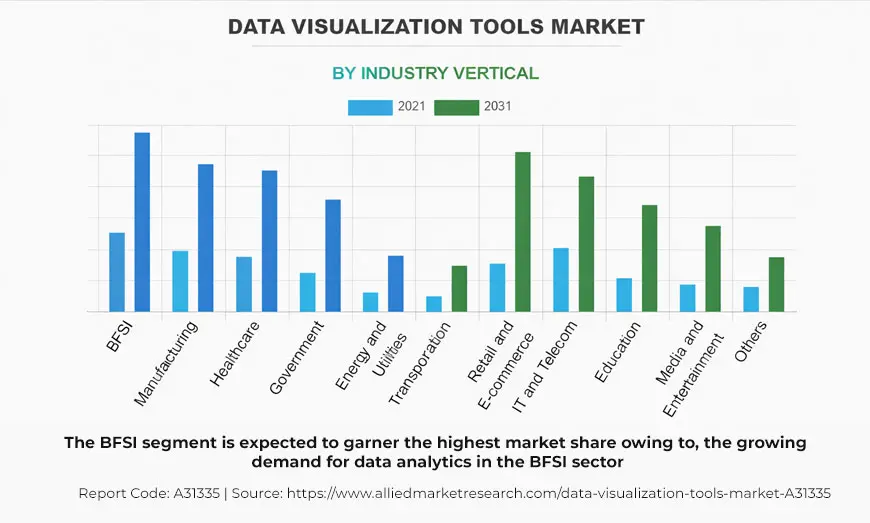
- Advanced BI and visualization: enterprises can transform complex data into visually appealing reports, charts, graphs, tables, and maps to track inventory levels, sales trends and more KPIs.
- Data exploration and self-service: Looker allows non-techies to create custom calculations and set up proactive alerts to monitor project status and progress in real-time.
What Is Power BI?
This is another powerful business intelligence tool that helps businesses create dashboards and reports and provides invaluable insights into Knowledge Performance Indicators. Power BI helps users with data discovery, data modeling, and transformation. With its simple and easy-to-use interface, users can create and visualize reports on mobile or desktop.
Strengths of Power BI:
Microsoft ecosystem integration: Power BI is an end-to-end analytics platform that is embedded within Microsoft ecosystem. It is a critical component of MS Fabric, a SaaS-based platform that manages data ingestion and visualization.
Self-service BI focus: Power BI focuses on self-service data preparation. Here, the business analyst can reuse the data prepared on this platform. Relocating data preparation work from Power Query helps centralize data.
Ideal user base: Power BI is designed for business analysts, data scientists, engineers and also non-technical users who want to make their report creation easy and perform in-depth data analysis tasks.
With over 30 million active users, Power BI is used by more than 100,000 users across multiple industries. To use Power BI service, users have to sign up and take the license from Microsoft.
Licensing structure
There are three categories of license that Power BI offers:
- Free: helps users create in-depth, interactive, visually appealing reports. They can share reports to other users. Users should have Pro or Premium license to do so.
- Pro: user can create, share, and publish interactive reports. This license is included in Microsoft 365 E5 and Office 365 E5.
- Premium: this version includes features from the Pro license. It is basically accessible for large model sizes. It requires frequent refreshes.
Features of Power BI available on paid versions
- Smart AI Features: Natural language queries, automated insights, anomaly detection, and predictive analytics
- Data analysis expressions: Power Query promotes data transformation by enabling data modelling.
- AI and analytics: Leverages Natural Language Q & A, quick insights, and anomaly detection.
- Power BI mobile: Allows users to manage data and view/interact with reports on the go.
- Integration with relational databases such as SQL Server, Oracle, MySQL and PostgreSQL. It also integrates with Salesforce, Google Analytics, Azure services, and AWS databases.
Apart from these features, Power BI allows users to analyze datasets in Excel, promotes designing maps from complex data sets, helps reuse datasets across various reports and dashboards, enables creation of custom visualizations and more.
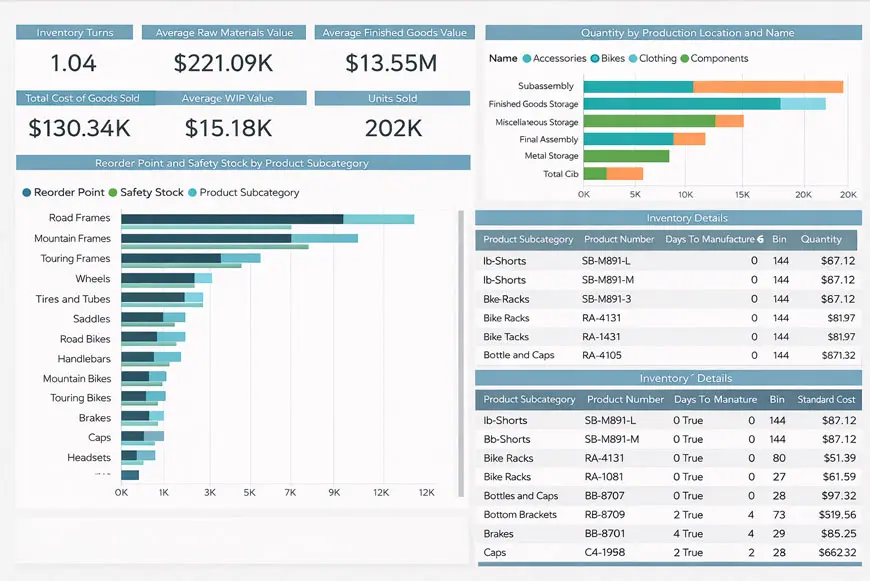
Power BI: Use Cases
- Self-service reporting: Allows users to consolidate data from different platforms and create dashboards and reports for sales, finance, accounts, and marketing departments.
- Manufacturer and healthcare: Power BI allows users to track efficiency, turnaround time, manage patients’ data, and equipment efficiency in the manufacturing and healthcare sectors.
- Sales and marketing: These departments can evaluate the performance of their team members by viewing their scorecards, comparing sales performance, and customizing the reports according to the team.
- Read this blog to check Power BI use cases in detail.
Looker vs Power BI: Feature Comparison Table
| Feature | Looker | Power BI |
| User adoption rate | Higher in enterprises with strong data teams | Higher among business users and analysts |
| Data Modeling | LookML semantic layer | DAX + Power Query |
| Ease of Use | Technical setup required | Beginner-friendly |
| Pricing | Enterprise-level | Affordable tiers |
| Deployment | Cloud-native | Desktop + Cloud |
| Governance | Strong centralized model | Good but distributed |
| Customization | Developer-heavy | Flexible visuals |
| Ecosystem | Google Cloud | Microsoft 365 |
Pricing Comparison for Looker vs. Power BI
Looker vs Power BI pricing can help organizations make the selection process easier. Price is one of the key factors when choosing a BI solution for an organization.
Looker and Power BI offer pricing models that offer pricing models that are customized according to different scenarios. Small and mid-size companies often find Power BI a better choice. And large organizations with a huge volume of data might find Looker more promising.
| Pricing Aspect | Looker (Google Cloud) | Power BI (Microsoft) |
| Free Version | No free Looker BI edition | Power BI Desktop free |
| Entry Platform Fee | $3,000–$5,000 per month (varies by deal) | N/A |
| Per-User Licensing | Viewer: ~$30/user/month
Standard: ~$60/user/month
Developer: ~$125/user/month | Desktop: Free Pro: ~$10/user/month
Premium Per User: ~$20/user/month |
| Enterprise/Capacity Pricing | Custom quote (often significant for large deployments) | Premium per capacity ~ $4,995/month (flat) or per user premium |
| Billing Terms | Annual/monthly contracts negotiated | Monthly or annual billing |
| Transparency of Pricing | Low — pricing usually via sales | High — published and transparent |
| Best Fit Based on Cost | Large enterprises with robust BI needs | SMBs and teams wanting predictable costs |
Looker vs Power BI: Which is Better?
Choose Looker if you want to govern analytics and embedded dashboards that are customer-centric. Dedicated engineering teams can freely write LookML code and build SaaS applications using white-labeled analytics. Looker focuses on strong embedded analytics.
Choose Power BI if your organization operates within Microsoft ecosystems. This platform is suitable for those who independently want to create reports and convert data into visually appealing formats without much IT knowledge. This platform is suitable for data analysts, engineers and non-tech users. Organizations seeking an affordable and flexible business intelligence solution should opt for Power BI.
To conclude, the choice of platforms depends on various factors. From budget to company size, from analytics strategy to tech/non-tech users, many factors can inform the decision-making process. If you are looking for support and want to know how Power BI can support your business or insights on Looker vs Power BI, then feel free to contact us. We take pride in helping organizations with an array of BI-related services: Power BI consulting, data governance and optimization, data visualization, data warehousing and more.
Frequently Asked Questions
There is not standard answer to this question. Power BI and Looker are two business intelligence platforms that serve organizations with an array of BI services. BI is good for those enterprises that are already using MS ecosystem. On the other hand, Looker is apt for those organizations looking for superior-level services such as real-time data modeling, centralized governance and more.
Yes, Power BI is more affordable than Looker. It also provides a free license (desktop version) to users.
Looker is better suited to data governance due to its LookML semantic layer. It supports a structured modeling approach to ensure data consistency. Power BI also offers data governance through Microsoft security protocols, but Looker is a better option.
Looker is based on LookML language which requires technical expertise for defining and managing data models. Power BI involves less technical knowledge and no coding-related expertise.