A practical, vendor-neutral guide for CIOs, IT directors, and digital workplace leaders evaluating SharePoint consulting partners in Australia — including a comparison...
Organizations today are under constant pressure to move faster, reduce manual work, and digitize processes—without increasing IT complexity. Microsoft Power Apps helps teams build secure, low-code applications inside Microsoft 365 that streamline operations, automate approvals, and replace spreadsheets and paper-based workflows.
Power Apps use cases refer to real-world business scenarios where organizations use Microsoft Power Apps to replace manual, spreadsheet-based, or email-driven processes with secure, automated applications built inside Microsoft 365.
From employee onboarding and field inspections to inventory tracking and finance approvals, Power Apps enables teams to streamline workflows using low-code development, deep Microsoft 365 integration, and Copilot-powered AI.
Many organizations still rely on spreadsheets, emails, and manual approvals to run everyday processes—resulting in delays, errors, and wasted effort. These workflows often involve multiple stakeholders, disconnected data, and repetitive data entry, making them difficult to scale and govern.
Microsoft Power Apps addresses this challenge by enabling teams to build secure, low-code applications that automate approvals, centralize data, and integrate seamlessly with Microsoft 365, SharePoint, and Teams.
With the growing demand for efficiency, exploring real-world Power Apps use cases helps organizations understand how automation can reduce paperwork, improve visibility, and free up valuable time for high-impact work.
What is Power Apps: An Overview of Microsoft Power Apps
Microsoft Power Apps is a low-code application platform that enables organizations to build custom business apps inside Microsoft 365. These apps help replace manual, spreadsheet-based, and email-driven processes with secure, automated solutions that work across web and mobile devices.
Power Apps integrates natively with SharePoint, Teams, Dataverse, Power Automate, and Copilot-powered AI, enabling teams to build applications faster with minimal development effort.
If you’re new to the platform, explore our detailed guide on what Microsoft PowerApps is and how it works to understand its core capabilities.
What is PowerApps Used For in Organizations?
Organizations use Power Apps to simplify and automate everyday business processes such as:
Employee onboarding and internal requests
Inventory and asset tracking
Approval workflows and compliance tracking
Field inspections and data collection
Exploring real-world Power Apps use cases helps teams understand how low-code apps can reduce operational overhead, improve data accuracy, and speed up decision-making.
Real Business Applications of Microsoft Power Apps
Microsoft Power Apps enables organizations to quickly build custom business applications without traditional development. Companies commonly use Power Apps to digitize manual processes and integrate data across Microsoft 365 services.
Below are some practical business applications of Power Apps used by enterprises.
1. Employee Onboarding Application
Organizations can build onboarding apps that allow HR teams to automate employee documentation, training assignments, and onboarding checklists.
Key benefits include:
centralized employee information
automated onboarding workflows
integration with SharePoint and Teams
Many of these PowerApps solutions work best when integrated with SharePoint for data management, security, and scalability. This is where professional SharePoint consulting plays a critical role in ensuring long-term success. ? Explore our SharePoint Consulting to implement these solutions effectively.
2. Inventory Management System
Power Apps can track inventory levels, purchase orders, and warehouse data in real time.
Businesses use this solution to:
monitor stock levels
generate purchase alerts
integrate with ERP systems
3. Leave Management Application
HR teams frequently build leave management solutions using Power Apps integrated with SharePoint and Power Automate.
These applications help organizations:
manage leave requests
automate approval workflows
generate leave reports for HR analytics
4. Field Service Inspection App
Power Apps can also support field teams by enabling mobile inspection forms and service reports.
Technicians can use mobile devices to:
capture inspection data
upload photos and reports
synchronize data with central systems
Build Scalable PowerApps Applications
From workflow automation to enterprise business apps, our PowerApps developers help organizations accelerate digital transformation using Microsoft Power Platform.
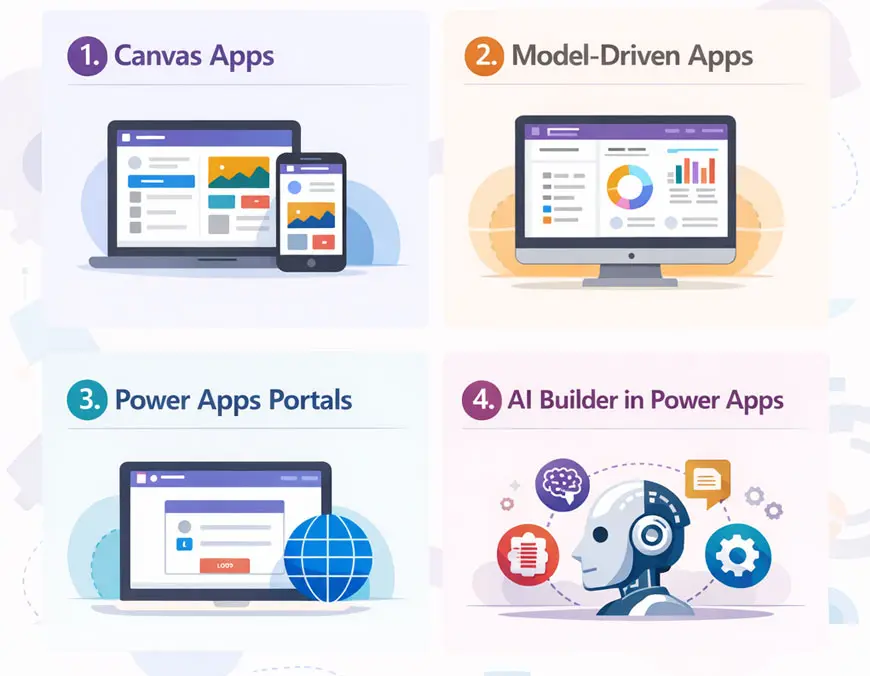
Canvas apps are ideal for building custom, user-friendly apps with drag-and-drop design. Best for: Forms, mobile apps, and task-based workflows.
Model-Driven Apps
Model-driven apps are designed for complex, data-driven processes built on Dataverse. Best for: CRM-like systems, case management, and structured business processes.
Power Apps Portals (Power Pages)
Portal-based apps allow organizations to build external-facing websites connected to business data. Best for: Customer self-service portals, partner access, and community platforms.
AI Builder in Power Apps
AI Builder enables users to add AI capabilities such as document processing, prediction, and text recognition without data science expertise. Best for: Automating document-heavy and data-intensive workflows.Now that we understand what Power Apps is and how it’s used, let’s explore practical Power Apps use cases that organizations implement today.
Exploring the Best Power Apps Use Cases & Examples
PowerApps is a versatile tool that caters to a variety of business needs. Below are some of the best Power Apps examples that demonstrate the full potential of PowerApps:
Lead-Capturing App: Automate lead tracking for sales teams.
Event Registration App: Simplify event management with custom forms and workflows.
These power apps examples showcase how PowerApps can be tailored to meet unique business requirements, helping organizations save time and improve efficiency. If you’re still wondering what is PowerApps used for, these examples highlight its role in simplifying everyday processes.
What is PowerApps Used For: Key Benefits of Using Power Apps
Understanding the benefits of Power Apps is essential for businesses exploring the best Power Apps examples. Its low-code approach and integration with Microsoft tools make it a top choice for process automation.
Power apps solve routine business challenges in minimum time. For example, organizations can create lead-capturing applications for field workers. With the help of Microsoft PowerApps Use Cases you can learn how to create a portal app for event registration, etc.
Power apps are mobile-friendly. It means an employee will get the benefit of using the app anywhere anytime from the comfort of their space.
Power apps are compatible with other Microsoft tools. D365, SharePoint, and Teams are a few examples. Its interface can connect with other platforms.
Power apps are based on a low-code approach which means it does not require any technical expertise to create. But yes, if you are a developer, it will be easier for you to create it fast unlike full-fledged coding apps.
Power apps are cost-competent. It doesn’t require a huge amount to spend on time and resources. Power app licensing comes with a minimal amount.
Power apps provide the utmost security as it is a Microsoft power tools. Microsoft implemented certain functionalities to ensure the power apps provide the utmost security
Power Apps Examples: Real-World Use Cases of PowerApps
Many organizations implement these applications with the help of experienced consultants to ensure scalability, governance, and seamless integration with Microsoft 365 services. Businesses looking to implement enterprise-grade solutions often work with Microsoft PowerApps consulting servicesto design secure and scalable applications.
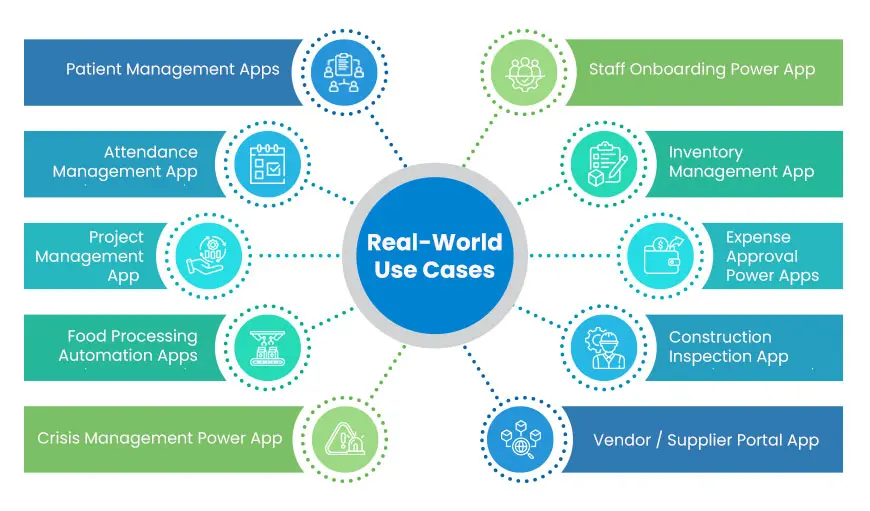
When discussing what Power Apps is used for, reviewing power apps examples like Patient Management Apps or Expense Approval Apps can provide clarity on its practical applications.
1. Patient Management Apps
One of the most helpful Microsoft Power Apps Use Cases is the Patient Management System. The patient management application is generally used by hospitals, clinics, and small dispensaries. It serves the purpose of managing patient charges efficiently. Appointment scheduling and managing electronic healthcare records can also be done. All this data can help in future treatments, research, etc. This is one of the best power apps examples for the healthcare industry. It acts as a data management tool for the healthcare industry.
2. Attendance Management App
If you’re wondering what is Power Apps used for in managing attendance, this example highlights its potential. NPOs are using Power Apps for effective attendance management of homeless kids and families. To manage different programs for different locations they are using it. It helps them to automate the attendance of participants. Based on gender, age, and location in which program they have enrolled, attendance will be analyzed.
With the help of Power BI, the admin department can track the record of detailed information of families, kids, and youth who benefit from their services. Power apps are pocket-friendly apps as compared to Custom app development that are bit expensive. Also, power apps are intuitive, easy to build, and provide all the customization that is required.
3. Food Processing Automation Apps
Food Processing apps are generally utilized by FMCG companies. FMCG organizations receive a huge number of invoices for raw materials daily which requires a lot of hectic paperwork. To simplify these processes, they have created the Food Processing Automation Power app. It helps them to manage invoices, check inventory, order processing, and end-to-end tracking of the food processing life cycle. This power apps example demonstrates how FMCG companies can streamline their processes with PowerApps.
A clear Microsoft PowerApps Use Cases to understand how power apps can be integrated with an ERP system to provide seamless execution with other operations.
4.Expense Approval Power Apps
This is a best power apps example to streamline expense approvals across departments.
Streamline the expense approval process and make sure that all expenses are approved before they’re incurred. Create custom forms to input expense details, set up approval workflows, and track the status of each expense request. Use PowerApps to generate reports on expense data, such as total spending by employee or department. Microsoft PowerApps Use Cases for expense approval is one of the powerful and robust app we can have that can be used for as many businesses as possible.
5. Crisis Management Power App
After the lockdown, it became hard for many organizations to run their operations due to a lack of resources. To overcome this issue, one Microsoft PowerApps Use Cases that caught our attention was the power app which was created for a Crisis management. This app is loaded with features like employees’ health, employees’ grievances, etc.
They broadcast all the messages from this app to employees e.g., location-based emergency contacts. The app is created in multiple languages.
6. Staff Onboarding Power App
This power apps example simplifies the onboarding process and reduces paperwork.
Onboarding apps help the HR department of any organization create a unique process for employee onboarding. HR can automate the onboarding process by adding various features. Features like adding new employees, task assignments, attendance management, manager assignments, reminders, HR policy, etc can be easily added. This app helps in providing staff data that helps HR in taking future training sessions, events, and other activities. It reduces the risk of paperwork and human errors. This Microsoft PowerApps Use Cases is also one such powerful used case that can help almost every organization to effectively manage HR department.
7. Inventory Management App
Logistics and manufacturing organizations are using power apps to create custom inventory management solutions. Power apps help them to automate the tracking of stock levels. Setting up alerts for low supplies, managing orders, and monitoring supply chain management can also be done. Consider it to be a digital warehouse manager. It keeps track of supplies and alerts you when you’re running low on stock.
8.Project Management App
This app effectively manages your projects. It helps in creating custom forms to input project details. It easily sets up workflows for task assignments and approvals and tracks the status of each project. You can use PowerApps to generate reports on project data, such as completion rates and total project costs. It acts as a virtual project manager. It tracks everything from task assignments to completion rates and total project costs.
9. Construction Inspection App
This power app helps construction businesses in managing construction projects seamlessly. It bridges the gap between field workers and office employees by keeping everybody informed about the updates. Property inspection and other land-related details can be filled out through this app. It helps to provide an overview to supervisors. The Construction Power app allows on-site users to manage timesheets, send notifications, and download PDF and other reports.
These best power apps examplesdemonstrate how PowerApps can automate workflows, reduce errors, and improve productivity.
10. Vendor / Supplier Portal App
A PowerApps solution that allows organizations to manage interactions with their vendors or suppliers via a portal. Features could include vendor registration and profiling, submission of documents (e.g. tax certificates, insurance), tracking order status, invoice submission, and performance feedback. Vendors can see purchase orders, shipment schedules, payment status, etc. Internally, the app helps procurement teams keep an updated supplier database, automate approval workflows, and monitor supplier KPIs (e.g. delivery timeliness, quality scores).
Benefits:
Improves transparency & communication between organization and suppliers.
Reduces manual paperwork and back-and-forth via email.
Speeds up procurement cycles, reduces delays.
Easy auditing and compliance, since all documentation is stored in a central system.
Helps in supplier performance monitoring, which can lead to better sourcing decisions.
11. Field Service / Field Worker App
This is a mobile-friendly PowerApps application for field workers, technicians, or inspectors. Features may include: job assignment (work orders), mapping/navigation to site locations, capturing site data (photos, checklists, readings), updating status in real time, offline data capture (for sites without connectivity), logging time, and syncing data back to central systems. Could also include safety checklists, incident reporting, maintenance schedules, parts usage tracking, etc.
Benefits:
Enhances efficiency of field operations, reducing lag between field and office.
Improves data quality (photos, formals, checklists) because field workers submit directly rather than via paper.
Enables better planning of resource allocation (who is near which job, what tools / parts needed).
Offline capability ensuring that work can continue even without connectivity, with automatic sync later.
Helps in preventive maintenance, reduces downtime, improves customer satisfaction (if external field service).
Industry-Specific Power Apps Use Cases
Healthcare Patient management systems, appointment scheduling apps, and clinical data tracking.
Manufacturing Inventory monitoring, quality inspections, and maintenance reporting.
Construction Safety checklists, inspection reports, and workforce tracking.
Finance Expense approvals, procurement workflows, and financial reporting.
Why Choose Beyond Intranet For PowerApps Consultation?
Beyond Intranet is a top-rated Microsoft Power Apps Consulting company. We work on a customer-first approach. We are a 17+ years old Power App Consulting Firm. We are a leading Microsoft solutions partner company with some of the best Microsoft-certified experts. All our professionals are capable of delivering exceptional guidance on Power Apps. We help our clients automate their mundane business processes in the most efficient way in the least time. What sets Beyond Intranet apart:
24/7 Support- To you help you anytime anywhere.
Cross-Industry Mastery- Not restricted to specific industries.
Save Time- Boost productivity and save valuable time.
End-to-End Customization: Seamless integration, tailored just for you.
Certified Microsoft Partners: 17+ years of guaranteed success.
Don’t let technology just be a mere support function, make it a driving force for your business growth. Refer to the above-mentioned Microsoft PowerApps Use Cases and Feel free to reach us anytime to discuss your project.
Need help in building your next app on PowerApps?
Office 365 and PowerApps have a lot to offer. The need is to understand the common basics of it and start creating quick apps. If you are new to this and still want to explore more, we have a complete PowerApps skilled team sitting just next to you. Explore more about Beyond Intranet’s Microsoft PowerApps Consulting Services or contact us by filling out this short form below. We promise- you will love your next new app!
Microsoft Power Apps is a low-code platform that enables businesses to build custom applications quickly using pre-built templates, drag-and-drop interfaces, and data connectors. It’s part of Microsoft’s Power Platform suite — integrating with Power Automate, Power BI, and Copilot — allowing users to automate processes, visualize data, and add AI without extensive coding skills.
Yes, over 500 connectors exist — including Salesforce, SAP, and Google Drive — making cross-platform integration seamless.
About Author
Taha Siddiqui
Taha Siddiqui writes and plans technical and engaging content for Beyond Intranet as a senior content developer. He holds an engineering degree from Mumbai University and brings 6+ years of professional experience to his work. Over the last three years he has been central to Beyond Intranet’s Microsoft 365 content efforts, focusing on SharePoint, Power Platform and Copilot.